Error code: -2147014842

I have a few users that are using RDM. They primarily use it for SSH only to log in to networking gear. They encounter the following error 30 seconds after connecting via SSH to a switch. They have resorted to using their other SSH client due to this issue. Does anyone have any thoughts or solutions in regard to this? 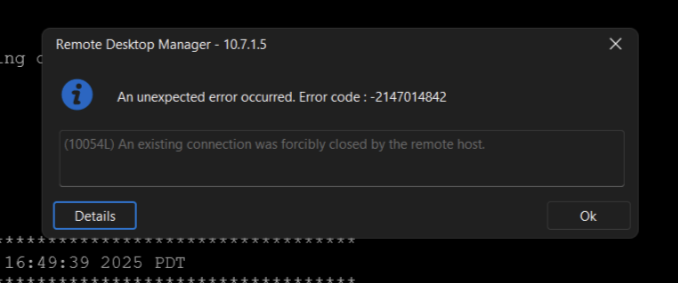
Snag_595bc73.png
All Comments (5)
Hello,
Thank you for reaching out to us regarding this,
Could you please specify the version of RDM you are currently using?
What type of data source are you using?
Was this working without issues for them previously?
Let me know,
Best regards,
Samuel Dery
One potential solution is to enable TCP keepalives in the SSH session settings. This can help maintain the connection by sending periodic packets to prevent timeouts. Additionally, setting a ping interval (e.g., every 30 seconds) can keep the session active. You can find these options under the 'Advanced' tab in your SSH session properties. Adjusting these settings has helped me maintain stable connections.
If the issue persists, it might be beneficial to check the SSH server's configuration for idle timeout settings that could be causing the disconnection.
https://forum.devolutions.net/topics/40002/ssh-login-errorsnow rider
Hope this help!
Hello,
Thank you for reaching out to us regarding this,
Could you please specify the version of RDM you are currently using?
What type of data source are you using?
Was this working without issues for them previously?
Let me know,
Best regards,
Thanks for your help!
The user I am working with is on Version 2025.1.29. Now that I see that, seems to be an older version. I am going to update them as soon as possible. I believe the data source is either a local or devolution server. I am not 100% sure if this was working for them previously.
One potential solution is to enable TCP keepalives in the SSH session settings. This can help maintain the connection by sending periodic packets to prevent timeouts. Additionally, setting a ping interval (e.g., every 30 seconds) can keep the session active. You can find these options under the 'Advanced' tab in your SSH session properties. Adjusting these settings has helped me maintain stable connections.
If the issue persists, it might be beneficial to check the SSH server's configuration for idle timeout settings that could be causing the disconnection.
https://forum.devolutions.net/topics/40002/ssh-login-errorsnow rider
Hope this help!
Thanks for this information! I am going to pass this on as it seems like this would help.
Hello,
Thank you for your reply,
Were you still encountering this issue, or is it now working as expected?
Let me know,
Best regards,
Samuel Dery