Search control from status bar shows results from wrong database
Search control from status bar shows results from wrong database

RDM version 2025.1.30, using auto-hiding navigation bar and search box from status bar.
The search box shows results from database that was current when RDM was started. The Navigation bar is correctly filtered based on search text on status bar. But as soon as Navigation bar collapses, the results are shown from initial database. All other search controls (available from View | Search on ribbon) work correctly.
As soon as navigation bar is pinned, the search box does not show search results in its own and navigation bar is correctly filtered.
As a side note: when current database is based on local .xml file, the search box on status bar states No Enterprise license found and refuses to show search results.
All Comments (16)
Hello,
Thank you for reaching out regarding this matter.
I attempted to reproduce the issue on my end but was unable to do so successfully.
Could you please try using the portable version of RDM to test in a clean, default environment?
You can follow the instructions in the link below to set it up:
https://docs.devolutions.net/rdm/kb/how-to-articles/portable-rdm-installation/
I look forward to your reply.
Best regards,
Jacob Lafrenière
Using portable version ended in exactly the same problem. When changing data source, the search control returns values from wrong data source.
All affected data sources are SQL Server databases.
The effect is only visible, when Navigation sidebar is set to auto-hide. When navigation sidebar is visible, the search control results are not used, instead the navigation bar contents is filtered and shows correct results. The attached picture shows the search control results from wrong data source.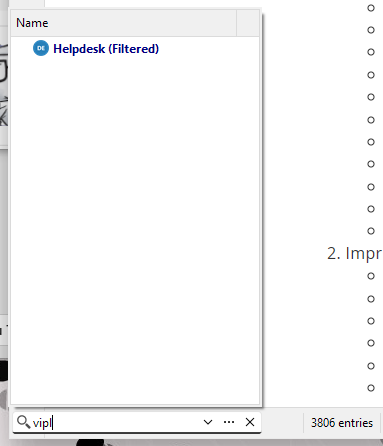
Meelis
RDM - search result.png
Hello,
Thank you for the follow-up.
Can you confirm whether you are referring to the data sources or vaults?
Since 2025.1.x, a new multi-vault search feature has been integrated.
If you really meant data sources, I'll set up another SQL data source on my side to test this out!
Best regards,
Jacob Lafrenière
Yes, currently the problem is with several databases. Haven't tried it with vaults.
Yes, currently the problem is with several databases. Haven't tried it with vaults.
Tried with vaults and when changing vault (in the same database), the effect is same as when changing database. The search control returns results from wrong (first used) source, not from current source.
Hello,
Thank you for following up.
This issue is quite difficult to reproduce on our end.
Could you please send us a recording demonstrating the problem?
I’ll send you a link via direct message where you can upload the files.
Thank you for your understanding.
Best regards,
Jacob Lafrenière
Sent a Problem Steps Recorder recording. As it was recorded on non-english machine, the text inside is not in English. But pictures captured every mouse click.
Hello,
Thank you for the follow-up.
I cannot see the screenshots since they were not included in the .zip file you provided.
I prefer a screen record of you reproducing the issue if possible. (.mp4, .mov)
You can use the same link I sent you via direct message to send me another one!
I look forward to your reply.
Best regards,
Jacob Lafrenière
that's weird, because the .zip file is generated by Problem Steps Recorder and when I open it, the pictures are visible. I took pictures out from generated .MHT and added as separeate .png files.
Hello,
Thank you for the follow-up and the screenshots.
Can you deactivate "All vault" in the search bar and try again?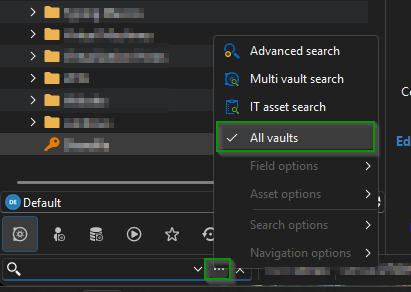
I look forward to your reply.
Best regards,
Jacob Lafrenière
6c2bd855-ef53-437b-8673-716bf700045a.png
All vaults is unchecked. It doesn't make any difference whether it is checked or not.
Hello,
Thank you for the follow-up.
I was able to reproduce the issue you are experiencing with the faulty search when switching data sources. I will report this bug to the development team, and they will begin working on a fix soon.
I will follow up with you as soon as a fix is deployed in a future update.
Best regards,
Jacob Lafrenière
Hello,
We've fixed the issue of the filter not updating when switching vaults or data sources. You can expect these changes with the upcoming 2024.1.34 version.
Regards,
Jafran Majeau
Hello,
Thank you for your patience.
The latest version of RDM includes a fix for the search box issue you were experiencing. Could you please update RDM or test the fix in a staging environment?
Let me know if the issue persists.
Best regards,
Jacob Lafrenière
in version 2025.1.34 the problem does not exist anymore. Thanks
Hello,
Thank you for the follow-up.
I’ll go ahead and mark this topic as resolved. Please feel free to reply here if the issue arises again.
Best regards,
Jacob Lafrenière