[BUG REPORT] WebView2.Cache children dir ' --disable-plugins'??
[BUG REPORT] WebView2.Cache children dir ' --disable-plugins'??

I only found this after I set a custom cache path for my Edge Browser entries via RDM settings, I decided to use my existing SharePoint Site doc library I sync for various uses such as logs.... After I set this new Cache path, I eventually received a OneDrive error from an unsyncable folder, seems a Dir in WebView2.Cache is a Dir named ' --disable-plugins',nb yes there is a space at the start which I think caused my issues, see attached of the original cache location.
I did try to search around this path outcome but didn't find anything that helped at least for myself, I can't say if this is the correct naming for this library but from my IT Support experience I can't see it being correct for a path name considering how many issues it would create in all sorts of systems backups for one and like with what bought this to my attention OneDrive syncing.
Could Someone look pls as ideally, I'd like to store this cache on OneDrive which I currently cant...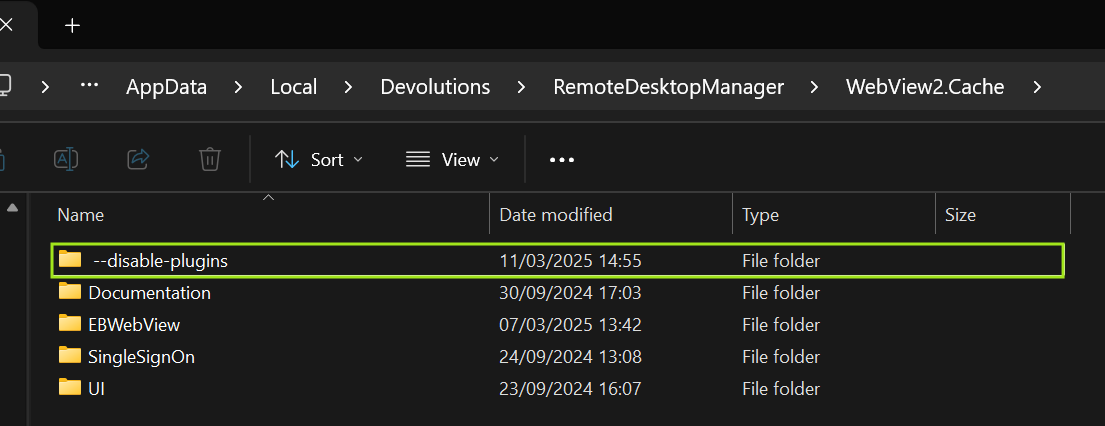
JK
Devolutions Force Member (and Long time Devolutions Fan)
f334494e-80f1-49c5-be03-a581c4d71e23.png
All Comments (7)
Hello,
Thank you for reaching out to us regarding this,
Could you please specify the version of RDM you are currently using?
What type of data source are you using?
That being said, I'm not sure I understand the issue in this case, you've created a folder on your SharePoint and entered the path to this folder in the "Override Cache Path" field under "File" -> "Settings" -> "Entry Types" -> "Websites" or are you attempting to sync the WebView2.Cache folder directly?
Let me know,
Best regards,
Samuel Dery
2025.1.29.0 64bit,
I just wondered if that path name is planned, or is it a coding bug causing a switch to be used as a folder name?? The issue arose when that webview2.cache subfolder was created with a space at the beginning of ../ --disable-plugins/. That pathname occurred before changing however without a space at the beginning, like I say that can't be expected outcome, right?? The only reason I even noticed this was when I set the Cache path to a OneDrive synced location which doesn't like space prefixes in file or folder names, other than that it would have gone unnoticed, but now i do wonder what this bug could affect?
FYI I use the standalone MicrosoftEdgeWebview2Setup.exe,
JK
Devolutions Force Member (and Long time Devolutions Fan)
I had another post recently regarding WebView2 as I lost profiles on my web sessions, looking at this issue with the path naming bug it might explain why I lost cache data because this dir --disable-plugins pushed its children up a level, so EBWebview dir was recreated and the existing EBWebview dir with existing cache data wasn't reused??
Does explain my last issue....
JK
Devolutions Force Member (and Long time Devolutions Fan)
The root cause is that WebView2 doesn't allow to start a second instance on the same cache path if they are using a different set of args. If you try, it simply doesn't start.
The catch is, not all args force this behavior and it's not documented.
In RDM, to solve this, we force the cache path to be unique for a given set of args. We have a few that args mapped to a "Friendly" folder name (DisableSmartScreen, SingleSignOn,...) and the rest we create a folder of the args (sanitized to remove illegal directory characters).
As you can see, we forgot to trim to leading spaces. It only looks to be a problem with OneDrive but nonetheless I think we can fix it. We could rename the existing folder and use the left-trim arg from now on.
I will do this fix, should be transparent at run time.
Stéfane Lavergne
Cool, many thanks, removing that trailing space will be fine...
Till I see a fix release note for it, I'll leave it default.
Thanks
JK
Devolutions Force Member (and Long time Devolutions Fan)
Fixed, look for "Trim leading space(s) from WebView2 cache path" in the release notes. Should be in .30.
Best regards,
Stéfane Lavergne
see that thanks
JK
Devolutions Force Member (and Long time Devolutions Fan)
