Horizontal Scroll Mouse Wheel in Navigation Pane

Hello,
I've noticed for some reason the horizontal scroll in the navigation pane in RDM (if you have it set to scroll when the selected column(s) overflow the viewing area) does not seem to honor the scroll direction configured at the Windows level - it is always "normal" although I have mine configured to "inverted" at the Windows level (via Logi Options+ for a Logitech mouse).
For some reason "normal" direction with horizontal scroll (at least in Logi Options' terminology) is considered "wheel left scrolls right, wheel right scrolls left" (to me that seems inverted, but I disgress). So anyway I configured mine to "inverted" (resulting in "wheel left scrolls left, wheel right scrolls right") - the horizontal scroll direction configured there is honored in just about every app except RDM. RDM for some reason still sticks with "wheel left scrolls right, wheel right scrolls left" (and it doesn't change regardless of how I have my mouse configured).
Vertical scroll works fine, I have it set to standard (wheel up scrolls up, wheel down scrolls down).
Is there any way we could get the RDM navigation pane (and ideally, any other panes in RDM that may have the same issue) to honor the windows-level (or manufacturer's app-level) configuration for the mouse horizontal scroll wheel? I just happened to notice it in the nav pane because that's one I use frequently (and often scroll side-to-side to see additional columns I've added there without having to make it so wide that I lose a bunch of screen space), but I don't know if the same issue might be present in other panes as well.
RDM version: v2024.3.21
Data source: SQL Server
Mouse model (in case anyone is interested or if its specific to this model): Logitech MX Master 3
Any feedback is much appreciated.
Thanks,
David Willis
All Comments (15)
Hello,
Thank you for reaching out regarding this matter.
I will check with my IT team to see if I can obtain a similar mouse for testing. In the meantime, could you please update your RDM to the latest version and let me know if that resolves the issue?
Additionally, would it be possible to test with another mouse to see if the behavior persists?
Best regards,
Tommy Sanders
Ok great, thanks!
I will update RDM when I get a chance to and test and let you know the results.
I just tested with a different Logitech mouse (M510) and it had the same issue. Though with this mouse for some reason, "standard" direction is "wheel left scrolls left, wheel right scrolls right" (the way I'd expect it to be, and the opposite from what the other mouse the MX Master 3 has for some reason). So I have it set to "standard" in this case. But regardless the issue remains the same (RDM horizontal scroll via mouse wheel is always "wheel left scrolls right, wheel right scrolls left" even if the mouse is configured for the opposite).
Best regards,
David Willis
Hello,
Thank you for your response,
Could you please send me a screenshot of where do you change the direction of the wheel? Is it from the Logi Options+ application? I've been able to reproduce the issue I just want to make sure that I changed the same option as you to report it to the developers.
Best regards,
Tommy Sanders
Hello,
Thank you for looking into this. Yes, it is from the Logi Options+ app - here is a screenshot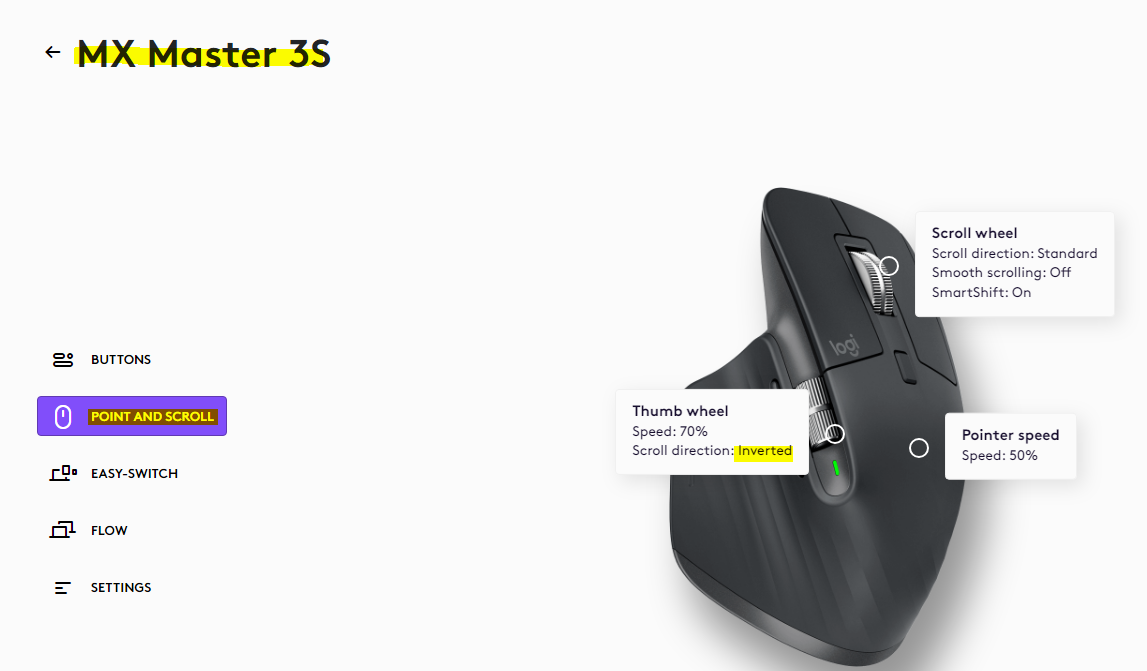
Thanks!
David Willis
be334472-5540-4357-bc4c-d13bebca989b.png
Hello,
Thank you for your response,
Unfortunately, I have not been able to reproduce the issue. Would it be possible for you to test with the latest version or with a portable version?
To do so, you will need to do the following:
1- Download the .zip file below:
https://devolutions.net/de/remote-desktop-manager/download/thank-you/?platform=RDMbin&edition=team&os=windows
2- Create a new folder on your Desktop
3- Extract the content of the .zip file into the folder created at #2
4- Go to this folder once the .zip file has been extracted and run remotedesktopmanager.exe
5- Connect to your data source
Best regards,
Tommy Sanders
Oh ok, I thought you had been able to reproduce it.
Once I get a chance to upgrade I can test with a later version. Or maybe I can use the portable w/ a test data source. Its just if I upgrade our main data source to run w/ the latest version then everyone else using it has to upgrade as well. I'll try and test this sometime in the coming days though and let you know the results.
Thanks,
David Willis
Hello,
Thank you for your response.
I will await your feedback.
Best regards,
Tommy Sanders
Heheh, well, the situation gets stranger now. I upgraded to the latest v2025.1.27, and it appears that now, "standard" horizontal scroll mode in Logi Options+ does indeed scroll correctly (wheel left scrolls left, wheel right scrolls right) in the RDM navigation pane.
Problem is, its the opposite in every other application (wheel left scrolls right, wheel right scrolls left when in standard mode).
However, I've been able to "fix"/work around the issue by leaving it set to "inverted" at the global level, but then adding RDM with its own app-specific config in Logi Options+ and setting horizontal scroll mode to "standard" for RDM only. That way I have the same behavior in all apps (wheel left scrolls left, wheel right scrolls right).
I'm still not sure if its a bug (or how your team would view this from their perspective), it seems strange that RDM would for some reason behave differently than all other apps with regards to what is considered "standard" vs. "inverted" direction. But maybe it's actually an issue with Logi Options+, I'm really not sure. In any case, I was able to make it work for what I needed so from my end on this, I should be good. Hopefully if anyone else encounters similar strange behavior, the notes on this thread might help them.
Appreciate the help.
Best regards,
David Willis
Hello,
Thank you for your response.
I'm glad to hear that everything is working well. I’ll be sure to keep an eye out for any similar cases and will let you know if I come across one.
Best regards,
Tommy Sanders
Thanks. One other note, unfortunately the workaround I noted above (using Logi Options+) doesn't work if running RDM in an RDP session (because then Logi Options+ has no way to know which app the mouse is over within the RDP session). And this is true even if Logi Options+ is also running on the remote machine.
So, to work around that issue, I had to use AutoHotkey (running on the remote machine), which I already use for some other hotkey stuff but modified my script so when the mouse is over RDM now within an RDP session it will reverse the horizontal mouse wheel scroll direction. If anyone wants more details please, let me know or PM me and I'd be happy to share.
Ultimately it would be nice if RDM could behave the same way as other apps - again, I'm not sure if this is on the Logitech side or RDM side - but it does seem strange that horizontal scroll direction in RDM is reversed from how all other Windows apps behave. It's a minor issue of course, but if the Devolutions team had a chance to look into this and possibly correct it at some point that would be much appreciated!
Best regards,
David Willis
Hello,
Thank you for your response.
I will proceed with opening a case so we can perform further testing.
Best regards,
Tommy Sanders
I thought I would reply to this and note that I have the same issue, across multiple mice. This happens with Thinkpad trackpoints, Dell Pointsticks, MX Master 2S, and Asus MD300. As far as I can tell, any mouse with horizontal scroll has inverted scrolling for horizontal axis only, within Remote Desktop Manager only. Tested today on version 2025.1.39.0
Hello,
We haven't been able to get access to most mouses specified in this post, and the testing I've done by simply changing the horizontal scrolling direction in the default Windows 11 settings (Settings - Bluetooth & devices - Mouse - Scrolling direction) have not caused me any problems (it properly inverts the scrolling, both horizontally and vertically).
That said, we use third party software for several parts of our interface, and after investigating, I've found out that they seem to have some issues specifically with inverting horizontal scrolling. To the point where they are currently implementing a new option to specifically toggle this setting. It isn't released yet, and we have no accurate ETA, but it is close enough to appear in their "upcoming features". We will implement this as an option as soon as it is available, and hopefully it will fix your issues.
We will update you when implement this.
Regards,
Jafran Majeau
Thanks for the update Jafran - hopefully the third party update (when released) will help - definitely looking forward to it!
One other piece of info I would provide that I just noticed today, in the AutoHotkey logs - when a WheelLeft/WheelRight from the mouse is sent to the system with RDM as the active app, the message received by the system is actually opposite from what it should be. In other words if I scroll the horizontal wheel left while RDM has the focus, the system is actually receiving a WheelRight message (and vice versa). When any app other than RDM has the focus, the correct signal is received.
So it isn't that RDM is responding wrongly to the message (e.g. a scenario where it receives WheelLeft but decides to scroll right instead) - rather, something about RDM having the focus is actually changing the message the system receives. I'm not sure what would lead to that, but I have to think the mouse, at a hardware level, is sending the same message regardless (as it would have no knowledge of which app has the focus). Just thought that was interesting (and maybe helpful to someone trying to debug this issue).
David Willis
Hello,
That is indeed interesting, and I will investigate this. I will provide an update when I can.
Regards,
Jafran Majeau