RDM 2025.1.25 - PowerShell session invisible

RDM version 2025.1.25, PowerShell (both local and remote) session:
- Display is configured to be external (not embedded)
- Terminal is anything but Classic.
When trying to connect, the connection window is invisible (or missing).
When I change either Display to Embedded or Terminal to Classic, the connection window/tab is visible.
All Comments (17)
The WindowsTerminal.exe process is visible in Task Manager, but there is no embedded or external window.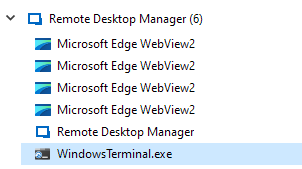
RDM - Task Manager.png
Hello,
Thank you for reaching out to us regarding this,
Would you be able to provide us with some screenshots of your entry Properties?
Let me know,
Best regards,
Samuel Dery
Would you be able to provide us with some screenshots of your entry Properties?
You mean this one?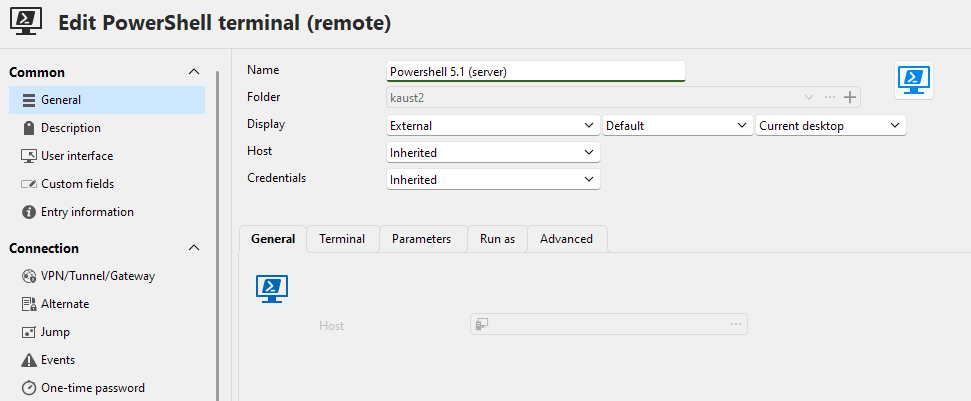
RDM - PS Properties.png
Hello,
Thank you for your reply,
Indeed, could you also show me the Terminal and Advanced sections so that I can reproduce your configuration.
Let me know,
Best regards,
Samuel Dery
Terminal tab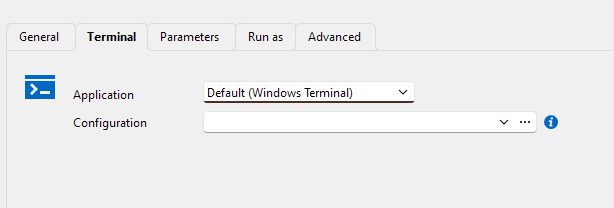
Actually, anything but Classic will trigger invisibility.
Advanced tab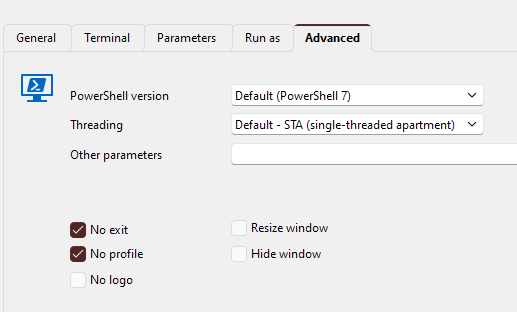
Haven't noticed that any change here would affect the problem.
It seems that the problems exist with sessions that existed before Database schema update. I created new session and that one works with external window
RDM PS Advanced.png
RDM PS Terminal.png
Hello,
Thank you for your reply,
I see, that is indeed odd,
How many entries are affected? If you make a change to the entry "Properties," then "Update" it and return to the "Properties" to revert the change, does it work as expected?
Let me know,
Best regards,
Samuel Dery
As this is test (for discovering problems after schema update) database, there are only few sessions. But all sessions that existed before Schema update are affected.
I can change properties, and it always works same way. All sessions that are not configured as classic and use external window, have their window hidden when connected.
This problem was resolved after upgrading RDM to v2025.1.27
Hello,
Thank you for your reply,
I'm glad to hear that!
Best regards,
Samuel Dery
Now I have RDM 2025.1.30 and the same problem in Server 2022 RDP session. The PowerShell session is hidden with same conditions. Windows 10 workstation and VDI environments don't have the problem.
The Server 2022 has also Windows Terminal installed.
Hello,
Thank you for your reply,
Could you confirm if you encounter the same problem with the latest version 2025.1.31.0?
https://cdn.devolutions.net/download/Setup.RemoteDesktopManager.2025.1.31.0.exe
Let me know,
Best regards,
Samuel Dery
Still same problem. WindowsTerminal.exe runs from RDM folder, but the session is invisible.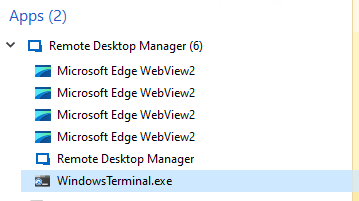
06cb7767-0327-4616-9b9c-86c7b86a2312.png
Hello,
Thank you for your reply,
I see, would you be able to provide me with a short recording of the behavior?
I will send you a private message so that you can send us the recording securely.
Best regards,
Samuel Dery
Uploaded the screencast.
Hello,
Thank you for your reply and for the recording.
I have opened a case with our QA Department to see if they can reproduce the behavior,
I will keep you updated with any news I receive regarding this,
Best regards,
Samuel Dery
This problem is re-introduced with RDM version 2025.2.14.0.
Both Windows 10 and Windows 11 have the problem.
Hello,
Thank you for your reply,
I see, I have reached out to our development team and will keep you updated with any news I receive.
Best regards,
Samuel Dery