VNC File Transfer not possible

Hey,
Version:
2024.3.28.0 64-bit
i am pretty new to RDM and i set up some FreeVNC connections (Embeddded) but the file transfer from host to client <-> client to host ist not available.
I was using realVNC viewer before and file transfer is working without any issues.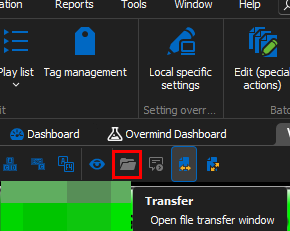
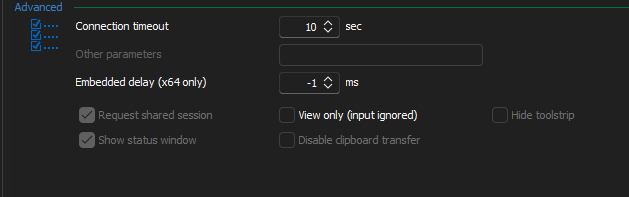
Do I miss any setting?
BR
19fa1bf1-c01b-42c9-bd9e-13ab27f8cc86.png
296477d8-0914-438e-9590-cc53b0acdf96.png
Recommended Answer
Hi
File Transfer with RealVNC servers is not supported with the embedded FreeVNC viewer. I'm afraid you'll need to use Real's VNC Viewer in "external" mode.
It's on our roadmap to eventually add this, but RealVNC's protocol extensions are closed (closed source and closed specification). So the only way we can achieve this is by reverse-engineering, which is a difficult and time consuming task.
File transfer is supported in embedded mode with UltraVNC servers, and we hope to add support for TightVNC servers in the medium term.
Sorry for the inconvenience. Don't hesitate to post back if something isn't clear or you have further questions.
Kind regards,
Richard Markievicz
All Comments (6)
Hi
File Transfer with RealVNC servers is not supported with the embedded FreeVNC viewer. I'm afraid you'll need to use Real's VNC Viewer in "external" mode.
It's on our roadmap to eventually add this, but RealVNC's protocol extensions are closed (closed source and closed specification). So the only way we can achieve this is by reverse-engineering, which is a difficult and time consuming task.
File transfer is supported in embedded mode with UltraVNC servers, and we hope to add support for TightVNC servers in the medium term.
Sorry for the inconvenience. Don't hesitate to post back if something isn't clear or you have further questions.
Kind regards,
Richard Markievicz
Hi
File Transfer with RealVNC servers is not supported with the embedded FreeVNC viewer. I'm afraid you'll need to use Real's VNC Viewer in "external" mode.
It's on our roadmap to eventually add this, but RealVNC's protocol extensions are closed (closed source and closed specification). So the only way we can achieve this is by reverse-engineering, which is a difficult and time consuming task.
File transfer is supported in embedded mode with UltraVNC servers, and we hope to add support for TightVNC servers in the medium term.
Sorry for the inconvenience. Don't hesitate to post back if something isn't clear or you have further questions.
Kind regards,
Oh... Good to know, thank you very much for quick reply!
BR
Earlier I referenced Tight VNC but misspoke. I use Ultra VNC on the host as Devolutions recommends, but its file transfer doesn't work for the Mac version of RDM.
Hello Paul,
Sorry for the delay in my response.
I noticed that we're currently in the Windows section of the forum. Would you like me to move your last message to the correct section, or would you prefer to start a new topic under the macOS section instead?
Let me know how you’d like to proceed.
Best regards,
Jacob Lafrenière
Hello Paul,
Sorry for the delay in my response.
I noticed that we're currently in the Windows section of the forum. Would you like me to move your last message to the correct section, or would you prefer to start a new topic under the macOS section instead?
Let me know how you’d like to proceed.
Best regards,
@Jacob Lafrenière
Hi Jacob.
Somehow I posted my clarification about ultraVNC instead of TightVNC in this thread, instead of my thread already started in Mac section: https://forum.devolutions.net/topics/50988/mac-version-vnc-client-cant-do-file-transfer#217795
I'll hop over to that thread and update. I hope you can provide insight as to why Mac isn't offering file transfer like Windows does.
Thanks
Paul
Hello,
Thank you for the follow-up.
I understand the situation better now. I’ll mark this specific topic as resolved and leave you in Sam’s capable hands, he should be able to provide further guidance.
Best regards,
Jacob Lafrenière