datat reports from sql server issue using Devolutions Cloud

- using RDM from two years ago (great product !!)
- RDP and VNC connections. So easy, so fine.
- Data Reports connecting to local SQL Server. Running as a champ.
- for Data Reports, using "Database" folder to save queries.
- saving connections in local storage and / or Dropbox.
- as Dropbox is deprecated, trying same configuration using free Personal Hub (database folder copy/paste from Dropbox to Personal Hub).
- when trying to open a report from Personal Hub, an error raises:
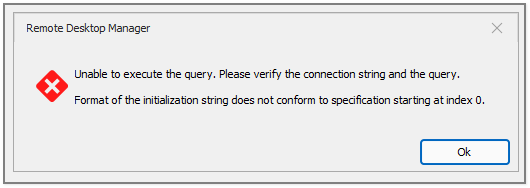
Am I doing anything wrong?
initStringErr.png
All Comments (11)
Can you please double check your report settings, it looks like some values might be missing/bad.
Stéfane Lavergne
Checked report settings.
Having report settings stored in Dropbox -> all work fine.
Copy/paste report definition from Dropbox to Personal Hub -> error.
Steps followed for checking from scratch:
- created new "folder database" definition
- once connection string is built, "test connection" works fine
- created new "data report" definition, inherited from folder database:
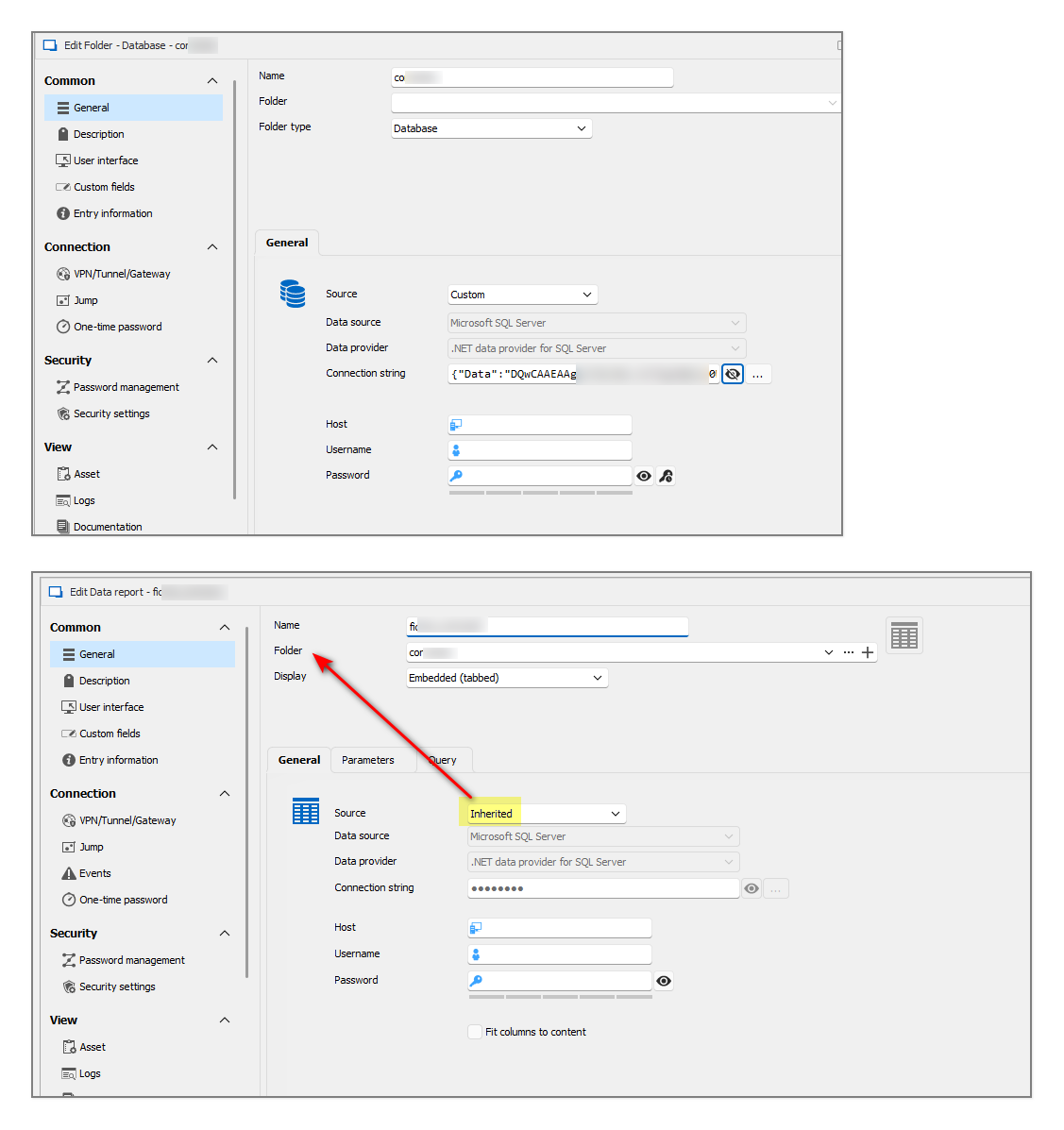 when running data report -> error.
OK, a variant that works:
when "data report" contains the connection definition (custom, not inherited) -> no error, and report is shown correctly.
So it seems that issue raises when "data report" connection is inherited from "database folder.".
fed8d6a8-c7a1-49fe-8a1b-5ee048b260e1.png
Thank you for the info & screen shots.
Looking at the folder screen shot we can see that the connection string is still encrypted. This is most likely a bug, I've asked QA to try to reproduce it. You could try updating the connection string in the folder and setting the report back to inherited to see if it resolves it. (hang on, you've already done this...)
once connection string is built, "test connection" works fine
So the connection string was good on add/edit, but not after. So this would leave me to believe that the database folder type never resolve the connection string properly.
We need to investigate. I will get back to you as soon as I know more.
Best regards,
Stéfane Lavergne
QA just confirmed it's a bug; the value doesn't get resolved. We will fix this ASAP. Thank you for bringing it to our attention.
Best regards,
Stéfane Lavergne
Wow, how fast !
Great support for a great product.
Congratulations to the whole team.
QA just confirmed it's a bug; the value doesn't get resolved. We will fix this ASAP. Thank you for bringing it to our attention.
Best regards,
@Stéfane Lavergne
Hello,
bug still not fixed.
Any timeframe for resolution?
Best regards
Odd, the initial issue was closed (test passed) on February 25th. I will ask QA to perform the test again. My guess is something else broke this again.
Sorry for the inconvenience,
Best regards,
Stéfane Lavergne
QA got back to me. It looks like the bug we initially resolved wasn’t the one causing your issue. They were able to reproduce your issue, and a new ticket has been opened. It will be assigned by the Product Manager for resolution.
Sorry for the inconvenience.
Best regards,
Stéfane Lavergne
Hello,
We've fixed the issue with inheriting connection string from database folders in Hub datasources. You can expect this fix with the upcoming 2025.3.22 version.
Regards,
Jafran Majeau
Hello,
Thank you for being so patient!
I'm pleased to inform you that a new version of RDM (2025.3.22.0) has been released, featuring the fix for your issue.
Latest Version: Download RDM
Please let us know if this works or if you encounter any issues.
Best regards,
Maxim Robert
Hello,
Thank you for being so patient!
I'm pleased to inform you that a new version of RDM (2025.3.22.0) has been released, featuring the fix for your issue.
Latest Version: Download RDM
Please let us know if this works or if you encounter any issues.
Best regards,
@Maxim Robert
Hello,
tested with 2025.3.22.0 (today upgraded to .23) release, and it works fine !
Thanks for your attention.
Best regards.