Possibility to open an entry on startup and keep it even the window is closed
Possibility to open an entry on startup and keep it even the window is closed

Hello there,
I have grafana setup to monitor my systems and it is the backbone of my daily support routine.
I have setup as a website entry and can monitor it when I load the entry and after that right click the tab and select keep tab on disconnect. Is there a way to open any entry when RDM is launched and set the setting to keep tab open on disconnect?
Thank you,
All Comments (7)
Hello,
My name is Kelly. I work in support at Devolutions. I can try to explore the options with you to possibly answer your questions.
When RDM is launched, it is possible to configure a Play List which can be launched at start up. The Play list would need to include the entry for the website you wish to monitor and would need to be added in the Local machine tab of Play list management. Here you can set the play list to launch at startup.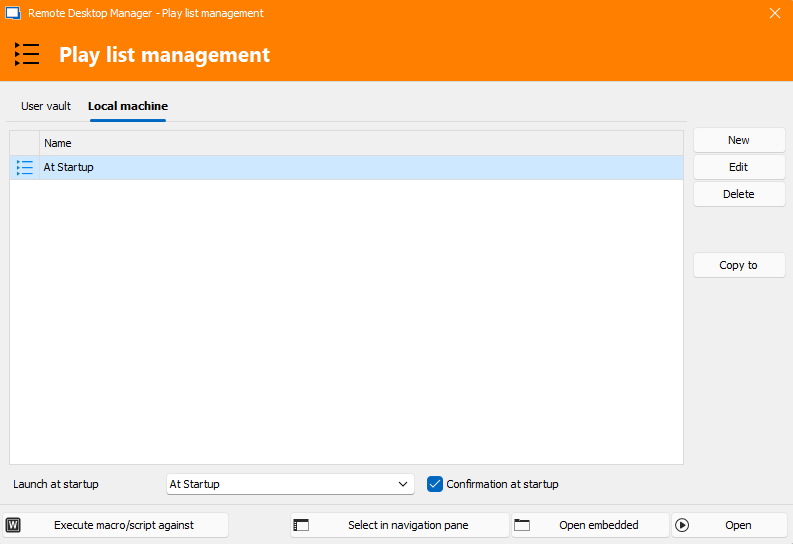
In the website entry, configure the General > Display to External, instead of embedded. You can select the browser to use with this entry if you do not want the default browser used. This will open the connection in a browser window or tab outside of RDM. If RDM is closed, the browser tab will remain open.
I hope I understood your questions. If so, I hope this is helpful.
Kind Regards,
Kelly
AtStartup-2025-02-05.png
Hello Kelly,
I didn't know I can achieve this with Play List function and it's awesome! First, I want to thank you :) That option what's I need to open the entries at launch. But I wish the "keep entry open on disconnect" feature would come in the the entry setting some day. Because I really like it to be opened in embedded session as the RDM is my favourite tool and I am keeping my one ey on it constantly.
Thanks for the support
Good morning.
I am very happy to read the Play List feature is now more useful to you. I am afraid I misunderstood what you meant by "keep entry open on disconnect". You don't want to close RDM and keep the entry session/connection open?
Would you mind describing a scenario of what happens when you want the connection to remain open?
Which data source is used with RDM?
Is it RDM that becomes disconnected from the data source?
Kind regards,
Kelly
No worries,
I am using website entry. When I first launch RDM it is now opening thanks to you with play list feature. I have to right click to open tab and select "Settings" and then "Keep tab on disconnect". This way it's always keep open even if I close the RDM window on my mac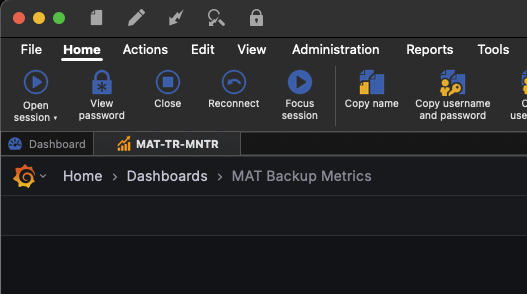
7051172a-da6a-4889-a856-0f0add2c91c3.png
01a9528a-72b2-4c46-b79e-6d2e6a59c343.png
I think there is a way to set that as a default option for your RDM, but this will be for any opened tab. File >Settings >Entry types >Keep tab page opened on disconnect >No or Yes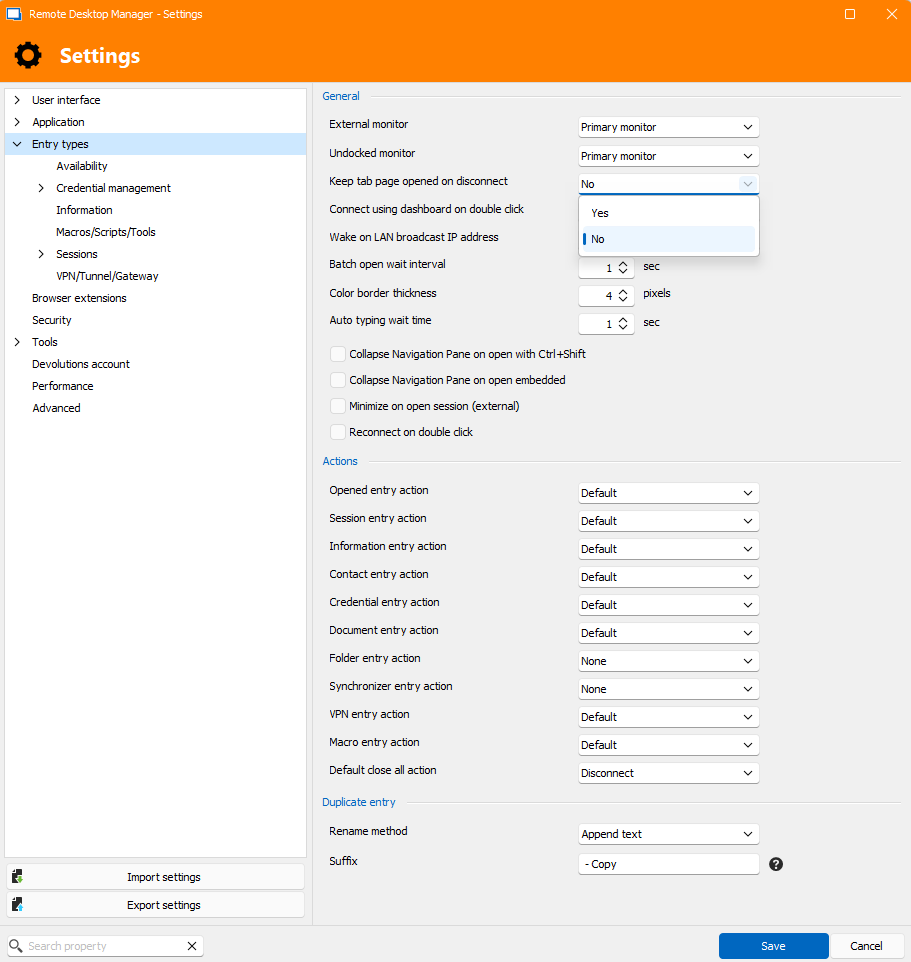
keepTabonDisconnect-2025-02-06.png
I have searched on settings and I couldn’t find a setting like that in your screenshot on Mac version of RDM. May be you can open a ticket to add this feature? If it would possible to set separately for each entry then this will be fantastic.
Thank you
Hello,
Thank you for your response.
I have verified that this option is not available in the Mac environment. To address this, I have submitted a feature request, which you can view using the following link:
https://forum.devolutions.net/topics/43931/add-options-in-rdm-settings
Please let me know if you need any further information.
Best regards,
Tommy Sanders