SSH Key Entry

Why does copy password not copy the SSH key passphrase ?
I have to open the entry, view the passphrase and copy it, otherwise I get nothing.
I tried CTRL+C on the entry, right-click copy password, the copy password button in Actions, etc.
RDM 2024.3.27.0.
Thank you.
Marcel
All Comments (6)
Hello Marcel,
Thank you for contacting us on that matter,
The copy private key is available from the dashboard only.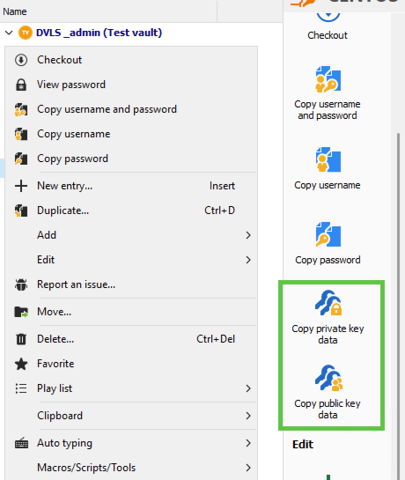
Let me know if that helps
Best regards,
Tommy Sanders
1bdd6eac-b6e0-4802-be96-3e400a4b53f2.png
image_480.png
Hi Tommy.
I usually need to copy the passphrase, not the private key itself.
Cheers.
Marcel
Hello,
Thank you for your response.
Unfortunately, there is no option to copy the passphrase at the same time. However, as a workaround, you can go to the Properties of the entry, navigate to the Custom Fields tab, enter your passphrase, and check the Plain Text box to hide it.
Once done, your passphrase will appear in the dashboard of the entry, allowing you to copy it.
If this workaround does not meet your needs, you may consider submitting a feature request to our developers for this functionality to be added by default.
Our feature request forum enables the community to share ideas with our development, service desk, and management teams. It also allows other users to express interest, helping us prioritize new features.
You can submit your idea on our forum here:
Feature Request Forum
Best regards,
Tommy Sanders
Hello,
Thank you for your response.
Unfortunately, there is no option to copy the passphrase at the same time. However, as a workaround, you can go to the Properties of the entry, navigate to the Custom Fields tab, enter your passphrase, and check the Plain Text box to hide it.
Once done, your passphrase will appear in the dashboard of the entry, allowing you to copy it.
If this workaround does not meet your needs, you may consider submitting a feature request to our developers for this functionality to be added by default.
Our feature request forum enables the community to share ideas with our development, service desk, and management teams. It also allows other users to express interest, helping us prioritize new features.
You can submit your idea on our forum here:
Feature Request Forum
Best regards,
SSH key passphrase might be stored in a separate field that isn't included in the standard "Copy Password" function. Check if there’s a dedicated "Copy Passphrase" option or if field permissions are restricting it. You could also try updating RDM or checking its settings for clipboard behavior. Let us know if you find a fix! I was searching for a trusted paper writing service when I came across CanadianWritings writing service https://canadianwritings.com/ for help. Their writers are skilled, and the papers meet university standards. I’ve used them multiple times, and they’ve never disappointed me. If you’re in Canada and need academic writing help, this is the perfect service for you!
Hello. I already have this feature request open.
Copy SSH key passphrase feature
Hello,
Thank you for your response.
That sounds perfect. Based on the developer's update, he is already working on it from his side.
Please feel free to reach out if you have any further questions.
Best regards,
Tommy Sanders