Unable to RDP to one windows host using macos rdm 2024.3.9.0 - ERRCONNECT_CONNECT_FAILED (0x00000006)
Unable to RDP to one windows host using macos rdm 2024.3.9.0 - ERRCONNECT_CONNECT_FAILED (0x00000006)

Hello -
Having an issue trying to RDP in to one windows host. All of my other windows RDP hosts work.
Seeing this in the Application log - ERRCONNECT_CONNECT_FAILED (0x00000006) as well as an occasional ERRCONNECT_DNS_NAME_NOT_FOUND (0x00000005) along with the Connect Failed error.
This was happening before the recent upgrade to the 2024.3.9.0 client as well. I can RDP to it from anywhere else, just not with this client on this machine.
I am able to use nslookup on this machine to correctly pull the IP, so it seems strange that the DNS Error happens. To avoid that, I changed to the IP address instead of the host name and am still getting the ERRCONNECT_CONNECT_FAILED (0x00000006).
Thanks!
Richard
All Comments (28)
Hello
Sorry to hear about the difficulty connecting.
As a first step, can you capture a session log and send it to me, either by PM or to service@devolutions.net (mentioning this forum thread so it's routed properly)? Instructions for enabling session logging are here. RDM Mac doesn't always show the true underlying error in the UI, but the session log will show more clearly what's going on.
I'll give some additional thoughts in the meantime:
- What's your OS version? We did get sporadic, weird networking issues from a subset of customers on earlier version of macOS Sonoma. From my side, 15.1.1 seems stable as does 15.2.
- In System Settings > Privacy and Security > Local Network; is there an exception configured for Remote Desktop Manager?
- In conjunction with checking that setting, can you also try disabling the RDP sandbox mode in the "Advanced" tab of the RDP session settings
Let me know if any of that helps.
Kind regards,
Richard Markievicz
Just sent them in through the UI... Thanks!
Answers to the other bits -
- Macos Sequoia 15.2 (24C101)
- Turning off the Sandboxing didn't have an effect.
- No Exception for RDM
Hello
Thanks a lot for sending that through. It doesn't reveal much: the connection fails almost immediately, no TCP connection can be established to the server; before anything protocol specific happens (so this doesn't seem related to RDP specifically). You're using the IP address so there's no DNS "magic" to go wrong.
The question is, why can't we establish a connection to the server?
Is there a chance that the server is listening on a non-standard port? Or perhaps it's listening on 3389, but you inadvertently configured a different port in RDM?
Just to clarify what you wrote in your OP: you can connect to that server using Microsoft RDP (now "Windows App") from the same Mac? What happens if you change the settings in the session in RDM to open "External"? This will take the session configuration and launch it using Microsoft RDP ("Windows App"). Does that work?
Please, let me know if you have some questions or something isn't clear
Kind regards,
Richard Markievicz
Found something super interesting –
If I toggle – System Settings -> Privacy and Security -> Local network -> Remote Desktop manager to ‘on’ it works. Disabling it again kicks me right off the session.
So that’s fine, I can live with that, but I am really curious, why does only that ONE host require it…?
Of note here is that the workstation I am using to RDP into the server is on the same subnet as the host I am trying to get to…..
Richard
Hello
First, sorry for the delay, I've been offline with flu.
Indeed, I'm not surprised by this and that's why I mentioned it in my original reply as something to check.
Without knowing more about your environment and the servers you connect to, I can't answer why you need this entitlement for only that one server. Under the hood, this is abstracted from us - before we reach the RDP protocol level, we first (if you're connecting to a hostname) make a DNS query and then open a TCP connection to the host. The OS provides that functionality and we simply make the proper calls to the OS.
What I can direct you to is this technical note from Apple that explains the feature in some depth: TN3179: Understanding local network privacy. We can see that "A local network address is any address on a local network. Traffic to a local network address goes directly; it’s not forwarded by a router." For such addresses, the entitlement is required to both "Making an outgoing TCP connection" and for "Resolving a local DNS name". Finally we see that "The system implements these TCP and UDP checks deep in the networking stack, and thus they apply to all networking APIs".
Hopefully you can apply the knowledge in that article to your environment to understand why the entitlement is required for that server. I will say that given the nature of RDM, it's not surprising that this entitlement would be expected (versus, say, an application that you might not want or expect to query information from your local network). Normally the OS is supposed to prompt for this entitlement the first time it's needed but historically macOS has been a little unreliable with privacy related prompts, and it's not a prompt that we can control or trigger from our side.
I hope that information helps but if you have any further questions or comments please don't hesitate to get in touch.
Kind regards
Richard Markievicz
Hello,
I have exactly the same problem: All RDP connections to windows systems don't work anymore, neither with DNS name nor via IP address. The mentioned switch (System Settings -> Privacy and Security -> Local network -> Remote Desktop manager to ‘on’) doesn't work neither. And yes: connections via "Windows App" still working.
Any suggestions?
Best,
Christian
I have the same problem, with the update to mac os x 15.3 the RDM unfortunately no longer works. Neither RDP nor SSH connections work. The display in the dashboard also no longer works.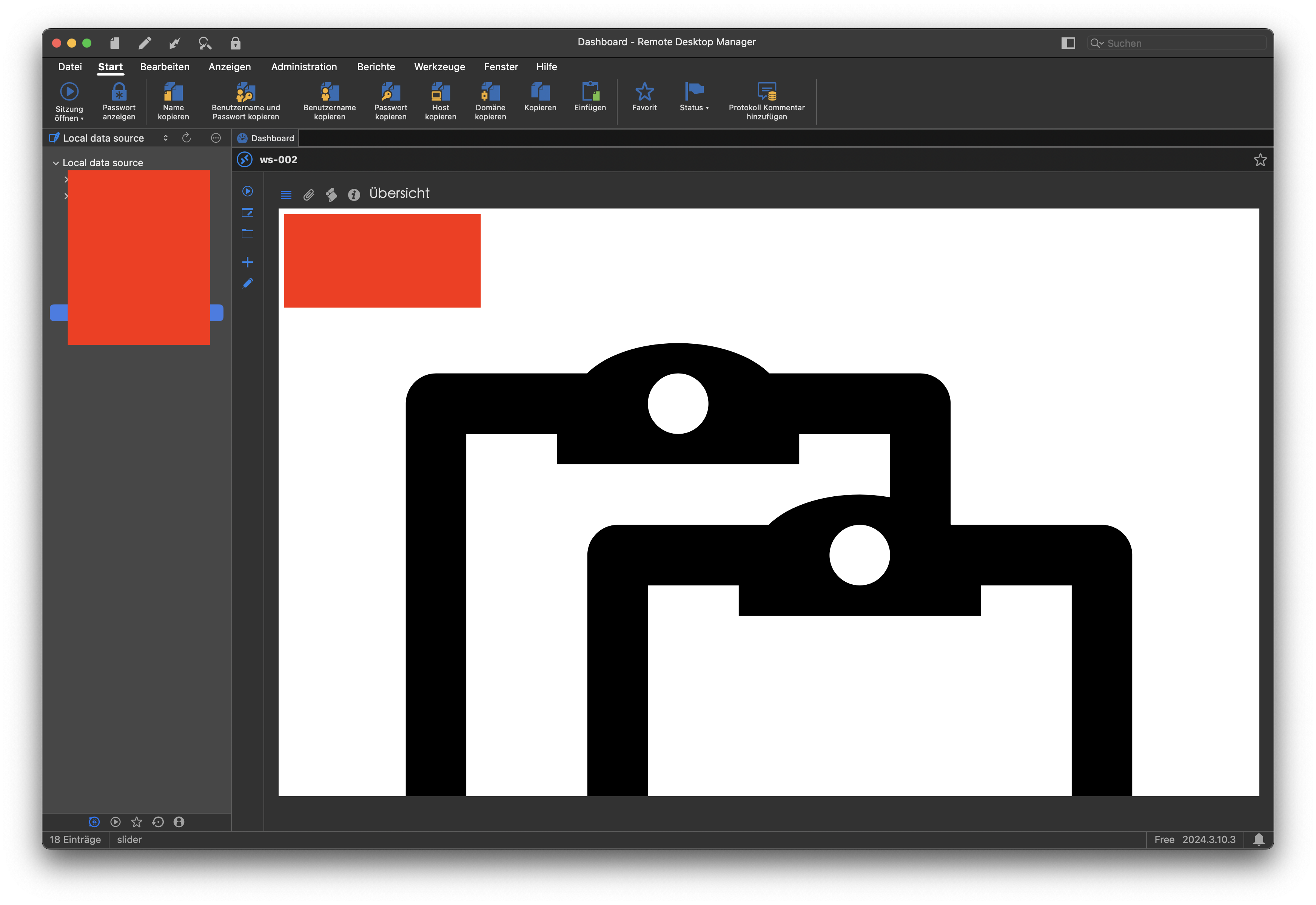
Bildschirmfoto 2025-02-06 um 12.56.06.png
Hello,
The issue with the dashboard is known and should be fixed in the next release. Sadly, we don't have an ETA for that yet. As for the connection issues, the new versions of macOS are known to cause problems. Make sure you allow RemoteDesktopManager under System Settings -> Privacy and Security -> Local network. Also, if you have a firewall, try to disable it and see if it fixes the issue. You can also try clearing your DNS cache and restarting the computer.
Best regards,
Maxim Buisson
Hello,
I am experiencing the same problem, some of the servers became inaccessible, the port used is standard, switching System Settings -> Privacy and Security -> Local network did not help. The problem occurred with the latest update.
The client on Windows works correctly, so the problem is related only to the client on Mac.
Best regards,
Andrew Shvets
DevOps Engineer Hybrid company
Hi Andrew
Could you start by generating as session log, as I described my original post on this thread? RDM Mac sometimes doesn't display the "true" error message in the UI but this will show clearly if it's the same problem.
Thanks and kind regards,
Richard Markievicz
Hi, Richard!
Submitted my session log via the form in the app, I'll look forward to the feedback, it's very important to my work, thanks!
Best regards,
Andrew Shvets
DevOps Engineer Hybrid company
Hello Andrew
Ok, it's the same issue. We're simply failing to open a TCP connection to the host, before any part of the RDP protocol is involved. So, annoyingly, something is blocking this at the OS level. There's been a lot of trouble with this "feature" in macOS 15.
Just to confirm - Local Network Access for RDM is enabled? One thing you can try is simply toggling it off and then back on and see if that helps. As much as I hate to suggest it, I have seen this work - you can also try a reboot.
If it's still not working
- Can you connect using the Microsoft RDP client ("Windows App")?
- What does `nc` tell you? (e.g. `nc -zv {IP Address} 3389`)
Thanks and kind regards,
Richard Markievicz
Hi, Richard!
Only some of the hosts are down, I sent the session log of one of the problem hosts. LAN access for RDM is enabled at the moment. I've tried turning it off and on again, as well as rebooting the device, but none of that helped. It's probably possible to test with an older version of RDM, since I haven't seen problems before, but I'm not sure.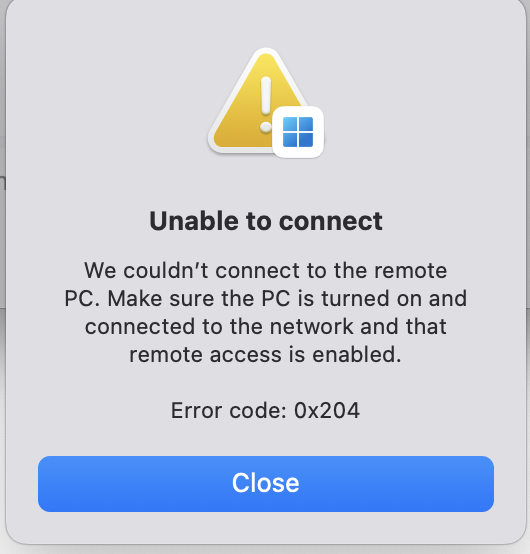
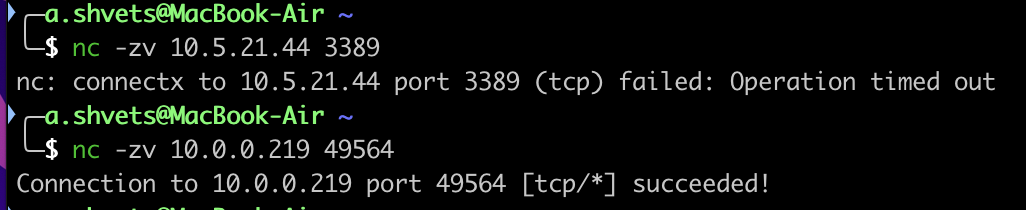
Best regards,
Andrew Shvets
DevOps Engineer Hybrid company
63614e57-b4d5-431a-a4f4-d4ba5a6723d5.png
beb64cfa-dc5b-4db0-a37d-7ec5468e7025.png
Good morning,
After today's update to Sequoia 15.3.1 and a restart, the error still persists. I cannot access any host, although e.g. 10.1.1.114 reports "succeeded":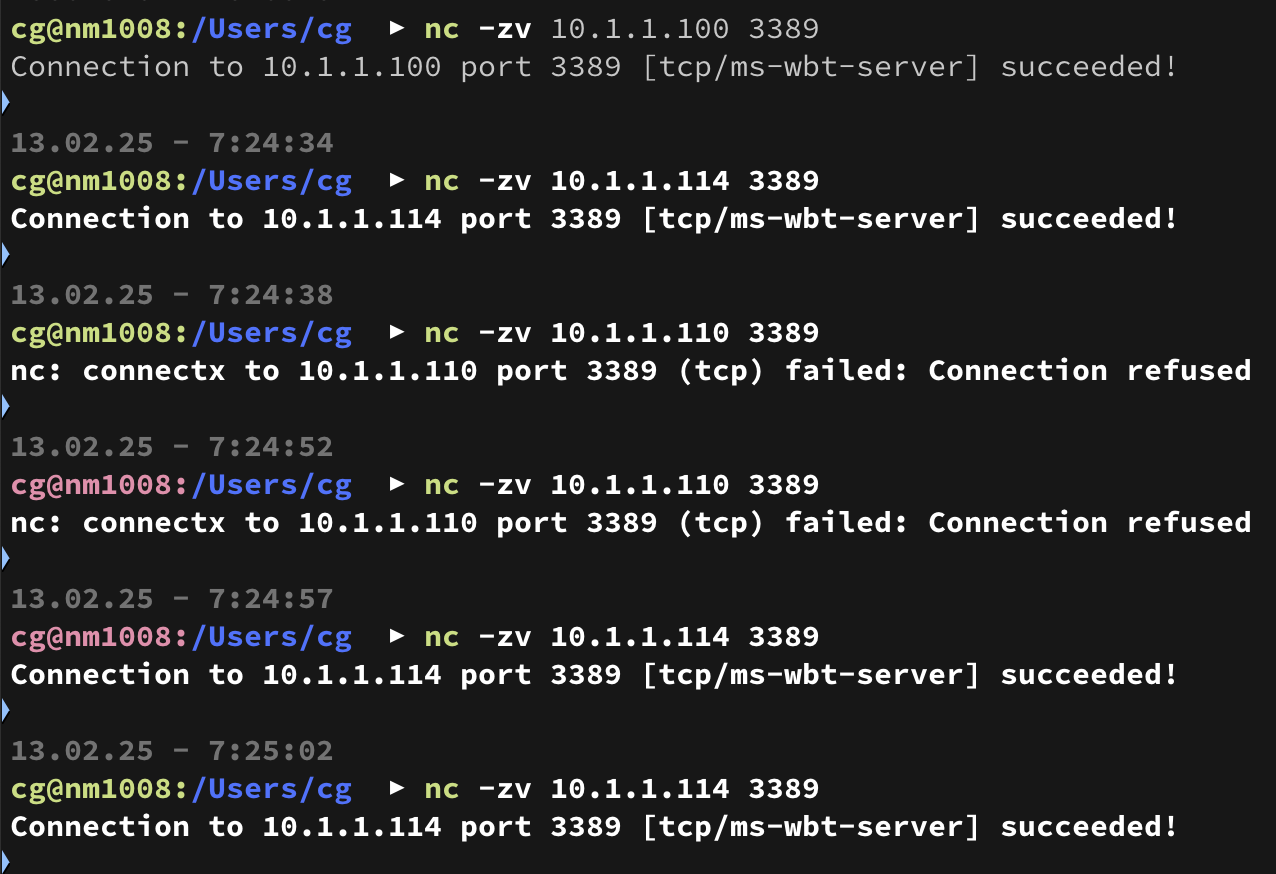
Screenshot 2025-02-13 at 07.26.57.png
Hi, Richard!
Only some of the hosts are down, I sent the session log of one of the problem hosts. LAN access for RDM is enabled at the moment. I've tried turning it off and on again, as well as rebooting the device, but none of that helped. It's probably possible to test with an older version of RDM, since I haven't seen problems before, but I'm not sure.
Hi Andrew
So, it looks like you're not able to connect this host using RDM, Microsoft RDP ("Windows App") and `nc` can't connect either? Is that correct?
Thanks and kind regards,
Richard Markievicz
Good morning,
After today's update to Sequoia 15.3.1 and a restart, the error still persists. I cannot access any host, although e.g. 10.1.1.114 reports "succeeded":
Hello
Have you tried toggling the "Local Network" permission off-and-on again for RDM?
Are you able to connect using Microsofts RDP client ("Windows App")?
Thanks and kind regards,
Richard Markievicz
Hi, Richard!
Only some of the hosts are down, I sent the session log of one of the problem hosts. LAN access for RDM is enabled at the moment. I've tried turning it off and on again, as well as rebooting the device, but none of that helped. It's probably possible to test with an older version of RDM, since I haven't seen problems before, but I'm not sure.
Hi Andrew
So, it looks like you're not able to connect this host using RDM, Microsoft RDP ("Windows App") and `nc` can't connect either? Is that correct?
Thanks and kind regards,
Yep, but everything works correctly from a Windows machine. Probably the problem is not specifically in RDM, but in MacOS settings, but that doesn't make it any easier=) If you can tell me how to use RDM in a new environment, that would be great. The problem is probably the standard port for the RDP protocol, since hosts on non-standard ports are available. I have too big an infrastructure to change ports, but if there is no solution in the objective future, I guess I'll have to do it
Translated with DeepL.com (free version),
Best regards,
Andrew Shvets
DevOps Engineer Hybrid company
Hi Andrew
Indeed, this clearly seems to be a macOS problem rather than an RDM one, although that's not very helpful.
It might be related to the port, but the working host is in a different subnet which I would guess is more likely related.
Can you experiment with disabling the firewall on your macOS system and see if something changes? How about trying a different network adaptor (wired instead of wireless, for example)?
Kind regards,
Richard Markievicz
Hi Andrew
Indeed, this clearly seems to be a macOS problem rather than an RDM one, although that's not very helpful.
It might be related to the port, but the working host is in a different subnet which I would guess is more likely related.
Can you experiment with disabling the firewall on your macOS system and see if something changes? How about trying a different network adaptor (wired instead of wireless, for example)?
Kind regards,
Hi Richard,
The hosts are inaccessible in all subnets, I connect via corporate VPN.
I don't know much about macOS, can you tell me how to turn off the firewall?
There is no technical possibility to test another network adapter.
Best regards,
Andrew Shvets
DevOps Engineer Hybrid company
Good morning,
After today's update to Sequoia 15.3.1 and a restart, the error still persists. I cannot access any host, although e.g. 10.1.1.114 reports "succeeded":
Hello
Have you tried toggling the "Local Network" permission off-and-on again for RDM?
Are you able to connect using Microsofts RDP client ("Windows App")?
Thanks and kind regards,
Good morning,
This seems to work at this time: I can connect to all hosts (except one, but that looks like another issue). Let's see, how long it will work. ;-)
Hi cmg
There is a long and detailed thread here with discussion about how the local network access permission gets "lost" by the OS, and sometimes needs to be toggled and/or have the machine rebooted.
There's also a script in that thread that one user said helps with the problem.
This doesn't appear to be fixed in the latest (15.3) Sequoia.
Overall, this looks like a half-baked feature from Apple with a lot of issues, affected lots of different applications. I hope that Apple will work these issues out in an update.
Kind regards,
Richard Markievicz
Hi Andrew
Indeed, this clearly seems to be a macOS problem rather than an RDM one, although that's not very helpful.
It might be related to the port, but the working host is in a different subnet which I would guess is more likely related.
Can you experiment with disabling the firewall on your macOS system and see if something changes? How about trying a different network adaptor (wired instead of wireless, for example)?
Kind regards,
Hi Richard,
The hosts are inaccessible in all subnets, I connect via corporate VPN.
I don't know much about macOS, can you tell me how to turn off the firewall?
There is no technical possibility to test another network adapter.
Hi Andrew
Firewall is in System Settings > Network > Firewall, although in an enterprise environment there might be policies or otherwise that prevent you from meddling with it. It's worth a try, based on some threads I've read on the Apple support forums.
See also my last reply to cmg on this thread, which links to a specific post with more information.
Kind regards,
Richard Markievicz
Hi Andrew
Indeed, this clearly seems to be a macOS problem rather than an RDM one, although that's not very helpful.
It might be related to the port, but the working host is in a different subnet which I would guess is more likely related.
Can you experiment with disabling the firewall on your macOS system and see if something changes? How about trying a different network adaptor (wired instead of wireless, for example)?
Kind regards,
Hi Richard,
The hosts are inaccessible in all subnets, I connect via corporate VPN.
I don't know much about macOS, can you tell me how to turn off the firewall?
There is no technical possibility to test another network adapter.
Hi Andrew
Firewall is in System Settings > Network > Firewall, although in an enterprise environment there might be policies or otherwise that prevent you from meddling with it. It's worth a try, based on some threads I've read on the Apple support forums.
See also my last reply to cmg on this thread, which links to a specific post with more information.
Kind regards,
Hi Richard!
Turns out I had my firewall turned off the whole time. Upgrading to 15.3.1 did not fix the problem. I guess the only way left is to use the scripts you wrote about earlier
Best regards,
Andrew Shvets
DevOps Engineer Hybrid company
Hi Andrew
Something you might try is creating a new user account on your Mac and testing if the issue persists in a new user account. Perhaps there is some issue or corruption there and it would help you identify it. Apple says that the Local Network access is configured on a. per-user basis.
Kind regards,
Richard Markievicz
Hi there,
I still have the same problem, but i dont think its related to the MAcOS 15 problem, cause I still use MacOS 11.7.10 and for some reason it stopped working using the dns name as host, but it is still working with ip. But as DHCP is preferred in our network settings as dynamic IP, I have to change this. So I can not reach the Hosts from my Mac anymore?
When I use RDM on Windows and connect to a host using the dns hostname, its working fine.
kind regards,
Philippe
Hi Philippe
A comparison to RDM on Windows is not apples-to-apples, because the RDP stack is completely different (on Windows, we use the official Microsoft client controls which aren't available on macOS) as well as differences in network configuration (i.e. OS level differences).
First, we'd need to isolate if this is an RDM issue or an OS issue. Can you connect using hostname by using the Microsoft client ("Windows App")?
Second, a session log might show a specific error in the DNS resolution. You can follow the instructions here, and send the log to me either by PM or to service@devolutions.net (mentioning this forum thread in your message).
Please, let me know if something isn't clear or you have further questions.
Kind regards,
Richard Markievicz
What fixed my issue even though it was working fine earlier in the day and then just stopped was enabling FreeRDPSandboxed under Privacy and Security. 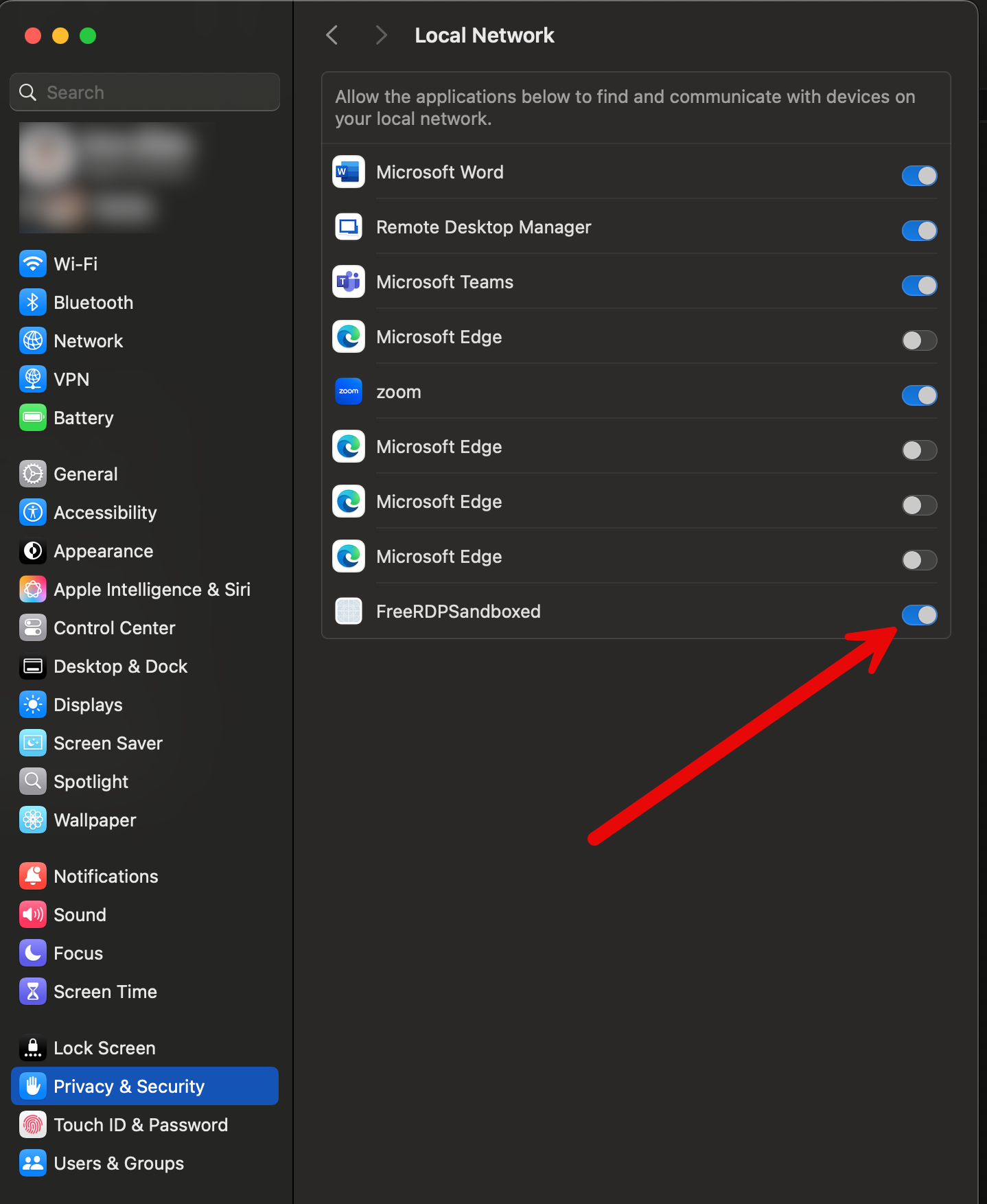
7eae2eab-5c50-4f9c-90eb-48d159dab17b.png