Sync RDM between two win11 desktop computers

Hi there.
I want to sync RDM between two computers. I have no issues with buying licence just not sure what exactly needs to be bought. Also, is it possible to get all pwds from bitwarden vault? this would be ideal.
Thanks Matjaž
All Comments (14)
Hello,
Thank you for reaching out to us regarding this matter.
You can use RDM Free on both computers with a Hub Personal datasource to synchronize them.
However, please note that Bitwarden is not available in the Free version. Alternatively, you can import your credentials directly into RDM.
Would you like me to provide details about the available licenses?
If you have any further questions or need assistance, please don’t hesitate to let us know.
Best regards,
Tommy Sanders
Hello,
Thank you for reaching out to us regarding this matter.
You can use RDM Free on both computers with a Hub Personal datasource to synchronize them.
However, please note that Bitwarden is not available in the Free version. Alternatively, you can import your credentials directly into RDM.
Would you like me to provide details about the available licenses?
If you have any further questions or need assistance, please don’t hesitate to let us know.
Best regards,
Hello.
Yes, please provide me info for licenced RDM with bitwarden support, so i can test it if it works as expected. Trial possible?
Hello,
Thank you for your response.
To request a trial license, please visit the following link: https://devolutions.net/remote-desktop-manager/trial/
Best regards,
Tommy Sanders
I can install one unit licence for Single User remote desktop manager on all gateway machines? i have 3 atm.
Hello,
Thank you for your response.
Could you please provide more details regarding your question? Additional information would help me provide a more complete and accurate answer.
Looking forward to your response.
Best regards,
Tommy Sanders
Im using up to five machines, on first one I have installed free RDM. (three for now, but want to add fourth and possible five on apple platform, when supported)
I need to sync data between but have it local not in your infra.
What licence i need? This is single user case.
Hello Matjaz,
Our licensing worked on a "per named user" basis, meaning that in your case, you would only need x1 single user licenses of Remote Desktop Manager Team edition. And this includes the integration with Bitwarden - https://docs.devolutions.net/rdm/kb/how-to-articles/configure-bitwarden-entry/
To sync your data between your devices, you would need a centralized data source. For self-hosting, the options are either a SQL Server directly (Express edition is supported) or Devolutions Server (https://devolutions.net/server/).
Don't hesitate to reach out again if you have any further questions.
Best regards,
Thanks for reply
this page doesn't exist https://devolutions.net/server/).?_gl=1*k6cciw*_gcl_au*MTk5NjMwMzgwNS4xNzQwMzk0NTA2*_ga*NzYxMjgzNjk4LjE3Mjg0NjQ4NTY.*_ga_P11646PR82*MTc0MDM5NDUwNS4xOS4xLjE3NDAzOTQ1OTUuMzkuMC4w
since I have all stuff already saved on one machine, i guess there is export option and import into SQL or devolution server? Devolution server is extra cost?
and another question, i checked devolution server, maybe free version will be good enough
if dev server is temporarily down, can I still work with client and just sync doesn't work ?
Hi Matjaz,
My apologies about this, here's the proper link, just in case - https://devolutions.net/server/
You are correct, you will be able to do an export of your current vault and import it into a SQL server or Devolutions Server, under File - Import and File - Export respectively. And yes, you will be able to use the free edition of Devolutions Server, but it still requires you to have the Team edition of Remote Desktop Manager in order to be paired.
To access the data stored in Devolutions Server from RDM when it's down/unreachable, you can use the offline mode - https://docs.devolutions.net/rdm/data-sources/offline-mode/
Best regards,
Hi Anthony,
i managed to setup Devolution server with vault which i am able to sync to three my machines. All is working well when online, but when dev server is not reachable also RDM is not working. Your manual does not match my setup Devolutions Server offline mode - Devolutions Documentation not sure, maybe you have documented some older version or ?
i need this solution to be able to work also offline , which is quite often case when working in IT (like connecting to some vpn which force you to change def gw for example ...)
Hello,
Thank you for your question.
There are three things to verify before working in offline mode in RDM with DVLS:
- User Permissions: The user must have permission to work in offline mode.
- Cache Validity: Ensure the cache has been built and is not outdated.
- Vault Security Settings: If the vault’s security level is set to High, offline mode will be disabled.
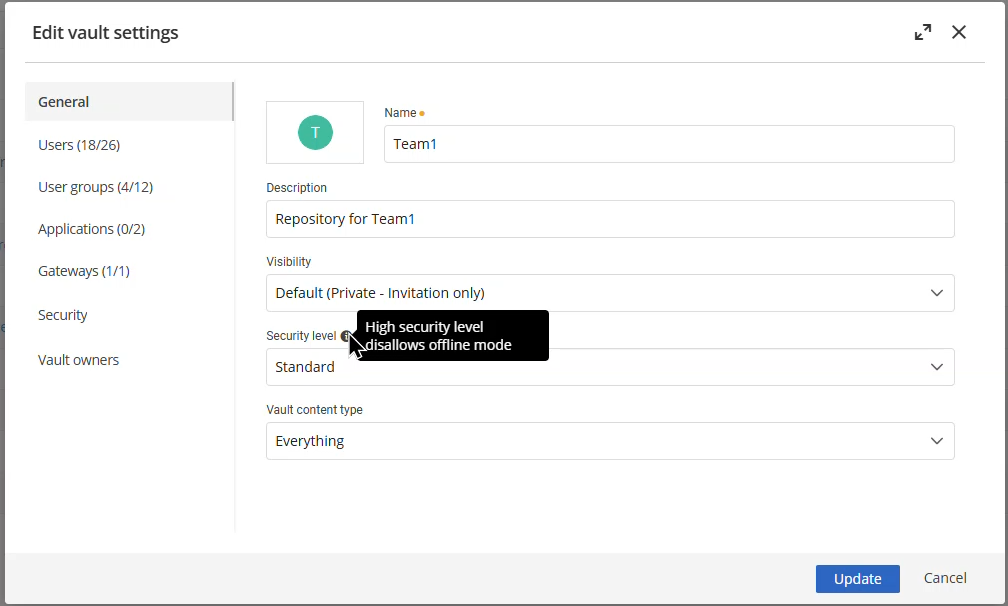
Best regards,
Tommy Sanders
7857e937-3ef7-4ffb-94fd-2fdbb73da1f3.png
Hi Tommy
screenshots you are providing doesnt match my software
2024.3.29.0 64-bit for RDM
2024.3.13.0 for devolution server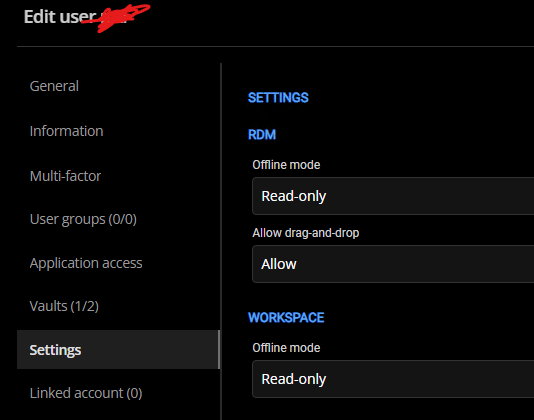
where can i find cache validity ?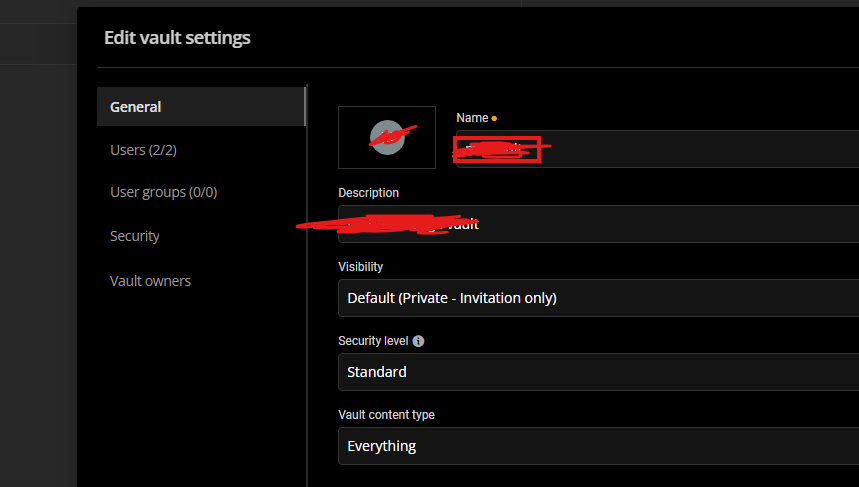
20a44b56-913e-4546-9d05-b919c50f0a49.png
575ffde1-9e1e-4a6c-9940-ab0873aab712.png
Hello,
Thank you for your response.
Could you please open Remote Desktop Manager and navigate to:
File → Data Sources → Edit Data Source → Advanced tab,
and send me a screenshot of those settings?
Best regards,
Tommy Sanders