USB device missing, Remote FX

Hi
I want to use my 3D Spacemouse (3Dconnexion) in remote session. I have used it before when I had win 10 but now on Win 11 on remote laptop (host is win 10 enterprise).
Its not working in windows remote desktop settings so I'm trying Remote desktop manager instead. More info here: https://answers.microsoft.com/en-us/windowsclient/forum/all/redirection-with-remote-fx-not-working-win-11/b4639694-1c36-4dac-b188-79f5a485f612
I start a new session in desktop manager and go to "Local resources" → "Other supported RemoteFX USB devices" → and some of my USB devices is appearing but not my 3D spacemouse receiver (the 3Dmouse is wireless), how do I add it to the "Other supported RemoteFX USB devices"?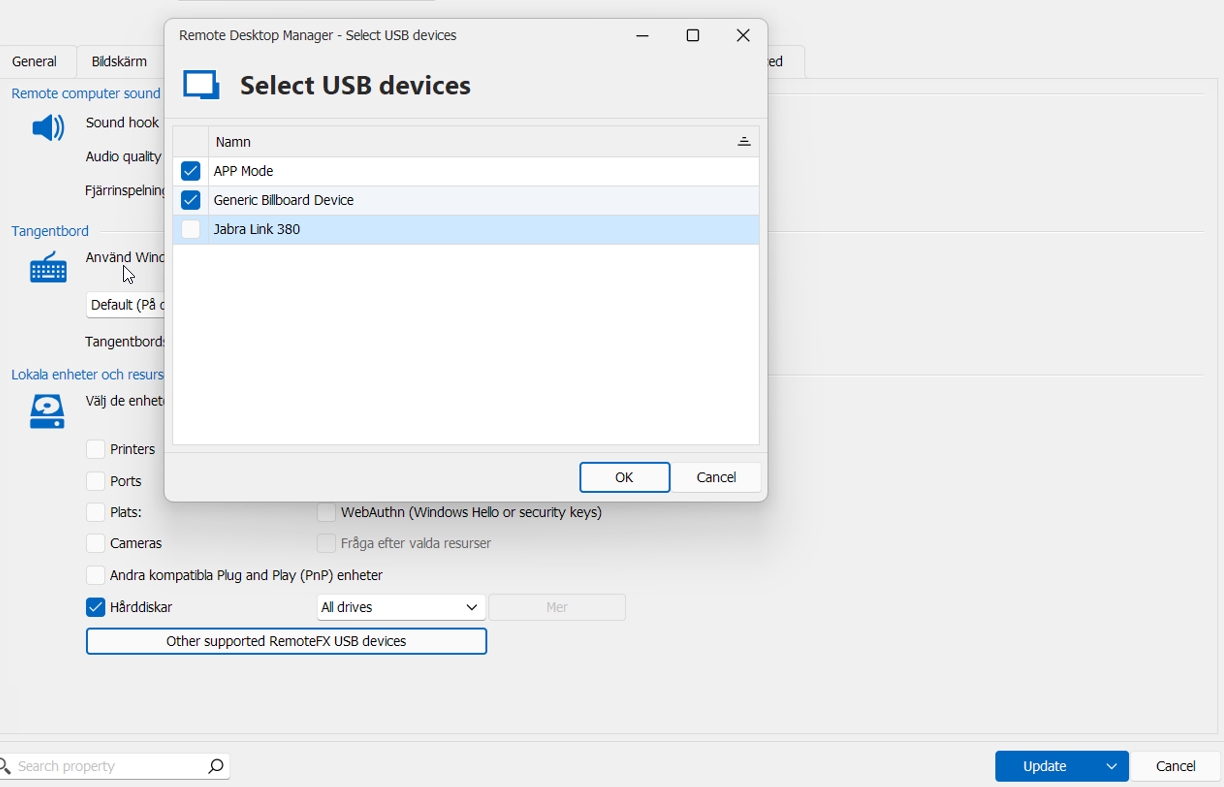
firefox_zO8UaZdLde.jpg
All Comments (17)
Hello,
Thank you for reaching out regarding this matter.
Could you please confirm that you're using the latest version of RDM? In the meantime, I would also suggest checking the box for “Other supported Plug and Play (PnP) devices” as a potential solution.
Please let me know if this helps.
Best regards,
Tommy Sanders
Hi, do I need RDM installed on the hos computer as well?
I have the latest version of RDM on my remote laptop.
“Other supported Plug and Play (PnP) devices” → Does not help.
Hello,
Thank you for getting back to me.
Please check that your mouse drivers are updated to the latest version.
Outdated drivers can sometimes interfere with RemoteFX, preventing the mouse from appearing correctly.
Additionally, I discovered that Windows 11 has modified some features of RemoteFX, and Microsoft has phased out certain parts of it.
This may result in limited compatibility for specific hardware, even when using RDM.
Best regards,
Tommy Sanders
OK can you check if Microsoft have any plan to fix this? They just ignore my questions.
Hello,
Unfortunately, I don't see any plan for a fix on their side.
Best regards,
Tommy Sanders
Hi All,
I trust you are doing well that side. 🙂
We are experiencing a similar issue on our end.
We are trying to get the ePad Signature Pad (VP9801) working with Remote Desktop Manager version 2025.2.
The device is detected correctly in the Windows Remote Desktop session (see screenshot 2) and redirects to the server without issue.
However, it does not appear inside Remote Desktop Manager (see screenshot 1).
For reference, here’s the product link:
https://epadlink.myshopify.com/products/epad
Could you please advise on any steps or configuration we could try to get the device working within Remote Desktop Manager?
Looking forward to your guidance.
(Screenshot 1.)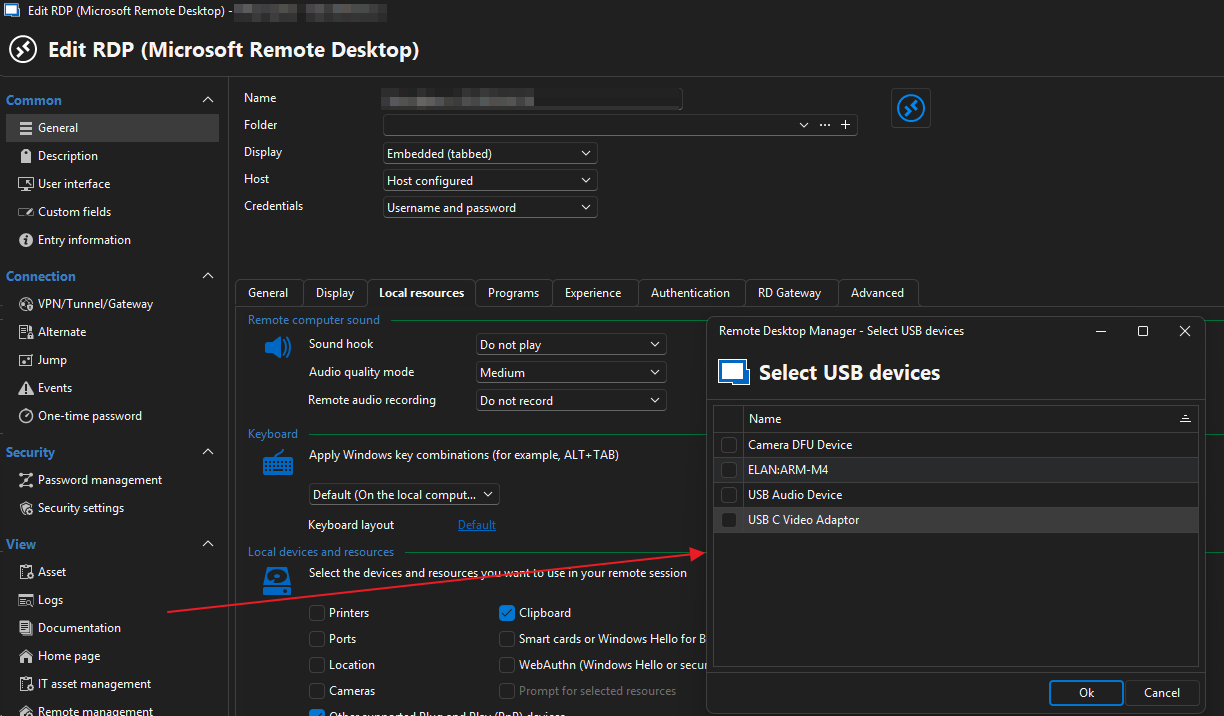
(Screenshot 2.)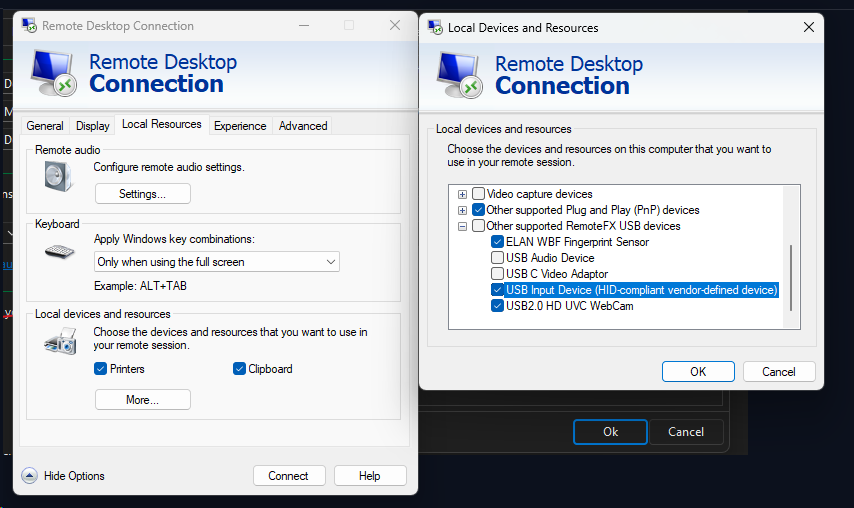
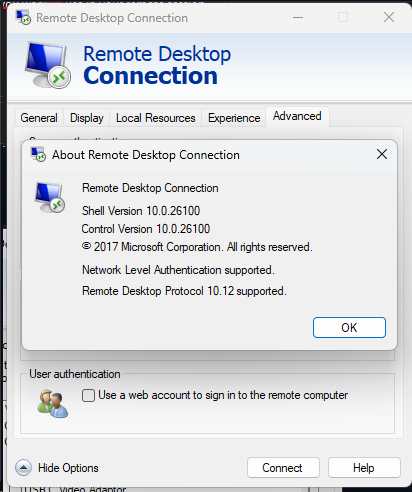
Below is the client's PCs specifications: (Client).
Processor 11th Gen Intel(R) Core(TM) i7-1165G7 @ 2.80GHz (2.80 GHz)
Installed RAM 24.0 GB (23.7 GB usable)
Device ID 7A2F1E4E-1276-423F-B2DB-82C6A49C16F9
Product ID 00355-60675-90974-AAOEM
System type 64-bit operating system, x64-based processor
Pen and touch No pen or touch input is available for this display
Edition Windows 11 Pro
Version 24H2
Installed on 13/12/2024
OS build 26100.6584
Experience Windows Feature Experience Pack 1000.26100.234.0
Server operating system: (Host)
Processor Intel(R) Xeon(R) Silver 4215R CPU @ 3.20GHz 3.19 GHz
Installed RAM 112 GB
Device ID 9591D3D4-22EE-4C8C-A5CD-3DD54DA47B71
Product ID 00454-20700-41605-AA156
System type 64-bit operating system, x64-based processor
Pen and touch Pen and touch support with 10 touch points
Edition Windows Server 2022 Standard
Version 21H2
Installed on 14/07/2025
OS build 20348.4171
Kind regards,
Hendrik de Vos
Implement Retail (Pty) Ltd
79bb29a7-adcd-4768-b3c2-02dac718892b.png
9ea8f035-84c9-4050-848a-82b71e4a9bb5.png
7531cd56-1871-4298-8e25-6afaea57db2c.png
Hello,
Thank you for your response.
Could you please confirm whether this issue occurs on only one type of device or across multiple devices?
In the meantime, may I also ask if any of your colleagues have experienced the same issue? Additionally, did the issue start after a specific update or change?
Best regards,
Tommy Sanders
Good day Tommy,
I trust that you are well.
My apologies for the delayed response. Based on my knowledge, the issue only occurs with the ePad device. Unfortunately, the software package does not support alternative signature devices, so we are limited to using the ePad.
From what I have observed, it seems that only external devices do not redirect via RemoteFX when using RDM. However, when using the standard Windows RDP client, the ePad does work correctly. The same behavior occurs with the ePad device on other computers as well.
Please let me know if you require any additional information, as we are trying to implement this solution for our clients rather than relying on the Windows Remote Desktop Client.
Kind regards,
Hendrik de Vos
Hello,
Thank you for your response.
I will check with our IT team to see if we have a similar device available for testing and will get back to you as soon as possible.
Best regards,
Tommy Sanders
Dear support,
same problem here
with the latest version it is not possible to select the remotefx usb availale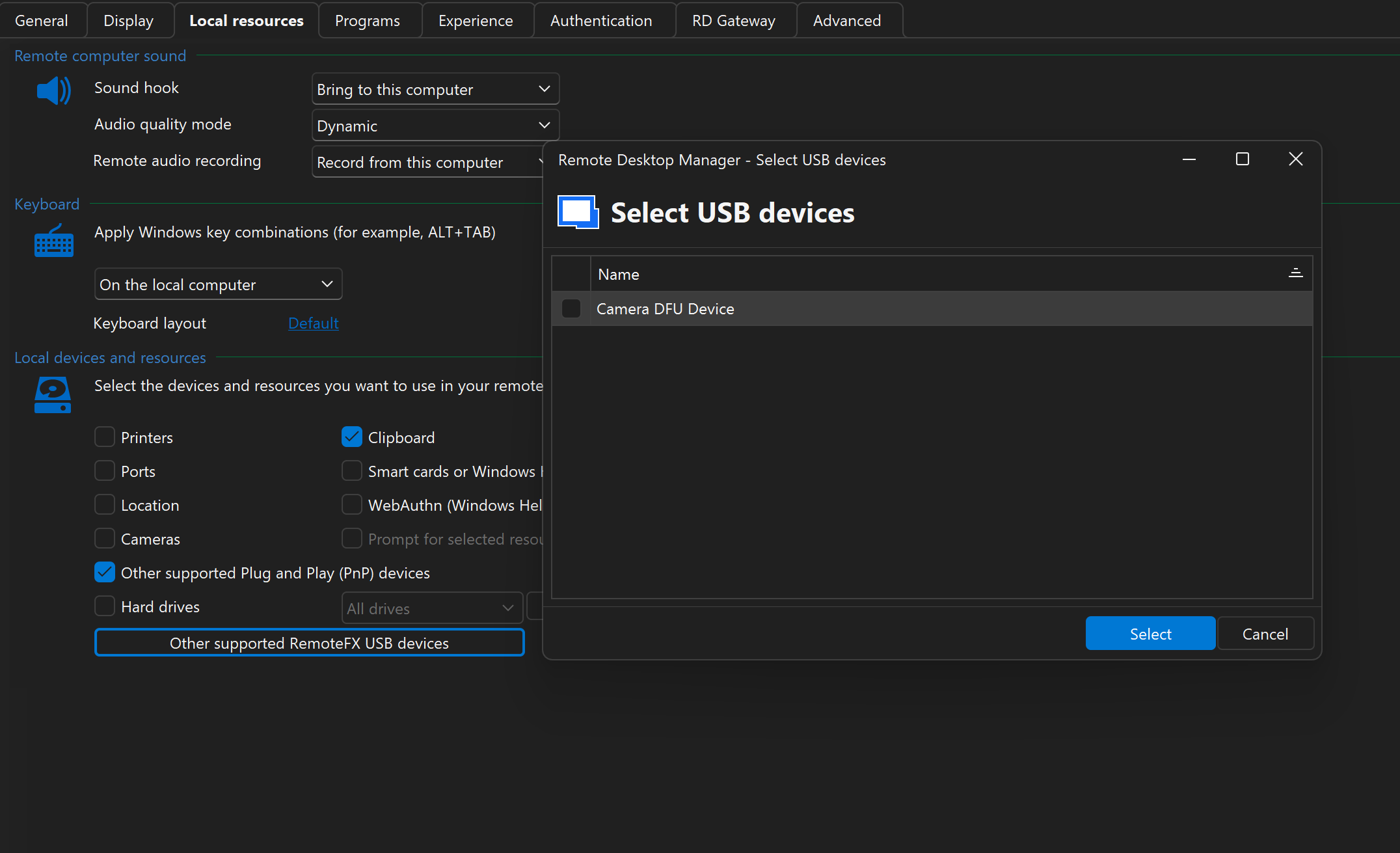
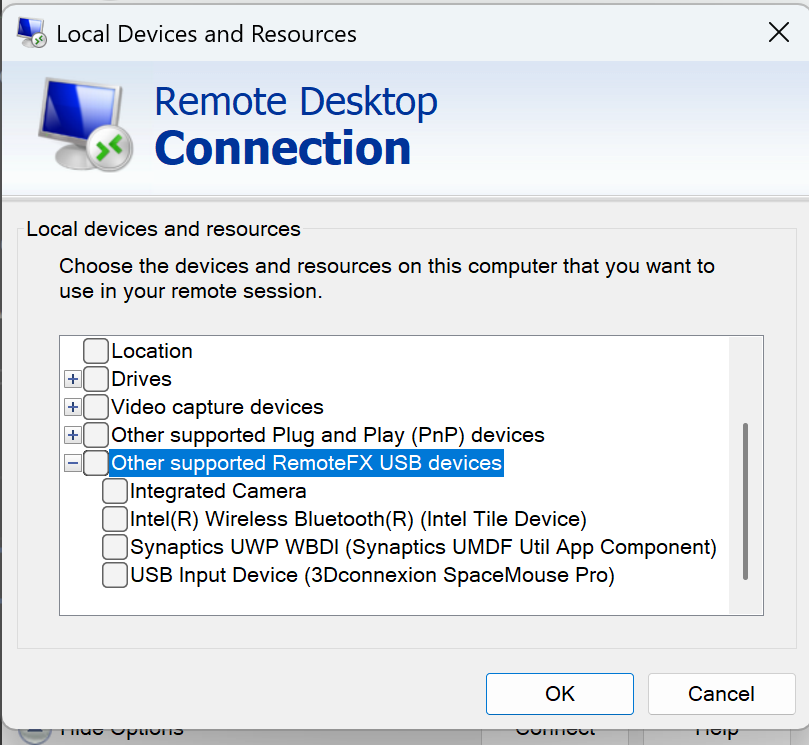
I'm on windows 11 24h2 latest KB applied
Regards
A
24db83c7-671b-4200-88eb-6e431ee0a877.png
640c574f-74c3-47e9-a894-8beb92f8d164.png
Hi Clemente,
I trust that you are well.
The Devolutions Support Team is aware of the issue and it has been logged for further investigation.
Kind regards,
Hendrik
Hello,
Thank you for your patience.
We are still working on identifying a suitable device for testing and will keep you updated on our progress.
Best regards,
Tommy Sanders
Hello @info99 ,@ponka 85 and @clementeandrea
The issue is known on our end, and our development team is currently working on a fix.
I will keep you informed as soon as it is resolved.
Best regards,
Tommy Sanders
Hello,
In 2025.3.21.0, devices from 3Dconnexion and ePadLink will be listed in the RemoteFx section.
If your device still isn't listed after the update, please let us know the ID of the device you want to redirect and we'll add it to the list. The ID can be found through the Device Manager, under the Hardware Ids section of the device properties: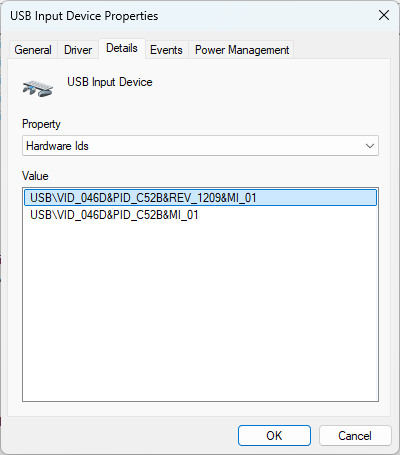
Regards
Jonathan Del Signore
2698a7f0-a0ae-4b12-a56c-276166d74ba8.png
Hello,
It was brought to my attention that some older 3Dconnexion devices were under the Logitech vendor ID. These will be supported in version 2025.3.22.0.
Regards
Jonathan Del Signore
Hi Jonathan,
I trust you are well. Apologies for the late reply.
Thank you for this – we really appreciate it!
We do not have the ePad device with us at the moment, but I have asked our client to test it on our behalf.
If it still does not work, we will then send the Hardware IDs to you.
Kind regards,
Hendrik de Vos
Hello,
Thank you for your response.
Version 2025.3.22.0 has been released. We’ll wait for your feedback in case you encounter any issues or if something isn’t working as expected.
Best regards,
Tommy Sanders