Powershell Entry support for credential from linked Host
Powershell Entry support for credential from linked Host
0 vote

Hello,
With a PowerShell (local) entry configured with a linked Host entry (or to prompt for a host on launch), there doesnt currently seem to be a way to use the credential defined on the linked host.
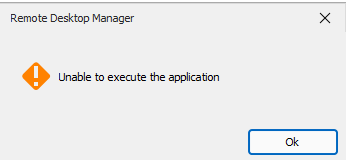
There is a setting on the 'Run as' tab of the PowerShell entry, however when this set to either 'Current session' or 'Linked (vault) \ Prompt', the entry fails to open with error 'unable to execute application'.
Not sure if this is a feature request, or a bug with the 'Run as\Current session' parameter not correctly retrieving credential from linked host.
Please let me know if you would like any additional info.
Thanks
Joe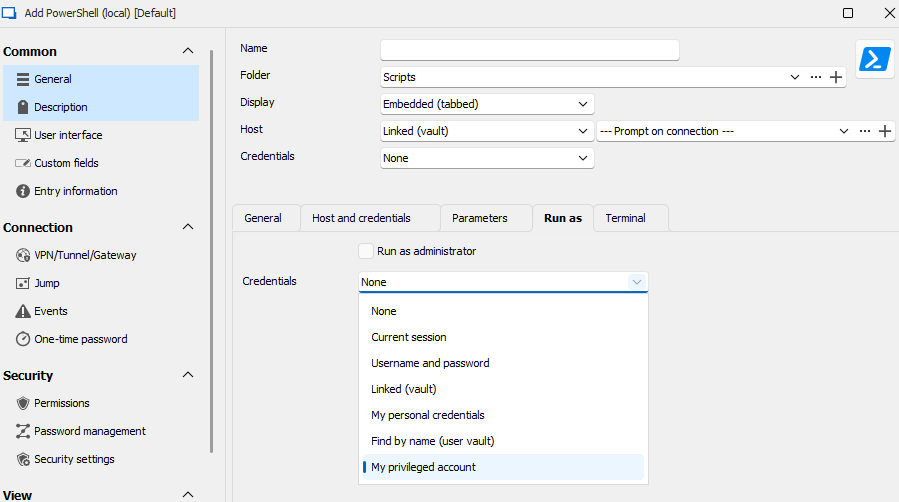
4cd86b7c-f038-4c5e-b4d3-c8afd07258fe.png
7cf44380-b9ac-44f5-8aab-9fce5e90db92.png
All Comments (7)
Hello,
The host and the credentials are separate configurations in the entry. To make this work at the moment, you would have to either link to that credential in the Run As section, or configure the "credentials" section of the entry to your credential, and then set the Run As section to "current session". Doing it this way should work for your scenario I believe.
As for fetching the credential from the linked host entry, we will note this as a possible future improvement. Maybe it could be a new mode in the "credentials" mode dropdown. Thank you for the idea.
Regards,
Hubert Mireault
Hi Hubert,
Thanks for looking into it. Using RDM 2024.3.16, if I set a primary credential attribute on the entry, and the 'run as' attribute to 'current session', the entry fails to open with error 'unable to start application'. I'm not sure whether this is a bug? Seems to also be the case when I explicitly set a 'run as' credential.
Conversly, if I set the primary credential on the entry, and the run as parameter to 'none', the entry launches successfully. But that raises the question, what difference in functionality should result by changing the 'run as' attribute from 'none' to 'current session'?
Regarding the feature request, yes please give some consideration to adding a mode to the dropdown called 'linked host credential' (or something similar)
Please let me know if you would like any additional info.
Thanks
Joe
Hello,
In the case of the RunAs configuration, we send the credentials to the ProcessStartInfo object we use to start Powershell. This effectively should start the Powershell entry under another user's credentials. We also seem to have an issue reported by some of our users where the RunAs doesn't work properly. This seems to have happened when we switched to .NET8. I've added this thread to our internal ticket for tracking.
Maybe I misunderstand the way you want to use the credential linking in the powershell entry. Is this what you're trying to accomplish? Or are you trying to use the credentials as part of the script, for example through variables?
Regards,
Hubert Mireault
Hi Hubert,
Sounds like I'm running into the RunAs issue you mentioned since .NET8.
Regarding how I'm using the credential, yes its for a script via a parameter/s, that connects to a host with WinRM using credentials specific to said host. Was hoping there was a way to utilize the credential from the linked host by setting the run-as attribute to current session, but sounds like that wont work, and will require the feature request I mentioned (i.e. additional item in dropdown called 'linked host credential'). Current work-around is to set the credential property on the PowerShell entry to prompt, then I can manually choose the applicable credential for the linked host, but its not an ideal solution.
Thanks for your assistance on this.
Joe
Thank you for the additional information. So from what I understand you don't currently need the RunAs in your case, it really is about the "linked host credential" setting.
I've opened a separate ticket for this specific feature.
Regards,
Hubert Mireault
Yes that is correct, thanks Hubert.
Joe
Hello,
This feature as been completed internally and will be available starting from the version 2025.2.3.0 of RDM.
Regards.