Reset RDM ribbon

The ribbon for one of my PCs has lost the Copy Username and Password option.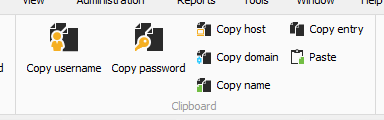
Is there a way to reset the ribbon?
Screenshot 2024-10-24 063140.png
All Comments (6)
Hello,
Thank you for reaching out to us regarding this matter.
Could you kindly provide your RDM version and the datasource you are currently using?
To reset the ribbon, please navigate to the Window tab and click on Reset Layout.
Please let me know if this resolves the issue.
Best regards,
Tommy Sanders
Resetting the layout did not correct the issue.
RDM version 2024.3.14
Hello,
Could you please confirm which entry type is selected when you are unable to see the option? Additionally, could you let me know what datasource you are using?
In the meantime, please navigate to File -> Application -> Clipboard -> Advanced and check if the 'Credential Copy Options' is set to "All Buttons."
Let me know if this helps.
Best regards,
Tommy Sanders
'Credential Copy Options' is set to "All Buttons." was the issue.
It was set to the 2 button option.
Thank you.
Hello
I’m happy to hear that your issue has been resolved.
Please don’t hesitate to reach out if you have any further questions.
Best regards,
Tommy Sanders
To reset the ribbon in Remote Desktop Manager, try navigating to the View tab and look for an option like Reset Ribbon or Customize Ribbon, then select Reset to Default. Alternatively, check your profile settings to ensure the "Copy Username and Password" option is enabled. Reinstalling or updating RDM could also help if the issue persists. As a student with multiple responsibilities, managing essays can be very challenging. I used ukwritings.com/buy-essay to buy an essay, and I was very pleased with the outcome. The essay was professionally written, well-researched, and delivered on time. The writer even accommodated some last-minute changes I requested. This service is a great option for students who need high-quality academic work without the hassle.