Variable $QUICK_CONNECT$ not working after update to 2024.3.10.0
Variable $QUICK_CONNECT$ not working after update to 2024.3.10.0

Hi RDM team,
I use RDM to start a program after RDP connection and this is not working anymore as the Variable is no longer properly resolved.
It's not working anymore since I updated to 2024.3.10.0. I don't know exactly which version I had before, I didn't took a note. I updated meanwhile to 2024.3.12.0, but still same issue. I know for sure it was working properly in 2024.2.21.0. So maybe this was happening with the release change from 2024.2.x to 2024.3.x.?!
I tested with the following changed template via Quick Connect and looks like the variable is simply empty:
Result: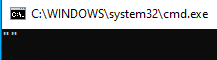
Thanks in advance for checking!
3be10a2b-1ab5-445f-a93f-e49f2513ef4e.png
f5d02b83-86d3-4911-9c6b-f143e6c0ecd3.png
b7efbdc0-a813-4511-9a5d-d7554a8e4dc7.png
All Comments (9)
Hello,
Thank you for reaching out regarding this matter.
Could you kindly verify that there are no errors in your file path?
Additionally, would it be possible for you to create a portable installation of the latest version of Remote Desktop Manager (RDM) and check if the issue persists?
To do this, please follow the steps below:
- Download the .zip file from the following link:
- Download RDM Portable
- Create a new folder on your desktop.
- Extract the contents of the .zip file into the folder created in step 2.
- Navigate to the folder and run remotedesktopmanager.exe.
- Connect to your data source.
Please let me know if the portable version resolves the issue.
Best regards,
Tommy Sanders
Dear Tommy,
thanks for your reply, this portable version is 2024.2.21 which will definitively work, so I don't need to test.
I tested meanwhile with other variables like $HOST$ and $NAME$. Both are working fine.
In addition I tested with 2 other colleagues on their machines and they have the same issue like me after the update.
So after detailed testing I can tell you right now that the variable $QUICK_CONNECT$ is empty when using the Quick Connect feature.
Other variables are filled with correct values, but for sure I didn't test all of them ;)
Please have a look if you can recreate the issue. It's very easy. In order to test with RDP connection, just create a RDP connection template and add this: 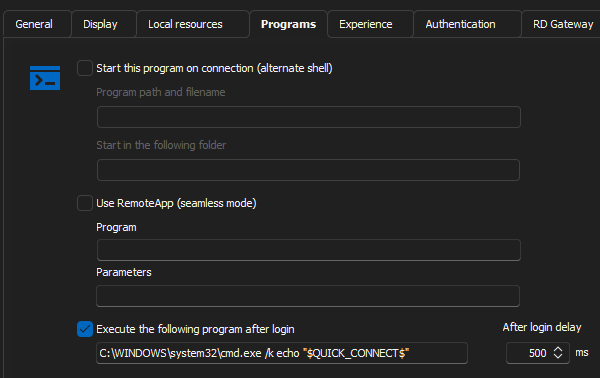
After successful login it will popup an empty "" in a CMD window as shown in screen of my initial post.
If you replace the variable with e.g. $HOST$, it will show the host value in the session.
69cc6a0f-9691-4ebe-b2c0-1dc102ce9c9e.png
Hello,
Thank you for your response.
I’m not sure I completely understand the response. Does the problem persist with the portable version of RDM?
If not, I would recommend resetting your local configuration. To do so, please follow these steps:
- Close RDM.
- Navigate to your %localappdata% directory and open the Devolutions folder.
- Rename the "RemoteDesktopManager" folder to "RemoteDesktopManager.old."
- Start RDM.
- Reconnect to your data source.
Unfortunately, I am unable to reproduce the issue on my end.
If the problem persists after resetting your configuration, I will create a case and send you an invite for a remote session.
Let me know how it goes.
Best regards,
Tommy Sanders
Hi Tommy,
we tested now the following:
- Install a fresh version 2022.3.27.0 (I still had this available.) > $QUICK_CONNECT$ working perfectly
- Upgrade to version 2024.3.12.0 > $QUICK_CONNECT$ variable is empty, not working anymore.
- Followed your guideline in last post > didn't help, still $QUICK_CONNECT$ not working
For me this is clearly depending on the version, it started with 2024.3.10.0, or maybe a bit earlier, I cannot say, but as mention 2024.2.x it was definitively working fine.
And, just to mention, I did the test on a PC that never had a RDM installed before.
So what can we do next?
Regards,
Gordon
Hello,
Thank you for your response.
I have discussed the issue with one of our developers, and I’m pleased to inform you that it is expected to be resolved in the next release, version 2024.2.14.0.
However, please note that the Support Department is unable to provide an exact release date, as the entire process—including build, quality assurance, and release—is managed by other teams.
We appreciate your understanding and patience.
Best regards,
Tommy Sanders
Hi Tommy,
thanks for the update and your support! Good to hear that this is addressed now and will be fixed. I'll wait for 2024.3.14.0 and will reply here after my tests if it is fixed...
Hello Gordon,
Thank you for your response. I look forward to receiving your feedback.
Best regards,
Tommy Sanders
Hi Tommy,
please apologize my late reply. I tested version 2024.3.14.0 already weeks ago and it works fine again, thanks a lot for that!
Personally I'm running currently 2024.3.15.0 in the moment and I know from others running 2024.3.18.0 that it's fine in this version as well, so looks like you applied a sustainable fix...
Best regards,
Gordon
Hello,
Thank you for your feedback.
I'm glad to hear that your issue is solved.
Please do not hesitate to contact us for further questions.
Best regards,
Tommy Sanders