View username/password context menu option missing for RDM Entries configured with a privileged account
View username/password context menu option missing for RDM Entries configured with a privileged account

Hello,
Using RDM 2024.2.21 with DVLS 2024.2.8.
When right mouse clicking an entry in the navigation pane for which the credential is configured to be a DVLS privileged account, the menu options to view/copy username/password/otp are missing. Have tried with both administrative and regular users of RDM/DVLS.
I'm fairly sure at least username/password used to work in a prior version, as I logged a ticket previously about the OTP not being correctly retrieved for entries configured with a DVLS privileged account https://forum.devolutions.net/topics/40052/rdm-unable-to-retrieve-otp-for-dvls-pam-privelleged-account
This functionality is necessary because often for website entries, population of the site's login page/html form doesnt allways work with RDM, so its necessary to do a manual copy/paste of username/password.
Please let me know if you would like any additional info.
Thanks
Joe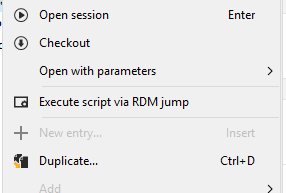 vs
vs 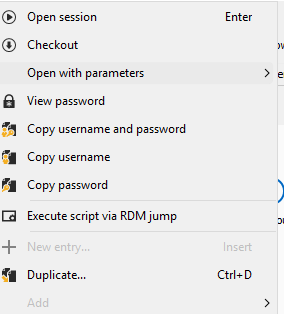
9cf30641-f0bc-4a5d-887c-b2499f34d37e.png
76bc9741-c395-4557-ae9c-6c0d4036cafc.png
All Comments (6)
Hello Joe,
I have tried multiple ways to set a privileged account credential under an RDP session, and they all allow me to copy the credentials.
Could you tell me which credential type you are using under this entry?
Is it My privileged account?
Note that this option is saved locally on your workstation.
Best regards,
Patrick Ouimet
Hi Patrick,
Its when the credential is set to a 'Prilieged Account' and points to a specific DVLS PAM entry.
Joe
e0947042-8711-419f-aca4-b2106241496d.png
Hello Joe,
Thank you for this feedback.
An internal ticket is now created.
I'll let you know when a fixed version will be available.
Best regards,
Patrick Ouimet
Hi Patrick,
Any update or eta on this one?
Thanks
Joe
Hello,
This should become available with our 2025.1 release. A beta is planned in the next week or two.
Regards,
Hubert Mireault
That's great, thanks Hubert.
Joe