Text input when leaving RDM window

Hi Guys
I've been using RDM for a while now, unfortunately since recent job change it's a free version now.
Not exactly sure when it happened but since last 2-3 versions of RDM, every time I leave the RDM window to go to another app, just before current session lose the focus, RDM inputs number 5 in an active field.
Not a big issue if it's just empty text box like an address bar but if I select any text to copy it over to another app outside RDM, the whole selection is being replaced with number 5.
I tried to update to the latest version but the problem persist.
I'm currently on version 2024.2.17.0 64-bit with .NET 8.0.4
Any ideas are welcome.
All Comments (5)
Hello,
Do you have the same behavior with a portable version of RDM?
1- Download the .zip file below:
https://remotedesktopmanager.com/home/thankyou/rdmbin
2- Create a new folder on your Desktop
3- Extract the content of the .zip file into the folder created at #2
4- Go in this folder once the .zip file has been extracted and run remotedesktopmanager.exe
Best regards,
Etienne Lord
Hi Etienne
I noticed that your link pointed to the newer version 2024.2.18.0 64-bit.
Before I ran it as portable, I updated my installation and so far it seem to be OK.
I'll let you know if the problem reappear in the installed version and try the portable then.
Thanks for your help.
Regards
Krystian
Hello,
Not a problem! Keep me posted :)
Best regards,
Etienne Lord
Hi Etienne
I have a bit more information now.
Tested version 2024.2.18.0 64-bit. both installed and portable, both behave in the same way.
It does not happen every time. For example, if I switch from RDM to File Explorer, Teams, Excel, Word - all is fine.
However if I switch from RDM to Edge, Chrome or Visual Studio Code, Just before focus leave the RDM session it enters number 5 into current field. 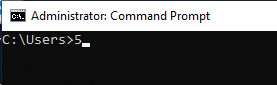
Not a big issue but it's incredibly frustrating if you select a block of text to copy over to Code or Edge and all that text is being replaced by "5".
Regards
Krystian
a64d875e-96af-4ca0-a02c-405d7990d95c.png
Hello,
Thank you for your response.
I will create a case so you can send us a video of your issue.
Please do not hesitate to contact us if you have any further questions.
Best regards,
Tommy Sanders