TSPrint by TerminalWorks

How can I take advantage of TS Print (by TeminlaWorks) to redirect printed output from a remotes RDP session in RDM to my local system? If I just use Windows Remote Desktop, it just works.
All Comments (7)
Hello,
Thank you for your question and your patience.
Could you please follow the steps in this document and let us know if this helps?
The option is in the properties of your RDP entry.
Microsoft RDP Printer Redirect Troubleshooting
Best regards,
Tommy Sanders
Thank you. But I do have that option checked.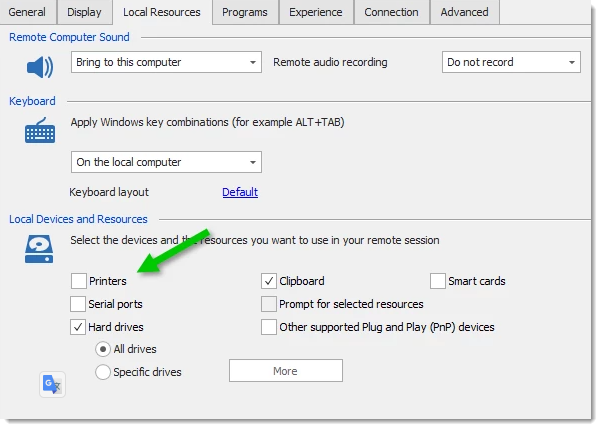
Note that I am using TS Print (by TeminlaWorks) to redirect printed output, it's not just a case of redirecting to an actual print queue on the system. Windows Remote Desktop handles this just fine.
Hello,
Thank you for your patience.
Could you please let me know your RDM version?
Additionally, could you provide more information about your configuration?
Are you trying to connect from your local machine to a terminal server where the terminal server print software is installed, or is the software installed on your local machine?
Could you also try setting your display to external?
It will start in MSTSC but with the RDM configuration.
Let me know if this works.
Best regards,
Tommy Sanders
Setting to External display had no effect: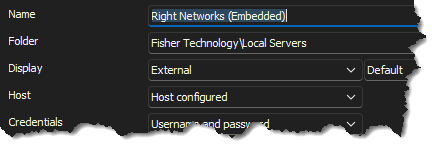
I have RDM version 2024.2.16.0 64-bit.
TSPrint is installed locally and works fine if I connect that same host directly via MSTSC. In RDP, even with an "External" display, I get: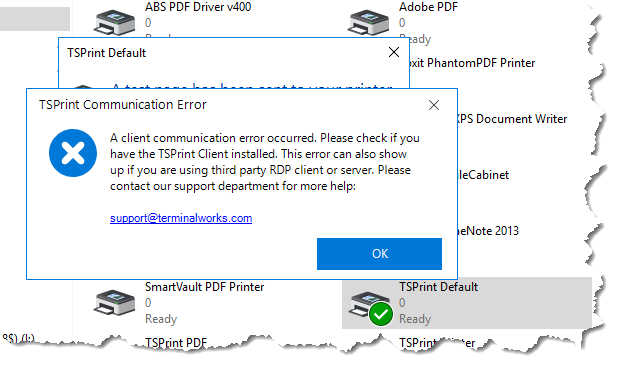
5ae0899d-a3ee-4587-a4e6-df41786959b1.png
bcb95ed8-b391-4ba2-a4d3-18742269bf31.png
Hello,
I apologize for the delay.
Here is what I found: Could you please go to the properties of your RDP entry, navigate to the Experience tab, and change the ‘Load plug-ins in embedded mode’ setting to ‘Yes’ instead of ‘Default’?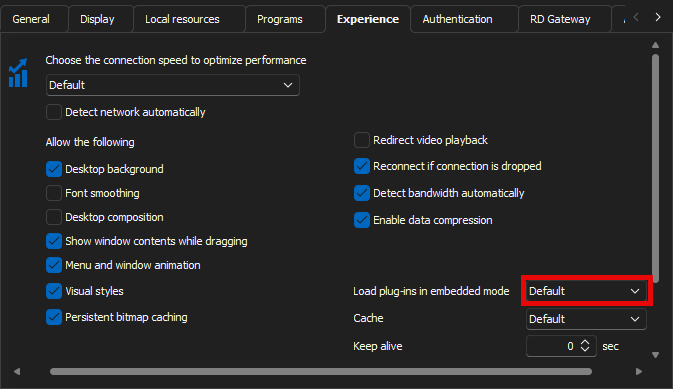
Please let me know if this helps.
Best regards,
Tommy Sanders
1bc4fac6-772f-4da6-a2f1-0bb872c64f88.png
That seems to have done the trick. Thank you!!
Hello,
Thank you for your response.
I’m glad the issue has been resolved.
Please do not hesitate to contact us if you have any further questions.
Best regards
Tommy Sanders