VMware sync

Hi,
Having issues setting up a VMWare sync and struggling to find documentation on it.
The entry also has the user format setting missing, which is what is causing me problems.
All other sessions I can tell it what format to use for the username.
On the sync when it grabs the credentials from I think its dropping "domain" and failing to authenticate.
When I manually add my credentials to the entry in the correct format it works.
To get around the issues I was going to create a service account for the sync and populate the session.
However, I can't locate what permissions are needed on vcenter for the sync entry?
Running SQL datasource
version 2024.2.11.0
Thanks
Iain
Version 2026.1.15.0 64-bit
Data Source SQL
All Comments (10)
Any help with documentation and confirmation on the the permissions would be gratefully received.
Thanks
Thanks
Iain
Version 2026.1.15.0 64-bit
Data Source SQL
Hi iaing80,
We sadly do not have documentation ourselves on the proper way to configure permissions for the VMware sync entry. However by looking at the system, it seems the same permissions that are used for the user interface are the ones that are used for the API. So in the case of syncing, as long as the service account has the permissions necessary to see the virtual machines it will be able to perform the sync.
I think the read-only role should be sufficient, we'll have to see but you can add the permission at whichever level you need with the read-only role and propagate it to child objects.
If you require more assistance I can try to take some screenshots and such.
Best regards,
Luc Fauvel
Thanks will try a service account with read only and see if this works.
Thanks
Iain
Version 2026.1.15.0 64-bit
Data Source SQL
Did you ever have any luck getting this to work. When I did a read-only account for the sync it fetched the machines but never created any entries for me?
How did it fetch machine if it did not create entries?
I have all my syncs set with a read only account and point to a template VMRC console.
Happy to share my settings tomorrow.
Thanks
Iain
Version 2026.1.15.0 64-bit
Data Source SQL
How did it fetch machine if it did not create entries?
I have all my syncs set with a read only account and point to a template VMRC console.
Happy to share my settings tomorrow.
@Iain
I'd love to know that myself. All I see is "fetching machine in the status bar, like it is startiing to work and as soon as it stops fetching machine it never enumerates them or creates the entries for them. I have my sync setup with template VMRC Console as well. Would love to see your settings.
Apolgies, got side tracked today!
Have set a reminder for Monday when I log on to grab screen shots.
Try the log view and see if it spits out any errors.
Thanks
Iain
Version 2026.1.15.0 64-bit
Data Source SQL
Apolgies, got side tracked today!
Have set a reminder for Monday when I log on to grab screen shots.
Try the log view and see if it spits out any errors.
@Iain
Thanks!
I finally found some useful entries in the Application Logs, that it was failing to login to the vcenter. I logged into the vcenter manually with the account and it worked fine. I noticed my password was 36 characters and was wondering if that was too long for RDM to handle, and it still failed to login. I had my username, domain, password as separate lines in the Sync config. I changed it so it was domain\user and the password separately. This connected and ran for a much longer time and gave me some errors I'm not sure how to decode. Although I just looked and added the entries this way.
Sorry for the delay!
So general is det up like so: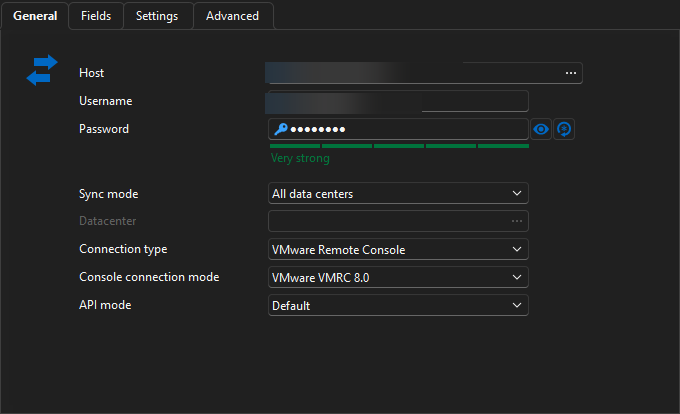
Fields set to..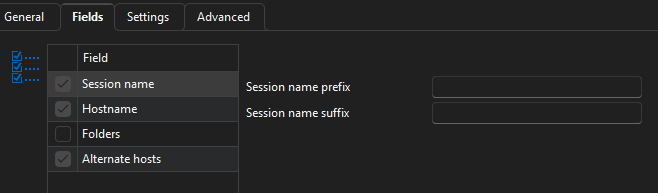
Here I set the destination for folder for the consoles to appear in RDM and the template to use.
I also have a filter by group but you may or may not require that. 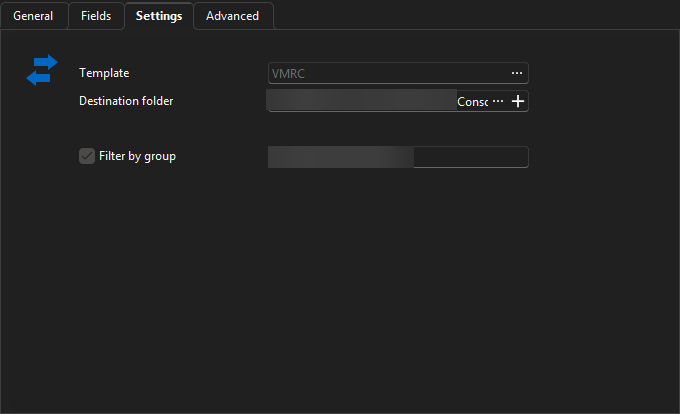
On my advanced settings I run it in silent mode as I have the sync set to auto. When it run it won't let me change vault till it completes but that's not a big issues for me.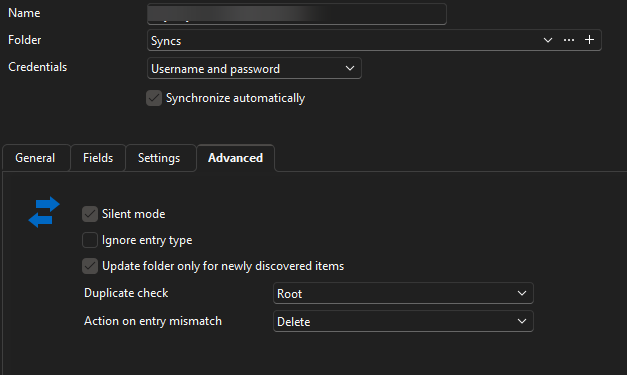
I have replicated this setup across numerous vaults and vCenters.
Thanks
Iain
Version 2026.1.15.0 64-bit
Data Source SQL
e105ee7e-5950-497f-99eb-2097561ec68f.png
a46df883-ff6c-49a9-953e-6105d2c3691d.png
7336bfe8-2120-4aa7-85c0-b17ceae40f87.png
7ca0844c-2425-4a8f-9158-fbb0a0866241.png
Sorry for the delay!
So general is det up like so:
Fields set to..
Here I set the destination for folder for the consoles to appear in RDM and the template to use.
I also have a filter by group but you may or may not require that.
On my advanced settings I run it in silent mode as I have the sync set to auto. When it run it won't let me change vault till it completes but that's not a big issues for me.
I have replicated this setup across numerous vaults and vCenters.
@Iain
I actually figured it out over the weekend. In the username field I was putting username, domain, and password all separately I changed it to domain\username no domain and the password. And it suddenly started working.
Thanks for your help!
Matt