VMWare Dashboards No Longer Working After v2024.1.32.0

Good afternoon.
I just noticed that the VMWare Dashboards are no longer working in any version newer than v2024.2.8.0, including the newly released v2024.2.11.0.
v2024.1.32.0 64-bit performs the automated linked credentials entry login with no problems:
v2024.2.8.0 64-bit pops this up right off the bat: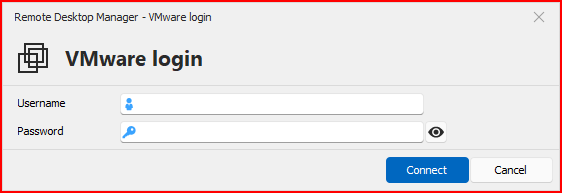
When manually inputting credentials, I can get logged in to the Dashboard no problem:
Or, if I hit cancel: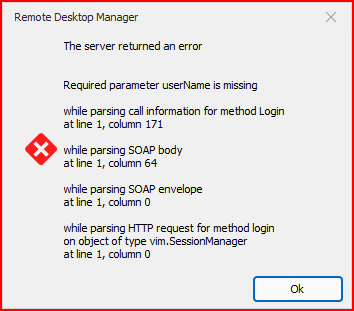
The pop up box appears no matter if I have "Linked (user vault)" credentials, OR specified a username and password like below: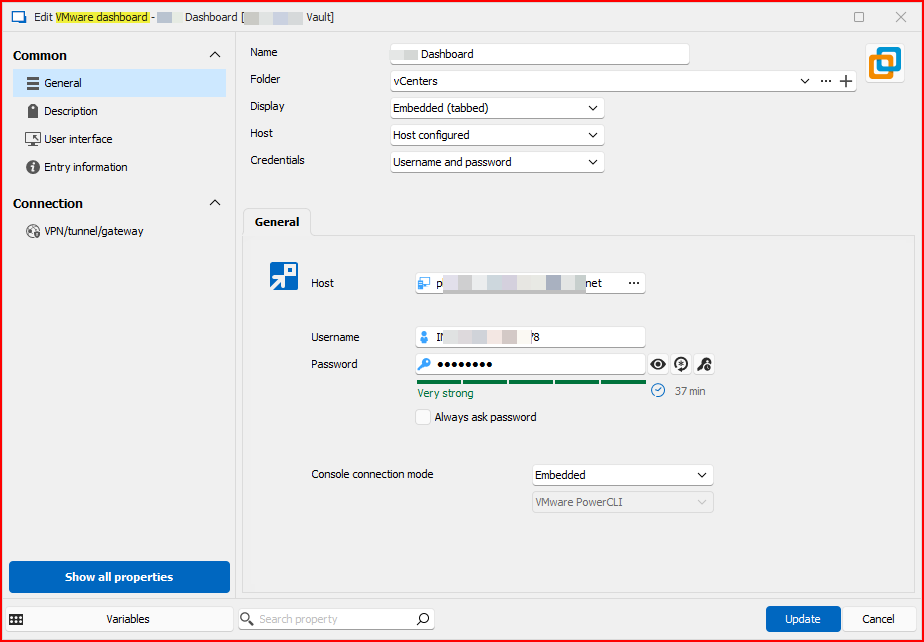
So something changed between v2024.1.32.0 and v2024.2.8.0.
Please add this to your list of things to fix with automated linked credentials. Or at this point, automated credentials period. :-)
Thank you, and have a great evening.
--- Chuck
Overgaard, AZ (-7 MST / Zulu Year-Round)
RDM Version: 2025.3.11.0 64-Bit - MSSQL - Daily Usage
RDM Version: 2025.2.28.0 64-Bit - MSSQL - VM
9bb78fef-0959-40ca-bd6d-75456a399c96.png
a5cbdaee-569b-4811-a68e-07e062147b72.png
7b752d3b-c34c-4c9b-b96a-53507bea1888.png
4c103773-bec5-495f-8766-2d64d12dbaa2.png
All Comments (21)
Hello Chuck,
To confirm with you, this login window appears before opening the dashboard with the list of machines, is that correct?
I tested in our environment on 2024.2.11.0 and it seems to work well. Is the user opening this entry an administrator user, or a user with lesser privileges? I'm trying to figure out what might be causing this issue as we don't seem to have made changes specifically to the VMWare dashboard from what I can see of the code.
Regards,
Hubert Mireault
Hello Chuck,
To confirm with you, this login window appears before opening the dashboard with the list of machines, is that correct?
That is correct, sir. Double Click the entry, or Open Session, and after about a 3 second pause, the credentials window pops up.
I tested in our environment on 2024.2.11.0 and it seems to work well. Is the user opening this entry an administrator user, or a user with lesser privileges? I'm trying to figure out what might be causing this issue as we don't seem to have made changes specifically to the VMWare dashboard from what I can see of the code.
I have everyone on my team set as Administrators. The same users using the same settings and same options that the version which works. Literally, double clicking the entry in the version that works, and double clicking in the version that does not work.
Nothing changed between the two entries.
Thanks!
Regards,
--- Chuck
Overgaard, AZ (-7 MST / Zulu Year-Round)
RDM Version: 2025.3.11.0 64-Bit - MSSQL - Daily Usage
RDM Version: 2025.2.28.0 64-Bit - MSSQL - VM
Hello Chuck,
I have a few questions / things I'd like you to try:
- If you right click on your VMWare dashboard entry in the dashboard and press "view password", do the credentials show up properly there?
- If you create a new VMWare dashboard entry with the same information and try to open it, does it work? If yes, could you export both entries and compare the data between them? It might be possible to identify a possible faulty setting that way
- Do you have any User Specific Settings (be it credentials or otherwise) on the entry or not at all?
I will ask our QA team to try and reproduce this issue, as I've been trying and still not being able to reproduce on my end.
Regards,
Hubert Mireault
Hello Chuck,
I have a few questions / things I'd like you to try:
- If you right click on your VMWare dashboard entry in the dashboard and press "view password", do the credentials show up properly there?
Yes. I see the credentials appear correctly: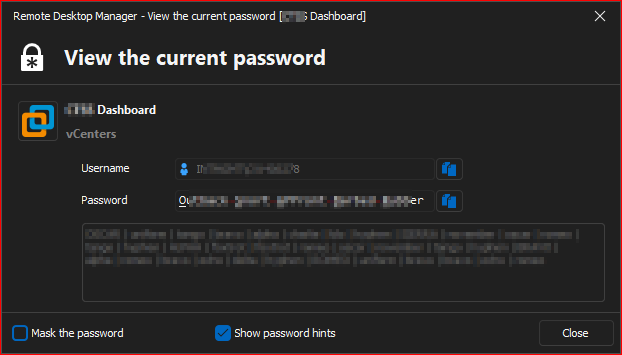
- If you create a new VMWare dashboard entry with the same information and try to open it, does it work? If yes, could you export both entries and compare the data between them? It might be possible to identify a possible faulty setting that way
I created a new entry (not duplicated entry) with the same configuration. The exact same results were returned.
- Do you have any User Specific Settings (be it credentials or otherwise) on the entry or not at all?
User Specific Credentials, yes. Nothing else is changed for this type of entry.
I will ask our QA team to try and reproduce this issue, as I've been trying and still not being able to reproduce on my end.
Regards,
--- Chuck
Overgaard, AZ (-7 MST / Zulu Year-Round)
RDM Version: 2025.3.11.0 64-Bit - MSSQL - Daily Usage
RDM Version: 2025.2.28.0 64-Bit - MSSQL - VM
795c23b8-999b-4347-b443-7d04a22e90c8.png
And just to reiterate...
Any of the seven VMWare Dashboards I have worked 100% perfectly fine all the way to and including v2024.1.32.0.
The issue started, without any change to any of the seven entries in v2024.2.8.0.
--- Chuck
Overgaard, AZ (-7 MST / Zulu Year-Round)
RDM Version: 2025.3.11.0 64-Bit - MSSQL - Daily Usage
RDM Version: 2025.2.28.0 64-Bit - MSSQL - VM
Thank you for the additional information, I will forward this to our QA team. With these questions I was trying to figure out what kind of configuration may be problematic specifically on our 2024.2 version, so hopefully it helps.
Regards,
Hubert Mireault
Hello Chuck,
I'm sorry to butt in but I just want to ask if every user from your team get this prompt? May I ask to which ESXi / vCenter version are you trying to connect? Do you use the default certificates or did you changed them to a trusted one?
I'm asking because on my side everything is working properly and even after trying to reproduce I'm unable to. 🤔
Regards,
Min
Hello Chuck,
I'm sorry to butt in but I just want to ask if every user from your team get this prompt?
Everyone that is utilizing RDM Teams (two separate databases) within my org are getting the same results.
May I ask to which ESXi / vCenter version are you trying to connect?
All are 7.0u2
Do you use the default certificates or did you changed them to a trusted one?
I would have to verify this one...
I'm asking because on my side everything is working properly and even after trying to reproduce I'm unable to. 🤔
Again, remember... Simply double clicking the exact same entry in v2023.1.39.0 works perfectly fine. Any of the v2024.x.x.x editions with no modifications to the entry, give this issue.
So if it works in v2023.x.x perfectly fine, and v2024.x.x.x no bueno, would tend to lead to the common denominator which is RDM.
Regards,
Min
Thanks!
--- Chuck
Overgaard, AZ (-7 MST / Zulu Year-Round)
RDM Version: 2025.3.11.0 64-Bit - MSSQL - Daily Usage
RDM Version: 2025.2.28.0 64-Bit - MSSQL - VM
Good morning folks.
Anyone have any updates on this?
Thanks!
--- Chuck
Overgaard, AZ (-7 MST / Zulu Year-Round)
RDM Version: 2025.3.11.0 64-Bit - MSSQL - Daily Usage
RDM Version: 2025.2.28.0 64-Bit - MSSQL - VM
Hello Chuck,
Do you still get the error with the latest (2024.2.13.0) version? This version includes a few improvement regarding the dynamic credential redirection.
Also would it be possible to perform the following test on your side:
- Create a portable version as well a new data source. https://docs.devolutions.net/rdm/kb/rdm-windows/how-to-articles/portable-rdm-installation
- Add the VMware dashboard entry (from scratch) and enter the credentials directly to the entry.
- Test the connection
Let us know the outcome!
Regards,
Min
Hello Chuck,
Do you still get the error with the latest (2024.2.13.0) version? This version includes a few improvement regarding the dynamic credential redirection.
Yes
Also would it be possible to perform the following test on your side:
- Create a portable version as well a new data source. https://docs.devolutions.net/rdm/kb/rdm-windows/how-to-articles/portable-rdm-installation
- Add the VMware dashboard entry (from scratch) and enter the credentials directly to the entry.
- Test the connection
That was done to verify the issue I posted about originally. Each version was tested in the "offline" editions, and that is how I found out exactly what the last version was that worked, and exactly what the first version was that stopped.
#2 & #3 was mentioned in one of my replies earlier. I don't remember which one, but everything you asked about in this reply was already mentioned above.
Let us know the outcome!
Regards,
Min
--- Chuck
Overgaard, AZ (-7 MST / Zulu Year-Round)
RDM Version: 2025.3.11.0 64-Bit - MSSQL - Daily Usage
RDM Version: 2025.2.28.0 64-Bit - MSSQL - VM
Hello,
I'll send you by email an invitation for a remote session with you to better understand the issue and find a solution together.
Best regards,
Tommy Sanders
Hello Chuck,
An additional question before the remote session my colleague Tommy proposed.
Is the "default connect action" value set to something other than the default, in File > settings?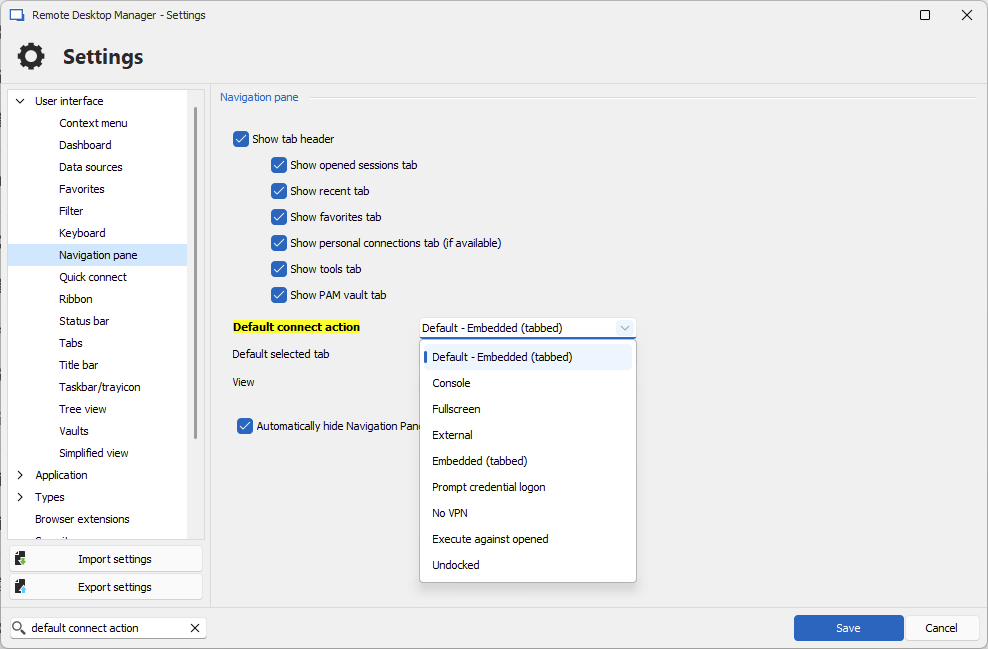
As of now this is the only lead we have. We've been multiple people investigating trying to figure out what might be causing this, but unfortunately we still haven't found anything concrete yet.
Regards,
Hubert Mireault
c0f4d922-1646-4261-bf64-88b1c8847e0f.png
Hubert,
I have the same settings for our vault: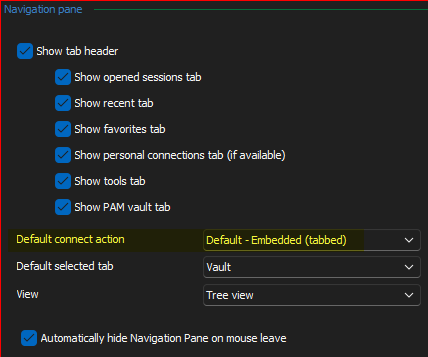
Hopefully there are some logs, somewhere that show something {not} happening.
--- Chuck
Overgaard, AZ (-7 MST / Zulu Year-Round)
RDM Version: 2025.3.11.0 64-Bit - MSSQL - Daily Usage
RDM Version: 2025.2.28.0 64-Bit - MSSQL - VM
5e0cb6f3-fe76-4391-8bd5-04d8820e96e7.png
Hello Charles,
Thank you for your time during the session.
In this session, we recreated the issue and as said in the session I will send it to the developers for further tests and will get back to you as son as possible.
Best regards,
Tommy Sanders
Hello Charles,
Thank you for your time during the session.
In this session, we recreated the issue and as said in the session I will send it to the developers for further tests and will get back to you as son as possible.
Best regards,
Not a problem, sir! Thank you for spending your time with me to verify the issue and work towards a resolution.
Have a great rest of your week!
--- Chuck
Overgaard, AZ (-7 MST / Zulu Year-Round)
RDM Version: 2025.3.11.0 64-Bit - MSSQL - Daily Usage
RDM Version: 2025.2.28.0 64-Bit - MSSQL - VM
Hey Chuck,
I'm here trying to reproduce your issue for a little bit now and I'm trying to put my finger on what the issue could be, sorry If I'm going to ask you questions you've already answered in the past but I think I have to because the picture painted so far with the information I got doesn't make any sense to me haha.
Since the session you've had with Tommy I've seen that you had an Overridden credentials set in the User Specific Settings sections.
My questions,
1- Does it work when you launch your sessions with overridden credentials?
2- Have you since the beginning of when you started experiencing the issue, had active user specific settings set on the entry?
3- have you ever tried to re-create the entry from scratch and setup the credentials manually to make it work?
Finally, It's a small detail but, the icon of the entry is showed like this on your RDM and mine is looking like this
I'm trying to make sure if we have the same entry at all or if you got an older version/deprecated entry. Did you ever changed the default icon of the entry for the original VMware logo? 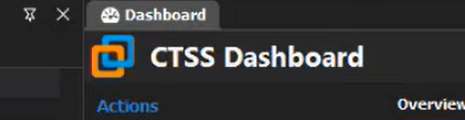
Thank you ahead of time for answering these.
Regards,
Alexandre Roy
image_2024-07-15_104440750.png
image_2024-07-15_104425384.png
Hey Chuck,
I'm here trying to reproduce your issue for a little bit now and I'm trying to put my finger on what the issue could be, sorry If I'm going to ask you questions you've already answered in the past but I think I have to because the picture painted so far with the information I got doesn't make any sense to me haha.
Since the session you've had with Tommy I've seen that you had an Overridden credentials set in the User Specific Settings sections.
My questions,
1- Does it work when you launch your sessions with overridden credentials?
No. I believe during the teams session, I even showed that launching with saved credentials does the same thing. It immediately prompts for credentials no matter if using Linked, None, or even manually input in to the entry as U/N and P/W settings.
2- Have you since the beginning of when you started experiencing the issue, had active user specific settings set on the entry?
Yes. There are no credentials that work at all, no matter what kind of settings are set in the entry.
3- have you ever tried to re-create the entry from scratch and setup the credentials manually to make it work?
Yes. Same results as number 2.
Finally, It's a small detail but, the icon of the entry is showed like this on your RDM and mine is looking like this
I'm trying to make sure if we have the same entry at all or if you got an older version/deprecated entry. Did you ever changed the default icon of the entry for the original VMware logo?
That is the icon from VMWare Workstation. I have System Images set in our data source. That is where you are seeing the icon.
Thank you ahead of time for answering these.
Regards,
Here are some questions for you now:
- Are you trying to reproduce with vCenter v8.x or v7.x? As you see in the teams session, you folks have a test vCenter v8.0 which it works flawlessly on, and most of our clients have not upgraded from v7.0.3.
- If you notice in the video, everything works like a champ all the way to the latest v2023.1.x. With making absolutely no changes to any entry, and simply exiting v2023.1.32.0, and launching any of the v2023.2.x.x version the issue is there. So with that being said, how can it be any kind of settings that I have in any of the entries? I don't understand why all the focus and questions regarding to how I have things set up with this shown in the video.
- In the teams session video, you can see that we checked Application Logs, and other places for errors and did not see any being applied other than the SOAP error message box that appears. Do you have any further ideas for logs that I can provide to you for assistance?
I appreciate all the assistance, as always!
--- Chuck
Overgaard, AZ (-7 MST / Zulu Year-Round)
RDM Version: 2025.3.11.0 64-Bit - MSSQL - Daily Usage
RDM Version: 2025.2.28.0 64-Bit - MSSQL - VM
I do not have a single VMWare version installed on my computer right now as the embedded version of RDM doesn't require an installation locally to work, doesn't seem to communicate with the installations file at all too.
I've got 1 theory, I see you have a lot of portable version configured on the computer.
In those session I see you jumping from the working version 2024.1.32 to a non-working version 2024.2.8 without any real change. The only thing I could see is that you're somewhat losing your user specific settings when you're jumping on that new version.
You're session is configured like so, credentials set to "none"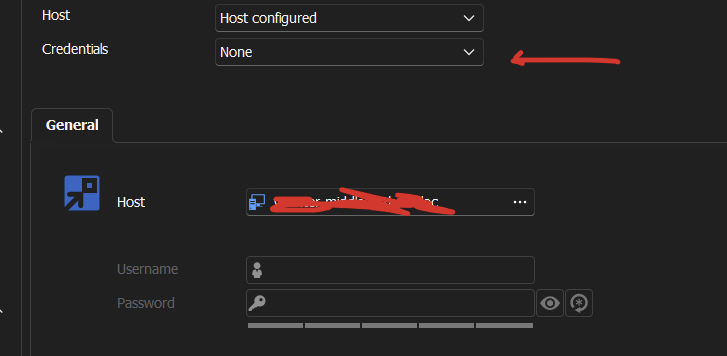
So this would make sense that if the user specific settings overridden credentials are empty, or none existent, that this "none" setting would fall next in line, which result in you getting the prompt asking for the credentials. User specific settings are bound to the database user, I can't say for sure If it's a .cfg issue / manipulation error, but here give this a go because it might just be it.
Could you please, manually create your data source again from scratch? Select the database and the right users that should have those user specific settings on. The usual stuff.
I thank you for the time you spent on that case with us trying to figure this out, you've done alot and I very much appreciate the dedication.
Thank you
Alexandre Roy
48660464-e13a-436e-a16a-e186dc48c648.png
I do not have a single VMWare version installed on my computer right now as the embedded version of RDM doesn't require an installation locally to work, doesn't seem to communicate with the installations file at all too.
I've got 1 theory, I see you have a lot of portable version configured on the computer.
In those session I see you jumping from the working version 2024.1.32 to a non-working version 2024.2.8 without any real change. The only thing I could see is that you're somewhat losing your user specific settings when you're jumping on that new version.
You're session is configured like so, credentials set to "none"
So this would make sense that if the user specific settings overridden credentials are empty, or none existent, that this "none" setting would fall next in line, which result in you getting the prompt asking for the credentials. User specific settings are bound to the database user, I can't say for sure If it's a .cfg issue / manipulation error, but here give this a go because it might just be it.
Could you please, manually create your data source again from scratch? Select the database and the right users that should have those user specific settings on. The usual stuff.
I thank you for the time you spent on that case with us trying to figure this out, you've done alot and I very much appreciate the dedication.
You're a chad, thank you
Alexandre,
I am trying to create a new datasource just as you asked. However, I am getting the licensing issue that has been reported by numerous users, including myself with regards to RDM reporting a perfectly good license is invalid.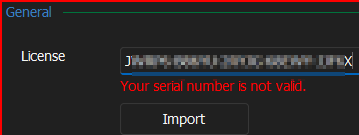
When I connect to my already set up Data Source, it returns valid: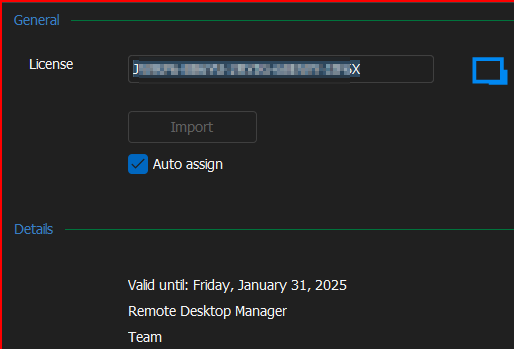
Please assist so I can get this created as you suggest.
Thank you!
--- Chuck
Overgaard, AZ (-7 MST / Zulu Year-Round)
RDM Version: 2025.3.11.0 64-Bit - MSSQL - Daily Usage
RDM Version: 2025.2.28.0 64-Bit - MSSQL - VM
da8605fa-3d83-4c12-96a4-d49f70176a48.png
fc63bfbd-8433-417e-a025-7aa100660273.png
Hello. Is there any new traction on this?
My company is adding more vCenters, and the Dashboard functionality still does not work.
Thanks!
--- Chuck
Overgaard, AZ (-7 MST / Zulu Year-Round)
RDM Version: 2025.3.11.0 64-Bit - MSSQL - Daily Usage
RDM Version: 2025.2.28.0 64-Bit - MSSQL - VM