No enterprise license found after update (2024.2.6.0)

After updating from 2024.1.x.x to 2024.2.6.0 the application states "No enterprise license found"
All Comments (32)
Hello,
What type of datasource are you using?
Under the Administration -> Licences menu, do you have a RDM license assigned to your user(s)?
Best regards,
Jeff Dagenais
Hi,
Using a Devolutions Hub Business datasource.
Yes, all licenses are assigned correctly, I have rolled back to 2024.1.32 and this loads the license without issue.
Chris
Hello,
Thank you for the details. We will investigate this issue.
Have a good day!
Maxime Morin
Hello,
We tried to reproduce the issue and couldn't. Would you be willing to do a session with us to reproduce the issue on your side to help us investigate?
Have a good day!
Maxime Morin
Hi,
I have upgraded again and can reproduce the error (although it randomly picks up the license occasionally), happy to have a remote session with you to investigate.
Chris
Hello,
We have created a ticket in our system, and you should soon receive an email with the link to book a support session.
Best regards,
Érica Poirier
Hello,
I just did an upgrade to 2024.2.8 and I have the same issue - "No enterprise license found" for all of my users. Just after the upgrade I also had it with 2024.1.32 - but after I reassigned all licenses at least everybody is able to work now...
EDIT:
Maybe it helps - in my case the admin is licensed. "Only" all users get no license...
EDIT 2:
You should note such a bug in the release notes as it really breaks the whole setup...
Brgds Andreas
Sounds just like my issue I opened this morning...
https://forum.devolutions.net/topics/42211/constant-license-window-popup-and-serial-number-not-valid-message-afte
So it's something that is happening to users no matter what. And, when you are on teams, it breaks the whole thing.
I have 12 members who are having to figure out a workaround on it.
Currently rolling back to <2024.2 is the only real option.
Seems like when >2024.2 does its database update, it completely tanks on itself as I point out in my issue linked above.
--- Chuck
Overgaard, AZ (-7 MST / Zulu Year-Round)
RDM Version: 2026.3.2.0 64-Bit - Free
Not exactly, as I had no issue updating the database and my admin user (not sa, but with permissions on the db) is able to work and also has no license problem...
When I install 2024.2.8 on my client I get no license, back to 2024.1.32 everything is working again. What if you get back to this version?
But yes, an annoying issue!
6 monts ago we had the same situation: No enterprise license found after update (devolutions.net)
Brgds Andreas
Hello Maxime,
We use SQL-Server.
Brgds Andreas
Not exactly, as I had no issue updating the database and my admin user (not sa, but with permissions on the db) is able to work and also has no license problem...
Well, was hoping to lend a hand to ya with the assistance. I am actually logging in as the sa account and getting the DB update error.
I would be well intrigued to know what their Beta testing looks like.
Seems that all of us who have issues, they seem to never be able to replicate.
When I install 2024.2.8 on my client I get no license, back to 2024.1.32 everything is working again. What if you get back to this version?
Yip, a restore back to 2024.1.32 works perfectly fine.
But yes, an annoying issue!
6 monts ago we had the same situation: No enterprise license found after update (devolutions.net)
Brgds Andreas
--- Chuck
Overgaard, AZ (-7 MST / Zulu Year-Round)
RDM Version: 2026.3.2.0 64-Bit - Free
Hello,
I'm curious to verify if you tried to refresh the license?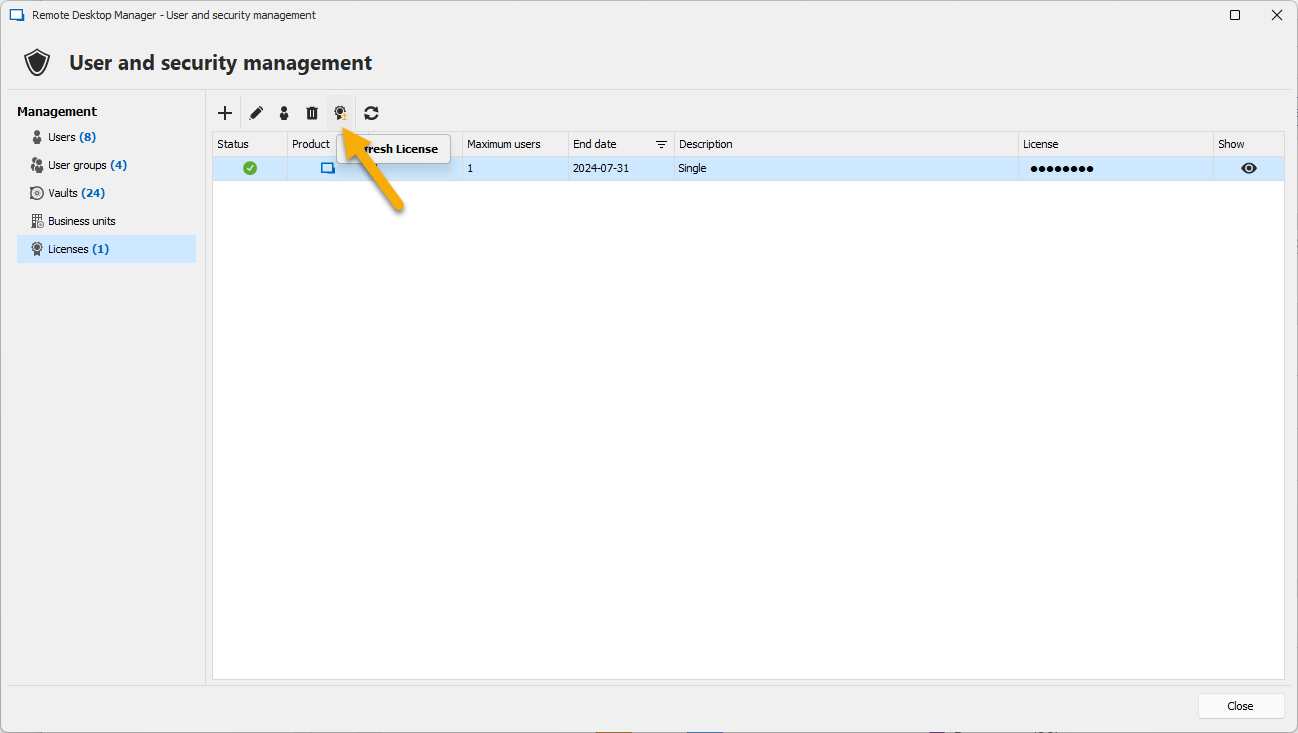
Regards
David Hervieux
b98e0cbb-220a-49c3-98d4-35bf6a6cdd5f.png
Had same issue after update from 2024.1.32 to 2024.2.8. Refreshing the licence as recommended by David Hervieux did the trick. Don´t expect a message from the program :-)
HTH
Gotthard
RDM 2024.2.8 on MS SQL (12 user)
Hello David,
to be honest - no, why should we do this? I never did this...
What does "Refresh License" exactly do/need? Because I only get this: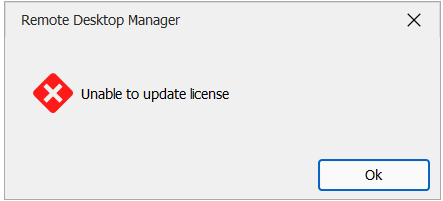
Brgds Andreas
62100abf-898c-4c5b-9fca-62bc41e6f72b.png
Using Devolutions Hub Business (Devolutions hosted) the workaround I was using is adding a 2nd identical data source and switching between the 2 (with "Allow Offline" enabled for the affected users)
Since the hosted platform update (I believe this was Monday evening) and a client update to 2024.2.8.0 the issue seems to have rectified itself for us even with "Allow offline" disabled.
Using Devolutions Hub Business (Devolutions hosted) the workaround I was using is adding a 2nd identical data source and switching between the 2 (with "Allow Offline" enabled for the affected users)
Since the hosted platform update (I believe this was Monday evening) and a client update to 2024.2.8.0 the issue seems to have rectified itself for us even with "Allow offline" disabled.
Hi Chris,
Thank you for the update, glad to hear the issue has been fixed with a server update.
Have a good day!
Maxime Morin
Refreshing the license did not work for me, either: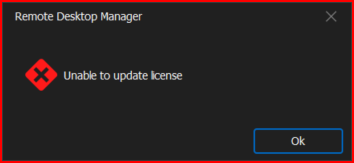
Please assist, as this is customer impacting for your customers all over the globe.
We are glad you like to hear the issue is fixed for some customers, but for those of us having an issue that it has not fixed, please provide updates.
One update every time a user gets something fixed or a workaround, is not sufficient for those of us where it does not work.
Since this is a hot topic for those of us impacting our day-to-day operations, should we call in on the tech support line to get a live person to assist each and every one of us until a fix is found?
Thank you!
--- Chuck
Overgaard, AZ (-7 MST / Zulu Year-Round)
RDM Version: 2026.3.2.0 64-Bit - Free
0e75e752-eb09-4b42-af73-1392e2469aa2.png
Refreshing the license did not work for me, either:
You get this, because RDM wants to call home which is not allowed on your firewall...
My network team added a firewall exclusion for
23.96.207.177:443
104.18.38.233:80
and then it was working. But so far I had no time to test it...
Brgds Andreas
Hello David,
Refreshing the license did NOT do anything - still no enterprise license in the status bar and no connection to the database. Back to 2024.1.32 and it is working again.
Can you PLEASE make RDM to have a grace period of e.g. 7 days when no license is found? At the moment after the upgrade nothing is working and we have no access to our entries and vault. This is - from an admin perspective - a very bad situation. With a grace period we would get some time to do a rollback and fix the problem.
Brgds Andreas
Refreshing the license did not work for me, either:
You get this, because RDM wants to call home which is not allowed on your firewall...
My network team added a firewall exclusion for
23.96.207.177:443
104.18.38.233:80
and then it was working. But so far I had no time to test it...
Brgds Andreas
Not in my case, sir!
DMZ network here...
Also, again, it worked just seconds before upgrading. So if this is something that you needed to do on your side in order for this to work, there was absolutely *NO* mention of this at all, whatsoever.
That being said, really need to know if that is the issue or not, since one of my other networks are bound by contractual law for no internet access. So if it does in fact need to phone home (which again, should be listed in the change documentation that pops up for those of us who need to have secluded networks), then that's going to be a shame that a lot of us will have to stay on older versions.
--- Chuck
Overgaard, AZ (-7 MST / Zulu Year-Round)
RDM Version: 2026.3.2.0 64-Bit - Free
As I wrote - the license refresh did not change anything on my side. So it was just a try, but it is not the solution.
Brgds Andreas
@everyone,
There's a fix coming regarding this issue.
We hope to release this new version today if the QA testing goes well.
Sorry for the delay.
Best regards,
Jeff Dagenais
Hello,
The new version 2024.2.10 is now available for download with fixes for the license issue.
https://cdn.devolutions.net/download/Setup.RemoteDesktopManager.2024.2.10.0.exe
Let us know if that helps!
Best regards,
Érica Poirier
So far so good by just upgrading from 2024.2.8 > 2024.2.10 on my main laptop.
I did also have a Jump Server on v2024.1.25.0. Performed an off-line upgrade/install on that box, since it is behind a firewall with no internet access.
So immediately when launching v2024.1.25.0 I get the following message. Yes, I know this can be changed, just showing the steps done, and other things folks may encounter: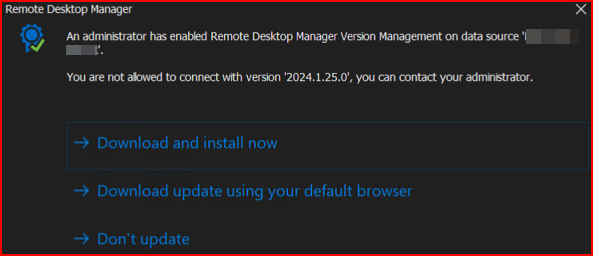
I had to do the "Don't update" and then exit the program to install the offline installer which went through with no problems, which brought me to this screen: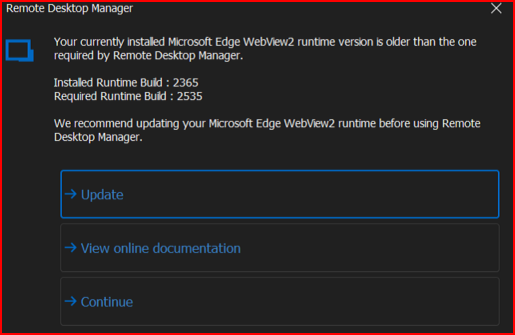
So, did the continue, exited the software and downloaded the latest offline installer from: https://go.microsoft.com/fwlink/?linkid=2124701. Installed/upgraded then ran RDM.
Launched like a champ with no errors, license issues, or anything other than what am used to seeing, and even on the newest release:
So looks like whatever y'all did for 2024.2.10.0 worked. Would you mind informing us folks who are extremely interested to know, what was making the software give the licensing issue?
Thanks for the quick turnaround.
--- Chuck
Overgaard, AZ (-7 MST / Zulu Year-Round)
RDM Version: 2026.3.2.0 64-Bit - Free
a05a6054-aaee-4946-9e42-962b05544e56.png
2b132a0f-05f5-4335-a1d6-bb8214620b35.png
92167776-4ab2-43fe-93a6-0e88cd20a781.png
Works!
Thanks for the fix.
Brgds Andreas
Hello,
Thank you both of you for your feedback.
We are glad that it's now working as expected!
Best regards,
Érica Poirier
@All - anybody having Delinea Secret Server as PAM Solution - don´t use this version! It breaks selecting credentials and prompts for them... :(
I´ll open a new thread for it...
Brgds Andreas
Hello everyone,
I wanted to give you a quick overview of the license issue we've encountered.
We have an old legacy license format that isn’t validated and a new license format based on JWT (JSON Web Tokens). We're transitioning to this new format to eventually make it easier to update the license content. For example, with the new format, you could simply refresh to add newly added users or extend the license date when you renew.
However, this transition process is complex, and we missed one specific case. We’re currently working on improving our test procedures to ensure this doesn’t happen again in the future.
Thank you for your understanding and patience as we work to resolve this issue.
Regards
David Hervieux
Hello everyone,
I wanted to give you a quick overview of the license issue we've encountered.
We have an old legacy license format that isn’t validated and a new license format based on JWT (JSON Web Tokens). We're transitioning to this new format to eventually make it easier to update the license content. For example, with the new format, you could simply refresh to add newly added users or extend the license date when you renew.
However, this transition process is complex, and we missed one specific case. We’re currently working on improving our test procedures to ensure this doesn’t happen again in the future.
Thank you for your understanding and patience as we work to resolve this issue.
Regards
Thank you for the transparency. That means a lot to the customer base.
I do have one question on the JWT process.
How are you factoring that in to those of us who work in an environment where RDM Teams servers, etc. don't sit on internet facing machines?
If you are going to a web based token, what is the process you are incorporating for customers such as myself where a web-call based licensing verification system would fail, and possibly render my RDM completely 100% useless due to the legal contractual agreements on our servers.
--- Chuck
Overgaard, AZ (-7 MST / Zulu Year-Round)
RDM Version: 2026.3.2.0 64-Bit - Free
Hello,
For customers who cannot verify their license tokens on the web, you can import the .lic files that contain the JWT according to your licenses.
https://docs.devolutions.net/rdm/commands/administration/management/licenses/#offline-registration
Best regards,
Érica Poirier
Hello,
For customers who cannot verify their license tokens on the web, you can import the .lic files that contain the JWT according to your licenses.
https://docs.devolutions.net/rdm/commands/administration/management/licenses/#offline-registration
Best regards,
When will this take affect? As everyone here has mentioned, we all currently have no issues with any license stuff.
So let me elaborate on my question a little bit...
Currently, everyone here has no issues with Enterprise Licensing after the fix to v2024.2.10.0. So, when the JWT goes in to affect for license verification where the internet is needed:
A) For those of us with no internet connectivity, will it automatically make the software go from a Valid License to no Valid License just because it doesn't have an internet connection?
B) With the offline license import, how will that make it recognize the license is valid without checking each and every time? And if the license was valid right before the upgrade, why can't there be a check and balance put in place to realize the license is valid and just leave it as is?
C) The instructions are kind of wonky. The documentation says you can import the license to make it valid (like in B), but then if the newer versions are going to utilize JWT for license verification, what is to keep the software from an infinite loop each and every time a version is upgraded, that step A doesn't work, so now we have to go to step B each and every version upgrade?
--- Chuck
Overgaard, AZ (-7 MST / Zulu Year-Round)
RDM Version: 2026.3.2.0 64-Bit - Free
Hello,
The JWT imported from .lic will be valid until the license expires, regardless of upcoming updates. The only reason we need to update the JWT other than an expired one is when we add more licenses or update the existing license because the application cannot verify it online.
Let us know if that is clear enough.
Best regards,
Érica Poirier