MultiExec Button SSH sessions with automatic split-screen
MultiExec Button SSH sessions with automatic split-screen
0 vote

I know in Remote Desktop Manager there is a function "broadcast" to send commands to different devices in SSH sessions at the same time. I just need this function combined with a shortcut button in navigation bar in order to be able to split the screen and automatically set all open SSH sessions to multiexec mode with one click. (This feature works perfect in MobaXterm)
All Comments (14)
Hello,
We have a configurable shortcut to open the 'manage broadcast' window. You can configure this in File > Settings > User Interface > Keyboard: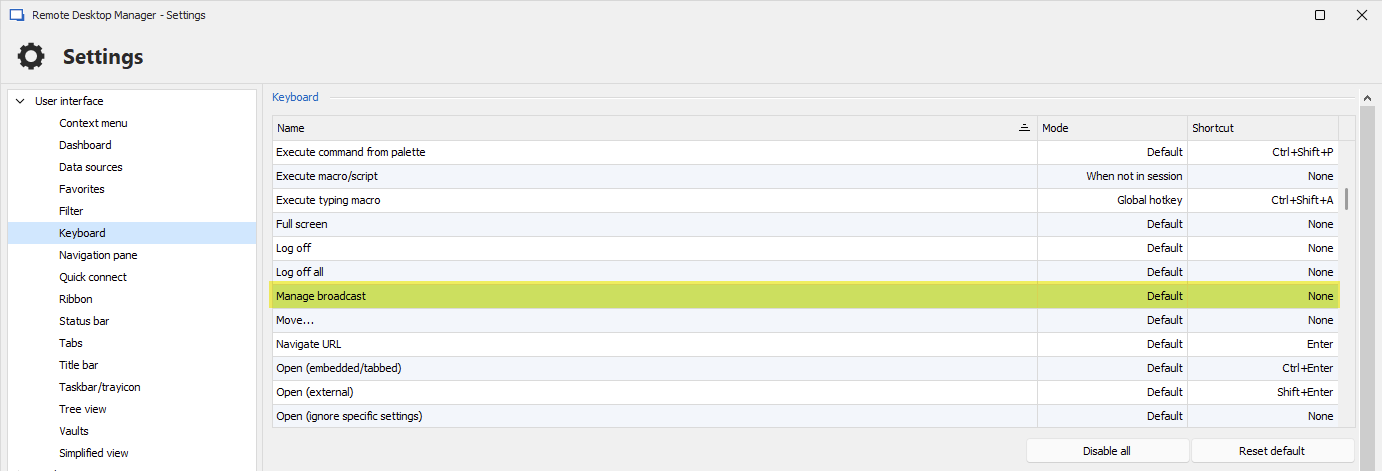
Could you try this out and see if it helps improve your workflow for the moment?
We could add a shortcut key to toggle broadcast on all currently opened SSH Shell entries, that shouldn't be difficult.
Do you also need the split screen functionality like mobaXterm? This might be trickier to do on a shortcut, especially if you have undocked windows, already split your screens, etc.
Regards,
Hubert Mireault
f055afe1-4233-49c4-9d74-b7ab59c9b9be.png
Hello Hubert,
thank you for your response. I'm already using the "manage broadcast" window with a keyboard shortcut.
But: I always have to press the broadcast shortcut keys + select all opened SSH Shell entries + click OK + click on windows / share windows vertically. I think every admin, who uses this broadcast mode, wants to see all command lines in all sessions while typing in commands so the split-screen button is always used after activating the broadcast function.
The good news: RDM already got these functions implemented, but all is separately, so it is inconvenient. Imagine you just have to open 2 SSH Shells and click a new "broacast"-button in navigation bar in ordner to activate broadcast mode and got a splitted screen only from opened SSH Shells. This could be 2 sessions, or 4 sessions ... just include all open SSH sessions (until you reach the maximum of the possible monitor size).
In my opinion, this would be a very important feature and could support a lot of admins and save time.
Best regards,
blackstream
Hello,
We could add the following then:
- One shortcut for toggling the broadcast on all currently opened SSH Shell entries
- One shortcut for each of the three view modes:

I don't think we should be forcing specifically tile vertical for example, as some users might not want to change the window mode, or they may want a different one. Having it separated in two distinct actions feels more logical to me.
Would this work for you? Let me know what you think.
Regards,
Hubert Mireault
b9957e0e-3c3d-4e3e-903b-ed927b88105a.png
Hello Hubert,
your suggestion "One shortcut for toggling the broadcast on all currently opened SSH Shell entries" sounds really good. So worklfow would be that I open two (or more) SSH Shells and then only click one shortcut in navigation bar to broadcast all opened SSH sessions without selecting them manually. If I click the shortcut a second time, the broadcast mode for all opened SSH sessions is closed.
If I can be honest, I actually see the function of the window mode differently. It's not only my personal view, I asked a lot of admins for this reason.
Advantages:
- The greatest value of broadcast mode is to compare content of two devices (or more) and configure them at the same time (such as Switches/Router/Firewalls) ... if you compare two things, wouldn't you put two documents next to each other to compare them, would you? Even outside the digital world, people would even place two sheets of paper next to each other and not on top of each other, right?
- Devices can always be stucked in command line so admins always want to see the content they are writing on their command line. So I don't see a reason that people don't want to change the window mode after activating the broadcast function. (Software MobaXterm shows how it's done by "MultiExec"-button in navigation bar because it really makes sense to automatically change window to vertical after using broadcast mode :-) )
- Tile vertical could be set as the default mode after activating broadcast mode - of course users could change the mode afterwards anyway so this shouldn't be an issue
Thank you so much.
Best regards,
blackstream
Thanks for the feedback! I think we could add a setting to handle whether the view should change automatically or not, with the default changing to the vertical view mode that you mention.
We will open a ticket with all of this information. We will post back here once we have an update.
Regards,
Hubert Mireault
Perfect, thank you so much!
Hello Hubert,
are there any updates yet?
Regards,
blackstream
Hello,
This is planned in our 2024.3 roadmap, as unfortunately we were already nearing the end of our 2024.2 development cycle.
Regards,
Hubert Mireault
Hello,
that's alright. Thank you!
Regards,
blackstream
Hello,
I hope this feature request is still on your road map... can't wait to use this feature :-)
Thank you so much.
Best regards,
Markus
Hello,
Most of the development for this has been done and it should release with our 2024.3 version this september (with our beta in 2-3 weeks, give or take).
Just a small note, but the view mode will not change automatically by default, you will have to change an option in File > Settings.
Regards,
Hubert Mireault
Hello,
We have implemented the feature to broadcast all opened sessions in RDM. This new functionality will be available starting from version 2024.3.5.0 of RDM. Here are the details:
New Buttons Added:
- Broadcast All: Allows broadcasting across all open sessions.
- Remove All Broadcasts: Clears broadcasts from all sessions.
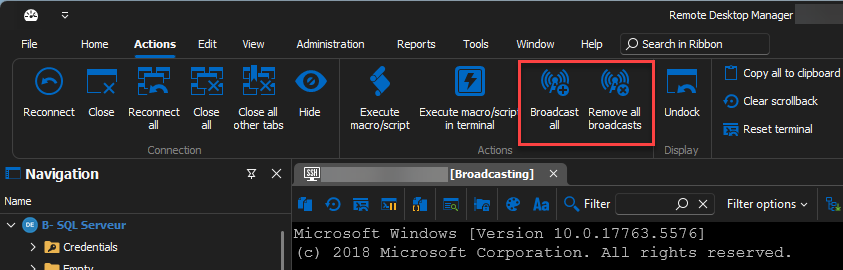
Behavior of "Broadcast All" Button:
- Requirement: At least two entries open that can broadcast.
- No Existing Broadcast Entry: Adds all entries to the broadcast.
- Existing Broadcast Entry(ies): Adds any entry not currently broadcasted.
- View Switching: If enabled, switches to a pre-configured view.
Behavior of "Remove All Broadcasts" Button:
- Removes all entries from the broadcast if any are currently broadcasting.
We've also introduced a new configuration option under File > Settings > Types > Terminal: "Change view when toggling all broadcasts." This setting automatically adjusts the view when the "Broadcast All" button is activated.
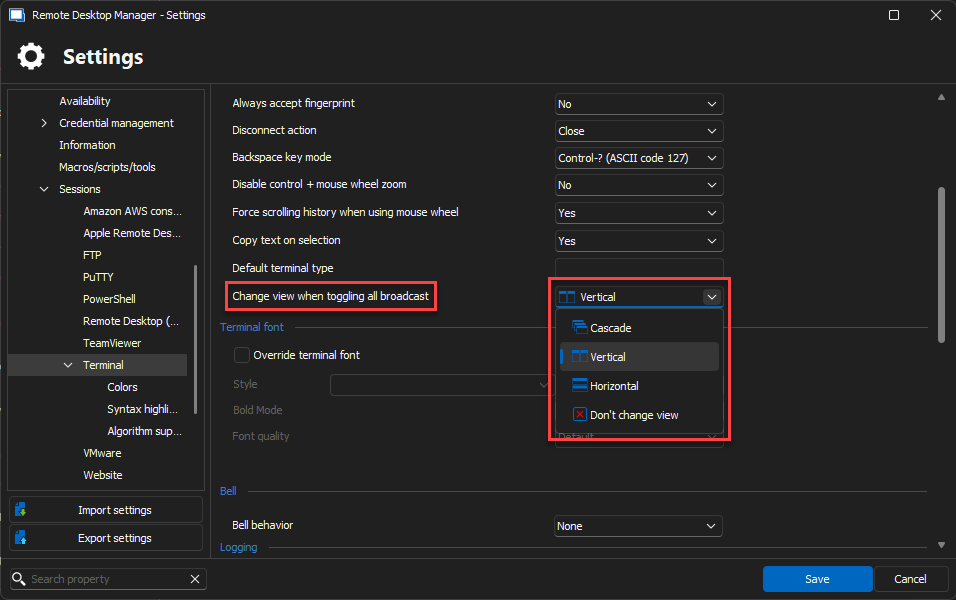
View Settings:
- Cascade
- Tile Vertical
- Tile Horizontal
- Don’t Change the View (default)
While broadcasting, you can still manually change the view via the ribbon, but it will revert to the originally set view once the broadcast ends.
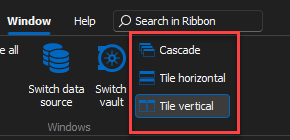
New Keyboard Shortcuts:
- Cascade
- Tile Horizontal
- Tile Vertical
- Broadcast All
- Remove All Broadcasts
We hope these updates will enhance your workflow efficiency. Should you have any questions or require further assistance, please do not hesitate to contact us.
Regards,
e68812d3-99c3-4e4a-99e8-b9dca9f22564.png
c57d6c5c-b72b-42f2-b28e-0ad3807dea36.png
dd0709c1-4feb-42db-b5a0-0c360f2a459f.png
Hello,
thank you for implementing the new feature. I have tested it and I hope you can do a small change afterwards to improve it.
If I open two SSH sessions, they are never active for broadcast immediately. I have to click into the SSH session window every time before the "broadcast all"-button gets visible. 
Can you add "broadcast all"-button permanently that it will be active directly after open two SSH sessions?
Thank you so much!
Best regards,
Markus
e6f0a44c-d235-4753-98ed-010b6ecde97a.png
Hello,
The fix for the "Broadcast all" button not appearing after opening a second SSH session will be available starting with version 2024.3.11.0 of RDM.
Regards,