Error creating Custom Credential Management Entry in version 2024.1.21.0
Error creating Custom Credential Management Entry in version 2024.1.21.0

When i try to create a new Custom Credential Management Entry, i receive an error message: Object Reference not set to an instance of an object.
I've used these connection types successfully in v2023.3.33. Is this connection type still supported in v2024? 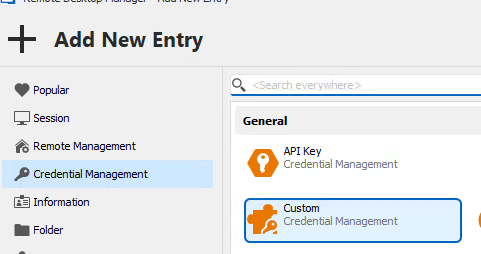

47a20d56-cabd-4b5b-88a6-255a8d1982f3.png
85b2d894-41f4-4c34-af7f-453d9a61e65e.png
ErrorMessageDetails-CustomCredEntry.txt
All Comments (3)
Hello Robjones,
Thank you for contacting us on that matter!
Could you provide us with a screenshot of the details of the error message?
Also, would it be possible for you to create a portable installation of the latest version of RDM and see if this issue still occurs? To do so, you will need to do the following:
(Close RDM)
1- Download the .zip file below:
https://remotedesktopmanager.com/home/thankyou/rdmbin
2- Create a new folder on your Desktop
3- Extract the content of the .zip file into the folder created at #2
4- Go to this folder once the .zip file has been extracted and run remotedesktopmanager.exe
5- Connect to your data source
This test will allow us to rule out your local installation of RDM as a possible cause for this issue.
Please note that if you are using an Advanced Data Source, I would recommend skipping step #5 and using the default data source created by the portable installation of RDM instead.
Best regards,
Maxim Robert
Hey there Maxim,
I included the details of the error message in the attached file: ErrorMessageDetails-CustomCredEntry.txt
It looks like I gave to long of a title on this ticket, i'm using RDM v2024.1.21.0
Hello,
Thank you for reporting this issue.
This is also related to the runtime issue as mentionned in https://forum.devolutions.net/topics/41639/powershell-embedded-script-editor-isnt-working-in-2024121#189954
Regards,
Mathieu Morrissette