RDM and the problem with the latest version of RVTools

Hi,
after installing RVTools version 4.5.1 and changing the path to the executable application
(yes, the installation of the new version installs in a different directory: C:\Program Files (x86)\Dell\RVTools),
I get this error message:
RVTools: login failed!
Can not complete login due to incorrect user name or password.
If I uninstall this new version and install the older version 4.4.4,
it runs and connects to the vCenter/ ESXi server with no problem.
Please fix this or give a tip on how to fix it.
Thank you.
P.S.
I have this setup: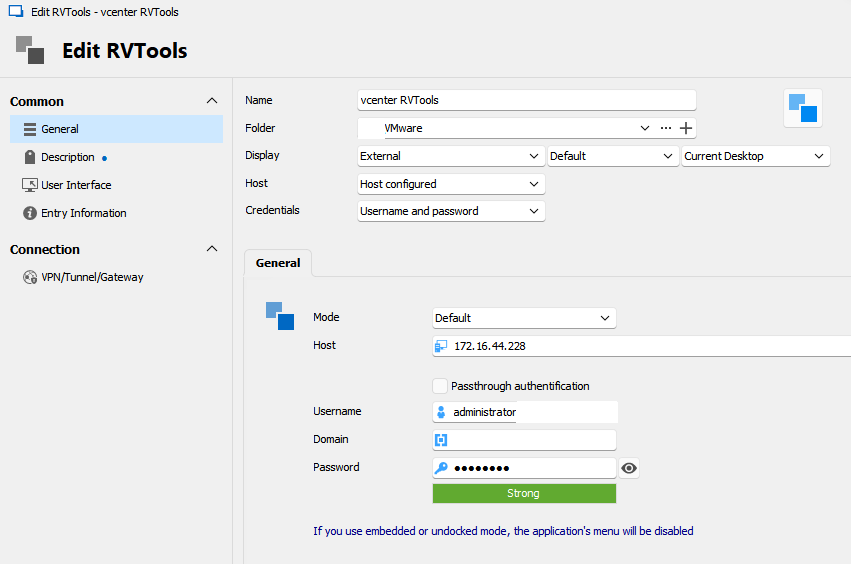
a0e5b8f3-6289-4926-a658-88328e0305ce.png
All Comments (5)
Hello,
Unfortunately it seems that Dell dropped the support for the command line parameters:
https://forum.devolutions.net/topics/41200/rvtools-plug-in-returning-invalid-credentials
Regards
David Hervieux
Hello,
I can indeed see in their release notes that they changed the default installation path and removed support for plain-text passwords when RVTools is executed via CLI.
We'll update to the new installation path and look into supporting the login with an encrypted password.
We'll notify you of any progress.
Regards
Jonathan Del Signore
Jo seems to be right. You need to change your password for an encrypted version: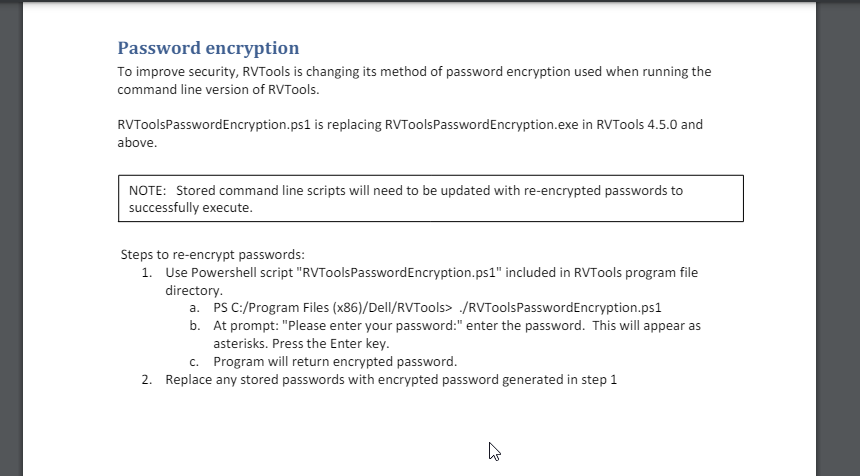
https://www.robware.net/resources/RVTools.pdf
He will investigate on his side.
Regards
David Hervieux
34976008-21a2-43bd-b0be-89a6afbb0e3c.png
Hello,
From version 2024.1.14.0, we will automatically encrypt the password before sending it to RVTools. (If your RVTools version is at least 4.5.0).
This will also enable the use of previously non-supported characters in their passwords, like " and \.
Regards
Jonathan Del Signore
Just to say you all:
THANKS-GRAZIE!
it worked for me