RVTools plug in returning invalid credentials

Good afternoon.
I am trying to integrate the RVTools plug in.
I am utilizing the following:
RDM Version shown in my signature
RVTools v4.5.1*
Whenever I try, RDM returns the following:
However, it works via command prompt, or even within RVTools itself, so I know the credentials are working.
I have tried using Link Vault credentials, as well as manually inputting the credentials within RDM.
* I have installed v4.5.1 which is now a Dell product. I had to notify RDM of the installation path which is now different by default.
Is there possibly some kind of issue with the newest version(s)?
Thanks!
--- Chuck
Overgaard, AZ (-7 MST / Zulu Year-Round)
RDM Version: 2026.3.2.0 64-Bit - Free
3f2e49f8-3b03-46b1-bad1-2915b4fbf8d8.png
All Comments (8)
Hello Chuck,
Perhaps they have changed the command line parameters. Could you post the command line that works for you with fake creds of course :)
Regards
David Hervieux
My apologies. After looking in to this more this morning, it does not work with the RVTools CLI. It continues to return incorrect username or password, but I can log in with the same credentials via the RVTools GUI.
I will uninstall the Dell incorporated version and install an older RobWare version that RDM is actually looking for later today and see if it works.
--- Chuck
Overgaard, AZ (-7 MST / Zulu Year-Round)
RDM Version: 2026.3.2.0 64-Bit - Free
So I did it quicker than later today! :-)
This is the config I have for RVTools within RDM: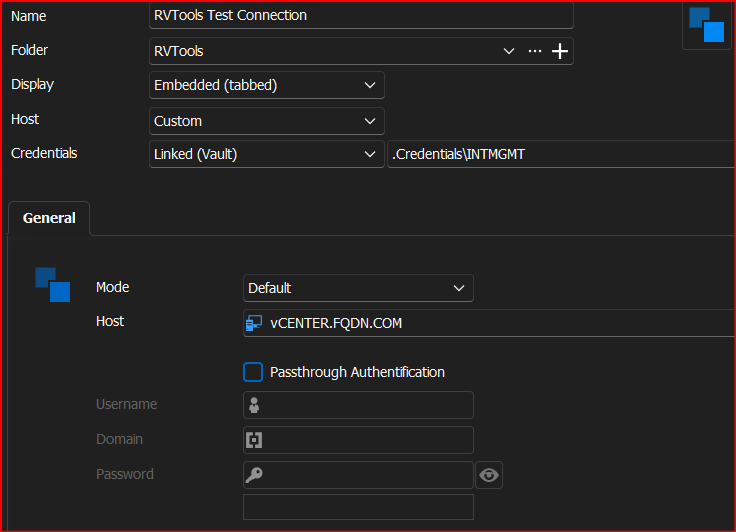
That config returns the following: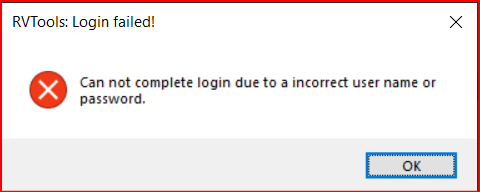
Changing the above listed config to allow "Passthrough Authentication" returns the following: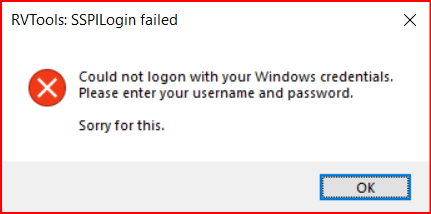
Using the following CLI in a command prompt works perfectly fine with RVTools v4.3.1 (Prior to Dell takeover and still the "Robware" version).
RVTools.exe -u DOMAIN\USERNAME -p PASSWORD -s vCENTER.FQDN
or
RVTools.exe -u DOMAIN\USERNAME -p PASSWORD -passthrough -s vCENTER.FQDN
RVTools v4.5 (Latest after Dell took over) does not work in RDM or CLI. I get the same messages.
--- Chuck
Overgaard, AZ (-7 MST / Zulu Year-Round)
RDM Version: 2026.3.2.0 64-Bit - Free
2738bf50-bdcc-4fc3-a26f-58d3637b9b2b.png
ace7dfe6-3996-477c-9cb3-fc8e64b31981.png
40c7f07a-b722-4283-b1f8-b9a27a5462aa.png
Hi Chuck,
As it turns out, it's still possible to send RVTools your password through command line, but it needs to be encrypted. See David's answer for the encryption method here : https://forum.devolutions.net/topics/41336/rdm-and-the-problem-with-the-latest-version-of-rvtools#188105
We'll look into encrypting it automatically when launching through RDM, but in the meantime you could use their powershell tool to accomplish the same.
Regards
Jonathan Del Signore
That did it, but there's another problem.
So I have my entry set up to Export with the following selection: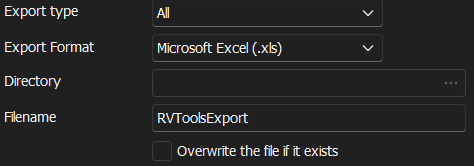
As you can see above, the ... selection is greyed out and there is no way to manually type a folder, which gives the following error on Update: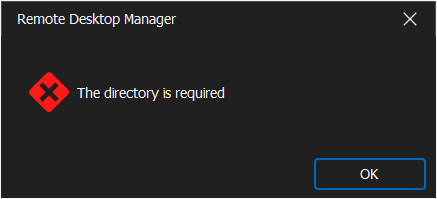
Even tried as a csv file, and the same results: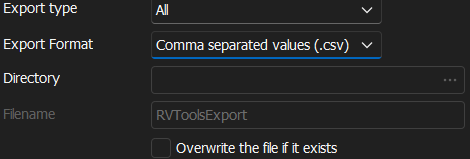
Please advise.
--- Chuck
Overgaard, AZ (-7 MST / Zulu Year-Round)
RDM Version: 2026.3.2.0 64-Bit - Free
c515f41e-6f98-4aa7-82f9-cb932c9b66b1.png
2e1eb4bb-3291-439a-94e3-5df2fa137e15.png
b6a4be29-4cb0-4b49-aa70-345739b60474.png
You're right, there's no way to browse directories at the moment. Sorry about that, we'll make a fix for this in our next version.
Regards
Jonathan Del Signore
Hello,
From version 2024.1.14.0, we will automatically encrypt the password before sending it to RVTools. (If your RVTools version is at least 4.5.0).
This will also enable the use of previously non-supported characters in their passwords, like " and \.
Regards
Jonathan Del Signore
Hello,
From version 2024.1.14.0, we will automatically encrypt the password before sending it to RVTools. (If your RVTools version is at least 4.5.0).
This will also enable the use of previously non-supported characters in their passwords, like " and \.
Regards
Good afternoon.
I upgraded my laptop to v2024.1.14.0 this morning, and it seems to now be working.
I am also providing un-encrypted credentials to RDM:
I also see that the selection for providing a directory is available: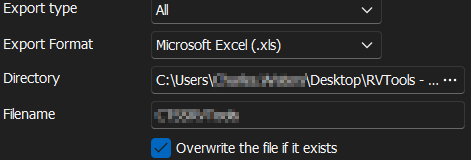
And the outcome is successful: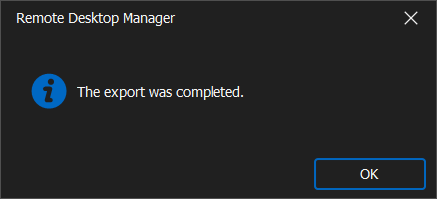
HOWEVER:
It does not actually do an export:
--- Chuck
Overgaard, AZ (-7 MST / Zulu Year-Round)
RDM Version: 2026.3.2.0 64-Bit - Free
9d34362a-b1e8-42b0-9e1d-e582ac8660da.png
a355ca27-01cf-43d2-82e0-b52a9ee549ab.png
7fb77cac-cfbe-49c2-baf0-2d09e5f2080f.png
bf0d8fee-1aa2-4bb8-876a-1f3f91b3d952.png