Client certificate authentication mode on android
0 vote

We have a DVLS behind a revery proxy that only lets connections pass if they have a valid client certificate.
RDM on windows has a very useful feature for this in the data source configuration.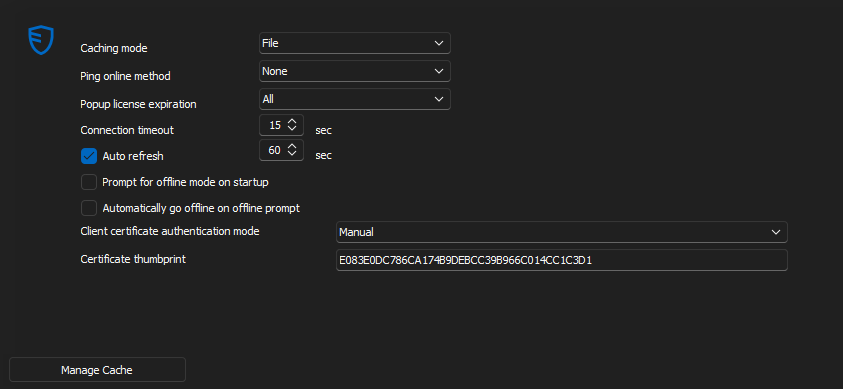
I would like to have access to the data source on my phone, but unfortunatly there is no such option on android.
In the setting of the app, there is an option named "Certificates" with the description of "Manage the certificates that can be used by the app", but I still cannot connect to DVLS when I import my client certificate into there.
Am I just using this feature wrong or is there currently no way to connect to a DVLS that requires a client-certificate?
CAM-Desktop.png
All Comments (10)
Hello,
I moved your request on the RDM Android Feature Request forum.
I will inform our development team of this topic.
Best regards,
Jeff Dagenais
Hello,
Thank you for reporting the issue we will look into it and get back to you.
Best regards,
Maxime Brousseau
Hello,
Currently, we indeed do not yet support managing a certificate for a DVLS data source.
We are adding this to our to-do list.
In the meantime, you might try using our data source export functions in RDM Windows and importing it into Android. The certificate-related information would thus be transferred (do not make any modifications to the data source to avoid losing the configuration). However, we cannot guarantee that the certificate you have loaded will be used by the application.
Best regards,
André Sanscartier
Hello,
We would like to know if you plan to try the workaround method we suggested to you. If you could confirm that it works, it would save us from having to set up an environment like yours and simply add the fields in the DVLS data source editing. This would allow us to expedite development and testing and deliver this improvement to you more quickly.
Best regards,
André Sanscartier
Thank you for looking into this topic.
This workaround unfortunatly does not work. I tried with 3 android phones, but no luck.
If you would be interested, I would be happy to provide a login alongside a client-certificate for our DVLS instance, so that you do not have to setup a test enviorment.
Kind regards,
Kilian
PS: If you are already working on client certificate authentication on andorid. I have colleague on MacOS who would appreciate this feature as well. (I know the codebases are probably significantly diffrent)
Hi Kilian,
Thank you for your offer. In this context, to comply with laws and regulations, our support team will contact you to take the necessary steps to authorize us to connect to your server. Thank you for your cooperation; it is greatly appreciated.
A member of our support team should be in contact with you shortly.
Best regards,
André Sanscartier
Hi Kilian,
Given that we are extending your request to include iOS and Mac in addition to Android, our IT team will need to set up a testing environment. Please hold off on allocating your time for us. We will keep you updated.
Thank you again!
André Sanscartier
Hi André,
I thought I could give some pointers on how this system works in our case, and it might help your IT team, or anyone for that matter, to set up a test or production environment.
Use Case:
Our DVLS sits behind a reverse proxy that only lets connections pass if a valid client certificate can be provided by the user or the program accessing it. RDM in most cases.
This whole setup is to protect the DVLS from the evil goblins that roam the internet. If a exploit is discovered in IIS, it wouldn't matter to us, as nobody without a client certificate can even reach the server. The client certificates are only distributed to people and devices who are known and protected by our organization.
Software:
As software for reverse proxy we use a pfSense virtual machine with the HA-Proxy package installed.
pfSense is also the certificate authority that signs the client certificates and manages the certificate revocation list.
Certificates:
For the internet-facing interface, we use a Let's Encrypt certificate that is issued for the exact name that the DVLS is reachable from. e.g. dvls.company.com
When creating the internal CA, make sure to not use any special characters in any of the fields, as this prevents HAProxy from asking for a certificate.
When creating the CRL, make sure to set the CRL-Lifetime to 730 days. If you type in 999 days and wonder why nothing works anymore, that's why. Ask me how I know :(
HA-Proxy:
To get HAProxy to only let connections through that have a valid certificate. You will need to have an ACL that's asking for a client certificate.
ACLs:

Actions:
Client-Certificates: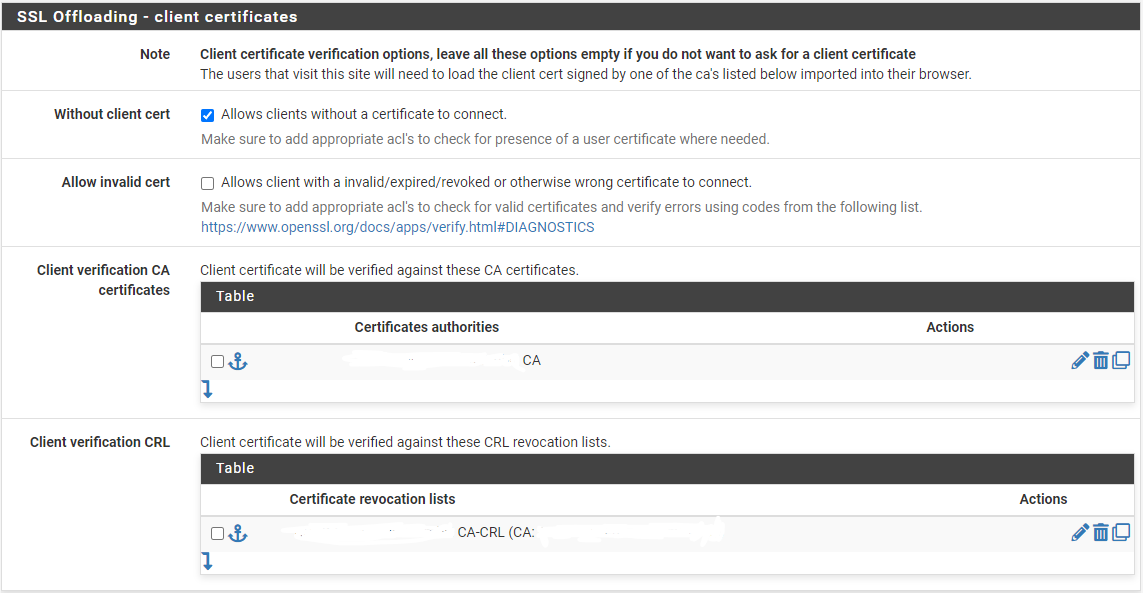
I would be happy to support you in any way possible. Please do not hesitate to ask,
To protect myself from internet goblins, I have redacted some information in the images, but I would be more than happy to share more information via DMs or other forms of communication.
I hope it helps!
Client-Certificates-1.png
Action-1.png
grafik.png
ACL-1.png
Hi Kilian,
Thank you for all these details. I will inform our technical team to take your configuration into account in order to accurately reproduce your environment.
Best regards,
André Sanscartier
Hi Kilian,
Just to inform you, we will soon be connecting to your environment with the information you have provided.
We are approaching your request on our to-do list.
Thank you again for your cooperation.
Best regards,
André Sanscartier