Some ideas for tabs and tab groups
0 vote

Hi there,
I want to ask you if these ideas can be considered as new features.
Tab group automatic color
Add an option so RDM choose itself a color different from others active at the moment. This would be incredibly useful for setting it for different client entries groups and having them visually separated but avoiding choosing color for each one (very different colors are not so much in the end and many times we don't need a specific color assigned but simply a different one).
Tab entry custom icon
Add an option to set an additional custom icon in the session tab when opened (maybe emoticon based without having to manage a graphic item like .ico); position of this icon could be set (like before or after the tab title). This would give us a way to highlight some specific sessions tab. I'm thinking to a specific option for avoiding changing the entry official title.
Avoiding tab groups bar if only one tab group opened
In case you open sessions of the same group only, having the tab groups bar is quite useless as "All" it's the same then the specific group: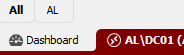
Hope to be helpful.
Thanks.
ce56cfbe-9df7-421b-94fc-95f4d971105c.png
798a17d5-571d-4b79-b377-b49435ac450a.png
All Comments (12)
Hello,
I have opened a ticket for the first and third points.
For your second point, is there a reason why configuring a custom image for the entry would not achieve the same thing? I'm asking because I looked a little on our end, and the third party library we use for the UI doesn't seem to support emojis properly in the tab (they show as text, similar to Notepad). Maybe we could find a different way to help you achieve what you're looking for.
Regards,
Hubert Mireault
Imagine that you have 3 RDP sessions opened: I set Windows icon for those 3 entries, but I want to highlight the domain controller one (with a star, for example).
I don't want to change Windows icon for a star, I would set both (because the star is an extra information).
Thank you for the clarification. We will see what we can do but we have limitations with our third party control.
Regards,
Hubert Mireault
Great, thanks!
Hello,
We've implemented some improvements for Tab Groups. First, the Tab Groups will no longer be displayed unless there are at least 2 different groups opened (excluding the All tab groups). Furthermore, we've added the Use smart coloring for entries feature, which can be found in File - Settings - User Interface - Tabs. When enabled, entries will ignore their set colors, and instead cycle between 11 different colors (automatically selected). You can expect these changes to reach live with the upcoming 2024 version.
Regards,
Jafran Majeau
Thanks Jafran,
this is really welcome. I want to be sure that you considered the tab group scope for the new "smart coloring" features, so we can choose it for the folder container, having the same random color applied to all child entries (it's important that all entries of the same folder are colored with the same one, in fact we use inheritance).
Hope you're considering my other complaint about unselected automatic color: https://forum.devolutions.net/topics/41072/unselected-tab-coloring#186773
Cheers!
Hello,
First, I'd like to clarify that the unselected tab coloring is handled separately, and it isn't a part of the current implementation I'm working on.
Second, the short version of this reply is that we're having trouble picturing your exact needs, and a screenshot with some explanations would likely go a long way. As far as we understand, Tab Groups can already give you the separation you're requesting from tab coloring.
The long version:
The smart coloring feature does not currently include the tab groups in its scope. As it stands, I'm not sure our implementation will provide you with the solution you need, and I'm not sure I understand your particular scenario, but I think all we need is some clarification.
What I'm getting from this is that you would like a way to set "All entries in a folder under the same Tab Group (likely decided by said folder) to have the same tab color, but have them change color when opening an entry from a different folder".
Just to clarify:
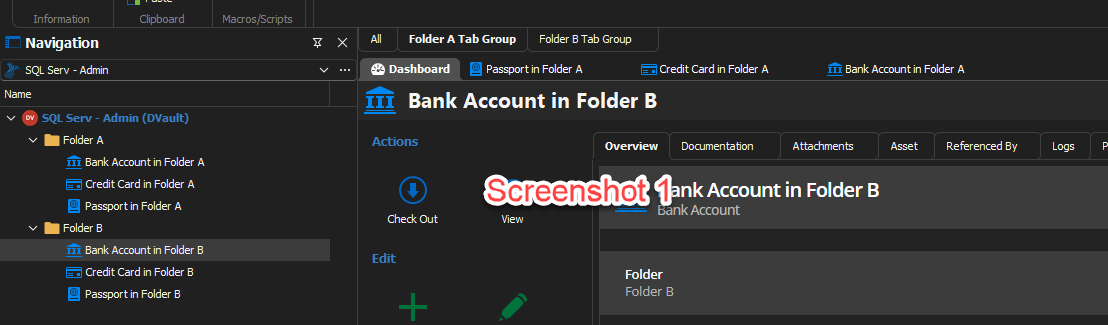
- Tab Groups are a feature independent of the actual Tabs (for the most part), which also separates them from tab coloring. This feature regroup several opened tabs under a "Parent tab", thus "grouping" said tabs. (Screenshot 1 below)
- In this context, having all "childs of the same tab group" have the same color doesn't seem useful, because they are already all grouped under the same "Parent tab".
- Tab colouring is also not supported for the Tab Groups, partially for the reason mentioned above, but there are other factors.
- Assuming you were not referring to the tab group feature, I surmise that you would like the possibility to change the tab color all entries inside a parent folder to have the same tab color as said parent folder (which is already possible, by setting the tab colors of all child entries to inherited).
- However, you would also like "not to have to choose" these colors, and have them display different colors from the ones currently in use.
If my last statement is correct, you can achieve your desired result by simply using the Tab Group feature instead. By setting the tab group name of child entries to inherited, all entries launched under the same folder will can be grouped at a glance at all times (Screenshot 1). However considering how your original post already showcases that you are aware the feature exists, I'm having trouble picturing what the issue/your specific need is.
If what you need is a quick way to setup all entries contained folders to be separated from "other entries located in other folders". You could do the following:
- Batch Edit all entries in said folders, and set their Tab Groups to Inherited
- Set a the folder Tab Groups to whatever names would make things clearest for your personal uses.
Regards,
Jafran Majeau
31fa7ac9-3ff6-43f6-9c28-b6ccefa4cc9b.png
Many thanks for your effort in replying.
I simply want to achieve a really basic situation like this.
CUSTOMER01 [folder]
|____ entryA
|____ entryB
CUSTOMER02 [folder]
|____ entryC
|____ entryD
With automatic color feature, I'm asking if I can set up each folder with this new setting (using tab group property), let inheritance on for each child entry, and so having an automatic color for entryA and entryB (f.e. red) and entryC and entryD (f.e. green). I simply want to have RDM choose an automatic color for each tab group (customer in my case), and all tab's having the same automatic color. The result is having a visual difference between customer's items (when opened). This is exactly what I'm using now, but I have to manually choose a color for each folder/tab group.
I'm only concerned about RDM will choose a different automatic color for each entry and not considers the folder/tab group.
Thanks.
Hello,
If I understand correctly, in your example:
- Each folder has a Tab group
- All entries inside a particular folder are also part of the parent's Tab group
- You would like each Tab Group to have a color
- All entries inside a particular Tab Group should have the same color as the parent Tab Group
- And you would like these color to be selected "Automatically" (but different enough from each other).
Am I following your example correctly?
Regards,
Jafran Majeau
Yes, correct.
Hello,
We are investigating the possibility to support coloring with tab groups. We'll keep you updated as we make progress.
Regards,
Jafran Majeau
Something like this: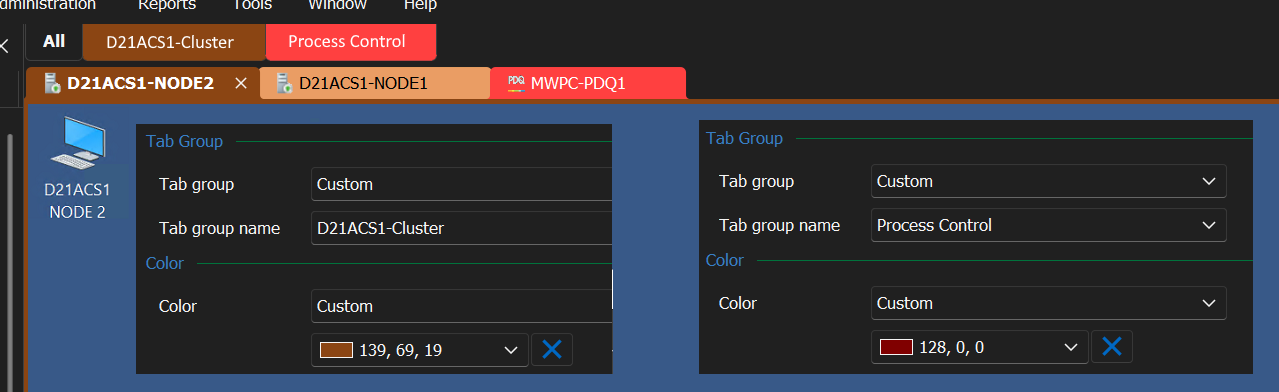
When you set the 'Tab Group' color - the Tab Group Tab should have THAT color.
e15dc536-be70-47b9-b0b9-146055e0c1b4.png