Quick connect credentials 2023.3.12.3 mac

Hello,
After updating to ver 2023.3.12.3 the new quick connect dialog now lets you select the credentials from your vault,
the problem is that it no longer uses the credentials defined in the connection template and you HAVE TO select / fill in credentials...
how can you define the default credentials to use in this new quick connect menu?
All Comments (12)
Hi,
I think we just didn't even think about this possibility. I will open a ticket to investigate this right away.
Best regards,
Xavier Fortin
Oh! And in the mean time, you can rollback to the previous version (2023.3.11.4).
Best regards,
Xavier Fortin
Hi maxlieberman,
Using credentials defined in the connection template seems to work for me.
Here are the steps I follow:
- Create a template of the correct type with my credentials
- Open the QuickConnect menu
- Enter the host
- Select the template in the session type to the right of the host field and browse button
- Leave everything else to the default values ( Port is set to default, credential is set to custom, username and password are empty )
- Hit connect
If you enter credential values such as a username or password, they will override the template credentials. However, if you leave them empty, the template credentials should be used.
I hope these steps will fix the issue for you. If not, please try to give more details about what is not working.
Best regards,
Maxim Buisson
This is exactly how it used to work in earlier versions,
but for some reason it now ignores credentials defined in the template.
I downgraded for now...
Hi,
Can you please tell me which session type you are using for your template and how you setup your credentials so I can try to reproduce the problem?
Best regards,
Maxim Buisson
Hi,
Sorry for the late response,
It happens with both RDP and PSM types. (and probably others)
Hi,
Can you please provide screenshots of your template setup, your QuickConnect menu before connecting, the template selected in the QuickConnect menu and the message you get after trying to connect ? Feel free to censor any data you want to keep private. We mainly want to see what you have filled. We would like to have a setup similar to yours so we can fix this issue, because we tried it with an RDP template and it worked as expected.
Best regards,
Maxim Buisson
Hello!
Sorry for the late response,
I was busy so I just downgraded and used an old version for a while... but I would like to get this resolved!
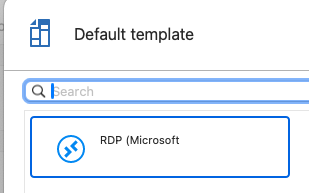
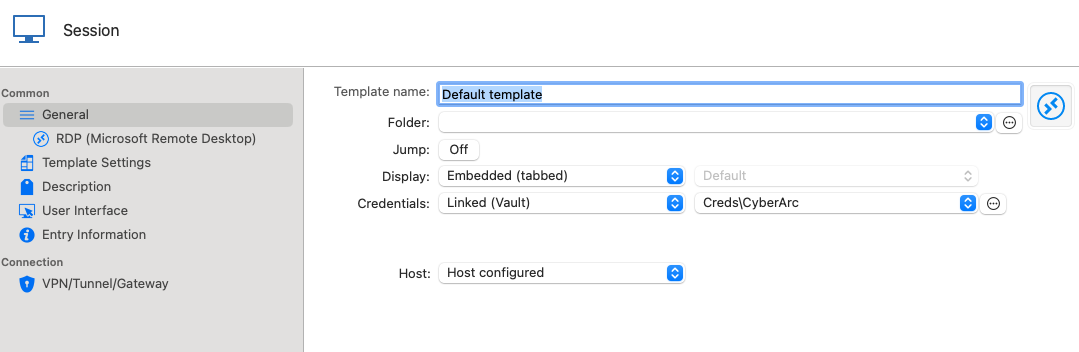
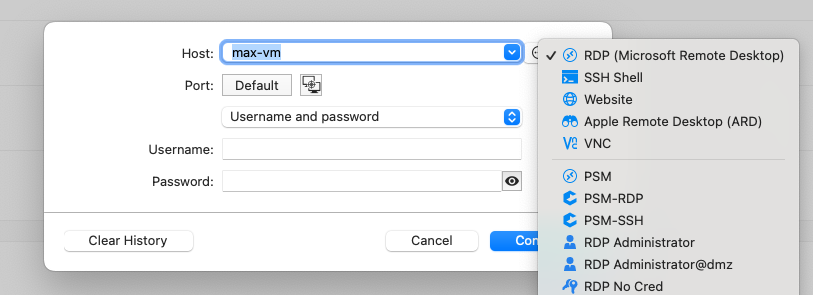
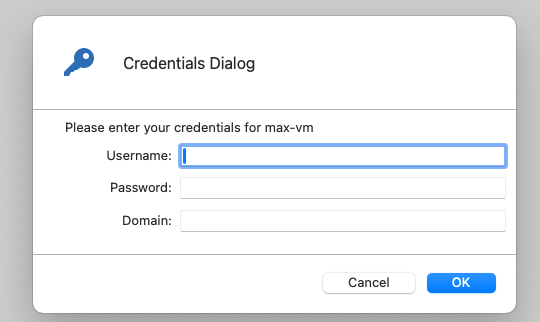
here are the requested screenshots...
as you can see there are credentials defined in the default RDP template that quick connect no longer considers...
It only respects what's selected in the new quick connect credential selection form.
this would be somewhat fine if there was a way to set defaults for this new form... but I did not find it.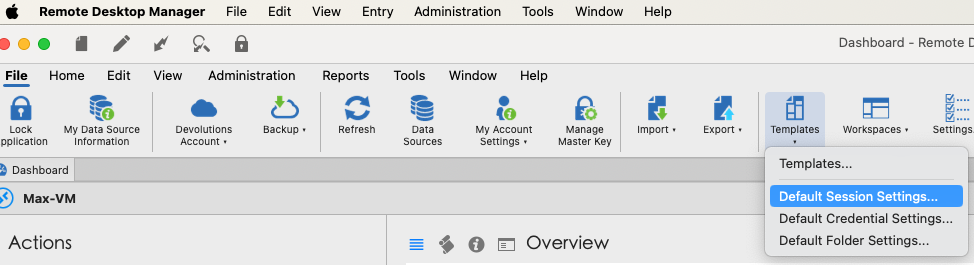
Screenshot 2024-03-06 at 16.26.08.png
Screenshot 2024-03-06 at 16.25.37.png
Screenshot 2024-03-06 at 16.24.13.png
Screenshot 2024-03-06 at 16.24.56.png
Screenshot 2024-03-06 at 16.24.43.png
Hi,
Thanks for the screenshots. I was able to reproduce the problem. We will work to fix it as soon as possible.
Best regards,
Maxim Buisson
Hello,
We have released a new version of RDM Mac (2024.1.6.2)
The quick connect should now use the template credentials if the credentials in the quick connect menu are set to username and password and left empty.
Feel free to let us know if there's anything wrong or if you have other issues.
Best regards,
Maxim Buisson
Hi,
Thank you, I noticed.
Weirdly it seems be be resolved already in v2024.1.5.1 (the version before).
One new issue I noticed with 2024.1.6.2: when trying to hide the footer, there's still a thin line present,
also the toggle in the settings is inverted. (hides when selected, shows when not)
As a workaround you can select Classic user interface instead of Ribbon.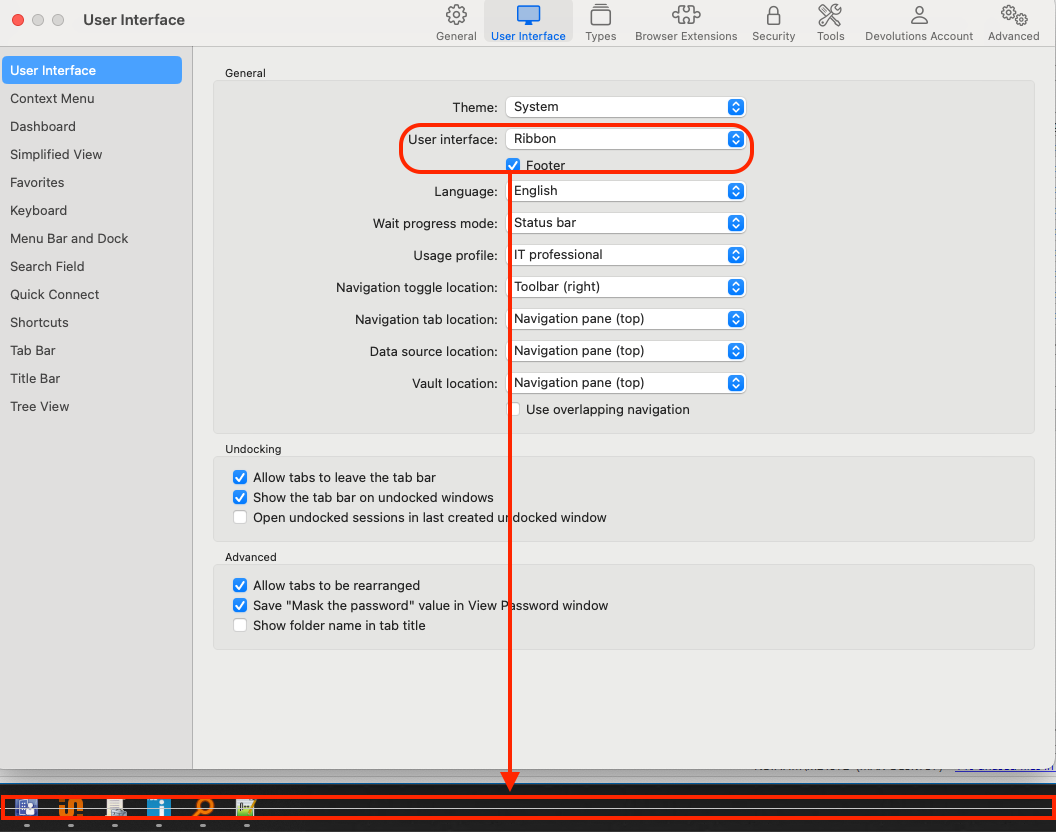
Screenshot 2024-03-27 at 9.29.20.png
Hi,
I'm glad to hear that the issue is resolved.
As for the issue with the footer, we are aware of it and if everything goes as planned, it should be solved in our next release.
Sadly, we can't really give an ETA of when it will come out.
If you have any questions don't hesitate to communicate with us.
Best regards,
Maxim Buisson