Workspace App Feature Requests / Improvements
0 vote

Hello,
based on my usage of Workspace App, I would like to ask for further improvements:
- The App should remember last window size and position, like almost any other windows application does
- Some kind of Caching Mode (not Offline Mode) - current usage with large vaults is not plausible - opening a vault that has 2000 entries takes often a very long time, 30-40sec over VPN isn't usable (Lazy Loading Tree however can't be activated and doesn't do anything to help with loading times)
- Offline-Mode button available on the main mask, not hidden in the settings
- There should be a setting to keep the offline mode on next app open
- Possibly an automatic offline mode detection, similar like RDM does
- Setting which vault is opened on startup
- Remove or add a setting not to show recent vaults, its very confusing seeing 6 vaults instead of 3, in our case, even though named the same
Basically, I am missing lots of options website is offering, and until couple of days haven't even been aware of the app. I wanted to give the app to the normal user, but right now, a website is from the performance and usage standpoint much better solution, however with one very big downside: no offline mode.
I hope you can bring the app on the functionality-level of the website, with the benefit of the offline mode.
Thanks
All Comments (7)
Hi, thank you for your request. The offline mode in the app is currently in its initial development phase. We are presently working on a second phase that will introduce numerous features and bug fixes. With that in mind, we plan to incorporate some of your requests into this second phase:
- The app should remember the last size and position. We will make sure it does.
- Introducing a caching mode. This feature will significantly enhance performance for users with large vaults. To sync the entries, simply use the blue sync button. The issue with the lazy loading button will be resolved in the next minor version.
- Making the offline mode button more visible. We believe placing the button under the 'File' menu is ideal since we lack a Static Menu at the top like RDM. What are your thoughts?
- The offline mode MUST remain active after an app reboot. We will ensure this.
- Automatic offline mode detection is currently available when you lose your internet connection but not otherwise. Could you elaborate on this? What specific use-case do you have in mind?
- Adding a setting to choose the vault to open on startup. The default behaviour will be to open the last visited vault, similar to the Web.
- We are currently making significant UI modifications for the app. This menu will undergo substantial changes; one reason being its current slight confusion.
In Workspace, we are currently catching up on several features from Devolutions Server and RDM. Your feedback and requests are invaluable in helping us prioritize tasks on our Roadmap.. Don't hesitate to reach us here.
Best regards,
Sébastien Aubin
Product manager - Password Management
Offline button in File-Menu: well, better than hidden in the settings. However, I still maintain position that directly on the interface, like for instance RDM globe-sign on the right lower side, would be by far the best solution. Not to mention streamlined experience.
Automatic offline detection: indeed you are right, I missed this. However, bind it to the upper notice: if a user would have it visible, like the globe in RDM, that Workspace is offline, would be beneficial. Even better if clicking on the icon would connect yet again. No need for automatic reconnect IMO.
Startup-Vault: similar to the web would be "Landing Page:". I firmly believe that most users would prefer to have User Vault start up by default. And when changing vaults, to go to a preferred one. Say they have access to 3 vaults, but one public vault is the main one, so when they change to vaults, they would maybe like to land always in the same (or at least last selected) vault. I know, this is maybe lot to ask, but here, you have my opinion.
Thanks for listening!
Hi, thank you for the clarifications. We will work on it and let you know when the second phase of the offline mode will be available.
Best regards,
Sébastien Aubin
Product manager - Password Management
Hi
im a happy user of the DEVOLUTIONS WORKSPACE browser extension
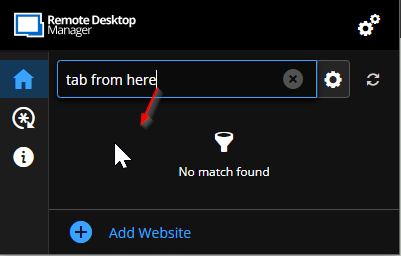
and love the ctrl-shift-z feature when i need to login but i wish that i after i type ind the account i need i cant select it and move on. i need to take the mouse and move it to select it. i know this is a small thing but would make it greater :)
Hope it's something that can be made :D 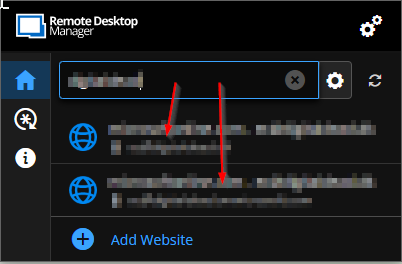
tab from here to here.png
Tab from here.png
Hi,
To be sure we understand correctly your request, you want a "keyboard navigation" to select (with tab or/and arrows) an entry in the list and then press "enter" to fill the page with the entry highlighted/selected?
Thank you for your feedback.
Best regards,
Olivier Désalliers
Hi,
To be sure we understand correctly your request, you want a "keyboard navigation" to select (with tab or/and arrows) an entry in the list and then press "enter" to fill the page with the entry highlighted/selected?
Thank you for your feedback.
Best regards,
yep, to Abel to tab navigate to the results. were the arrows are pointing to :)
Hi,
We opened a ticket for it. Thank you for your suggestion.
Best regards,
Olivier Désalliers