Biometrics unlocking no longer works, missing option in Settings
Biometrics unlocking no longer works, missing option in Settings

Hello.
A while ago, possibly after the last major upgrade of RDM on Android, biometrics stopped working and now I can just open the app without needing any kind of authentication and all my credentials are exposed. I tried going to settings and redefining the application password, but when I press "Save" it pops up the biometric authentication and when I use my fingerprint it just shows an error popup saying "Biometrics not recognized. If this problem persists, please deactivate and reactivate Biometrics in the app settings.".
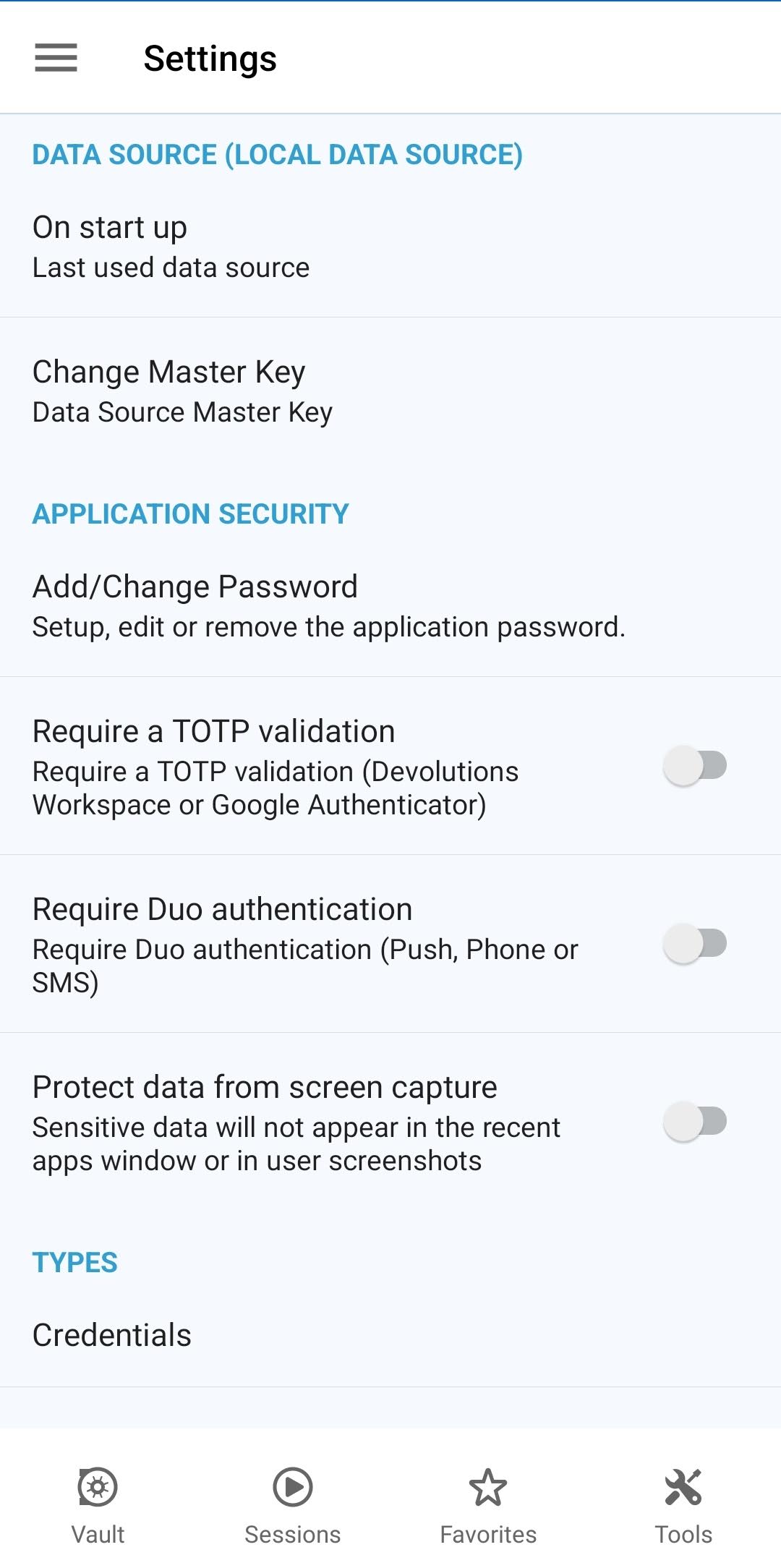
I have looked pretty much everywhere in the app's Settings and there is no Biometrics option anywhere, but I remember it being somewhere because I've been using it for ages with it enabled. I'm trying to avoid purging the app because I don't want to lose all my saved connections, but I'm running out of ideas and that's why I'm reaching out for help.
Thanks in advance.
PS: Android 13, RDM v2023.2.4.0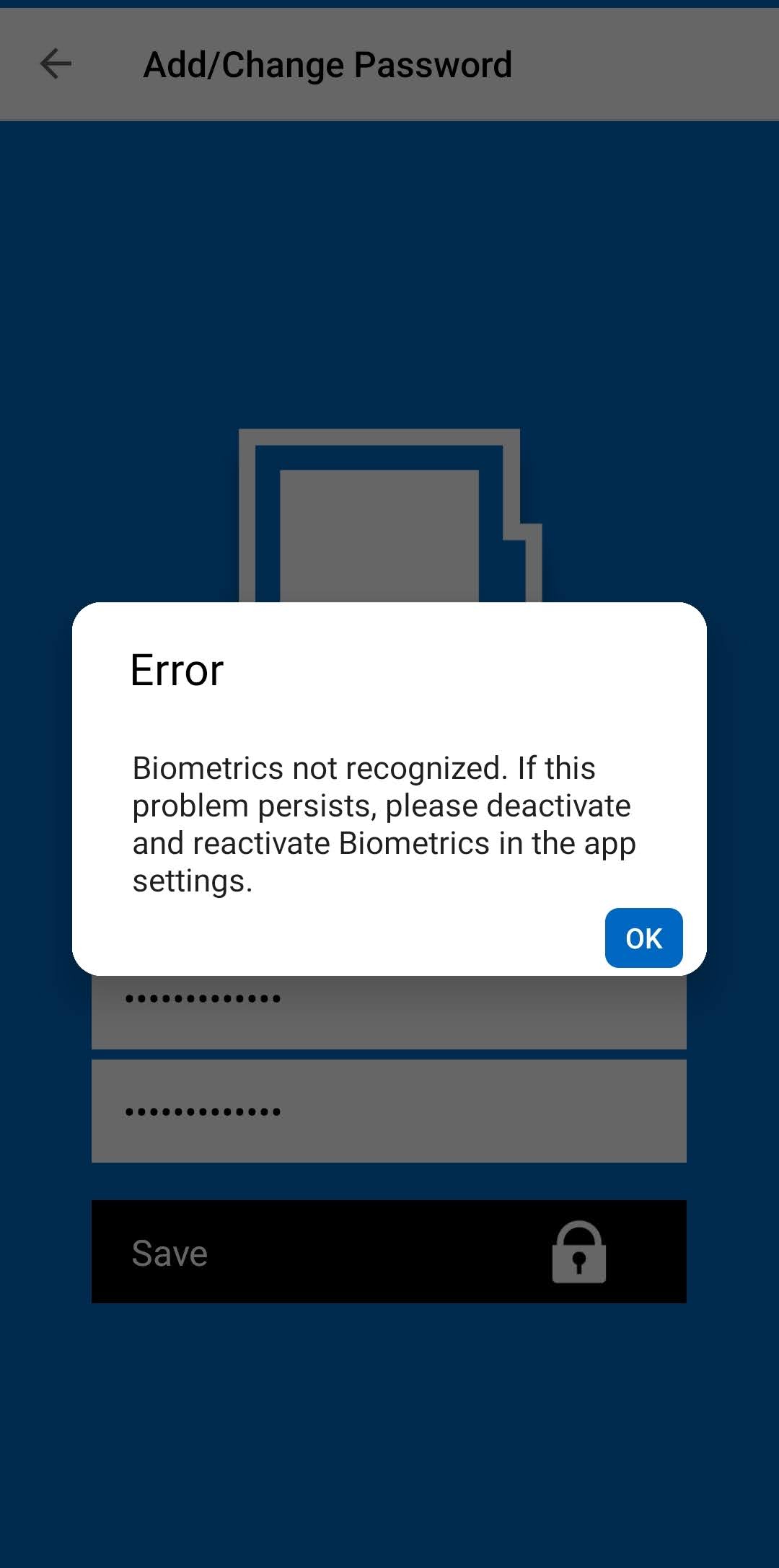
Screenshot_2023-10-04-14-40-29-788_com.devolutions.remotedesktopmanager-edit.jpg
Screenshot_2023-10-04-11-17-49-610_com.devolutions.remotedesktopmanager-edit.jpg
All Comments (7)
Hi,
Indeed, you should have access to the biometrics option, but it doesn't appear. We will check as soon as possible how to correct the situation.
Best regards,
André Sanscartier
Hi,
After conducting some tests, we have a few questions.
Is it possible that you never had a password for the application but were using fingerprint authentication?
And this continued to work through updates?
In the screenshot are you attempting to add a new password (not change) and is it being canceled out by the biometrics?
For us, this would explain your situation because now, your fingerprint needs to be re-registered in the application, and you are locked out because it has not been allowed to use biometrics without a password for some time.
In the meantime, you could try our cloud backup. You can activate it in the Backup tab of the data source editing. You will probably need to create a free account, but this would allow you to have a backup of your data and even retrieve it on any device or platform. Once you have tested it on another device and become familiar with it, you could start fresh with a new installation.
Please rest assured that we will ensure you can set a password and restore biometric functionality. We will also review the export procedure and clarify what is happening with this essential feature. We apologize for any inconvenience this may have caused you.
Regards,
André Sanscartier
Is it possible that you never had a password for the application but were using fingerprint authentication?
And this continued to work through updates?
This is possible but I'm not sure. I have been using the biometric authentication since the beginning (at least for the past 3 years)... but if the app allowed to use biometrics without setting an app password then it is highly probable that I enabled biometrics without setting one. And yes, this has been working fine through every update until recently (possibly the major update when the UI changed, but I didn't realize it until today for some reason).
In the screenshot are you attempting to add a new password (not change) and is it being canceled out by the biometrics?
I have no way of knowing whether I'm adding a password or changing it because the mechanism doesn't seem to establish a distinction between those two actions (the option is titled Add/Change - and described as to setup, edit or remove it), unless it was supposed to ask for the current one or offer a different screen for removing an existing app password if it existed. Currently it just shows the two fields visible below the error popup that you see on the screenshot; one for new password and another for confirmation/repeat. The biometric authentication appears right after I tap Save, at which point it rejects my fingerprint with the unrecognized biometric error popup.
I was willing to reset the app but have not done so yet on account of not being able to export the current connections/entries (I'll probably try the free cloud backup tomorrow, thanks for the tip). At this point it's not critical since the app still works properly with the exception of the export function and the lack of the app password and/or biometric lock. Nevertheless, I appreciate the concern and support provided thus far.
If any other information or test is needed, feel free to ask.
Thank you.
Hi,
Thank you for the follow-up. Indeed, if you are not prompted for an old password, it confirms our theory that there isn't one.
On our end, we are unable to reproduce your export problem, but we are working on a solution for the biometrics issue.
Regarding the backups, please make sure to use the same backup file name in all your installations. This file will contain the history of your backups. It's possible to configure a separate file for each device, but in your case, you should use the same one to retrieve your data. However, since the export is not working on your end and it might be related to a security issue caused by biometrics, we hope this won't affect the backups. Make sure your data is safely stored in the cloud by restoring it elsewhere before deleting your installation.
Regards,
André Sanscartier
Alright, so I somehow was able to export the credentials locally. I'm unsure about what I did, right or wrong, but I got past that.
Now, I have a different problem that leaves me stuck with the exact same issue: apparently clearing the apps data and cache, uninstalling, rebooting the phone, reinstalling... doesn't clear credentials, vault or the app's settings at all. Everything comes back as if I had not cleared the app. I'm a bit confused as to why that is the case, but at this point it seems impossible to reset the app without root, which I don't have.
Any ideas on this?
I seem to have fixed this through quite a bit of trial and error, here are the steps that I have taken (from memory):
- Export all your entries (make sure that the exported file is not empty, meaning export process worked)
- Uninstall current version of RDM (manually clear all data & cache before doing so)
- Get an older version of RDM (I got one from apkpure, v2021.1.5.8, this somehow cleared settings and entries from the newer version)
- Make sure to NOT setup any app password and DO NOT enable biometric authentication at his point
- Go to Settings and tap the "Migrate to Android 11" option, then migrate the local storage file (mine is XML though and may not influence the process, I just did it anyway)
- In Settings, tap the option "Clear offline cache" (may not influence the process, I just did it anyway)
- Using Play Store update RDM to the latest version
- Open latest RDM and set an app password, this time it shouldn't prompt for biometrics and a new biometric option should be revealed which will allow to enable biometric authentication if you wish to do so.
Like I said, there was some trial and error, and I redid most of this process twice because the first time I enabled app password and biometrics, it ended up with the exact same problem after updating to the current version. Hope this helps narrowing down the issue or someone who might face a similar situation.
Hi,
Glad that you found a solution. On our end, we have adjusted the application's startup to accommodate your situation, which could potentially occur with other users.
Thank you for bringing this issue to our attention.
Best regards,
André Sanscartier