SSH Private key via linked vault (Secret Server)

Hello,
I am trying to use Secret Server (Thycotic) as the SSH private key repository. I have seen the previous article which showed using a ssh no password template in Secret Server, but not showing how to get RDM to point at the repository for the private key. I have tried both a ssh private key template and ssh no password template and connected to the via credentials -> linked vault, but what I can't figure out is how to use that in the private key section of a SSH Shell in RDM. The 'private key type' gives no options for linked vault so I can not see how it would associate. Additionally I have tested and do not get prompted for username, but do for password, which shows that it is not getting the private key.
How do I set the SSH Session -> Private Key to link to the private key in the vault?
RDM version: Enterprise Edition 2022.2.26.0
All Comments (38)
The session will work if I load the key manually into the SSH-Key agent inside of RDM, but this is a manual process and I have to copy the private key down to my machine.
Hello,
I think I found a discrepancy or a wrong term...
In the SSH entry, select User Vault (Should indicate Linked (Vault)).
You can then select the Secret Server entry configured beforehand.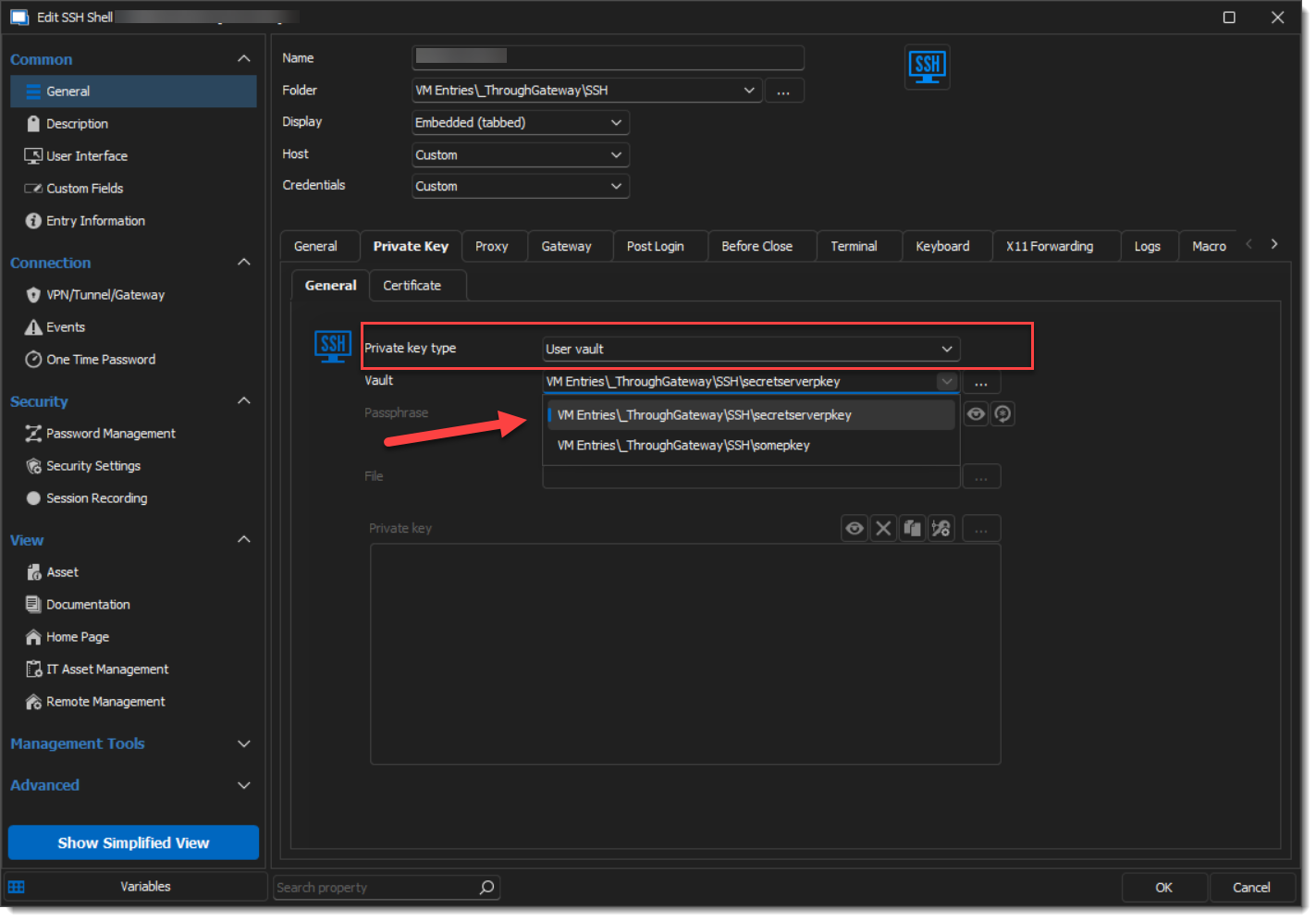
I'll file a ticket to get the label adjusted, let me know if this helps.
Best regards,
Alex Belisle
2d778bf2-710c-41a4-a3de-27192688d784.png
This seems like it would work if I was storing the key inside of RDM, but I am trying to store the key inside of Thycotic (Secret Server) and use it from there. If that is not possible, that is fine, I am just trying to confirm.
Hello,
To be honest, I don't have a Secret Server to test with.
The setup I shared with you would technically work, but I could not confirm the end-to-end process.
The Credential entry (private key) of the SSH is a Secret Server Credential entry has a few tweaks like the "Mode" option (In the Credential Selection tab) set to As Private Key, I assume you already got there.
I'm quite confident that if you can get your private key stored somewhere else in RDM, it would also be possible to use the process I've described, but I haven't ruled out anything yet.
Where do you get stuck at the moment?
Best regards,
Alex Belisle
I do not see the User Vault option as you have.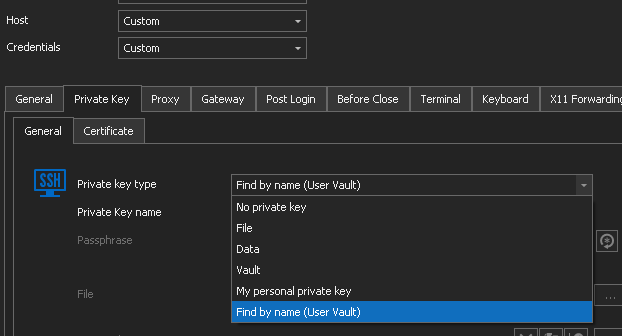
As for the options you mention, I am not an expert with RDM or Secret Server. I am using an SSH template and added the private key into the secret, but if there is some option I need to set on the template or globally on Secret Server, I do not know where you are referring to.
Thanks
Private-Key-Menu.PNG
Hello,
You are right, with RDM 2022.2.x, the User Vault I mentioned was still showing the right label (Vault)
You can select Vault, and then select the Secret Server Entry that you configured beforehand.
The Private Key would then be a Secret Server Credential Entry, with the "As Private key" option selected in the Credential Selection tab > Mode.
You can read more about configuring the Secret Server Entry here :
https://docs.devolutions.net/kb/remote-desktop-manager/how-to-articles/secret-server-entry-configuration/
Technically, and I haven't tested on 2022.2.x, activating the As Private Key will make it available to the SSH Entry > Private Key.
I hope this clears it out.
Best regards,
Alex Belisle
Hello,
After some investigation I've come to clarify a few things.
- The option that you are likely looking for is Vault, which should be named Linked (Vault) (that is a mistake on our end). This will let you browse for private keys located in your current vault.
- There is no User Vault selection while being in the main Vault, this option can only be seen when using an SSH Shell entry that is located in a User Vault (which is why it doesn't show up in the selection posted in your latest screenshot). The Find by Name (User Vault) is something else entirely, and likely not what neither of you meant to refer to.
I've changed the name of the option to Linked (Vault) and this should be reflected in future versions.
Regards,
Jafran Majeau
Oh, ok. I never realized that private keys were a separate configuration from username/passwords for Secret Server. This did the trick.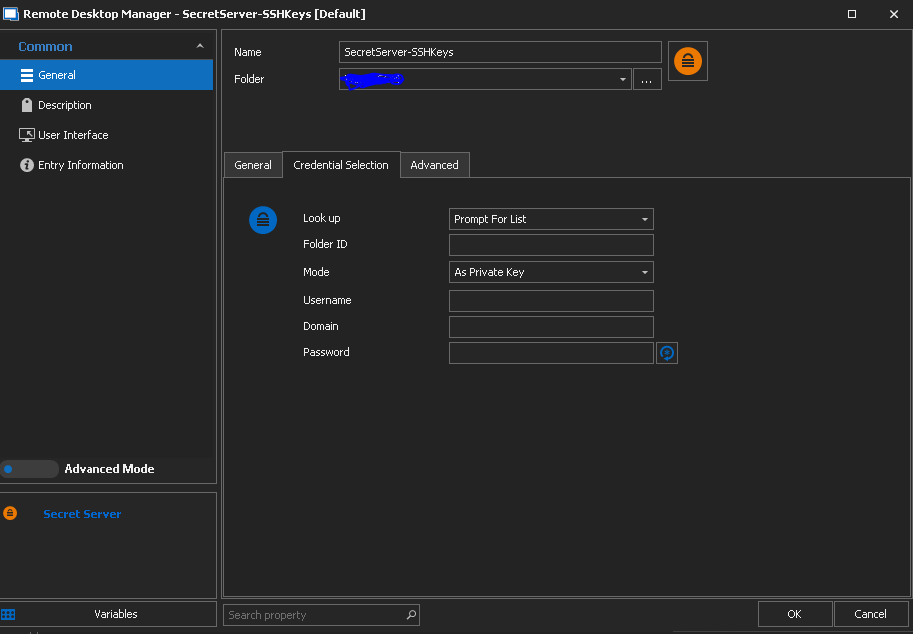
I am not able to directly point at the entry in SecretServer but at least I get the prompt for the folder list to then pick my entry with the key!.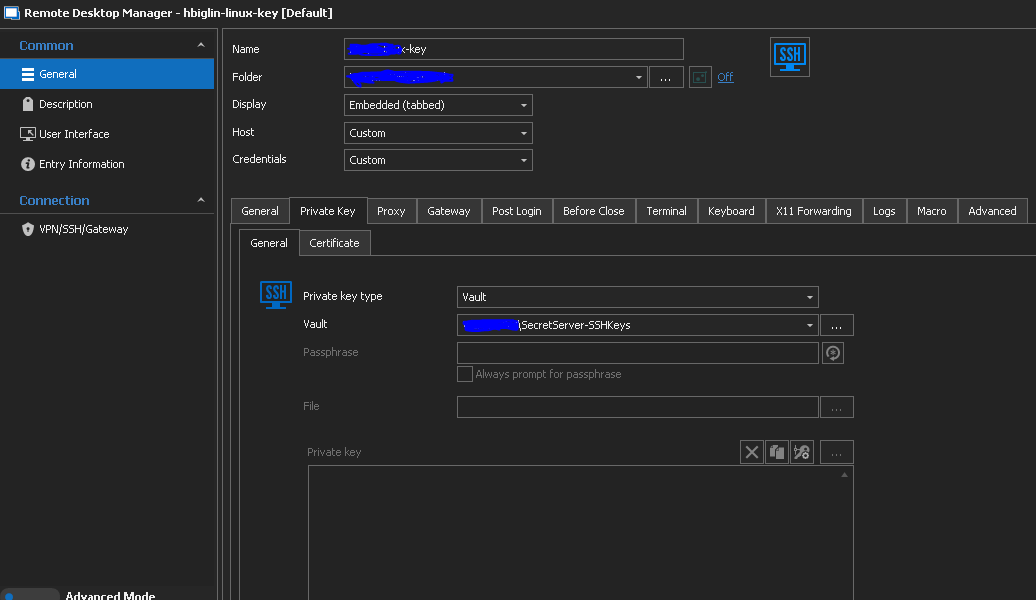
SSH-with-key.PNG
SecretServer-SSHKey.PNG
Hello!
I'm glad this is going the right way!
In the Secret Server credential entry, instead of Prompt with list, I think you could pre-select the entry in Secret Server to inject the Private Key seamlessly... Again, I cannot test so I'll use you as our guinea pig :)
Thanks for letting us know.
Best regards,
Alex Belisle
Yes, if I do a lookup by name I can match the key name. At least this is an improvement, but not as seamless as working with credentials, because this is requiring a second entry in RDM that I have to manage. But at lest it works.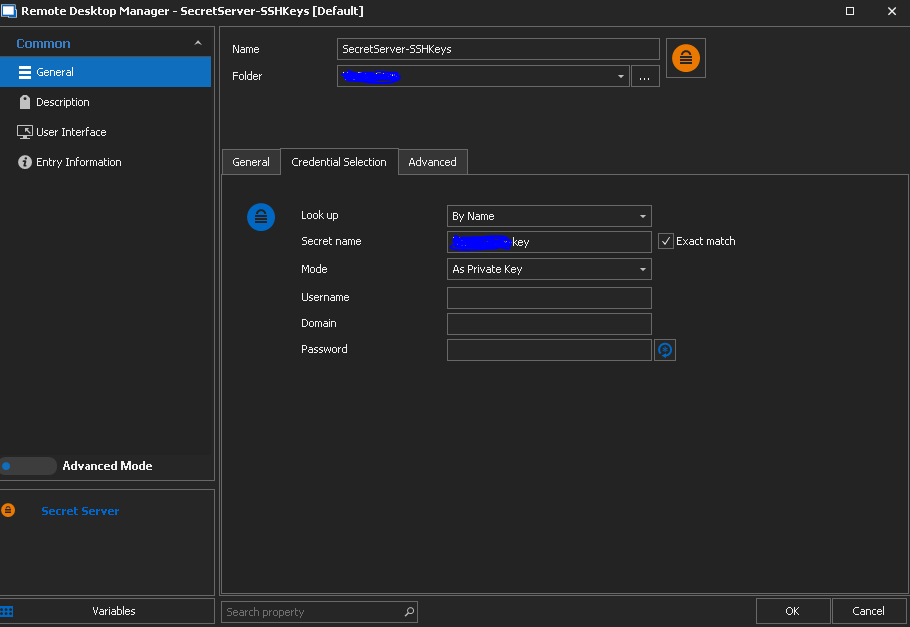
private-key-match.PNG
Hello,
Technically you could have several Entries pointing to different Keys in Secret Server, then your entries would be linked with the appropriate Secret Server (key) entry.
Would this help?
Thanks for keeping us posted.
Best regards,
Alex Belisle
Hello,
our linux admins are switching from username/password to private keys. Basically what´s written here is working - duplicate the existing Secret Server credential entry and switch "As Credential" to "As Private Key".
But a few things are missing/wrong:
Naming - still not showing the same on all places: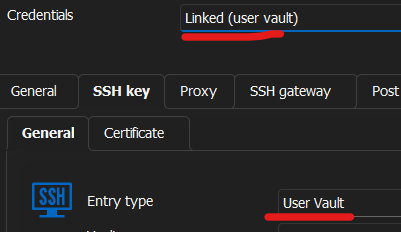
The "General" tab is not shown completely - the last few lines are cut off and there is no scroll bar on the right side: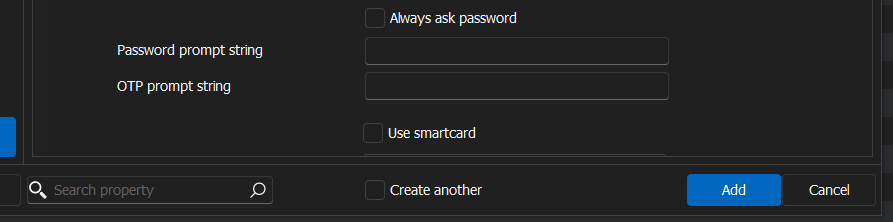
When I make the window full screen, this is missing below the "Use smartcard" checkbox:
Also when I activate the checkbox, no scroll bar is shown.
But the more important things are:
Currently we are able to select the vault, but not the private key as possible with normal credential entries. Please add a "select from list" link and the possibility to save the needed private key with the ssh shell entry. It makes no sense to get a prompt every time.
Additionally a username field in the "SSH key" tab would be helpful to have one place where the whole ssh key config is stored. We tested it and when you select "Username and password" as credentials and write the username on the "General" tab, the username is injected on login and you only have to select the right private key. But as I said, then you have the usernamen on the "General" tab, and the private key on another.
Brgds Andreas
7e54e244-db78-430f-a7e1-aff9b8f88ef9.png
ea1ee6a6-2c72-4dec-bf40-2fa93eea95c2.png
3c7a921f-4e4c-4bb0-be6a-3086e1da0259.png
Sorry to jump in but am also trying to test this out for our Linux users and struggling.
The link you mentioned no longer works, do you have a new one?
I can add the credential entry as "Private Keys". However, when I link it and launch a session I just get a list of credentials pull up.
Thanks
Iain
Version 2026.2.13.0 64-bit
Data Source SQL
This is the new link: https://docs.devolutions.net/rdm/kb/rdm-windows/how-to-articles/secret-server-entry-configuration/
But that is only the basic Secret Server configuration. I am talking about having the SSH keys stored in Secret Server and use it as a credential entry without the need to select the right key on every session start.
Brgds Andreas
Ah yes I have that setup, I am also in the same boat as you then.
I create second entry for private keys but it just lists all the entry when launched which defeats the purpose!
Thanks
Iain
Version 2026.2.13.0 64-bit
Data Source SQL
Hello!
Thanks for your patience.
Your DeLinea entry should be configured to point toward one specific Secret: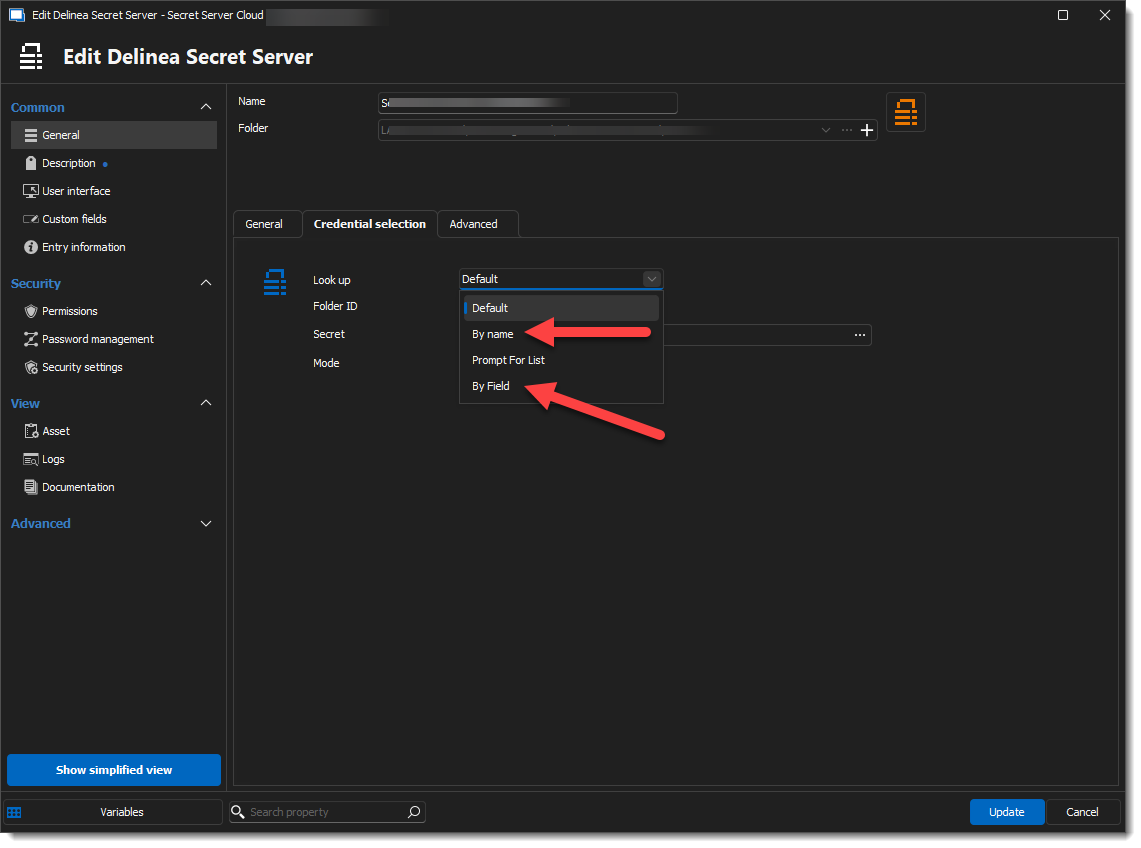
I have seen some cases where the "Name" field would not be mapped, and one had to specify the "By Field" Methos, document the field, and the value to look for.
To address @Andreas' comment about "Naming - still not showing the same on all places," It's intended to have a "Linked (user vault)" when the Connection entry is in the User Vault as well.
The Find By Name (User Vault) option is available when the Connection entry is in a regular vault.
I hope this helps!
Best regards,
Alex Belisle
05c73716-9c0f-4fbc-8bbd-71820d98e5d7.png
Why is this done different to the way it works with creds?
Why can't i point it to a specific entry in secret server?
These may seem daft questions as my knowledge on private keys is almost nil!
Thanks
Iain
Version 2026.2.13.0 64-bit
Data Source SQL
Hello,
Basically I have the same question as iaing80 - why can´t this be the way it works with username and password?!?
- If I have the private key in a local file, I am able to select it and it is used automatically.
=> Having private keys in a local file is not very secure...
- If I embed the private key in the SSH Shell entry, it is used automatically.
=> This would be better, but we have Delinea Secret Server to store credentials. I don´t need two places to store credentials...
- If I select "User Vault", I am able to select the Delinea Secret Server Vault, but I am unable pre-select private key and store it with the entry.
=> Usability! If you have to login to many linux servers a day and every time you have to select the right private key is annoying...
- If I select "Find by name (user vault)" - what should that do? Am I expected to store each private key as a "SSH key (Credentials)" entry?
=> Again - Usability!
Please - extend the functionality of RDM to treat Delinea Secret Server SSH keys the way "normal" username/password entries are handled. It should be possible to do the same thing as if I use username and password.
And about:
---cut---
To address @Andreas' comment about "Naming - still not showing the same on all places," It's intended to have a "Linked (user vault)" when the Connection entry is in the User Vault as well.
The Find By Name (User Vault) option is available when the Connection entry is in a regular vault.
---cut---
I really don´t know what you want to explain to me. Our users only have a User Vault. We don´t use Shared Vault in RDM.
What I wanted to tell you is, that at Credentials it is named "Linked (user vault)", and a few lines later it is called "User Vault" and I can again select the same Vault from my user vault.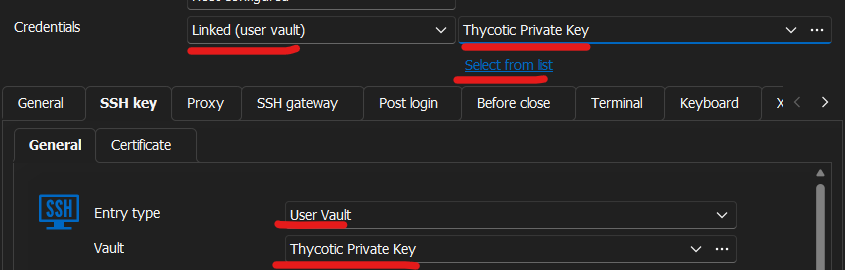
What we want is, that the "Select from list" link from the Credentials section is added to the SSH General Tab to be able to have the same functionality we are used to with private keys also.
Brgds Andreas
de754b0e-7874-4593-a02d-6e05961b9c42.png
OK so having now tested this with one of the Linux team, we have more questions!
How have others got this setup with multiple sessions?
Currently we would have to create multiple entries for secret server with each one having the "Name" of the private key then linking that to the session..
We tried using a variable &HOST& to see if that would pull through.
Please can this be looked into so it works like credentials do?
Thanks
Iain
Version 2026.2.13.0 64-bit
Data Source SQL
Hi,
I've went through the thread trying to understand. I just want to confirm with you both. What you want is for the Private Key settings, found in the SSH Key section of a SSH terminal entry, to allow linking to a Secret Server credential, configured with the "Prompt with list" option, and allowing to select the specific account (i.e. key) from there? So this:
But in the following pane:
Is that it?
If so, this is indeed not supported as of now. The reason for this is quite simple. This panel was not created with this in mind. In RDM there is a Private Key credential entry, and this was pretty much only designed with this one around, and for it there is no reason for a specific "Select from List" option since the Private Key entry does not refer to a "list" of keys, but only one individual one.
That being said, I don't think it's entirely impossible to do what you want a do (assuming I'm understanding right). The Secret Server credential entry, configured with Private Key mode, and with Prompt with List can be set as the Linked credential of SSH terminal entry (see my first screenshot). When launching this session, the Private Key will be resolved and set to the SSH terminal entry. Like this:
Please, do tell me if I misunderstood something.
Best regards,
Xavier Fortin
Screenshot 2024-07-25 at 4.26.26 PM.png
Screenshot 2024-07-25 at 3.42.14 PM.png
Screenshot 2024-07-25 at 3.41.00 PM.png
Xavier,
Correct you have hit the nail on the head!
So as I test I set up a session as normal. Set the credentials to point to the secret server vault (for Keys) which is now configure to prompt for list.
Found the entry for the private key.
Just like your third screenshot and then I launched the session and was expecting to log straight in..
However, I get this?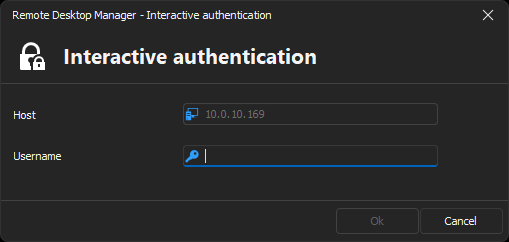
Thanks
Iain
Version 2026.2.13.0 64-bit
Data Source SQL
be5520da-ca60-494c-9d8d-daed3c4054e1.png
I believe even with using a public/private key you have to pass through the username. In Thycotic I am using the secret type 'Unix Account (SSH)'. That hold both the account username and my private key. With this I get a direct login.
I'll have the Linux bod test it out, thanks for the tip.
Thanks
Iain
Version 2026.2.13.0 64-bit
Data Source SQL
I've went through the thread trying to understand. I just want to confirm with you both. What you want is for the Private Key settings, found in the SSH Key section of a SSH terminal entry, to allow linking to a Secret Server credential, configured with the "Prompt with list" option, and allowing to select the specific account (i.e. key) from there? So this:
But in the following pane:
Is that it?
YES - this is exactly what we want! And I need it for "Linked (user vault)" as we only use user vault. We don´t use a shared vault.
If so, this is indeed not supported as of now. The reason for this is quite simple. This panel was not created with this in mind. In RDM there is a Private Key credential entry, and this was pretty much only designed with this one around, and for it there is no reason for a specific "Select from List" option since the Private Key entry does not refer to a "list" of keys, but only one individual one.
That being said, I don't think it's entirely impossible to do what you want a do (assuming I'm understanding right). The Secret Server credential entry, configured with Private Key mode, and with Prompt with List can be set as the Linked credential of SSH terminal entry (see my first screenshot). When launching this session, the Private Key will be resolved and set to the SSH terminal entry. Like this:
We tried this - this is not working. We are prompted for username and password. But what you wrote above is exactly the solution we need!
Brgds Andreas
I concur with Andreas, this is what we are after and currently does not work.
Edit: appears it does work after an username is entered. We are NOT required to enter a password.
Thanks
Iain
Version 2026.2.13.0 64-bit
Data Source SQL
Yeah, didn't think of the credentials themselves. Technically, a username, domain and password can be set into the Delinea Secret Server credential entry when the Private Key mode is chosen. But I'm assuming here that since you configure it with Prompt with List, you intend on using a single credential entry on multiple sessions, an so a single set of Username/Password won't do? In which case, I have no solution at the moment.
Deas, for your point specifically, we can't add a Linked (user vault) there. Since this is (I'm assuming) a shared vault, every Delinea Secret Server credential entries in each of your user's user vault would have it's own unique ID, there is no way to select an entry individual entry like that in a shared session (the entry ID from your user vault, would not match any other user vault). This is the reason there usually is a Find by name (user vault) instead, which allows a more generic means of finding a credential entry in user vaults. Unfortunately, has you've already noticed, it's impossible to "Select from list" with this mode.
Usually, for those kind of case, you would need your users to override the settings (right click -> Edit -> User specific settings...) and from this, a User vault mode would be available (since this would be their own specific override):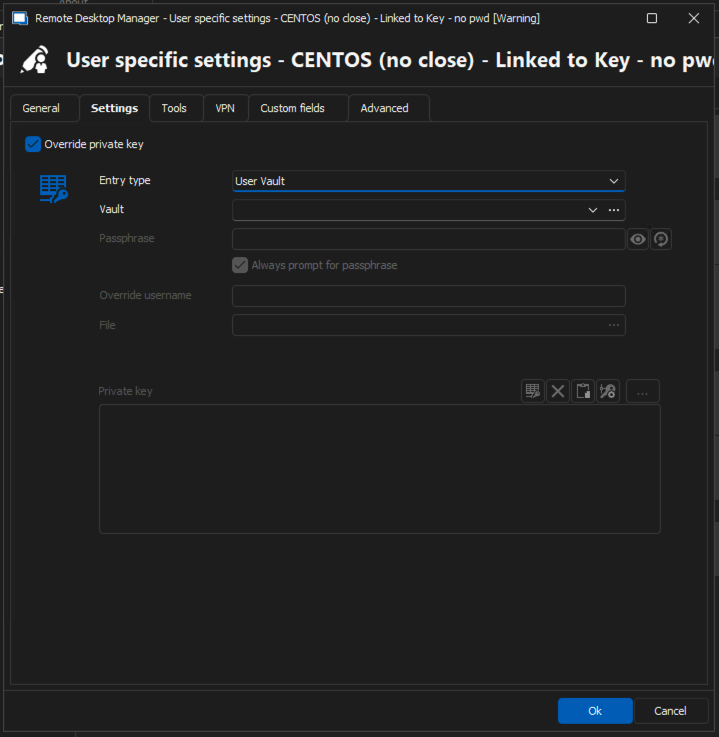
For the idea of supporting third party Private Key credential entry in the private key settings of a SSH with the Prompt with List option, I'll check with the RDM Windows team if that is something that could be looked into.
Best regards,
Xavier Fortin
92bc77b9-4eb9-42cd-92f4-1689536b7325.png
a single set of Username/Password won't do?
We have to comply with a security policy that forces us to use private key instead of username and password with linux systems...
Deas, for your point specifically, we can't add a Linked (user vault) there. Since this is (I'm assuming) a shared vault, every Delinea Secret Server credential entries in each of your user's user vault would have it's own unique ID, there is no way to select an entry individual entry like that in a shared session (the entry ID from your user vault, would not match any other user vault). This is the reason there usually is a Find by name (user vault) instead, which allows a more generic means of finding a credential entry in user vaults. Unfortunately, has you've already noticed, it's impossible to "Select from list" with this mode.
I think you got me wrong - every user has his OWN Linked (user vault) in RDM. There is nothing shared between our users! Everybody has his own login for RDM and also for Delinea Secret Server. There are shared credentials in Secret Server where multiple admins have access to, but everybody has his own personalized secrets for each system and daily operations. We don´t want to have a single private key to be used on all systems - this is not how we work. There is a secured "emergency user" on each system, but for daily operations each linux admin has his own personalized private key for each server. If a secret single is compromised, only this single secret and the associated system is lost, and not all servers. And personalized users so we know who did what.
For the idea of supporting third party Private Key credential entry in the private key settings of a SSH with the Prompt with List option, I'll check with the RDM Windows team if that is something that could be looked into.
Thanks for that - they implemented Linked (user vault) with SQL in RDP Gateway for me (Credential "Linked (User Vaul)" not available for RDP Gateway Credentials (devolutions.net)), I am sure they can do this! :) And adding it to SSH is hopefully the same task they had to do with RDP Gateway...
Brgds Andreas
Hi Deas!
I think you got me wrong - every user has his OWN Linked (user vault) in RDM. There is nothing shared between our users! Everybody has his own login for RDM and also for Delinea Secret Server. There are shared credentials in Secret Server where multiple admins have access to, but everybody has his own personalized secrets for each system and daily operations. We don´t want to have a single private key to be used on all systems - this is not how we work. There is a secured "emergency user" on each system, but for daily operations each linux admin has his own personalized private key for each server. If a secret single is compromised, only this single secret and the associated system is lost, and not all servers. And personalized users so we know who did what.
Hmmm... I'm still not certain I understand your issue then. You mean that your sessions will end up directly in the user vault of each of your users? Because, if it is so, in my case, the "User Vault" mode is available:
Am I misunderstanding something?
Best regards,
Xavier Fortin
Screenshot 2024-07-29 at 8.18.54 AM.png
Hello Xavier,
I think now we are on the same page!
If I configure it as you showed it is basically working, but for every connect a prompt comes up and our linux admins have to browse to their own corresponding ssh key. If they connect to e.g. 50 servers a day, they have to browse 50 times. This takes some time and is annoying if you have to do the same task 50 times a day.
I've went through the thread trying to understand. I just want to confirm with you both. What you want is for the Private Key settings, found in the SSH Key section of a SSH terminal entry, to allow linking to a Secret Server credential, configured with the "Prompt with list" option, and allowing to select the specific account (i.e. key) from there? So this:
But in the ssh key pane.

So what you have written a few days ago is what we want - the functionality from the credentials pane where we are able to link a Secret Server credential, but for the ssh key pane.
Brgds Andreas
Hi Deas,
Good then, I've opened a ticket for this and it was attributed to the relevant team.
We'll notify this thread when this is done.
Best regards,
Xavier Fortin
Thanks a lot for your help! :)
Brgds Andreas
Hi Deas,
Good then, I've opened a ticket for this and it was attributed to the relevant team.
We'll notify this thread when this is done.
Best regards,
Awesome newsa!! thanks
Thanks
Iain
Version 2026.2.13.0 64-bit
Data Source SQL
Hello Xavier,
Do you have an update for us to which release this is targeted? My linux guys asked me today...
Thanks a lot for your help!
Brgds Andreas
Hello Andreas,
The feature to be able to select a specific secret server key from the "Select from list" label has been added to our current planning for the version 2025.1 of RDM.
The 2025.1 version of RDM is estimated to be released around the start of February 2025.
Best Regards,
Michaël Beaudin
Hello Michael,
thanks for the info!
Brgds Andreas
Hi Andreas,
Just to be sure, when you say your Linux guys asked for this, do you mean users of RDM Linux?
Best regards,
Xavier Fortin
Hello Xavier,
no - our Linux admins which use on their Windows 10 workstation RDM to connect to their Linux servers. They changed from username/password to SSH key for remote login. They had to do this to comply with an internal security policy. Login with password is only possible on the local server console.
Brgds Andreas
Perfect! I just wanted to make sure so that our priority where set properly 😅
Best regards,
Xavier Fortin