Credential "Linked (User Vaul)" not available for RDP Gateway Credentials
Credential "Linked (User Vaul)" not available for RDP Gateway Credentials

Hello,
When I need to use a RDP Gateway, the Secret Server Credentials are not available.
Login Credentials - here I can select the User Vault and choose the account from Secret Server:
RDP Gateway - here I don´t have the User Vault:
As the credentials for my RDP Gateway are also stored in Secret Server, I need to select it there which is not possible at the moment.
Before I used a SQLite database where it was possible and I think also with a shared MS SQL vault it would be possible. But we only have personal secrets thats why we have no shared vault in our MS SQL database.
Edit: I just noticed, my exported and imported connections from my SQLite database work with a RDP Gateway configuration. So when I open them I get connected. But when I want to edit it, I am unable to change the RDP user from Secret Server.
Edit 2: I forgot to mention my RDM version - it is 2022.3.23.
Brgds Andreas
All Comments (44)
Hello,
For the Linked (User Vault) credential option, it's only available when the session entry is located in the user vault. As the SQLite data source has no user vault or shared vault, then it use the current vault to fetch the credentials (Linked (Vault)).
When we try to do this on a session entry located in a shared vault, if we want to bind a credential from the user vault, then we can only use the Find by name (User Vault).
The method here is to use the Find by name (User Vault) and put your secret server entry name in the Search string property.
Let me know if that helps.
Best regards,
Érica Poirier
Hello,
I am not sure if I understand what you mean or if you got what I mean... ;)
In my User Vault I have a Delinea Secret Server entry which points to our Secret Server. In my User Vault I am able to select this entry for each of my connections and choose a secret that is stored in Secret Server.
But for the RDP Gateway Credentials, I am not able to select this Secret Serer entry.
And I don´t think that what you suggest would work as the secret I am searching for is NOT in my User Vault, it is stored in Secret Server and i need to select the link to it as it is possible with the credentials for logging in.
Brgds Andreas
Hello Andreas,
Thank you for your feedback. I totally understood what you meant but I should have added a sample of what you can do to get it working. I'm sorry that I didn't provide a proper example.
That's true, you cannot select, from a drop down list, the Thycotic (Secret Server) entry you have in your user vault.
But here is what you can do in the RDP Gateway Credentials dialog to use your Thycotic entry located in your user vault.
- Set the Credentials parameter to Find by name (User Vault).
- Manually set the Search string parameter with the Secret Server credential entry name. It is important to literally type the credential entry's name in that field like this screen capture.

Using this method, this should work properly.
Let me know if that helps.
Best regards,
Érica Poirier
Hello Erica,
OK - now I got you and it is - at least - working, but I have to select the RDP Gateway credential every time RDM is started and for every connection. :(
Why did your developers change this and in which version?!? Why is it not possible to use the same worfklow as with every other credential dialogue?
PLEASE, PLEASE, PLEASE bring back the workflow as it was a few versions before. It makes absolutely no sense for me to select the RDP credential with the dialogue above, but the RDP Gateway credential from the same vault uses a different workflow and has to be selected every time. We use RDM to make life easier and not to have some extra work. A collueague who did not upgrade to 2022.3.x so far still has the old behaviour and this is how it should work, also with a user vault!
This is how it looks on my pc now with a downgrade to 2022.2.29 and a export of my old SQLite database:
I am NOT prompted and the RDP Gateway credential is selected automatically. Unfortunately maybe due to my downgrade I only see a blue "X" instead of the used credential. I am also not able to select a new secret. When I export such an "old" RDP connection, the xml looks like this:
<RDP>
<GatewayCredentialConnectionID>eea3c618-1b85-49e4-9536-54cd49dcb6b7</GatewayCredentialConnectionID>
<GatewayCredentialDynamicDescription>rdp user</GatewayCredentialDynamicDescription>
<GatewayCredentialDynamicValue>552</GatewayCredentialDynamicValue>
<GatewayHostname>RDPGW</GatewayHostname>
<GatewayProfileUsageMethod>Explicit</GatewayProfileUsageMethod>
<GatewaySelection>SpecificGateway</GatewaySelection>
<GatewayUsageMethod>ModeDirect</GatewayUsageMethod>
</RDP>
With the latest version ant the prompt it looks like this:
<RDP>
<GatewayCredentialConnectionID>88E4BE76-4C5B-4694-AA9C-D53B7E0FE0DC</GatewayCredentialConnectionID>
<GatewayHostname>RDPGW</GatewayHostname>
<GatewayPrivateVaultSearchString>Thycotic</GatewayPrivateVaultSearchString>
<GatewayProfileUsageMethod>Explicit</GatewayProfileUsageMethod>
<GatewaySelection>SpecificGateway</GatewaySelection>
<GatewayUsageMethod>ModeDirect</GatewayUsageMethod>
</RDP>
And this is how it looks on my colleagues pc who never upgraded to 2022.3.x:
He is on 2022.2.29 and is still able to select the vault and select the RDP Gateway secret from the secret server vault.
This is how it should be, also with a user vault!
Brgds Andreas
Hi Andreas,
Thank you for your feedback.
For your information, this configuration to use a user vault credential entry using the Find by name (User vault) option in the RDP Gateway Credentials dialog prompt hasn't been modified for quite a long time in Advanced Data Sources like a SQL Server data source. Here is a screen capture of the really old RDM version 14.1.3.
To avoid any confusion, are you still working on a SQLite data source or you are now connected on a SQL Server data source?
From what you have described, if your colleague is using a SQLite data source, then you won't be able to replicate this behaviour in a user vault of any advanced data source.
I think that would be easier to troubleshoot this problem in a remote session. I will open a ticket on your behalf and send you a link to book the support session.
Best regards,
Érica Poirier
Hello Erica,
I play around a lot at the moment and I tried it with SQLite and MS SQL datasources. I also tried now different versions starting with 2020.2.20 (where the Secret Server connection is not working) up to 2021.2.29 (where Secret Server startet to work). I really don´t know why, but the behaviour is unfortunately identical and as you described.
But look at the last screenshot I posted - this is RDM 2022.2.29 from a colleague. He has a MS SQL database connection since a few years and is able to do what I am missing! Why?!? The only difference is, that he uses the shared default vault and not the user vault. But even when I enable a shared vault for my user and add a new credential entry and test connection to it, it does not work as it worked before.
I can add him to the support session on monday so you can see yourself.
In the meantime - would it be possible for you to talk to your developers? We want to use RDM to simlify life. If I am able to preselect the credential used for login via RDP, why is it no longer possible to do the same for the RDP Gateway? And the proof that it was possible is that on my SQLite export I get this:
<RDP>
<GatewayCredentialConnectionID>eea3c618-1b85-49e4-9536-54cd49dcb6b7</GatewayCredentialConnectionID>
<GatewayCredentialDynamicDescription>rdp user</GatewayCredentialDynamicDescription>
<GatewayCredentialDynamicValue>552</GatewayCredentialDynamicValue>
<GatewayHostname>RDPGW</GatewayHostname>
<GatewayProfileUsageMethod>Explicit</GatewayProfileUsageMethod>
<GatewaySelection>SpecificGateway</GatewaySelection>
<GatewayUsageMethod>ModeDirect</GatewayUsageMethod>
</RDP>
The two red lines are the name of my Secret Server RDP Gateway login and the ID this credential has in the Secret Server database.
If I import this connection in an SQLite database and open it, it just works. I am no longer able to change it, but it is working.
Brgds Andreas
Hello,
Hello Andreas,
We will have a look on everything during the call.
For sure, the behaviour in the shared vault will always be different than in the user vault.
About the Secret Server credential in your SQLite Data source, please try to add the Secret Server (Delinea) licence key in Administration - Licenses. That should solve the issue.
Best regards,
Érica Poirier
Hi Andreas,
A ticket has been submitted to our engineering team to add the Linked (User Vault) option in the RDP Gateway Credentials dialog. Once an update will be available, we will post it here.
Thank you for your patience.
Best regards,
Érica Poirier
Hello Erica,
Thank you very much for your help!!!!
Brgds Andreas
Hello Erica,
regarding all the open items I currently have - this (missing "Linked (User Vault)" option in the RDP Gateway Credentials dialog) is the one that hurts me most! If this could be implemented as soon as possible, it would be perfect and help me to go on with my migration of all users to a SQL database.
Brgds Andreas
Hello Andreas,
For your information, the internal ticket is in Development stage.
As soon as this option will be added, we will update this ticket.
Thank you for your patience.
Best regards,
Érica Poirier
Hello Erica,
I just saw that 2023.1 is out now and installed it - but "Linked (User Vault)" is still not available. As I already said, this one hurts me most - please make your development to add this as soon as possible. I need to go on with the SQL database implementation but without this feature I am stuck and my boss gets more and more impatient why I don´t proceed...
Thanks a lot for your help!
Brgds Andreas
Hello Andreas,
As of now, there have been no updates on this matter. However, I have reached out to our engineering team to inquire about any progress. I'll make sure to keep you informed as soon as we have any new information.
Thank you for your patience.
Best regards,
Érica Poirier
Hello Erica,
thanks a lot - please urge them to implement this. I am stuck with my migration without this possibility...
Sure it is just a very small thing but if you need to work via an RDP Gateway the whole day and you have to select the RDP Gateway credential on every connection you open, it is very annoying and not a step forward compared to the SQLite database they use now.
I also take a beta version and test the implementation in my environment, if necessary.
Brgds Andreas
Hello Andreas,
The Linked (User Vault) for the RD Gateway will be available in RDM 2023.2 version that will be release on June 20th. We will release a beta version few days before the release date.
Once you will try it, please let us know if it's working as expected.
Best regards,
Érica Poirier
Hello Erica,
this are great news! :) How can I get this beta version? I would also take something before beta, if I could help...
Brgds Andreas
Hello Andreas,
The beta version will be announced in the following forum's section. Please subscribe to this section to receive notifications for new threads.
https://forum.devolutions.net/forums/14/remote-desktop-manager--beta
Best regards,
Érica Poirier
Hello Erica,
Thanks - "New topics" is enough? I think there will be a new topic for the new version...
Brgds Andreas
Hello Andreas,
That's right, 'New Topics' is the correct subscription to select to be notified once a new thread will be added in this section.
Best regards,
Érica Poirier
Hello Erica,
I just installed the beta and basically the "Linked (User Vault)" is available.
But it is still not possible to SAVE the credential used for the RDP gateway! Now I still get a prompt on every connect and need to select the entry from secret server. This is makes no difference in handling between the behavior before and the new functionality.
This is what you implemented: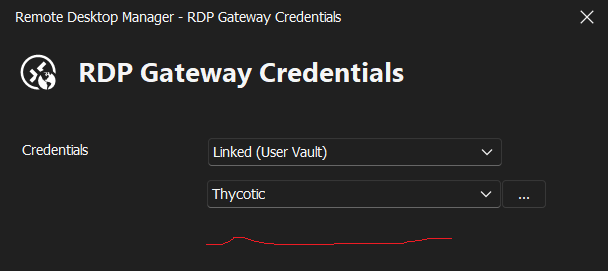
This is what I need: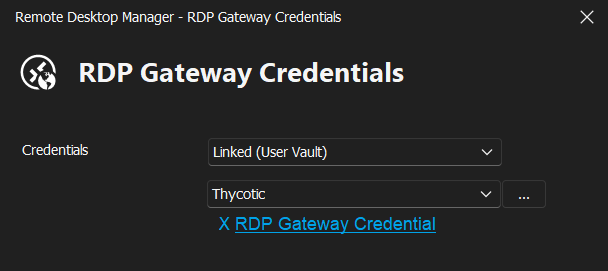
I really hope, that this is just a mistake in the beta...
Brgds Andreas
f3e75b92-dc7f-45f9-a17c-6347d69f5b07.png
9122fc94-8568-4995-84fc-937146e36a0f.png
Hello Andreas,
A ticket has been submitted to our engineering team to fix this.
Once an update will be available, we will post it here.
Thank you for your patience.
Best regards,
Érica Poirier
Hello Erica,
Thanks for your help!
Did they misunderstood what the goal should be or is it really just a mistake?
Brgds Andreas
Hello Andreas,
They may have found another bug in this dialog regarding the Thycotic integration as it's working in their environment.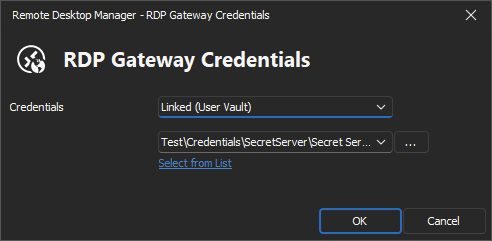
How is your Thycotic entry configured in the Credetial Selection tab? This will help them to fix the issue they think is occurring in your environment.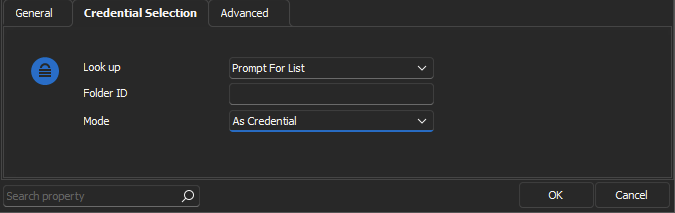
Thank you for your collaboration.
Best regards,
Érica Poirier
007fda5a-e115-4bf3-9719-23821856dd54.png
d5e999bf-34fa-46fa-8861-bb9335b40509.png
Hello Erica,
My config is basically as yours: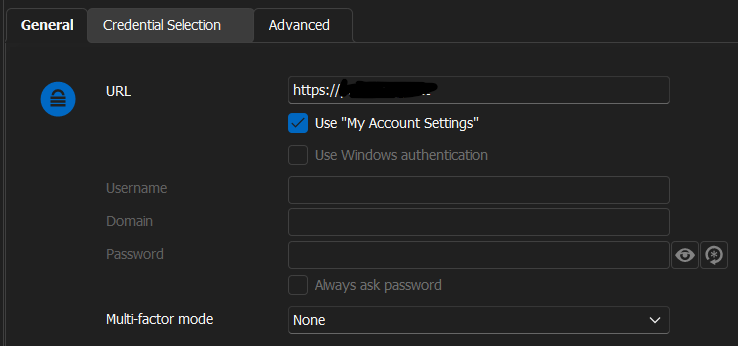
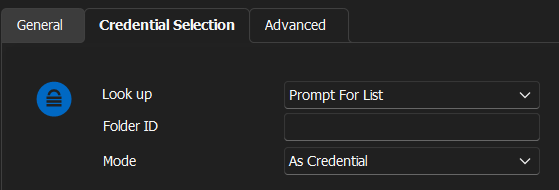
I have my Secret Server in the root. I moved it now to a sub folder, but this did not change anything.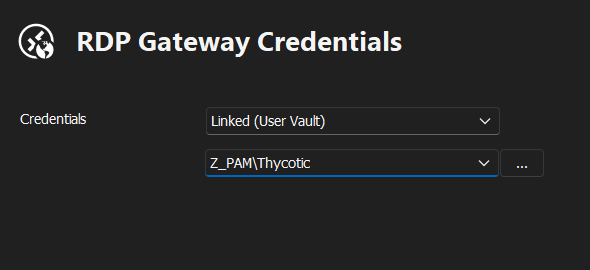
Brgds Andreas
c174e42c-7f3f-4bc3-8aa5-10dd137c0114.png
df1afda1-b3f8-4223-bcdb-ebe2b1415383.png
8b1ef15b-69de-4c0a-ba27-d7c536e304d8.png
Hello Andreas,
Thank you for your feedback.
As this doesn't help for the developers, is it possible for you to create a new Thycotic entry and try with it if it behaves the same for you?
It that still doesn't help, could you please export your Thycotic entry in a .RDM file, replace all sensitive data in the file and send it to me in a private message?
Best regards,
Érica Poirier
Hello Erica,
I added now a second Secret Server entry named "PAM" with the exact same config and now I have the link! I deleted the PAM entry and I still have the link with my old "Thycotic" entry, also after a restart of RDM.
Whatever it was, I am no longer able to reproduce it.
Do you have any idea what could have caused this? I have this "Thycotic" entry now since about 1 year, maybe because of the config I had before with the prompt? Maybe you could reproduce it this way...
Brgds Andreas
Hello Andreas,
Thank you for your feedback.
Because of this old entry that has been created a while ago, maybe some information in its XML code was corrupted. That's why I have asked you if it was possible to export this entry and send it to us for analysis.
But now, since you have created a new entry and that helped to fix the issue, you should no longer experience it.
Thank you for your collaboration.
Best regards,
Érica Poirier
Hello Erica,
if you like, I could restore the database to a new one and export the Secret Server entry, if the problem exists also with the restored one.
Brgds Andreas
Hello Andreas,
That's very kind of you to offer to restore your database.
It looks like a bad data migration may have occurred on your Thycotic entry along the RDM updates.
I have asked the engineering team and they don't think this will be helpful as only created another Thycotic entry solved the UI display problem.
Best regards,
Érica Poirier
Hello Erica,
OK - thanks for this info!
Brgds Andreas
Hello Erica,
sorry - the problem is back... :(
I was not able to modify all entries the last time and wanted to change another today. But I am again unable to select the Secret Server secret as no link is provided. Where I changed it the last time it is still working, but it looks like this: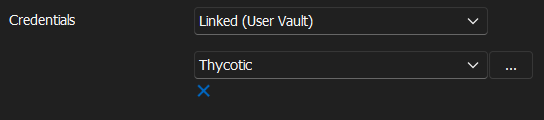
I also deleted my "Thycotic" entry once and created a new one. Also with this new one I am unable to select a secret for the RDP gateway.
I also exported a working connection and there it looks like this:
<RDP>
<GatewayCredentialDynamicDescription>RDPGW\rdpuser</GatewayCredentialDynamicDescription>
<GatewayCredentialDynamicValue>123</GatewayCredentialDynamicValue>
<GatewayHostname>RDPGW</GatewayHostname>
<GatewayProfileUsageMethod>Explicit</GatewayProfileUsageMethod>
<GatewaySelection>SpecificGateway</GatewaySelection>
<GatewayUsageMethod>ModeDirect</GatewayUsageMethod>
</RDP>
On a entry I create now the two "GatewayCredentialDynamic..." lines are missing.
I also tried it with a complete new user that never had anything in RDM. Created the Secret Server entry, created a RDP entry and on the RDP gateway Tab I am unable to select a secret.
I use 2023.2.7.
Brgds Andreas
291c2384-1452-474a-824a-1c11362ba14f.png
Hello Andreas,
RDM is now out of beta, could you please try with the 2023.2.9 version and see if the issue persists?
I just created a new entry on my end and it seems to work as expected: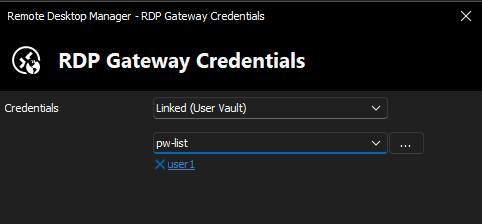
Best regards,
Richard Boisvert
294c3dc7-8999-4b5f-b38a-77ee3593b812.png
Hello Richard,
unfortunately not - not with my user and not with my admin user (who has an empty database) and where I just created the Secret Server and RDP entry. So it can´t be something that was migrated from version to version that causes this.
There I was able to set it with the first beta after I added a new Secret Server entry - this "trick" is no longer working: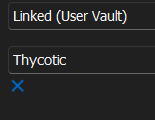
This is how it looks now when I want to change an existing entry or when I try to add a new entry with RDP gateway: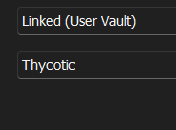
Do you want a remote session? Anything I could do/test? Should I try it with a portable installation?
Brgds Andreas
e7c50d4d-a64f-44db-826c-6f4af495b630.png
0c65635d-9ee6-4395-8323-e022c81e294b.png
Hello Andreas,
Just to confirm if the issue is on the entry in the user vault, could you try to set the RDP Gateway in a shared vault, set the credentials to "Find by name (User Vault)" and check if you have the same behavior.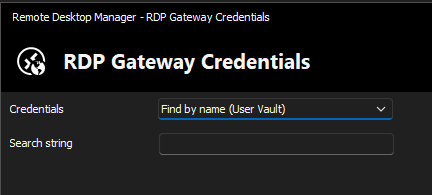
If that works, it will indicate the issue is only when the RDP session is in the user vault directly. Thank you for your assistance!
Best regards,
Richard Boisvert
21e26d78-c3fa-42d3-888f-8edb601d28c0.png
Hello Richard,
I am not sure what you want to prove with this test. Because I don´t want to search for an entry, I want to save the RDP Gateway credential like all other credentials. Because when I setup the RDP Gateway in shared vault and use "Find by name (User Vault)", I am prompted for a credential. This is working, but not what I want.
I added now a Secret Server entry in my shared vault, added a RDP entry and the RDP Gateway is also not working there.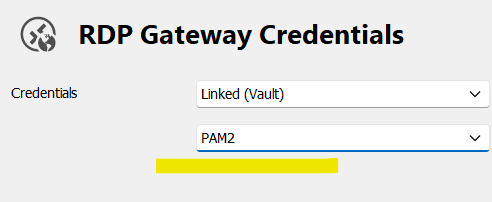
So I think you have a general problem with this...
Edit:
I exported now an entry where
<GatewayCredentialDynamicDescription>server\user</GatewayCredentialDynamicDescription>
<GatewayCredentialDynamicValue>123</GatewayCredentialDynamicValue>
is present.
When I import it again, this is lost and the gui shows this: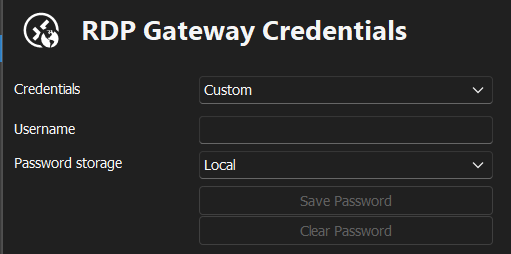
But when I export this new imported entry again, the two lines are in the export!!!
Something is really weired here...
Brgds Andreas
d19b431f-98c9-483a-9af3-b21b1456bf74.png
8f94d124-0918-4b1a-87e9-a8a9d41b325e.png
Hello Andreas,
Thank you for the tests. The issue seems to be only when the entry is in the user vault since everything works as expected when it is in a shared vault.
I will open a new internal case with the engineering team so they can investigate the issue.
Best regards,
Richard Boisvert
Hello Richard,
sorry - no, it is for me now also not working in the shared vault as written above! the grey screenshot is from an accout with a shared vault.
I can select shared vault in personal vault and vice versa - it does not work in any direction.
Brgds Andreas
Hello Andreas,
Sorry, I will modify the engineering ticket. Both Linked (Vault) and Linked (User Vault) do not allow the selection of the account in a list, but the Find by Name (User Vault) works as expected.
Best regards,
Richard Boisvert
Hello Andreas,
The engineering team think they found the problem, it seems to be caused by the HDPI. For the moment, you can reduce the scaling in Windows display settings to see the field.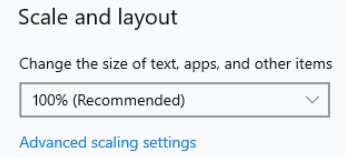
A permanent fix will be available in a minor release of RDM, we will let you know once it is available.
Best regards,
Richard Boisvert
420616d0-7462-4754-88f9-7f2a7072b15d.png
Hello,
We've found and fixed the issue (The one related to the scaling of the screen that hid some controls), this should be available for 2023.2.13.
Regards,
Jafran Majeau
Hello,
I just reproduced it now. If I set HDPI to 100% and restart RDM (this is also important), I see the link and I am able to select a secret.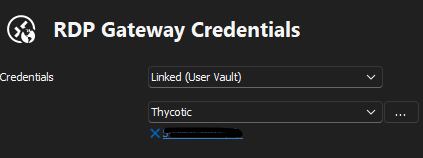
EDIT: just downloaded 2023.2.14 Beta and with this version it is finally working also with HDPI of 125%! :)
when will it be final?
Brgds Andreas
a990fa2b-6c92-46d9-af43-3e099d361770.png
Hello Andreas,
Glad it works with the fix in version 2023.2.14. This version is an official release. It's no longer on the beta side!
Let us know if you have further questions about it.
Best regards,
Érica Poirier
Dear Erica,
I think I am happy now and can proceed to migrate my users to the shared database! :)
Brgds Andreas
Hello Andreas,
That is a wonderful news.
Don't hesitate to contact us if you have further questions about our products!
Best regards,
Érica Poirier