Azure virtual desktop infrastructure

Hello,
new company for me: we use Azure VD infrastructure, and currently I am testing RDM (free) here, if I can implement it (for myself and possibly for others, paid version of course).
Currently this is being used to connect to the VD machines:
Connect to Azure Virtual Desktop with the Remote Desktop client for Windows - Azure Virtual Desktop | Microsoft Learn
Can I access these machines from RDM directly, can this be set up?
Thank you
Srdan
All Comments (7)
Hello Srdan,
Thank you for contacting us on that matter.
Could you tell me if you are using MSTSC to access those VD?
Could you tell me if you could create an RDP session and connect to it?
Could you tell me if you want to connect to Azure SQL as a data source?
If you are looking to test it, you could ask for a trial.
This is some link related to Azure in RDM:
https://docs.devolutions.net/rdm/windows/data-sources/data-sources-types/advanced-data-sources/microsoft-azure-sql/enable-azure-active-directory-authentication/configure-admin/
https://docs.devolutions.net/rdm/windows/data-sources/data-sources-types/advanced-data-sources/microsoft-azure-sql/enable-azure-active-directory-authentication/configure-user/
https://docs.devolutions.net/rdm/windows/data-sources/data-sources-types/advanced-data-sources/microsoft-azure-sql/configure/
Best regards,
Patrick Ouimet
Hello,
the reason why I posted that link, is exactly the reason that you know what I am using right now: it is not MSTSC, but Microsoft's own application called "Remote Desktop" (msrdcw.exe) - today is the first time I've seen it. When I subscribe in the app to one of my Azure accounts, I then see our host pools in Azure (which are resource groups, with one or more machines).
Currently I can't answer the question about the RDP connection, because I don't think that would even make any sense: my computer (or the application) must check which VM in the host pool is free, and then connect to that machine.
And no, not connecting to Azure SQL as data source, RDM is completely fresh installed on my local computer.
Does an enterprise version offer more in terms of Azure integration? Because according to your comparison, there is no difference there.
I don't need an enterprise test, if it doesn't provide me with more functionality where I need it. As I said: I am a long RDM user, some 10 years now, but did very little in connection with Azure. The new company I am in is using mRemoteNG, but have already asked me if I would take a look at implementation of RDM into our systems and will be looking to equip a team of 10 people - if we can implement it meaningfully.
About your links: I am not trying to create an Azure SQL database source.
Interesting thing would be to replace the aforementioned application, and have these connections open in RDM - however, that is what I am asking of you to answer for me ;-)
Thank you
Srdan
Hello Srdan,
If you are using MSRDC, could you try to configure your RDP session with this version?
It could be found under the entry properties -> General -> Advanced -> RDP Version -> MSRDC.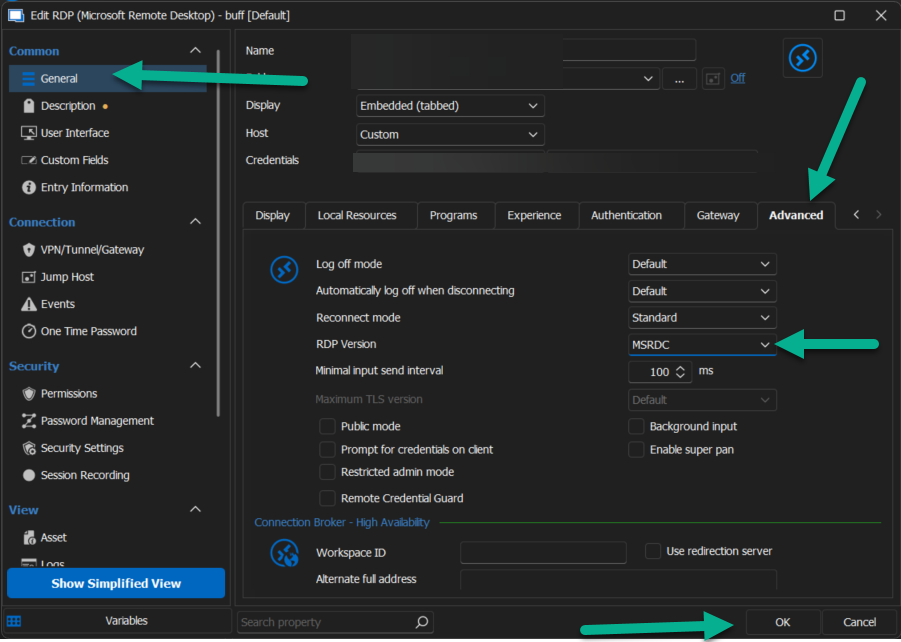
Let us know if this works for you.
Best regards,
Patrick Ouimet
msrdc.png
It is not possible to connect to virtual desktops without Azure authentification. So if I type the name of the host into MSTSC, nothing happens, since there is no Azure authentification. And entering it into usual username/domain/password fields in RDM does not work. RDP version (set to MSRDC) itself doesn't change anything.
This thread can be closed, I found exactly what I was looking for:
Azure WVD client (devolutions.net)
Unfortunately, not a solution. But at least it was attempted to implement.
Hello Srdan,
I sent you an email with a link to schedule a meeting and have a look at this.
Best regards,
Patrick Ouimet
Hello Patrick,
I don't believe this will be necessary. Besides, I am updating the other topic that deals with this issue.
Thank you
Srdan