autologin issue only in edge

we are using quite a lot of virtualmin servers (based on webmin). The login form is quite simple from the outside and autologin works fine in chrome. When we switched to embedded edge we found this strange problem:
- start session
- autologin happens
- error:
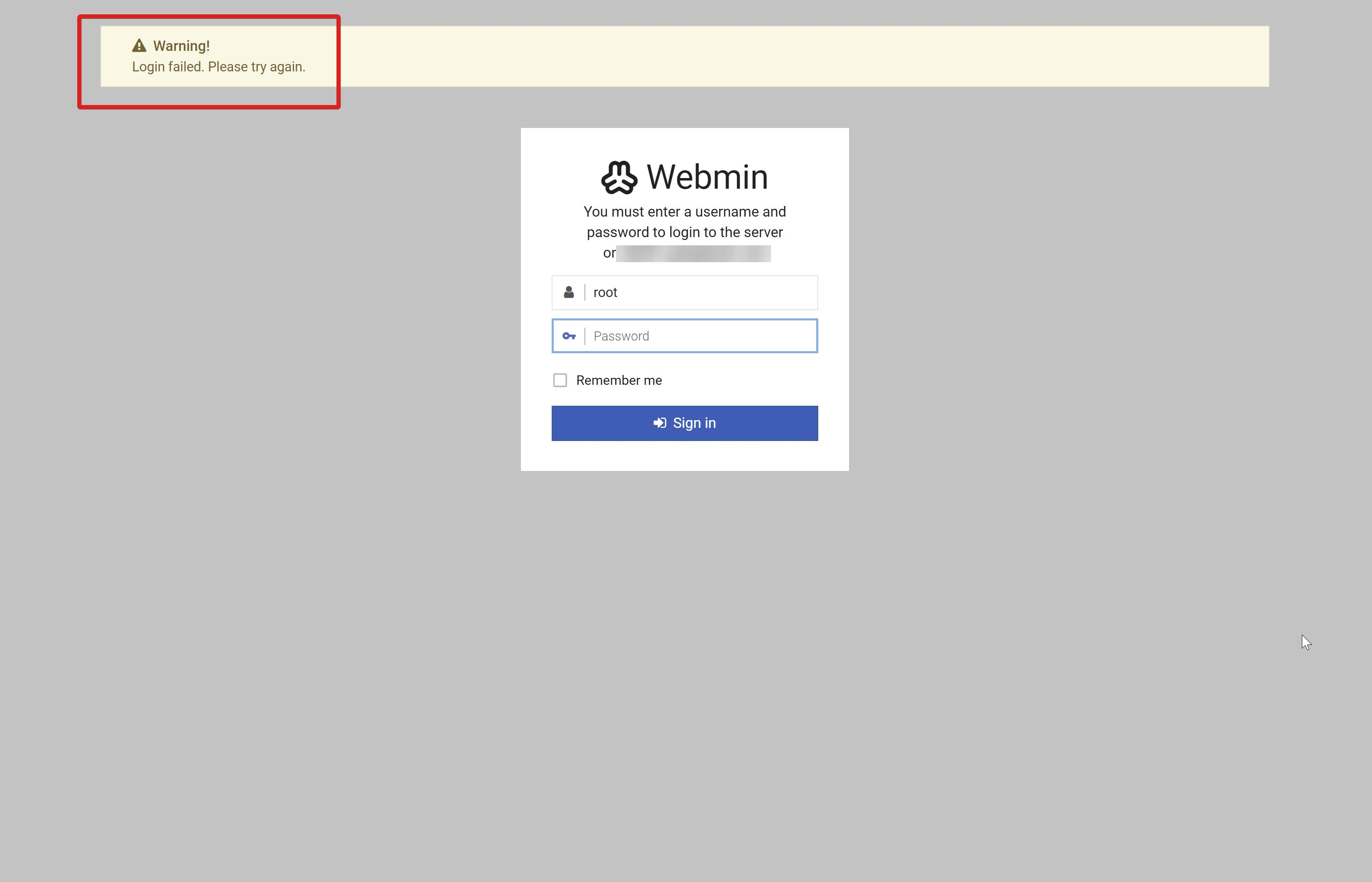
- re-enter the same password, login works
We already increased the autofill delay which didn't help. The autologin itself is happening with [ENTER] and we suspect, that this part of the autologin process happens too fast, but we don't know how to delay it?
I can give you access to a server if you like, send me a PM or email.
04500484-b40f-484b-9646-fd4838f103d8.png
All Comments (15)
Hello,
Could you activate the Incognito Mode? You can find this option in the properties of the entry, under the "More Settings" tab. We want to see whether the problem persists when this mode is on.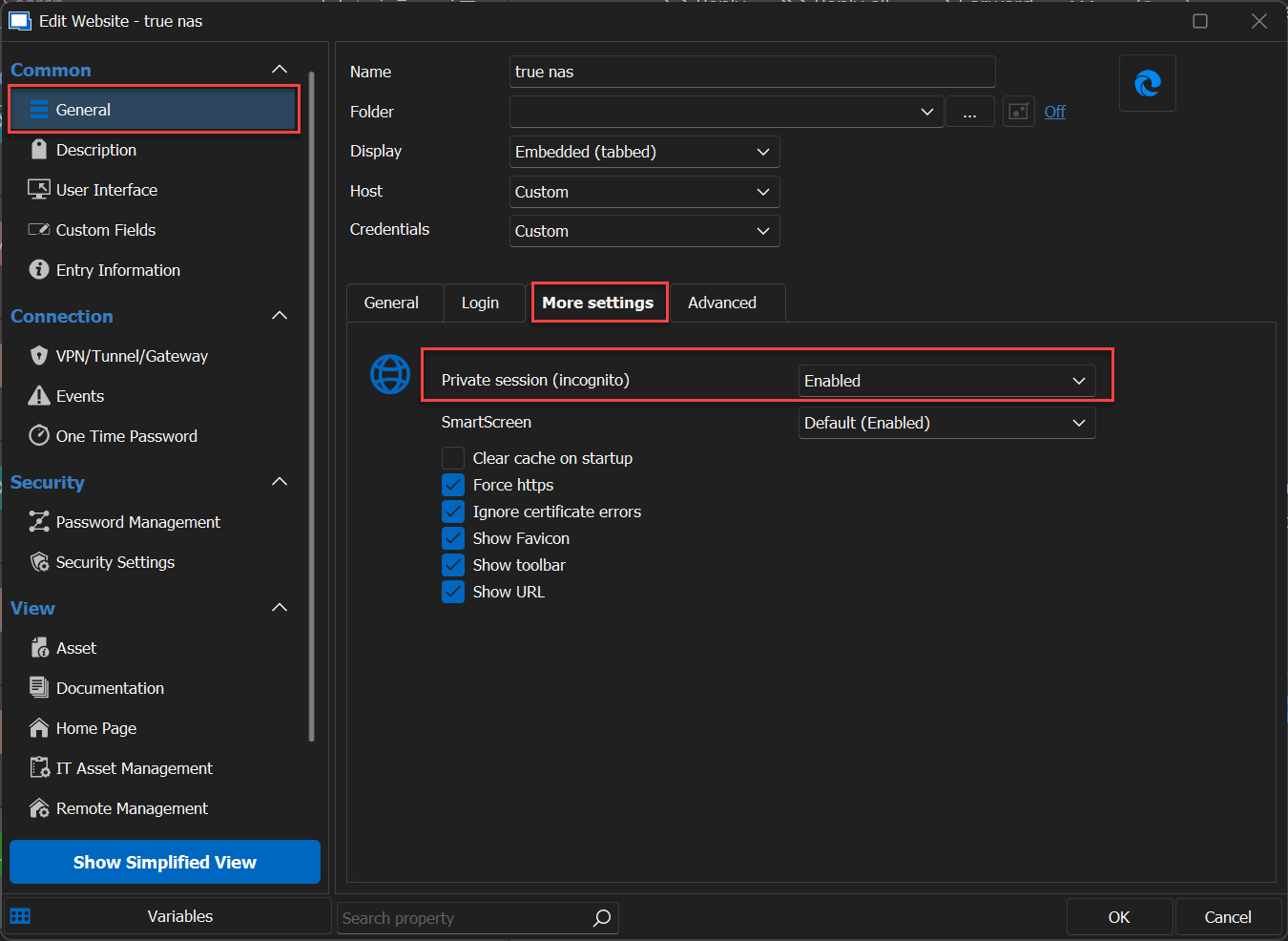
Best regard
Carl Marien
image1.png
surprisingly, it doesn't seem to happen in incognito mode!
Hello,
It's encouraging to hear that the issue you were experiencing doesn't persist in Incognito Mode.
This implies that clearing your cache and browsing history in the Edge browser will most likely resolve the problem.
Should you need further assistance or if you have any questions, please do not hesitate to let me know.
Best regards,
Carl Marien
that's not that encouraging ;) as it doesn't work even with non-incognito mode and "clear cache" checked (which wouldn't be a real solution anyways)..
Hello,
would you be willing to delete the cache and history directly from the Edge browser and then retry to reconnect via RDM? If the issue does reoccur, Could I ask you to access the website directly through the Edge browser without using RDM and check if the issue persists?
I've noticed some hesitation on your part to delete your cache and browsing history. Could you please share your concerns or any specific reasons for your reluctance? Your feedback would be immensely helpful for us to better understand your situation and offer an optimal solution.
Best regard
Carl Marien
re my not want to delete the cache see here: https://forum.devolutions.net/topics/39722/some-private-web-sessions-edge-seem-to-share-cookiescache we have finally a finegrained multisession system with webview2 in RDM and some sessions share a cache, so, I would rather not always remove the cache. but anyways, it doesn't fix the problem.
the problem doesn't happen in the edge browser (without RDM) as it doesn't have the autofill functionality of RDM.
and I don't really know what you mean here, as RDM uses webview2 and not the edge browser:
would you be willing to delete the cache and history directly from the Edge browser and then retry to reconnect via RDM?
Hello,
Considering our previous discussions, it seems the most effective workaround for your current situation might be to use the embedded version of the Chrome browser, which you mentioned was functioning correctly in your initial post. Alternatively, you could persist with using Edge-embedded Incognito mode.
Best regard
Carl Marien
if you read the previous discussion, you (and I a bit) worked hard to get the embedded edge workable, so I don't switch back to chrome. so, maybe you can escalate this to dev?
@perler
Can you PM me the server info so that I can test/fix this for you.
Best regards,
Stéfane Lavergne
I think I have a viable solution, I will need to discuss with the team on Monday before I can finalize it.
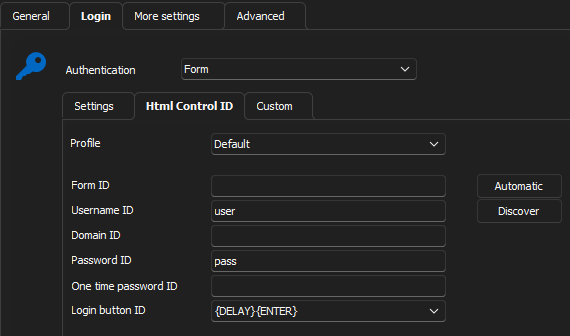
The change would allow you to use typing macros in Login button ID field.
In this case I sent {DELAY}{ENTER} and all works as expected. This is not a huge leap since when you use [ENTER] we already translates this to the typing macro {ENTER}. What I don't want to do is change the behaviour of [ENTER]. So by introducing the full support of typing macros with this field you would be able to do things like {DELAY}{DELAY}{ENTER} or even {DELAY}{TAB}{ENTER} the possibilities are endless.
I will get back to you on Monday, have a good weekend.
Best regards,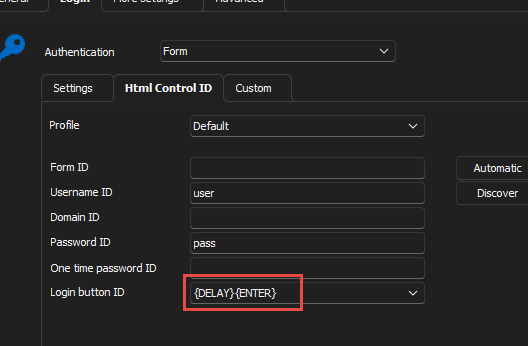
Stéfane Lavergne
baeb98c5-c83c-46e2-a30e-4ccb0969451d.png
Fixed, the change will be available in the .22 release.
Best regards,
Stéfane Lavergne
I am on 2023.2.22.0 64-bit and the issue is still there..
Have you tried with the following settings?
You might need to adjust the Autofill delay to say 1000ms (maybe more) and add an extra {DELAY} in the Login button ID.
Just tested with v2023.2.22 (installed not a dev build) and it worked, but only on the second start of the session. I then created an entry with 2000ms autofill delay and restarted RDM and it worked on first start of the session. You will need to tweak the numbers that best work for you.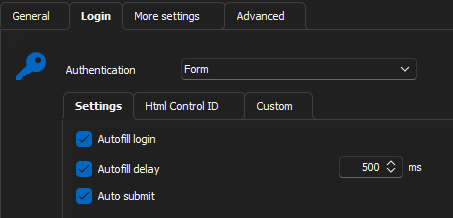
Stéfane Lavergne
fe0947da-e0a8-450d-a767-bcd18c61c74b.png
fae3dd23-1ea9-4fc6-9807-468a3ddc3127.png
yes! this did the trick (and 500ms was enough in my case). BTW, the default syntax seems to be [ENTER], not {ENTER} - is it the same?
and another point, this autofill/autologin feature is such a powerful timesaver and is hidden behind "HTML control ID" which I am sure a huge part of first time users just overlook. maybe it should be renamed and a moved to the first tab?
Excellent news.
yes! this did the trick (and 500ms was enough in my case). BTW, the default syntax seems to be [ENTER], not {ENTER} - is it the same?
Yes, [ENTER] it is actually the same but if you want to add a {DELAY}, you must use {ENTER} or it will not work. Thinking about it, I will the change the value in drop down to {ENTER}.
and another point, this autofill/autologin feature is such a powerful timesaver and is hidden behind "HTML control ID" which I am sure a huge part of first time users just overlook. maybe it should be renamed and a moved to the first tab?
Good point, I will ask the UI team to have a look. UI is not one of my forte.
Best regards,
Stéfane Lavergne