File - Options - Security

Hello,
can someone please enrich the information provided here:
Security - Devolutions
with some more information?
"Application Security (local)" - what does "Use this computer´s credentials as application password" mean? Do I have to enter anything when selecting this? What and how does this secure the application?
"Multi-factor Authentication" - how does this add an additional layer of security? Is this configured locally or in the SQL database? The question behind is how "easy" someone can remove it...
"Offline Security" - you can secure the offline access with a password. Does this also encrypt the offline cache?
"Other", "Enable DPAPI cryptography on local files" - what are those "local files"? Is the offline cache then also encrypted with DPAPI?
Thanks a lot for your help!
Brgds Andreas
All Comments (30)
Hello Andreas,
Here are the answers to your questions:
- "Use this computer's credentials as application password" will use the connected user's credentials and there is nothing else to do for this setting.
- "Multi-factor Authentication" will set an MFA locally only. To enforce this setting, you could enable the Force multi-factor authentication on the application login Policies combined with the Disable the menu File – Options policy to prevent a user to deactivate these settings.
- "Offline Security" with a password, this will encrypt the offline cache.
- DPAPI will encrypt the configuration files that contain sensitive information and also the offline cache files.
Let us know if you have further questions about this.
Best regards,
Érica Poirier
Hello Erica,
Thanks for your quick reply! :)
- But it says "computer´s credentials", not user credential! When I select it I have the choice to set "Force currently logged on username and domain". What does this setting make secure?
- Disabling the File/Options menu completely is a bad idea I think as there are many settings that are helpful. At the moment I don´t have the need to enable MFA, but if we will need to discuss this again.
- And when I switch offline, I have to enter this password?
- So if I enable "Offline Security" and DPAPI, the offline cache is encrypted twice? Of how is this handled? What if I use a default.cfg - is this file then also encrypted?
Brgds Andreas
Hello Andreas,
1- I'll get back to you about this one.
2- You can also enable the MFA at the data source level in Administration - System Settings - Application Specific - Applications instead of using the policies to block the Options.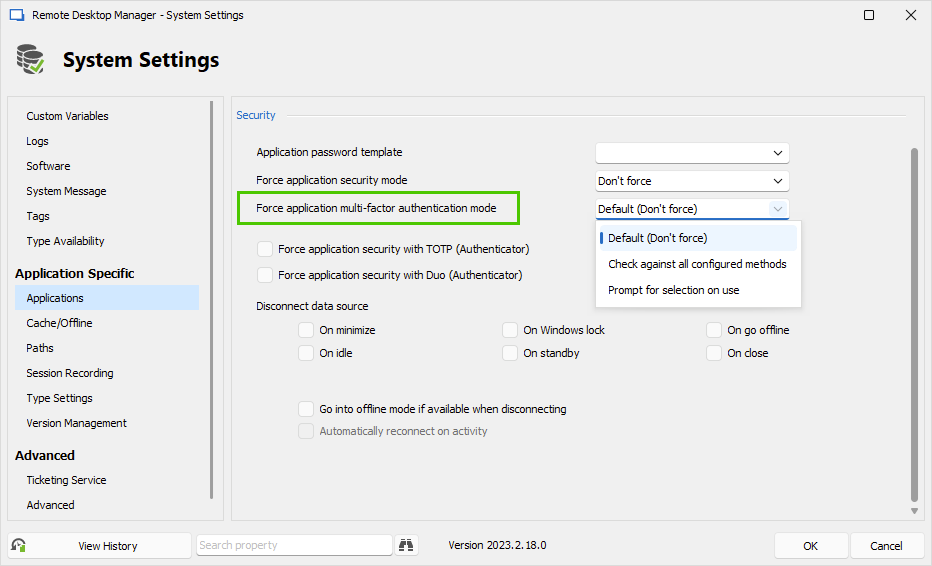
3- We need to provide the password when switching to Offline mode only if we enable the Prompt for offline access option.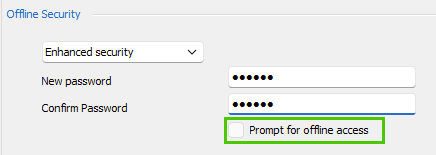
4- Enabling both methods will encrypt the files twice as DPAPI is a separated encryption step.
Best regards,
Érica Poirier
a61419bd-4a8c-4461-8f18-85cab1a9dd33.png
7e7d124d-2a7b-4b33-97de-d92c37d8052c.png
Hello,
1- Even if it's 'computer's credentials', those are credentials allowed on the machine. In other words, any users that already connected on the machine (local accounts or domain accounts). If we enable the Force currently logged on username and domain, then we cannot update the username box and it is fixed to the current logged domain user account on this computer. This feature force the user to type back his password to open RDM.
Let us know if you have further questions about it.
Best regards,
Érica Poirier
Hello,
Can I set "Enable DPAPI cryptography on local files" by GPO or System Settings? I was unable to find this...
Brgds Andreas
Hello Andreas,
You are right, there is no method to set the "Enable DPAPI cryptography on local files" by GPO or from the System Settings.
I have submitted a ticket to the engineering team to be able to set this option by GPO. Once it will be available, we will let you know.
Best regards,
Érica Poirier
Hello Erica,
Thank you very much! :)
Are there any other security settings you would recommend to apply?
Brgds Andreas
Hello Andreas,
Other than what we have on the documentation or in the RDM configuration, there is no other settings that could improve the security of RDM.
Let us know if you have further questions about this.
Best regards,
Érica Poirier
Hello Erica,
I enabled "Enable DPAPI cryptography on local files" now on my local machine to see what it does - basically nothing as I did not notice anything... ;)
Which files exactly have been encrypted? Can I check this to see the difference?
Thanks a lot for your help!
Brgds Andreas
Hello Andreas,
The option will encrypt the offline files and some of the RDM's configuration files which are the following.
- RemoteDesktopManager.enc
- RemoteDesktopManager.enb
- RemoteDesktopManager.stv
- RemoteDesktopManager.stb
Let us know if you have further questions about this.
Best regards,
Érica Poirier
Hello Erica,
Thanks - and how do I "see" that they are encrypted with DPAPI? Is there any indication or how can I check that it is working...?
Brgds Andreas
Hello Andreas,
When the DPAPI encryption option is enabled, you should see a small lock overlay icon on the file like this.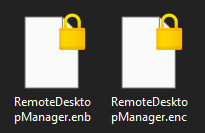
Best regards,
Érica Poirier
30a7e62a-3881-4bfd-af1c-426e916cdbc2.png
Hello Erica,
Thanks - and when I don´t see the lock?
This is my config: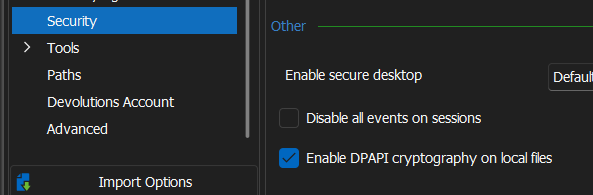
And this the folder C:\Users\...\AppData\Local\Devolutions\RemoteDesktopManager - the 4 marked Files don´t have a lock overlay...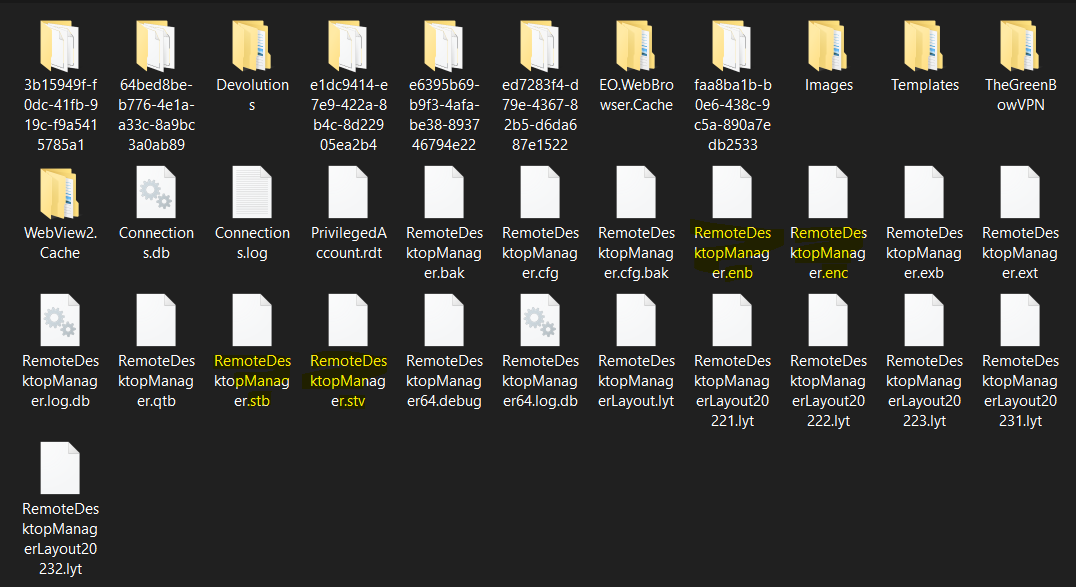
Brgds Andreas
311ddc1f-2011-483c-9b53-70e1822a7c68.png
d35c81aa-ff83-41c7-aff4-66ad04ab9f23.png
Hello Andreas,
Thank you for your feedback.
Once you've enabled the option, did you restart RDM?
Could you please verify the content of the offline .mcdf2 file if you see DPAPIENC in the file?
About the files that should have the lock overlay icon, I will verify with our developer team and will get back to you.
Best regards,
Érica Poirier
Hello Erica,
Yes, I restart RDM every day.
In the offline.mcdf2 I see DPAPIENC, so this file is encrypted. Thanks for the info!
About the other files - when I compare them to ones I have on my admin pc, they look different. So it could be that they are also encrypted. But they don´t include the word DPAPIENC.
Admin: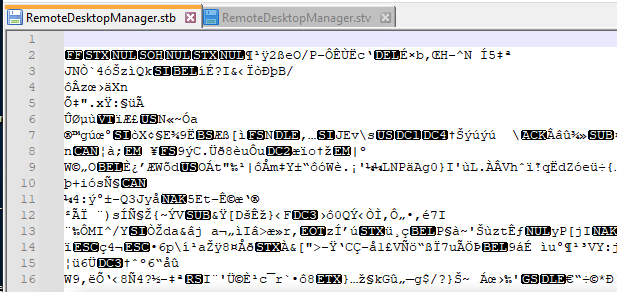
My User: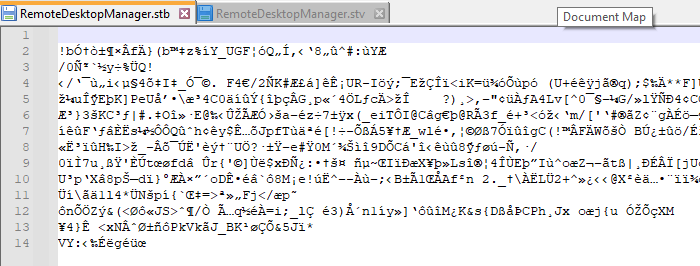
Brgds Andreas
974378c0-05f7-483f-8a34-fc502043a10c.png
95059cc1-360c-4e6b-9b68-9ed50867e988.png
Hello Andreas,
Thank you for your feedback.
The way the encryption is made, you won't find the DPAPIENC in the other files than the offline files.
I will get back to you about the lock overlay icon on the 4 files that should be encrypted with DPAPI.
Best regards,
Érica Poirier
Hello Andreas,
Thank you for your patience.
Usually, it should encrypt the 4 files automatically. As you can see in the attached short video, on enabling the DPAPI encryption option, the lock appears on the .enc file. Then while closing RDM, the other 3 files get the lock overlay icon.
Have you tried to disable the option, restart RDM, and try again?
Let us know if that helps.
Best regards,
Érica Poirier
2023-09-11_10-57-45.mp4
Hello Erica,
I tried this now at least 5 times - the files change, when I enable/disable DPAPI encryption, but no lock overlay is done...
Sorry to bother you with that little thing, but security is critical if you work with credentials and this must work and we also need a way to confirm it.
Just to make sure - we still use Windows 10...
Another thing I noticed - when I disable DPAPI encryption, the offline.mcdf2 file still has the "...DPAPI..." entry. So it seems that this file is still DPAPI encrypted, even if I disable it.
Brgds Andreas
Hello Andreas,
That is quite strange that the lock overlay isn't visible. We will get back to you about this.
Do you still see the DPAPI in the files when you clear the offline files and do a force refresh of the data source?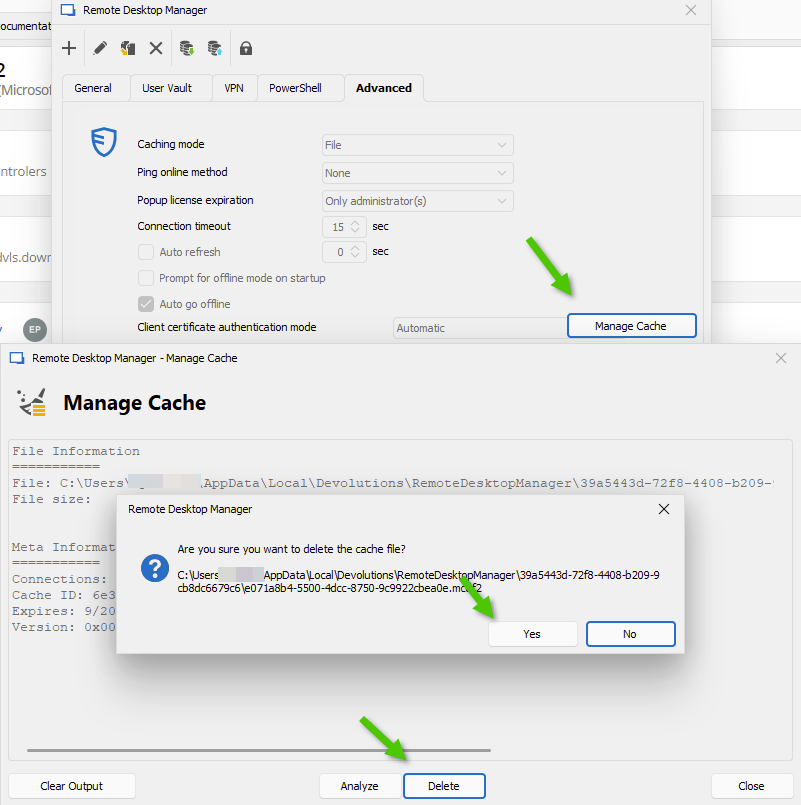
Best regards,
Érica Poirier
256b3be7-c2bf-44a9-b3c3-1644dccf9e7c.png
Hello Erica,
yes - I still see DPAPIENC in the offline cache file (offline.mcdf2) after deleting the cache. Is this file always DPAPI encrypted, regardless of this setting?
Brgds Andreas
Hello Andreas,
Thank you for your feedback and for being so patient.
In the meantime, I have submitted a ticket to our QA team to verify if they reproduce the behavior you get.
Best regards,
Érica Poirier
Hello Andreas,
About the overlay icon, I have a silly but interesting question.
Are you using RDM on a Windows Home edition?
Best regards,
Érica Poirier
Hello Erica,
no - Windows 10 Enterprise domain joined.
Brgds Andreas
Hello Andreas,
Thank you for your feedback.
Do you know if the DPAPI encryption is disabled on your computer, as explained in the following article?
https://www.top-password.com/blog/disable-efs-encrypting-file-system-in-windows/
Best regards,
Érica Poirier
Hello Erica,
it is german, but EFS is enabled according to the first screenshot from your link: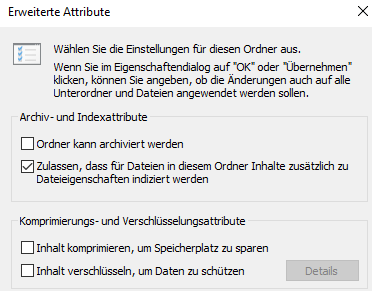
also no GPO is set and the registry keys don´t exist or are set to 0.
Brgds Andreas
7dae5791-8ce2-4b20-a637-234a58206415.png
Hell Andreas,
Thank you for your feedback.
Are the files that should have a lock overlay icon encrypted with the Encrypt contents to secure data option enabled?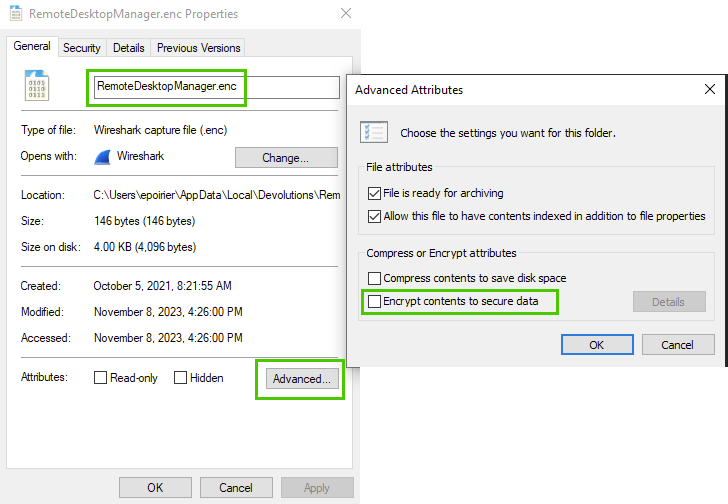
Best regards,
Érica Poirier
5df4fc5b-bd33-4c35-8e63-769e44029f27.png
Hello Erica,
something must have changed with 2023.3.24 or a version before. It is working now! :)
As soon as I set it, those 4 files get the lock icon, and as soon as I remove the setting, the lock icon is removed.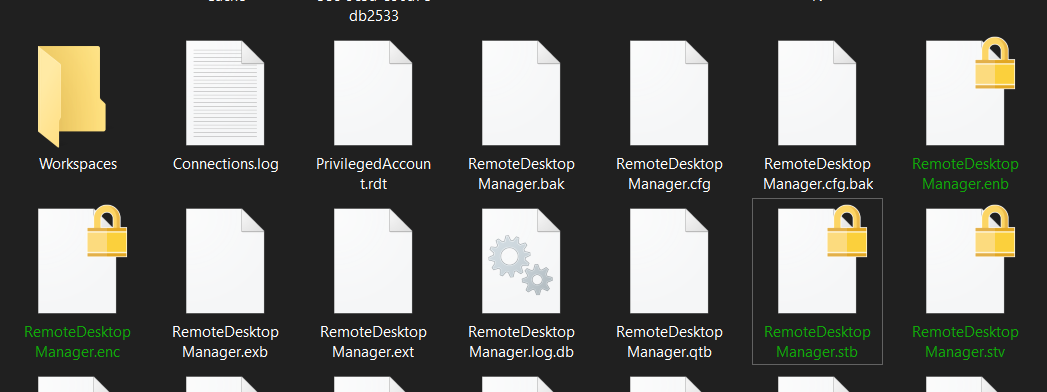
When I enable this setting, my users won´t recognize it. Correct? RDM will silently and without prompting them enable it and that´s it. Right?
Brgds Andreas
5b5bfd15-e8e7-4819-b74b-e0b8ee442cb7.png
Hello Andreas,
Thank you for your feedback. That's good news it works now!
That's right, if you enable that option globally, the users won't notice it in RDM.
Best regards,
Érica Poirier
Hello Erica,
Thanks for the info and your help!
Brgds Andreas
Hello Andreas,
This feature as been completed internally and will be available starting from the version 2024.2.2.0 of RDM.
Regards.