RDM Open with Template not inheriting variable from host

Just upgraded to 2023.2.14.0 64-bit and Open with a Template is no longer working. Have several embedded putty ssh hosts and the templates are just an alternate login method using embedded telnet but $HOST$ is not populating from any host entry that is trying to be opened with a template. Have tried several different settings changes and refreshes but continue to get an error stating "The host is required". Have 4 of these templates that worked without issue on previous versions of RDM. 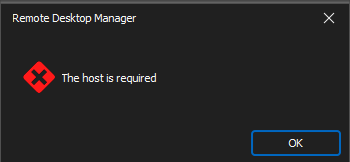
ad338ee3-5c8f-4dc6-906b-7ebf5ad866a3.png
All Comments (11)
Seems like there is same problem passing variable to external application just posted in Winscp Template not working in 2023.2.14.0 64 bit windows 10 (devolutions.net)
It seems a similar problem we have spotted just yesterday (same RDM version of the original poster), in that we created a sub-connection of s a Web site to access the underlying appliance but via SSH. Even tho' on the Web site's entry dashboard the value for the Host is clearly and correctly computed (from the site's URL), in the sub-connection inheriting the host or even using $PARENT_HOST$ lends to the same error message reported.
Hello,
Thank you for contacting us on that matter.
I'm sorry to hear that you're experiencing issues with Variables. I will open a case for the engineering department regarding this issue to get it resolved as soon as possible.
In the meantime, could you provide the application logs? This will help us identify the root cause of the problem and find a solution.
Also, I suggest trying a portable version of RDM version 2023.2.9.0. To do so, please follow the steps below:
1. Close RDM.
2. Download the .zip file from the following URL: https://cdn.devolutions.net/download/Devolutions.RemoteDesktopManager.Bin.2023.2.9.0.zip
3. Create a new folder on your Desktop.
4. Extract the content of the .zip file into the folder you just created.
5. Go to the folder where you extracted the files and run remotedesktopmanager.exe.
6. Connect to your data source.
I hope this helps and please let me know if you have any further questions or concerns.
Best regards,
Patrick Ouimet
Patrick,
With the debug at the high settings, 65407 there doesn't seem to be anything showing up related to attempts to use the templates in the Application Logs. 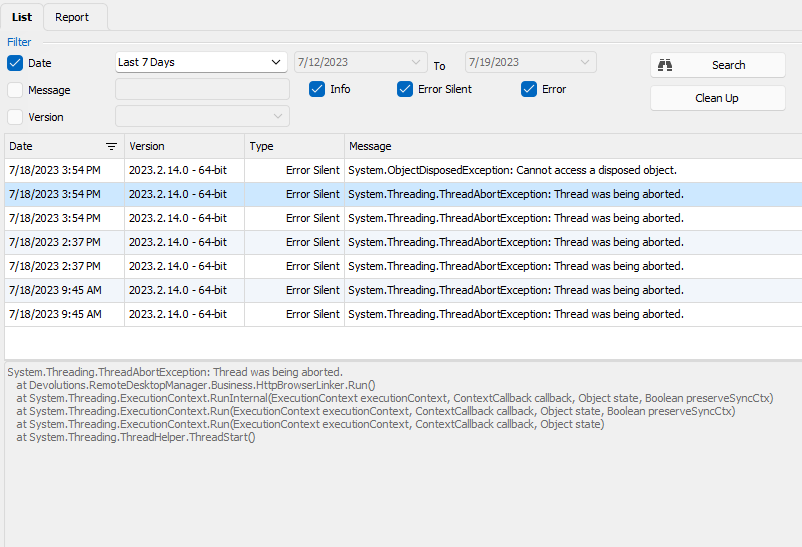
[7/18/2023 9:45:23 AM - 2023.2.14.0 - 64-bit] Error Silent: System.Threading.ThreadAbortException: Thread was being aborted.
   at System.Threading.WaitHandle.WaitOneNative(SafeHandle waitableSafeHandle, UInt32 millisecondsTimeout, Boolean hasThreadAffinity, Boolean exitContext)
   at System.Threading.WaitHandle.InternalWaitOne(SafeHandle waitableSafeHandle, Int64 millisecondsTimeout, Boolean hasThreadAffinity, Boolean exitContext)
   at System.Threading.WaitHandle.WaitOne(Int32 millisecondsTimeout, Boolean exitContext)
   at Devolutions.RemoteDesktopManager.Business.HttpBrowserLinker.Run()
[7/18/2023 9:45:23 AM - 2023.2.14.0 - 64-bit] Error Silent: System.Threading.ThreadAbortException: Thread was being aborted.
   at Devolutions.RemoteDesktopManager.Business.HttpBrowserLinker.Run()
   at System.Threading.ExecutionContext.RunInternal(ExecutionContext executionContext, ContextCallback callback, Object state, Boolean preserveSyncCtx)
   at System.Threading.ExecutionContext.Run(ExecutionContext executionContext, ContextCallback callback, Object state, Boolean preserveSyncCtx)
   at System.Threading.ExecutionContext.Run(ExecutionContext executionContext, ContextCallback callback, Object state)
   at System.Threading.ThreadHelper.ThreadStart()
[7/18/2023 2:37:07 PM - 2023.2.14.0 - 64-bit] Error Silent: System.Threading.ThreadAbortException: Thread was being aborted.
   at System.Runtime.InteropServices.SafeHandle.InternalDispose()
   at System.Threading.WaitHandle.Dispose(Boolean explicitDisposing)
   at System.Threading.WaitHandle.Close()
   at Devolutions.RemoteDesktopManager.Business.HttpBrowserLinker.Run()
[7/18/2023 2:37:07 PM - 2023.2.14.0 - 64-bit] Error Silent: System.Threading.ThreadAbortException: Thread was being aborted.
   at Devolutions.RemoteDesktopManager.Business.HttpBrowserLinker.Run()
   at System.Threading.ExecutionContext.RunInternal(ExecutionContext executionContext, ContextCallback callback, Object state, Boolean preserveSyncCtx)
   at System.Threading.ExecutionContext.Run(ExecutionContext executionContext, ContextCallback callback, Object state, Boolean preserveSyncCtx)
   at System.Threading.ExecutionContext.Run(ExecutionContext executionContext, ContextCallback callback, Object state)
   at System.Threading.ThreadHelper.ThreadStart()
[7/18/2023 3:54:36 PM - 2023.2.14.0 - 64-bit] Error Silent: System.Threading.ThreadAbortException: Thread was being aborted.
   at System.Runtime.InteropServices.SafeHandle.InternalDispose()
   at System.Threading.WaitHandle.Dispose(Boolean explicitDisposing)
   at System.Threading.WaitHandle.Close()
   at Devolutions.RemoteDesktopManager.Business.HttpBrowserLinker.Run()
[7/18/2023 3:54:36 PM - 2023.2.14.0 - 64-bit] Error Silent: System.Threading.ThreadAbortException: Thread was being aborted.
   at Devolutions.RemoteDesktopManager.Business.HttpBrowserLinker.Run()
   at System.Threading.ExecutionContext.RunInternal(ExecutionContext executionContext, ContextCallback callback, Object state, Boolean preserveSyncCtx)
   at System.Threading.ExecutionContext.Run(ExecutionContext executionContext, ContextCallback callback, Object state, Boolean preserveSyncCtx)
   at System.Threading.ExecutionContext.Run(ExecutionContext executionContext, ContextCallback callback, Object state)
   at System.Threading.ThreadHelper.ThreadStart()
[7/18/2023 3:54:44 PM - 2023.2.14.0 - 64-bit] Error Silent: System.ObjectDisposedException: Cannot access a disposed object.
Object name: 'FrmMainDocumentManager'.
   at System.Windows.Forms.Control.MarshaledInvoke(Control caller, Delegate method, Object[] args, Boolean synchronous)
   at System.Windows.Forms.Control.Invoke(Delegate method, Object[] args)
   at Devolutions.RemoteDesktopManager.Managers.ThreadManager.Invoke(MethodInvoker invoker, Boolean force)
ccae24b4-ea63-491e-9a01-0487623fb5eb.png
Hello,
Thank you for your patience.
Could you update your RDM to version 2023.2.18.0 and check if your issue still occurs?
Best regards,
Patrick Ouimet
Hello,
Thank you for your patience.
Could you update your RDM to version 2023.2.18.0 and check if your issue still occurs?
Best regards,
Yes just completed the update and the issue is persisting and still there isn't anything appearing within the logs to indicate root cause of the abend.
[7/21/2023 12:12:56 PM]DEBUG TreeView.LoadConnectionList...
[7/21/2023 12:12:56 PM]DEBUG     BeginUpdate...
[7/21/2023 12:12:56 PM]DEBUG         LoadConnectionInTreeNode : 7292 ms
[7/21/2023 12:12:56 PM]DEBUG         PreCreateGroups : 5 ms - Run count : 1
[7/21/2023 12:12:56 PM]DEBUG     BeginUpdate : 7309 ms
[7/21/2023 12:12:56 PM]DEBUG TreeView.LoadConnectionList : 7310 ms
[7/21/2023 12:12:56 PM]DEBUG Load Expand States...
[7/21/2023 12:12:56 PM]DEBUG     Nodes...
[7/21/2023 12:12:56 PM]DEBUG         Expand : 0 ms - Run count : 0
[7/21/2023 12:12:56 PM]DEBUG         Collapse : 0 ms - Run count : 0
[7/21/2023 12:12:56 PM]DEBUG     Nodes : 1 ms
[7/21/2023 12:12:56 PM]DEBUG Load Expand States : 3 ms
[7/21/2023 12:12:56 PM]DEBUG SelectionChanged - Default...
[7/21/2023 12:12:56 PM]DEBUG     Finally : 13 ms
[7/21/2023 12:12:56 PM]DEBUG SelectionChanged - Default : 15 ms
[7/21/2023 12:16:12 PM]DEBUG SelectionChanged - Default...
[7/21/2023 12:16:12 PM]DEBUG     LoadConnectionDetails...
[7/21/2023 12:16:12 PM]DEBUG         LoadConnectionInControls:FreConnectionDashBoard : 1 ms
[7/21/2023 12:16:12 PM]DEBUG     LoadConnectionDetails : 5 ms
[7/21/2023 12:16:12 PM]DEBUG     Finally : 10 ms
[7/21/2023 12:16:12 PM]DEBUG SelectionChanged - Default : 16 ms
[7/21/2023 12:16:21 PM]DEBUG ~~CLEAR~~
[7/21/2023 12:16:21 PM]DEBUG ~~CLEAR~~
[7/21/2023 12:16:21 PM]DEBUG GlobalConnectionManager.Refresh...
[7/21/2023 12:16:21 PM]DEBUG     LoadConnections UI - [SQLite : Local Data Source] - Disabled - 64-bit...
[7/21/2023 12:16:21 PM]DEBUG         Engine.Clear - DisposeInternalList : 7 ms
[7/21/2023 12:16:21 PM]DEBUG         Reload: False - HasSecurityChanged: True - HasChanged: True
[7/21/2023 12:16:21 PM]DEBUG         Engine.Clear - DisposeInternalList - ClearRoot : 0 ms
[7/21/2023 12:16:21 PM]DEBUG         LoadConnectionsFromDataSource...
[7/21/2023 12:16:21 PM]DEBUG             --> SELECT 1 FROM sqlite_master limit 1; : 1 ms
[7/21/2023 12:16:21 PM]DEBUG             LoadDataSourceSettingsFromDataSource...
[7/21/2023 12:16:21 PM]DEBUG                 GetDataSourceSettings...
[7/21/2023 12:16:21 PM]DEBUG                     --> SELECT 1 FROM sqlite_master limit 1; : 1 ms
[7/21/2023 12:16:21 PM]DEBUG                     --> SELECT * FROM DatabaseInfo : 1 ms
[7/21/2023 12:16:21 PM]DEBUG                 GetDataSourceSettings : 5 ms
[7/21/2023 12:16:21 PM]DEBUG             LoadDataSourceSettingsFromDataSource : 5 ms
[7/21/2023 12:16:21 PM]DEBUG SecurityDataSource.IsSupported is False, exiting Devolutions.RemoteDesktopManager.Business.DataSources.SQLiteSecuritySubDataSource
[7/21/2023 12:16:21 PM]DEBUG             GetConnections...
[7/21/2023 12:16:21 PM]DEBUG                 Database.GetConnections...
[7/21/2023 12:16:21 PM]DEBUG                     --> [SQL]...
[7/21/2023 12:16:21 PM]DEBUG                         Reading connections from database : 218 ms
[7/21/2023 12:16:21 PM]DEBUG                     --> SELECT c.ID, c.Data, c.SecurityGroup, c.ConnectionType, c.AttachmentCount, c.AttachmentPrivateCount FROM Connections c; : 221 ms
[7/21/2023 12:16:21 PM]DEBUG                     DecryptData : 15 ms - Count : 19970
[7/21/2023 12:16:21 PM]DEBUG                     DeserializeData : 424 ms - Count : 19970
[7/21/2023 12:16:21 PM]DEBUG                 Database.GetConnections : 672 ms
[7/21/2023 12:16:21 PM]DEBUG             GetConnections : 672 ms
[7/21/2023 12:16:21 PM]DEBUG             DoSetConnections - Disabled...
[7/21/2023 12:16:21 PM]DEBUG                 Engine.Clear - DisposeInternalList : 0 ms
[7/21/2023 12:16:22 PM]DEBUG             DoSetConnections - Disabled : 304 ms
[7/21/2023 12:16:22 PM]DEBUG         LoadConnectionsFromDataSource : 987 ms
[7/21/2023 12:16:22 PM]DEBUG         FavoriteManager.LoadFolders : 1 ms
[7/21/2023 12:16:22 PM]DEBUG     LoadConnections UI - [SQLite : Local Data Source] - Disabled - 64-bit : 1351 ms
[7/21/2023 12:16:22 PM]DEBUG     --> SELECT ConnectionCacheID FROM DatabaseInfo LIMIT 1 : 1 ms
[7/21/2023 12:16:22 PM]DEBUG GlobalConnectionManager.Refresh : 1354 ms
[7/21/2023 12:16:26 PM]DEBUG --> INSERT INTO ConnectionLog (
            [ID]
           ,[Username]
           ,[MachineName]
           ,[Message]
           ,[MessageType]
           ,[ConnectionName]
           ,[ConnectionTypeName]
           ,[ConnectionID]
           ,[ConnectionUserName]
           ,[StartDateTime]
           ,[EndDateTime]
           ,[StartDateTimeUTC]
           ,[EndDateTimeUTC]
           ,[GroupName]
           ,[Comment]
           ,[LoggedUserName]
           ,[Prompt]
           ,[TicketNumber]
           ,[SecurityGroup]
           ,[Cost]
           ,[Data]
           ,[UserInfoID]
           ,[SupportClose]
           ,[CloseMode]
           ,[OpenMode]
           ,[HostName]
           ,[Application]
           ,[Version]
           ,[IsEmbedded]
)
 VALUES (?,?,?,?,?,?,?,?,?,?,?,?,?,?,?,?,?,?,?,?,?,?,?,?,?,?,?,?,?) : 9 ms
[7/21/2023 12:16:34 PM]DEBUG --> INSERT INTO ConnectionLog (
            [ID]
           ,[Username]
           ,[MachineName]
           ,[Message]
           ,[MessageType]
           ,[ConnectionName]
           ,[ConnectionTypeName]
           ,[ConnectionID]
           ,[ConnectionUserName]
           ,[StartDateTime]
           ,[EndDateTime]
           ,[StartDateTimeUTC]
           ,[EndDateTimeUTC]
           ,[GroupName]
           ,[Comment]
           ,[LoggedUserName]
           ,[Prompt]
           ,[TicketNumber]
           ,[SecurityGroup]
           ,[Cost]
           ,[Data]
           ,[UserInfoID]
           ,[SupportClose]
           ,[CloseMode]
           ,[OpenMode]
           ,[HostName]
           ,[Application]
           ,[Version]
           ,[IsEmbedded]
)
 VALUES (?,?,?,?,?,?,?,?,?,?,?,?,?,?,?,?,?,?,?,?,?,?,?,?,?,?,?,?,?) : 5 ms
[7/21/2023 12:16:39 PM]DEBUG --> UPDATE ConnectionLog SET
  [EndDateTime] = ?,
  [EndDateTimeUTC] = ?,
  [ManualEndDateTime] = ?,
  [ManualClosedBy] = ?,
  [CloseMode] = ?,
  [ClosePrompt] = ?,
  [ActiveTime] = ?
WHERE [ID] = ? : 9 ms
[7/21/2023 12:17:19 PM]DEBUG FrmConnection.CreateConnectionSettingsFrame : Putty  : 1062 ms
[7/21/2023 12:17:19 PM]DEBUG --> INSERT INTO ConnectionLog (
            [ID]
           ,[Username]
           ,[MachineName]
           ,[Message]
           ,[MessageType]
           ,[ConnectionName]
           ,[ConnectionTypeName]
           ,[ConnectionID]
           ,[ConnectionUserName]
           ,[StartDateTime]
           ,[EndDateTime]
           ,[StartDateTimeUTC]
           ,[EndDateTimeUTC]
           ,[GroupName]
           ,[Comment]
           ,[LoggedUserName]
           ,[Prompt]
           ,[TicketNumber]
           ,[SecurityGroup]
           ,[Cost]
           ,[Data]
           ,[UserInfoID]
           ,[SupportClose]
           ,[CloseMode]
           ,[OpenMode]
           ,[HostName]
           ,[Application]
           ,[Version]
           ,[IsEmbedded]
)
 VALUES (?,?,?,?,?,?,?,?,?,?,?,?,?,?,?,?,?,?,?,?,?,?,?,?,?,?,?,?,?) : 9 ms
[7/21/2023 12:18:59 PM]DEBUG RDMCmd: Closed
Hello,
This is a follow-up on this case.
We are still working on this issue, but the good news, we have found something.
The engineering department has made a fix and is now testing this version.
I will let you know as soon as I have more details.
Best regards,
Patrick Ouimet
Hello swright,
I appreciate your patience.
The engineering department fixed this issue on version 2023.2.24.0.
May I suggest that you update your RDM to the latest version and see if you still have this issue?
Best regards,
Patrick Ouimet
Hello,
Using version 2023.2.25.0 and the issue is still there apparently. So, we have a website entry with an URL and a computed host name: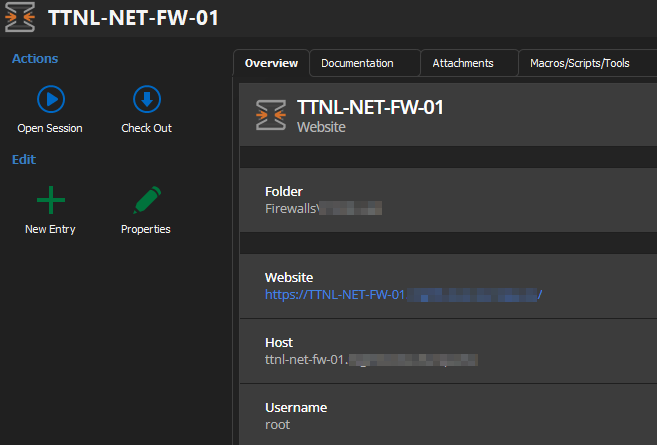
Then, as a child, we have an SSH connection where the host should be inherited: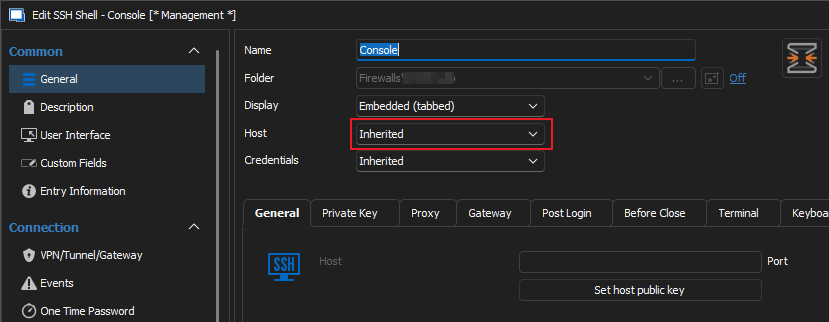
Unfortunately, by double-clicking on the child node it doesn't work: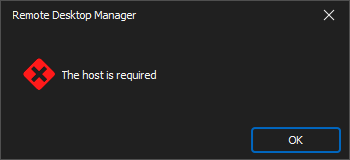
Using a custom host value set to $PARENT_HOST$ doesn't work as well: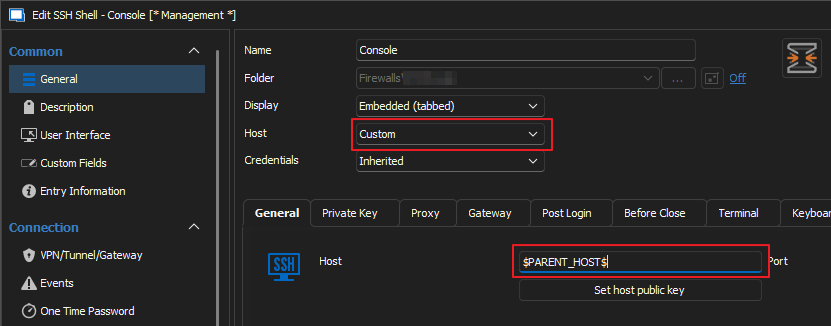
Thanks!
a2511ee5-aced-470d-a0d1-1829f1feb67a.png
5310e638-f500-4785-bba4-8ae112b47a8e.png
c24dff54-7155-4558-8b75-ab358546959e.png
830fd24c-a0b3-4fcb-a3cf-92f1fc7024f1.png
Hello techreg,
Thank you for this feedback.
I'll let the engineering department know about this behaviour.
We will test this on our side and see if we can reproduce this issue.
I'll keep you posted.
Best regards,
Patrick Ouimet