Error when loading "Running sessions (global)" list

Hi!
RDM 2023.2.14.0, DVLS 2023.2.3.0
When I click on the "Opened sessions" tab in the navigation, and then select "Running sessions (Global)" I get the following error
ArgumentNullException - Value cannot be null.
Parameter name: list
at System.ThrowHelper.ThrowArgumentNullException(ExceptionArgument argument)
at Devolutions.RemoteDesktopManager.Frames.FreOpenedConnections.LoadGlobalOpenedConnections()
at Devolutions.RemoteDesktopManager.Frames.FreOpenedConnections.LoadOpenedConnections()
at Devolutions.RemoteDesktopManager.Frames.FreOpenedConnections.CbSessionMode_SelectedIndexChanged(Object sender, EventArgs e)
at DevExpress.XtraEditors.Repository.RepositoryItemComboBox.RaiseSelectedIndexChanged(EventArgs e)
at DevExpress.XtraEditors.ComboBoxEdit.UpdatePopupEditValueIndex(Int32 prevIndex)
at DevExpress.XtraEditors.ComboBoxEdit.set_EditValue(Object value)
at DevExpress.XtraEditors.PopupBaseEdit.AcceptPopupValue(Object val)
at DevExpress.XtraEditors.ComboBoxEdit.UpdateEditValueOnClose(PopupCloseMode closeMode, Boolean acceptValue, Object newValue, Object oldValue)
at DevExpress.XtraEditors.PopupBaseEdit.DoClosePopup(PopupCloseMode closeMode)
at DevExpress.XtraEditors.Popup.SimplePopupListBox.OnMouseUp(MouseEventArgs e)
at System.Windows.Forms.Control.WmMouseUp(Message& m, MouseButtons button, Int32 clicks)
at System.Windows.Forms.Control.WndProc(Message& m)
at DevExpress.XtraEditors.XtraControl.WndProc(Message& m)
at DevExpress.Utils.Controls.ControlBase.BaseWndProc(Message& m)
at DevExpress.XtraEditors.BaseControl.WndProc(Message& msg)
at System.Windows.Forms.NativeWindow.Callback(IntPtr hWnd, Int32 msg, IntPtr wparam, IntPtr lparam)
------------------------ extended stack ------------------------
at Devolutions.RemoteDesktopManager.Managers.ErrorManager.BuildErrorDetails(Exception exception, String extraMessage)
at Devolutions.RemoteDesktopManager.Forms.FrmErrorMessage.ShowErrorMessage(Exception exception, String message, String title)
at Devolutions.RemoteDesktopManager.Managers.LogManager.OnThreadException(Object sender, ThreadExceptionEventArgs t)
at System.Windows.Forms.Application.ThreadContext.OnThreadException(Exception t)
at System.Windows.Forms.Control.WndProcException(Exception e)
at System.Windows.Forms.NativeWindow.Callback(IntPtr hWnd, Int32 msg, IntPtr wparam, IntPtr lparam)
at System.Windows.Forms.UnsafeNativeMethods.DispatchMessageW(MSG& msg)
at System.Windows.Forms.UnsafeNativeMethods.DispatchMessageW(MSG& msg)
at System.Windows.Forms.Application.ComponentManager.System.Windows.Forms.UnsafeNativeMethods.IMsoComponentManager.FPushMessageLoop(IntPtr dwComponentID, Int32 reason, Int32 pvLoopData)
at System.Windows.Forms.Application.ThreadContext.RunMessageLoopInner(Int32 reason, ApplicationContext context)
at System.Windows.Forms.Application.ThreadContext.RunMessageLoop(Int32 reason, ApplicationContext context)
at Devolutions.RemoteDesktopManager.Program.Main(String[] args)
All Comments (17)
Hello,
Thank you for contacting us on that matter!
Unfortunately, I was unable to reproduce this issue.
In that case, would it be possible for you to create a portable installation of the latest version of RDM and see if this issue still occurs? To do so, you will need to do the following:
1- Download the .zip file below:
https://remotedesktopmanager.com/home/thankyou/rdmbin
2- Create a new folder on your Desktop
3- Extract the content of the .zip file into the folder created at #2
4- Go to this folder once the .zip file has been extracted and run remotedesktopmanager.exe
5- Connect to your data source
This test will allow us to rule out your local installation of RDM as a possible cause for this issue.
Best regards,
Patrick Ouimet
Hello Daniel,
I recreated this issue.
This case is now assigned to the engineering department.
I will give you the news as soon as possible.
Best regards,
Patrick Ouimet
I copied our default.cfg file to the portable installation too.
When I click "Running sessions (Global)" I get this "Unable to connect to the data source." message: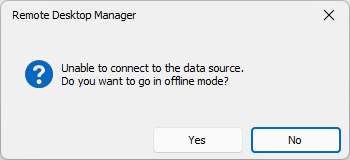
When I click No, the same ArgumentNullException appears again. When I click Yes, I get an empty list.
c6284061-9cc5-4467-9b55-5b460d0b5394.png
I recreated this issue.
This case is now assigned to the engineering department.
I will give you the news as soon as possible.
Alright, Thank you!
Hello,
There seems to be a bug with the Global sessions while on a DVLS datasource. The "ArgumentNullException" will be protected on RDM's side starting from RDM 2023.2.16.0.
However, the root of the problem stems from the call to DVLS to get the running sessions not working. I will create a new ticket on the DVLS side for this problem.
Best Regards,
Michaël Beaudin
Hello Daniel,
I appreciate your patience.
This issue should be fixed on version 2023.3.
You will be able to update your DVLS/RDM when this version will be available.
Best regards,
Patrick Ouimet
Thank you! ❤️
Hi,
A new release, version 2023.2.7.0, is available for DVLS and contains a fix for your issue. Let us know if that works for you.
Best regards,
François Dubois
Thank you!
I'm now on DVLS 2023.2.7.0 and RDM 2023.2.27.0
The open session list works now, but there's still some issues when viewing Running sessions (Global):
- There are hundreds of open sessions in the list going back 1 week and "Right click - Mark as Closed" does nothing. The sessions stay in the list.
- The list keeps refreshing every 10 seconds which loses the currently selected items and scrolls to the top, so it's hard to look through the list and select multiple items.
Best regards, Daniel
Hello Daniel,
I'm sorry to read that. I'm looking at it right now and will let you know as soon as possible if I need more information.
Best regards,
François Dubois
Hello Daniel,
I found the issue and fixed it. A new DVLS version should be released next week. I will keep you posted when the version will be available.
Sorry for inconveniences
Best regards,
François Dubois
Hello Daniel,
We released a new version, 2023.2.8.0, earlier this week. It should fix your issue with the running session. Please let us know if it works for you.
Best regards,
François Dubois
Hi!
now on DVLS 2023.2.8.0 and RDM 2023.2.28.0
The list is correct now and "mark as closed" works too, but the list still refreshes every 10 seconds, making it hard to work with.
Thank you!
Best regards, Daniel
Hello Daniel,
We will add a setting so you can control the refresh rate of the "Opened Sessions". We have created a ticket and will keep you updated on its progress.
Best Regards,
Michaël Beaudin
Hello,
We've added a new option to control the refresh rate of the opened connections view. This can be found in Files - Options - Advanced, under the name Opened connections tree refresh delay. This should be available for the next 2023.3 version.
Regards,
Jafran Majeau
Thank you! Will it be changed in the default configuration? I imagine users won't know there's an option for it, and the list will still be annoying to use by default. I'll definitely consider changing it in our internal default.cfg
Hello Daniel,
We will keep the behavior as it is for now. If we notice that more people ask or are bothered with this refresh rate, we will consider a different default value.
Best Regards,
Michaël Beaudin