RDP/DVLS version compatibility

Hi!
In all the recent release notes it says
"If you are using RDM as the client, RDM 2023.2 is required for this DVLS version"
and
"DVLS 2023.2 is required with this version (only if you're already using DVLS)"
I just updated to DVLS 2023.2 and noticed RDM 2023.1 still connects without issues.
Then I did set the "Minimal version" setting in DVLS just to make sure everybody updates RDM too.
In the past I also noticed that a newer version of RDM still worked with an older version of DVLS, with only minor issues.
So my question is, is there come backwards compatibility intended, or should I always make sure DVLS and RDM will run the same major version?
Of course it would be easier to just update DVLS and RDM separately and assume some kind of backwards compatibility, so we don't have to update everything at once.
Also, this message seems to get cut off and the full text is only visible in the toolip: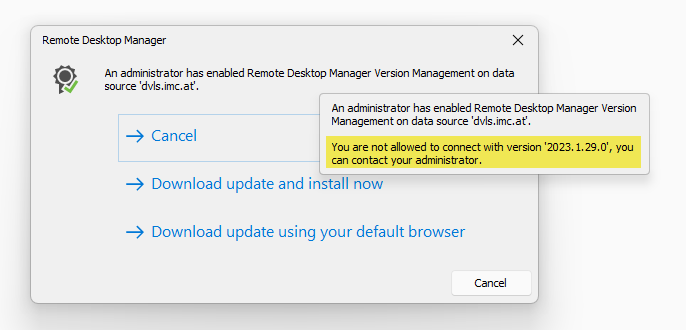
c8a5f4e0-e82c-4d3d-8aa9-2978bf0e2329.png
All Comments (6)
Hello Daniel,
In fact, you should always use the same major version for both products. The main reason is to ensure that all features will provide the expected behaviour as both applications are closely related. The backwards compatibility offers the possibility to have a delay between the update of DVLS and RDM. The shorter this period, the better the application's functionality.
About the message part that is only available on the tool tip, have you set a custom message in Administration - System Settings - Version Management?
Best regards,
Érica Poirier
Thank you!
The custom version message is not enabled here - the default message seems to get cut off.
It would be nice to be able to just display a warning, like "You version of Remote Desktop Manager is not supported. To use the latest features, please update to version 2023.2 [Update now] [Skip]"
And the other way around too, is a user installs a newer version when DVLS is not updated yet: "The data source 'dvls.example.com' uses an older version of Devolutions Server. Please update to Devolutions Server 2023.2 or use a compatible version of Remote Desktop Manager. [OK]"
That way, we don't have to force the update to everybody at once, but they still get a message that they should update. After a major DVLS update, we could enable the warning for a week before forcing the update.
Best regards,
Daniel
Hello,
In fact, it is possible to set a custom message in the Version Management window like the following. This sample is for the minimal version but it's available for the maximal version as well.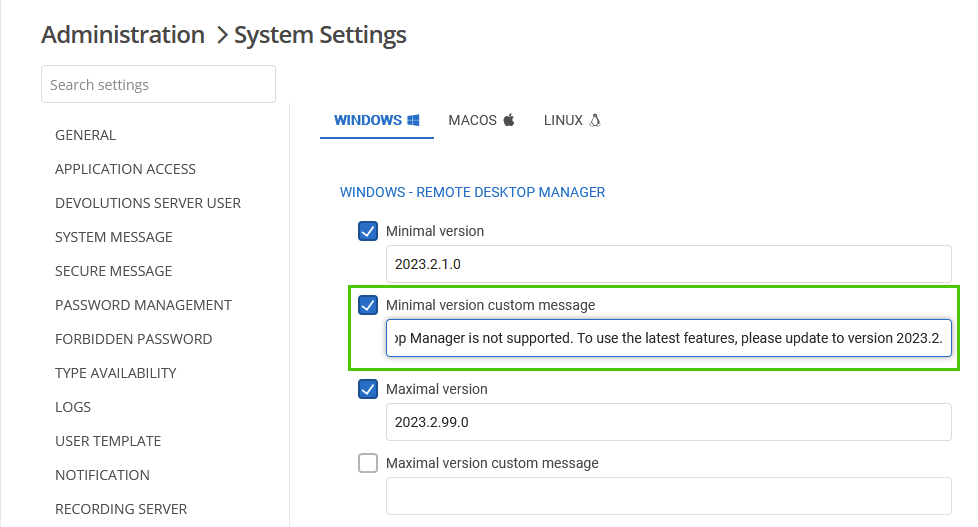
Then, that is what a user will get if he's using an older RDM version.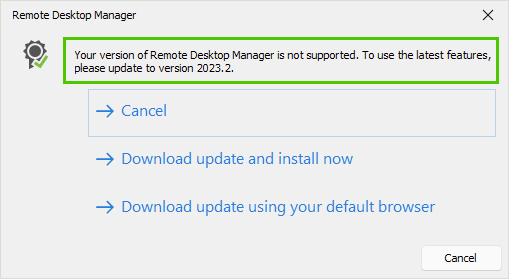
But anyway, a ticket has been submitted to our engineering to display the whole message on the dialog without the tooltip.
About your last suggestion, you mean to have a kind of optional version management message to only inform the user that his version isn't fully compatible?
Best regards,
Érica Poirier
5442ebd1-d6d7-477d-98a6-d907a9dcda2c.png
75a581da-86d5-40e6-99f8-a5ab315e7ccb.png
Thanks!
The best solution imo would be for the releases to "know" which versions of the other product are compatible. So when a new RDM version is released, devs should decide the minimum recommended (and required) versions for DVLS, and vice versa: a new DVLS release should know the minimum recommended version of RDM. If something is older than the recommended version, RDM should display a warning.
I think the options should be split between DVLS and RDM.
- For DVLS, the only option should be "Check for outdated RDM versions: Allow with warning · Allow without warning · Don't allow". The warning displayed in RDM could be something like "Your version of RDM is older than the minimum recommended version for the DVLS data source 'dvls.example.com'. Update now · Ignore"
- For RDM, similarly: "Show warning when DVLS version is outdated: Yes · No". The message could be something like "The data source 'dvls.example.com' is using an outdated version of Devolutions Server. Please ask your administrator to update".
If it doesn't match the required (not just recommended) minimum versions, the connection would be aborted in any case. This should be decided by devs imo, not by users or admins.
Best regards,
Daniel
Hello Daniel,
Thank you for your suggestion.
The information has been transferred to our engineering team for internal discussions about version management between RDM and DVLS.
We will keep you updated.
Best regards,
Érica Poirier
Hello Daniel,
For your information, the version warning dialog has been revamped and now we can see the whole message on the dialog in RDM version 2023.2.18.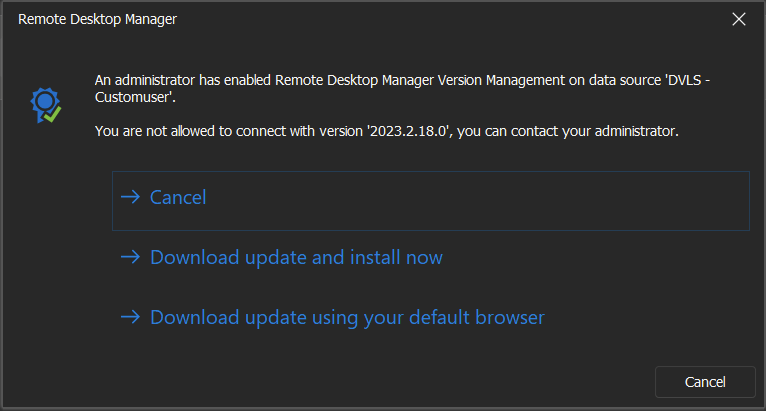
Best regards,
Érica Poirier
c84ef842-9d2f-4051-82d0-e8ab11ad7541.png