Active RDP Session Not Used

I have an active RDP session in RDM open on my Windows laptop. I attempt to connect and take over that session from another laptop. Instead of using the existing session (same DOMAIN credentials) it creates a new session. Is there a way to force RDM to connect to an existing session?
I'm using a Windows Laptop and a Macbook Pro M2. I've tested this in both directions. I have to disconnect from the session for it to use the same session. If I try to connect while either laptop has an active session then it creates a new session instead of "stealing" the existing.
Thanks,
Chris
All Comments (7)
Hello Chris,
Thank you for contacting us on that matter!
Are you using the same set of credentials to connect to this machine?
Unless the remote host allows multiple connections at once, the connection on the original machine should be interrupted and a message, similar to this one, should be shown.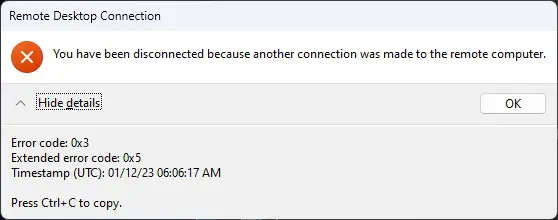
This behavior is the same that you would encounter if the RDP connection is launched outside of RDM through MSTSC.exe.
Best regards,
James Lafleur
2023-06-23_14-21-24.png
Yes, same DOMAIN credentials. Servers allow up to 2 admins to connect without RDS/terminal services, but I expected the same credentials to steal the session as you described.
I have been a sys admin remoting into datacenter/server environments for over 25 years and I have used RDM for well over 10 years. I don't know if this is an issue between mac/windows connections, but it was definitely not expected.
Any more ideas?
Hello,
Thank you for your swift reply!
We will investigate this behavior and get back to you shortly.
Best regards,
James Lafleur
Hello,
Thank you for your continued patience,
I asked our IT team to create a VM machine that allowed for 2 simutaneous connections.
I then had the RDP session entry imported into my RDM installation as well as another RDM installation belonging to one of my colleagues.
When we both opened the remote session using the same credentials, we were able to both use the session. Like you said, the session was never "stolen".
We then opened the session externally (meaning without RDM) and reproduced the same behaviour.
I asked our IT team and they mentioned that this is normal behaviour. If your servers allow you to have 2 admins in a simultaneous connection, then this is just due to that setting being enabled.
It seems the way to have this behaviour stop would be to disable that option within your server, or to log off when you're done with the session before logging in from another computer.
Best regards,
Thanks for the update!
I was hoping there was a way to stop this, but evidently that is not the case. Thanks for checking on this!
Chris
Hello.
My pleasure !
If you ever have further questions or issues feel free to contact us.
Best regards,