RDP session not work anymore after RDM 2023.2.5.1

Hello
after updating last version of RDM in a Intel Mac with Ventura 13.4 and RDP app 10.8.4 (2111), each RDP connection i try to execute doesn't launch RDP app.
No error message, simply RDP does't start.
I try also to open RDP app before using RDM but same result.
Any ideas?
Thanks a lot
All Comments (30)
Hi,
I'm assuming you are launching your session in external mode? Are you getting any error when launching your session?
Best regards,
Xavier Fortin
Hello Xavier
manual open RDP App and launch session work.
Same operation from RDM doesn't without any error.
It's possible to downgrade to previous version on RDM and try to reproduce the issue?
Can you send me a link for version 2023.1.12.0 (May 29, 2023)?
Sure, here you go: https://cdn.devolutions.net/download/Mac/Devolutions.RemoteDesktopManager.Mac.2023.1.12.0.dmg
Best regards,
Xavier Fortin
Hello
i confirm that previous version work like a charm.
I ask you to make internal check
Hi,
As mentioned, we will need more information to investigate your issue.
Do you launch in external mode? What happens when you try to launch? Is an error message shown? Can you provide a small video demonstrating the issue?
Best regards,
Xavier Fortin
Hello Xavier
this is a printscreen of an RDP session that work in 2023.1.12 but doesn't work in 2023.2.5.1 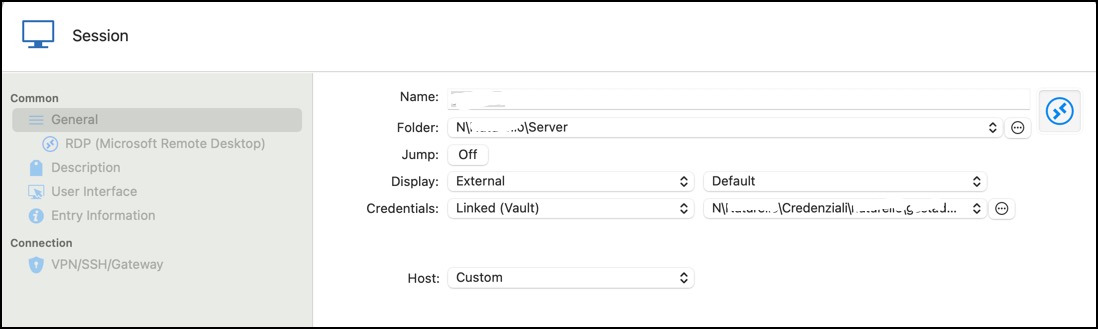
Whether I use direct opening or via template, after asking for the credential from linked folder, the Microsoft RDP app doesn't start.
No error message, simply doesn't start RDP.
thanks
2023-06-23_12-32-48.jpg
Hello
I think I located a potential regression with launching the external Microsoft RDC application.
Can you tell me what you have configured on the connection under RDP > Display > Remote Desktop Size?
If "Remote Desktop Size" is set to anything other than default, try reverting it to "Default" and let me know if that works around the problem.
Please let me know if something isn't clear
Thanks and kind regards,
Richard Markievicz
Hello
you are right! RDC session work only for "Defaul".
All my sessions are in "Full screen" and i use some template to open with different resolutions.
I revert to previous version and wait for resolution.
Thanks
Hello again
Thank you for the update. I've sent these comments to the RDM Mac team and they have a ticket open to address this. We will post back here once the fix is available.
I apologize for the inconvenience
Thanks and kind regards,
Richard Markievicz
Hi,
I'm having the same issue and the work around does not work.
version 2023.2.5.1
adding that I have Microsoft RDP Client Version 10.8.4 (2111)
Hello telmop
Just to confirm - you're using the "External" mode in RDM (you expect the MS RDP client to open)?
Thanks and kind regards,
Richard Markievicz
Correct.
Correct.
Hello
If the given workaround doesn't work for you, the best thing to do could be to export one of the problematic entries as an .rdm file and send to me (either by PM or to support@devolutions.net mentioning this forum thread). Make sure you don't include credentials in the export.
I can have a look and see if a combination of settings is causing this behaviour, or if the issue is elsewhere. As far as I know, the regression only relates to the screen sizing settings.
Please let me know if something isn't clear or you have further questions
Thanks and kind regards,
Richard Markievicz
here you go.
IRMAS TESTES.rdm
Hello again
Thanks for that. I confirm it works on my machine and I don't see any relevant changes on our side that could've caused a regression.
Did you install the RDP client from the App Store, or by direct download from Microsoft? Is it installed in the standard path ("/Applications/Microsoft Remote Desktop.app")?
There are two possibilities:
- RDM can't find the RDP client application
- There is a failure to launch the RDP client using the arguments we give it
I generated a .rdp file from the entry you exported.
Does it work if you double-click the .rdp file?
You might also try opening it in the same manner as RDM. Open Terminal.app and run the following command:
open -a "/Applications/Microsoft Remote Desktop.app" "$HOME/Downloads/RMAS TESTES.rdp"
Be sure to set the correct path to the .rdp file if you downloaded it to a different location.
Please let me know if something isn't clear or you have further questions
Kind regards,
Richard Markievicz
RMAS TESTES.rdp
Hi,
The problem should be fixed in the latest release of RDM Mac (2023.2.6.2).
Best regards,
Xavier Fortin
Thank you.
I can confirm it works as expected now.
Glad to hear it!
Do not hesitate if you have any other issues.
Best regards,
Xavier Fortin
Morning, i just updated my RDM on MAC to version 2023.6.2.2, and now i cannot connect to a few RDP clients anymore
They work fine from a Windows machine, also if set it to External instead of Embedded it seems to work
Error seems to be : [rdp_client_wait_for_activation]: ERRCONNECT_CONNECT_TRANSPORT_FAILED [0x0002000D]
Edit: I just went back to the old version 2023.1.12.0, and that works fine without any issues :)
Hi Glenn,
Can you confirm if setting the SSPI Module of one of your session to System fixes the issue?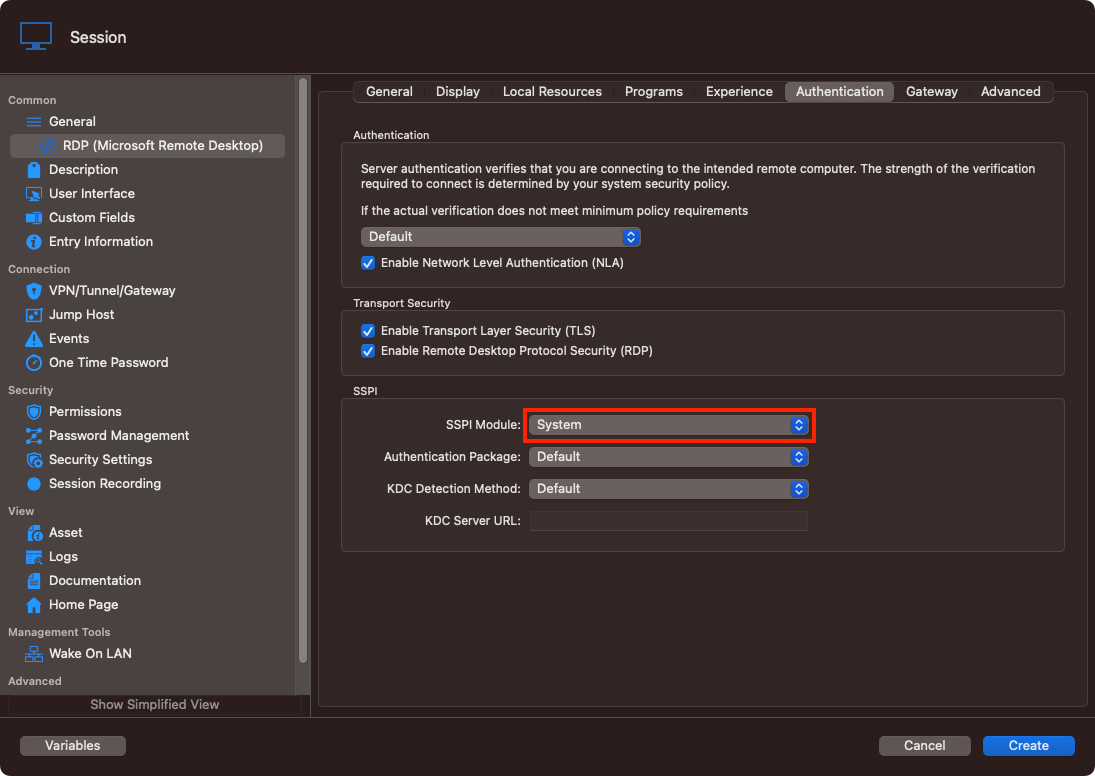
If so, it is a known issue and we are working on fix (the next reversion of RDM will fix the regression). In the case that it is your issue, you can temporarily rollback to the previous version of RDM Mac (2023.2.5.1).
Best regards,
Xavier Fortin
SSPIModule.png
Can you confirm if setting the SSPI Module of one of your session to System fixes the issue?
For me, it does. I've set the SSPI Module to "System" and my RDP-Sessions worked again. Had the same error message as glenn910.
After I did the downgrade, everything worked again.
Thanks for the info!
As mentioned, for the moment, I would suggest to rollback to the previous version (2023.2.5.1) until a patched version release.
Best regards,
Xavier Fortin
Hi,
any news about this?
I have a problem opening rdp sessions with external (embedded and docked works) and I'm on windows 11 pro with rdm 2023.2.27 (updated this morning but previous version had the problem too)
Hello cbazzucco
Are you referring to the Windows version of RDM? If so, this is likely a separate issue. Can you confirm?
Thanks and kind regards,
Richard Markievicz
Hi cbazzucco,
As Richard said, RDM Mac and RDM Windows works pretty differently with external RDP session, by calling two different external apps. I'd suggest you open a new thread describing in detail your issue in the RDM Windows forum section: https://forum.devolutions.net/product/rdm-windows
Best regards,
Xavier Fortin
Hello I have the same problem - RDP Session only works if opened using the Open(External) option but not Embedded option. Below is what I have:
MacBook Pro M3 (2023 Model)
RDM version 2023.3.8.0
RDP session only works if I open in External, but it does NOT work when I use the embedded/Tabbed option. I have several entries same with every single. one. I have made sure the Display and authentication all are default. I have also tried screen sizing mode Smart sizing.
Hi,
Do you get any specific error? Can you enable session logs (see here), reproduce the issue with an entry and shared the log file with us?
Best regards,
Xavier Fortin
Hi Xavier,
Thanks for getting back quickly, not sure what happened, but it seems to work now. I have been trying since yesterday and was just not working other than in external. When I tried in embedded it would just jump like a popup was blocked. I have tried several things and nothing seemed to work, this morning right before opening ticket and adding this on this forum, I tried and it was same. But to my surprise after reading your message when I tried, it just worked. I don't think sending support ticket from the RDM made any changes? I doubt but that is the only different thing I did. So it is working now, thanks for your reply.
Hi,
Interesting. If the issue starts occurring again, please, do inform us again.
Glad it works for you now!
Best regards,
Xavier Fortin