Teamviewer: Prompt for confirmation
0 vote

When we have a Teamviewer connection in RDM, it always directly connects to the PC when it's opened. In Teamviewer there is also the option "prompt for confirmation" so the user can allow the remote access. (and gets a message instead of just us connecting to it).
Could you add this as an additonal option instead of just open, to open with confirmation, and give that over to Teamviewer which opens the connection, after the prompt.
Thanks and kind regards.
Patrick
All Comments (5)
Hello,
This is easy to add only if the Team Viewer command line support this parameter. Do you know if it's the case?
Regards
David Hervieux
Hi David
I had to contact Teamviever to get all the details together.
It's possible via the Command line, described here: https://community.teamviewer.com/English/kb/articles/34447-command-line-parameters
The command is like this: TeamViewer.exe --ac3 which takes the last used custom settings. So if the last settings are like this: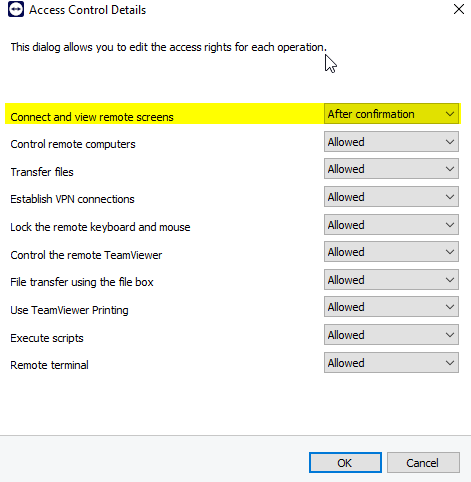
It will ask the customer for permission before connecting.
So thanks for implementing this option to use this parameter. (Perhaps you could make it definable by the user which --ac3 someone wants to use.
Kind regards
Patrick
IMG_9847.png
Amazing! That will be easy to add
Regards
David Hervieux
Great to hear!
One other thing, is there any way to show if a Teamviewer Machine ist online or not? That's the only feature that would be missing compared to the teamviewer manager.
Hello,
We've tried to integrate the command for the "prompt for confirmation" but it doesn't seem to work on our end.
Could you please try it directly in your "Command Prompt" application and tell us if it works for you:
1 - In the Windows search bar enter "cmd" and open the application.
2 - Enter the command : cd c:\Program Files\TeamViewer
3 - Press enter
4 - Enter the command : start teamviewer.exe -i "Your ID" --Password "Your Password" --ac3
5 - Press enter
Does the connection work and do you have the prompt for confirmation?
Regards
image.png