Filezilla SFTP embedded

Hello,
should FileZilla in MacOS work in embedded mode or not?
Thank you
Kosta
All Comments (7)
Hi,
It's impossible to support FileZilla in embedded mode. This is a third party application that we have to launch externally. If you want a FTP/SFTP solution in embedded mode, I would suggest using the corresponding entries (FTP, SFTP and SCP entries).
Best regards,
Xavier Fortin
Hm, interesting what you write:
In my RDM on my Windows PC, FileZilla does open externally but changes to embedded afterwards, same as WinSCP does.
However, due to fact that WinSCP is Windows only, can't use it on Mac.
So, I am not sure how to interpret your answer. Can you elaborate what you mean by corresponding entries? I am of course using SFTP entry, and have a choice to use FileZilla. I can also use the "FileZilla" entry, that does nothing else but use the FTP (FileZilla, WinSCP) entry though.
And it does start FileZilla externally and connects to the server.
However, different to Windows, it stays external, while Windows embeds the program after connecting inside the RDM window.
The ability to embed external applications is a very Windows-specific thing. It's supported via the Windows API, but macOS is a lot more strict in what it allows an application to do with another application.
As for what I meant as an alternative, I mean using the FTP and SFTP entries, as opposed to the Filezilla or the FTP (Filezilla, WinSCP, ...) entries. Here's a screenshot: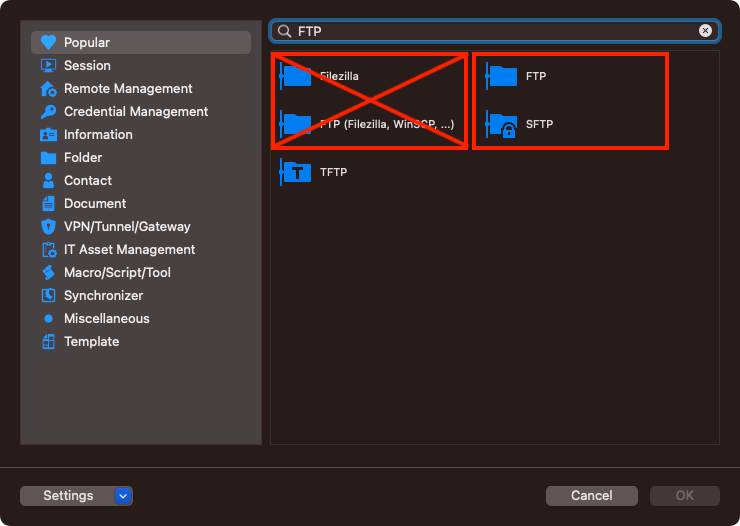
The former are our own implementation of the FTP and SFTP protocols and will open embedded directly in the app because they do not depend on an external third-party application.
Best regards,
Xavier Fortin
FTP entries.png
This is great, many thanks! Don't know why I even used external app... :/
Glad to hear this works for you!
Do not hesitate if you have any other issues!
Best regards,
Xavier Fortin
Another issue though: while this entry (SFTP) does work on MacOS well, I see left my own computer, right the remote, but on PC it's totally bonkers apparently. I think it doesn't leave the user's home directory on the remote side. Ideas?
Update:
If I enter / as starting directory, then it will start in the root, however, if I go one directory down and want to return, cannot, at least not with two dots. I can select the root directory on the top. Either I am doing something wrong, or something else is wrong.
And oh why doesn't it remember the view settings in the SFTP entry? I can go ahead and set all settings again each time I connect, like detailed view, window sizes etc.
This ain't MacOS support any more. It can be moved to appropriate forum, or give ahead and I'll recreate where needed.
Yep, the RDM Windows team will be better suited to help you with this.
I'd suggest opening a new thread in RDM Windows forum board (here). I'd rather not move this thread since the initial question was definitely for RDM Mac.
Best regards,
Xavier Fortin