RDM Connection Error: "No match for kex algorithm

Hello everyone,
I encountered an issue with my Remote Desktop Manager (RDM) after a recent crash caused by a hard reboot of my computer. Thanks to the assistance of @David Hervieux, I was able to recover my online database successfully. However, I now notice that some settings have reverted to their defaults.
Specifically, when attempting to connect to my Cisco switches, I encounter the following error message:
"No match for kex algorithm:
Client sent: curve25519-sha256,curve25519-sha256@libssh.org,ecdh-sha2-nistp256,ecdh-sha2-nistp384,ecdh-sha2-nistp521,diffie-hellman-group-exchange-sha256,diffie-hellman-group16-sha512,diffie-hellman-group18-sha512,diffie-hellman-group14-sha256,ext-info-c,ext-info-c
Server sent: diffie-hellman-group-exchange-sha1,diffie-hellman-group14-sha1"
I followed the instructions provided in the guide at the following link: [insert URL from original message]. However, the issue persists even after attempting the recommended configuration changes.
Could you please advise me on the next steps I should take to resolve this connection error?
Thank you in advance for your assistance.
Best regards,
Aviad 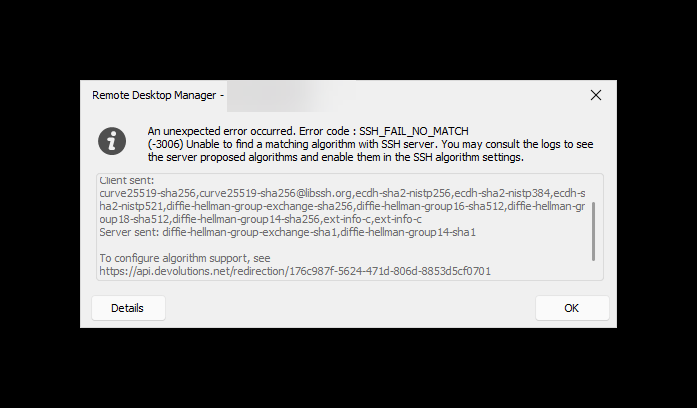

bb4df66c-5766-47de-bec7-84d1eb1e2eeb.png
5efb7fe6-72f0-4a4b-ba15-d29826ff2c96.png
f8c56779-791c-4793-8653-73a0a04dcd6a.png
All Comments (5)
Hello Aviad,
did you tried the steps from the SSH Algorithm Support KB article?
Regards,
Min
Thanks for your reply
i followed the guide but i still gets this error
Hello Aviad,
did you tried the steps from the SSH Algorithm Support KB article?
Regards,
Min
Hello,
You're receive exactly the same error message?
Did you enable also this two options on the 3rd tab?
Regards,
Min
ebf0d2ac-aaca-430e-8ad3-2d628aca1112.png
Great! - , i have enable this two options on the 3rd tab and now it works!!
Thanks a lot
Hello,
You're receive exactly the same error message?
Did you enable also this two options on the 3rd tab?
Regards,
Min
Hello,
Awesome! Thanks for your feedback! 😉
Regards,
Min