Credential w/ Website manipulation

Hi .. Aside from RDP connections that play ball, I have to use my AD credentials from time to time with other systems.
For instance the login to a storage device.
Now I have mastered the skill of pulling out the correct "id" tag to do the auto-fill of the credentials, but I would like to understand how I combine the domain with the username.
e.g. In my 1Password Credential entry I have the username & password stored and I have created a text field for the domain labelled 'domain' (imaginative I know). I have told RDM that information in the Cred entry and for RDP it works like a charm.
However, for the storage device I only have a Username & Password field and it wants the username to be in the format of <user>@<domain>.
How do I specify that in the WebSite Connection entry ?
All Comments (3)
Hello Ivan,
you can specify the username format in the Advanced section of the Website entry: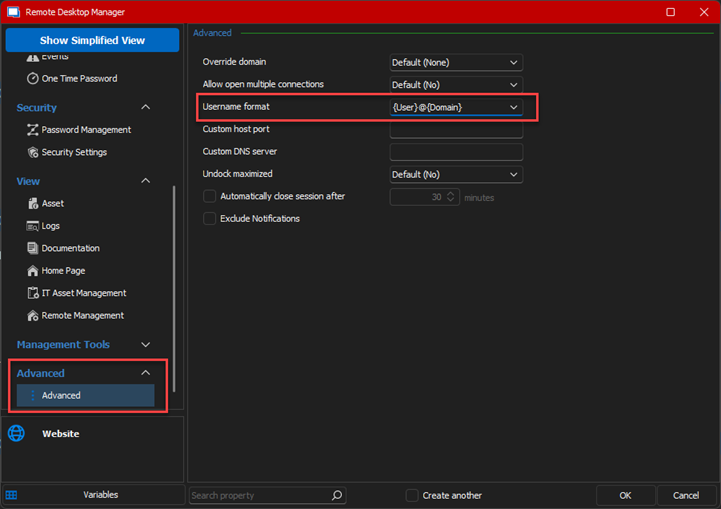
Regards,
Min
144c588c-16cd-4ca3-9474-4db2dab8d729.png
Perfect. Works like a charm.
Hello Ivan,
Awesome! Thank you for your feedback! 😎
Regards,
Min