Embedded Edge private session deletes cache/cookies?

I think there is a change of behaviour re embedded private edge sessions.
All our web sessions are embedded private edge, so that they don't share credentials. beforehand it was so, that, when you loginto a website in such a session and close it and don't close RDM, next time you open the same session you are still logged in. With a recent update it seems as you clear the cache/cookies when closing such a session and we are logged out (the option to clear the cache is not set).
In general, we actually would prefer if the edge non-private sessions would be seperate from each other (don't shrare cookies etc.), that way we wouldn't need to use private sessions for this.
All Comments (36)
Hello,
Could you please verify if the Clear cache on startup option is enabled int he More Settings tab of an Edge Website entry?
If so please try to disable it.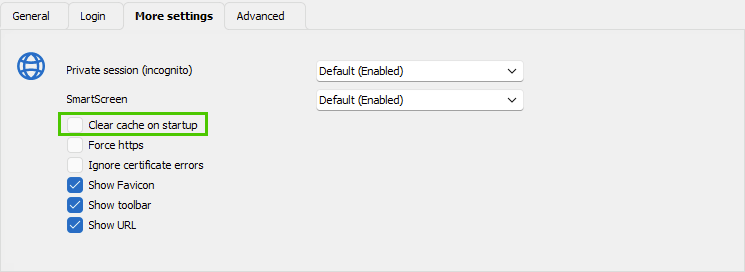
Let us know if that helps.
Best regards,
Érica Poirier
0ff82f92-6ee6-4b2e-b5b3-dd90d9824de2.png
no, it's definitely disabled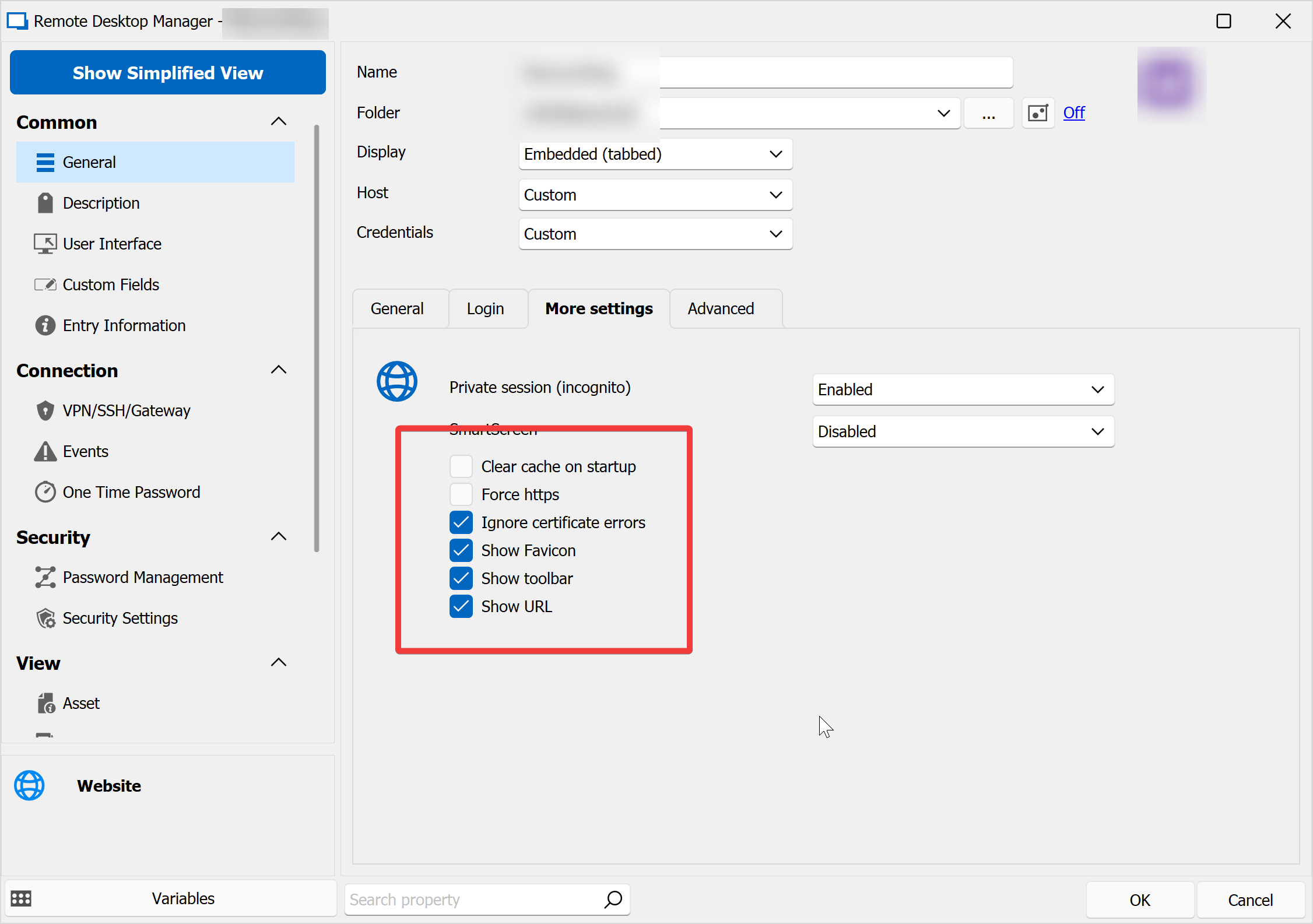
65439e27-0681-480e-aee0-2db824344bb6.png
Hello,
Thank you for your feedback.
What RDM version are you using?
Could you please try with the Private session (incognito) option disabled?
Let me know if that helps.
Best regards,
Érica Poirier
version: 2023.1.22.0 64-bit
ok, disabling private sessions is beside the point (as we don't want to share session data between the different browser sessions), but anyway, I tried disabling it and it brought up some more problems, which may be related:
- session has private enabled, works
- I disable private session, reload, blank page
- I enable clear cache and get this error message, which I got some time lately:
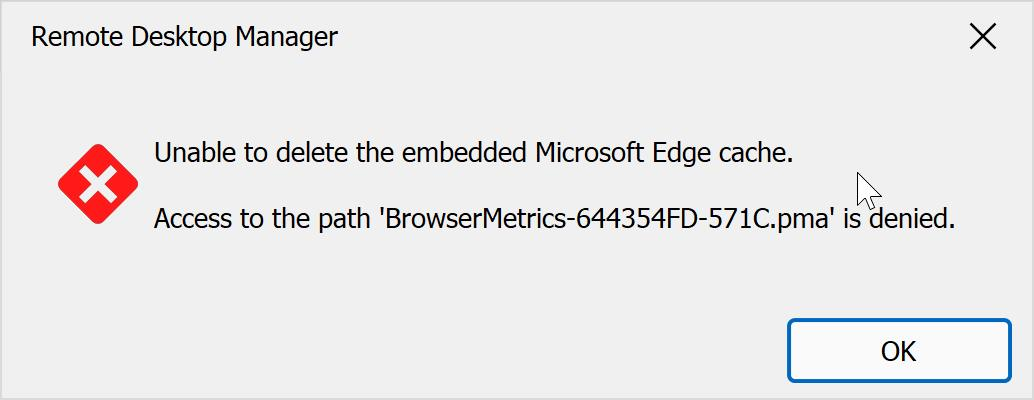
- re-enable private session, works again
BTW, I asked this in another thread long ago, but a menu entry/button/shortcut to clear a web browser session would be very handy..
98cfdd98-6bab-4795-9d1f-769734c0c75b.png
Hello,
Thank you for your feedback.
About these steps you describe, did you close the web session tab between each modifications? As the new settings will be applied only when the session is reopened.
About the issue, I am able to reproduce it when another Edge Website entry is opened. Have you another Website entry opened when experiencing this issue?
Best regards,
Érica Poirier
yes, I did close the tabs between settings changes.
yes, there are other tabs open, that's the idea ;)
Hello,
Thank you for your feedback.
The error occurs only after you have opened the entry at least once, modified the entry to enable the Clear cache on startup option, and then opened it again. It's as if RDM kept a file locked even after closing the entry.
About the Private session option, you can disable it as with new WebView2 implementation, each entry has its own cache folder, by default under %localappdata%\Devolutions\RemoteDesktopManager\WebView2.Cache\EBWebView\<GUID of the entry> (see #1 and #2 below).
You can even enable the Profile name option in the Advanced tab to identify this folder. And even with this enabled, the ID of the entry is added on the cache folder's name. (# 2)
Entry identified with #3 has its own cache folder too.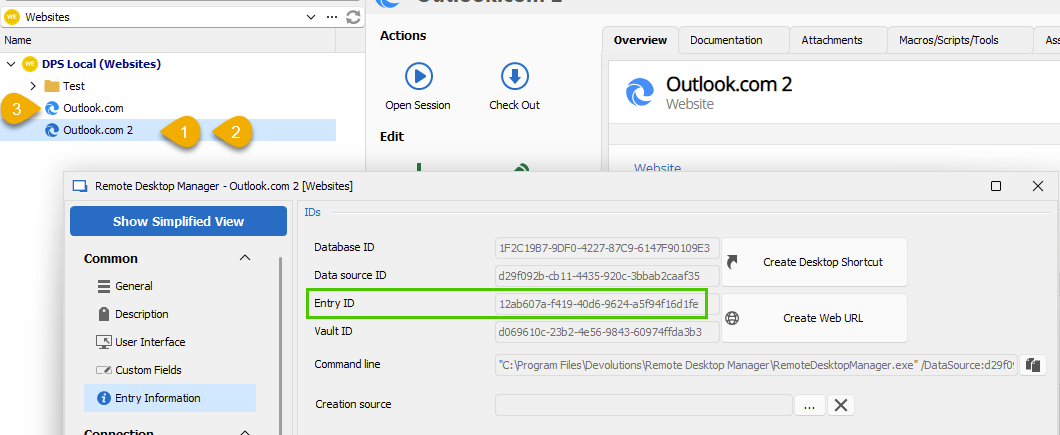
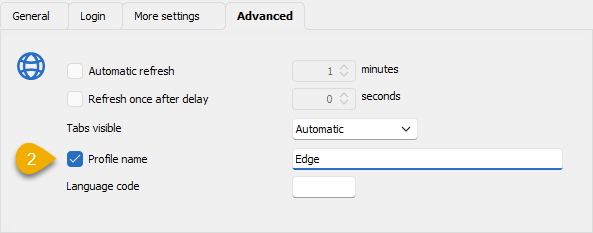
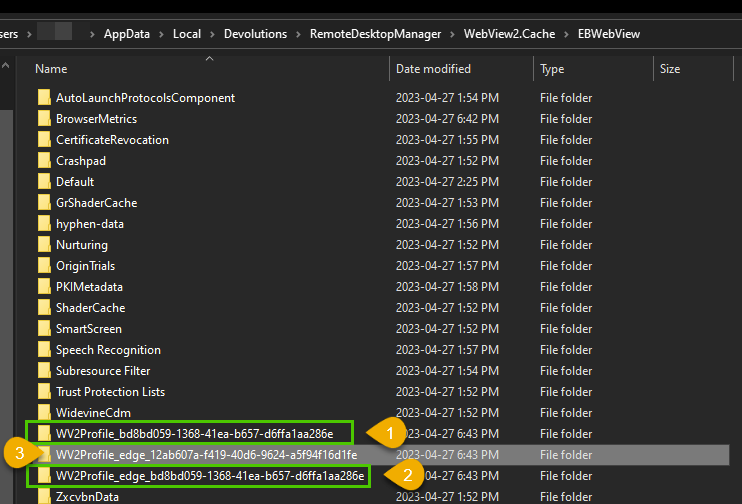
Let us know if that helps to understand how the Website entries cache is behaving.
Best regards,
Érica Poirier
38e393cc-ff37-49d4-a5fc-f45b322597a9.png
fc7b122e-240c-4c10-8881-1025738543c9.png
72af5712-c825-4f82-8ad4-668f10ba977e.png
ok, this is very good news! but.. I can't switch my private sessions to non-private. If I do, the session just shows a blank page (or window, as not even right mouse click works, which tells me, this isn't a browser canvas). changing back to private works again. I even deleted the whole WebView2.Cache directory without success..
private: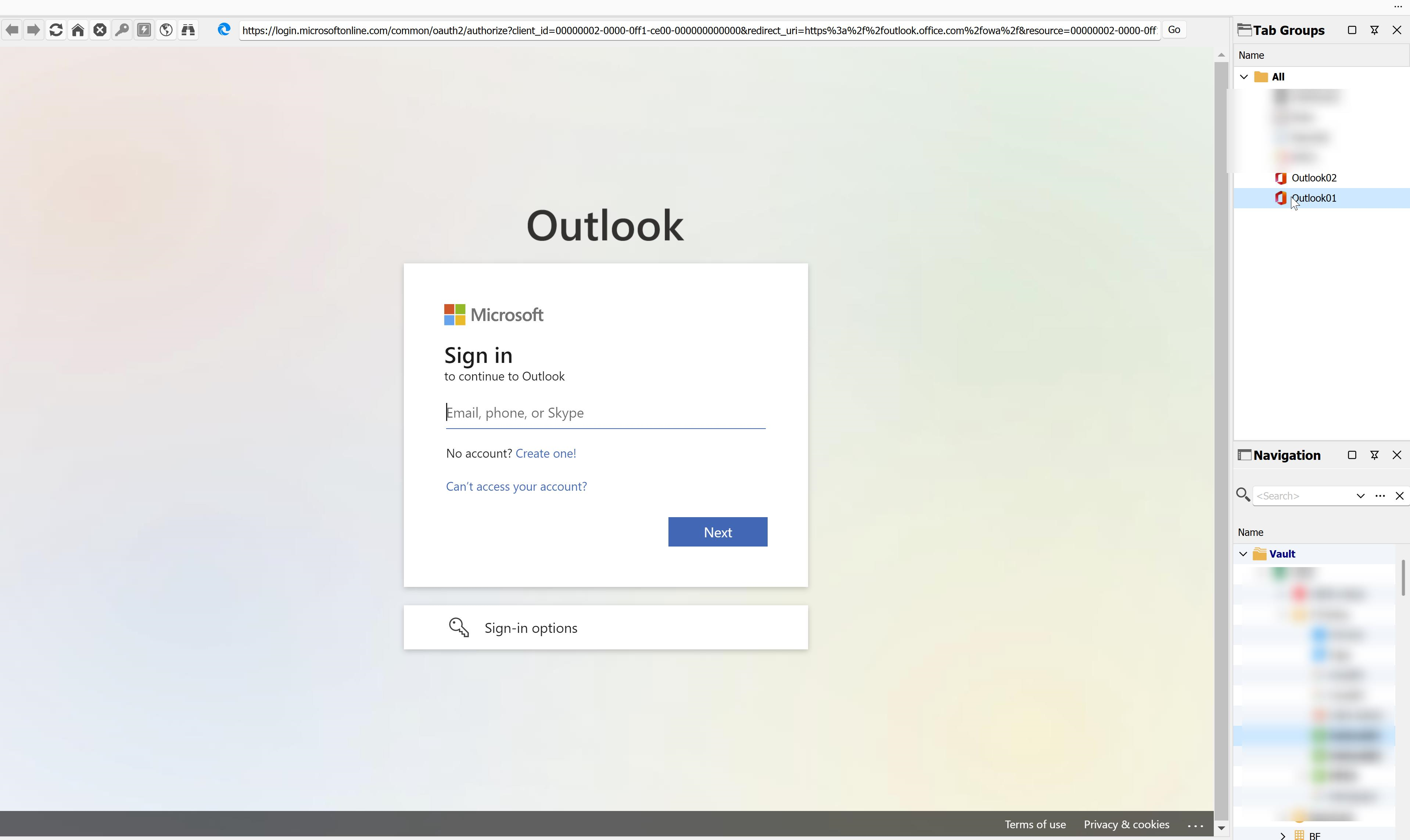
non-private: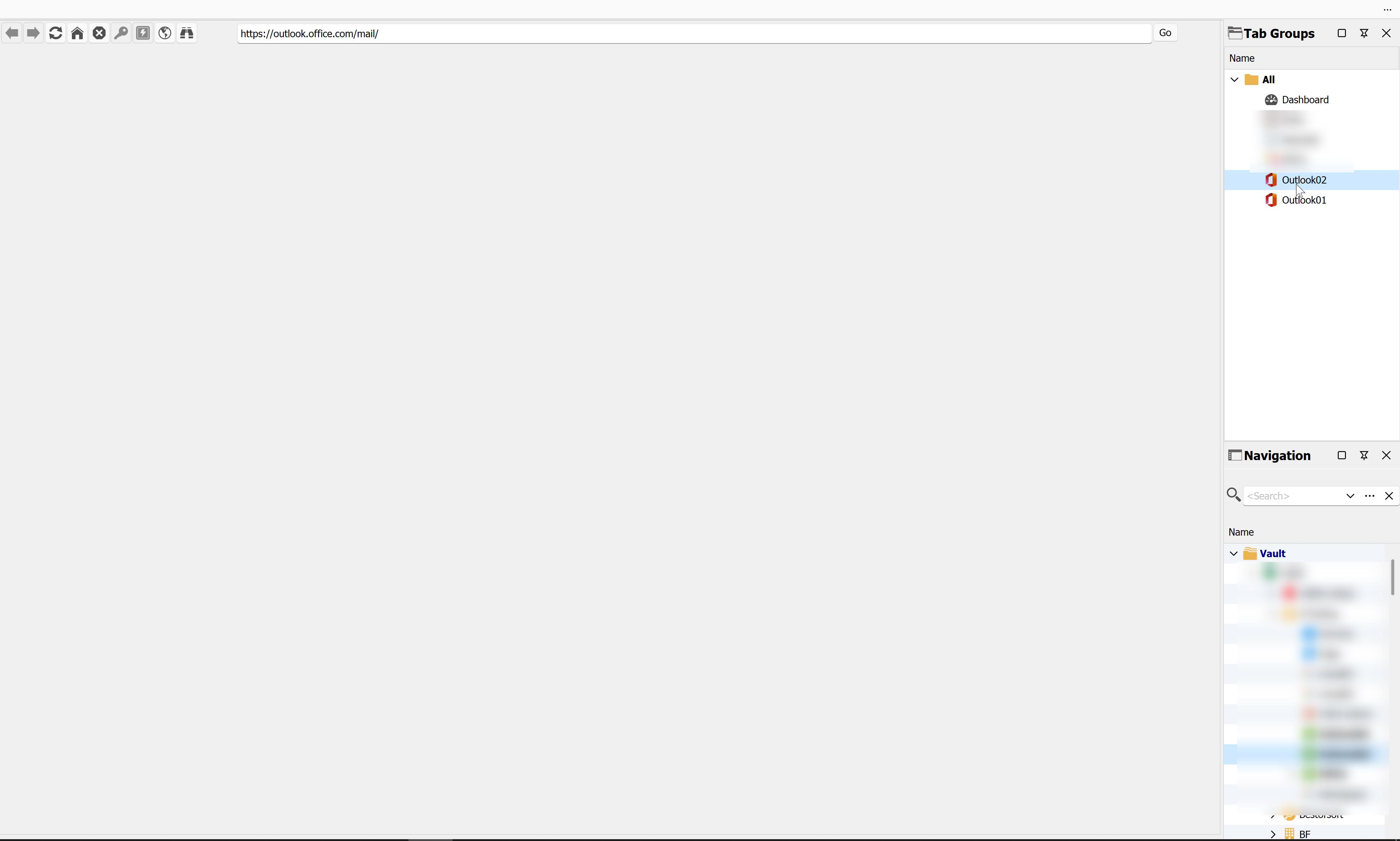
e4c8ac1f-01e9-4c8f-996b-165a8d86bc53.png
bee5fd3f-d611-4975-9e49-582e8deeecce.png
Hello,
Thank you for your feedback.
It seems that on the first opening of the entry, it copies the local Edge browser context but there is no documentation related to that fact in the following Microsoft article about the Webview2 we have implemented in RDM. Once the session cache folder is created, it will keep its own cache files for all subsequent sessions.
https://learn.microsoft.com/en-us/microsoft-edge/webview2/concepts/multi-profile-support?tabs=dotnetcsharp
Could you please try to disconnect from your Microsoft account in your Edge browser and then try again with the Private session option disabled?
Let us know if that helps.
Best regards,
Érica Poirier
ok, I got three profiles in edge. To avoid disconnecting all of them, is there a way to find out, which one is used?
Hello,
There is no information from the Microsoft documentation if it copies the information from the existing browser's cache. That is what I have experienced with my recent tests I made. So we have no information about which one it takes.
Could you please try the following steps and let me know if that helps?
1- Close and reopen RDM to make sure the cache files are not locked.
2- Edit the Website properties to enable the Clear cache on startup and Private session options.
3- Open the Website entry and then close it.
4- Disable the cache option.
5- Disable the Private session option.
6- Open the Website entry.
Best regards,
Érica Poirier
nope, blank window.
I then closed RDM, signed out of all edge profiles (not deleting cookies etc., I hope that's ok), restarted RDM, opened the session, blank window again.
I then created a new browser session, embedded edge, non-private mode. blank windows again.
Hello,
Could you try to upgrade to the latest version of WebView2 to verify if it helps with the issue, since we are still unable to replicate it: https://go.microsoft.com/fwlink/p/?LinkId=2124703
Could you also confirm what OS you are using, and if it is on ARM or not.
Best regards,
Richard Boisvert
No change after installing the webview2 versin.
I am on WIndows 10 intel.
When I check "clear cache on startup" i get this error, even if I completely remove the EO.WebBrowser.Cache folder in %appdata%.. Maybe that's a clue?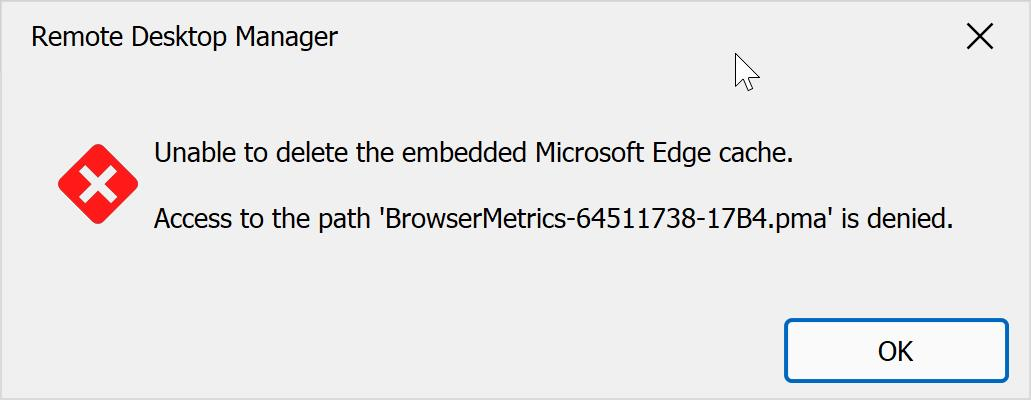
9e5fe426-4f0c-44a2-8542-24c78198ca96.png
Hello,
Could you please go to %localappdata%\Devolutions\RemoteDesktopManager\WebView2.Cache and make sure your account has full control on the folder and that the inheritance is enabled? Also, just to be sure, check the "Replace all child object..." box and click apply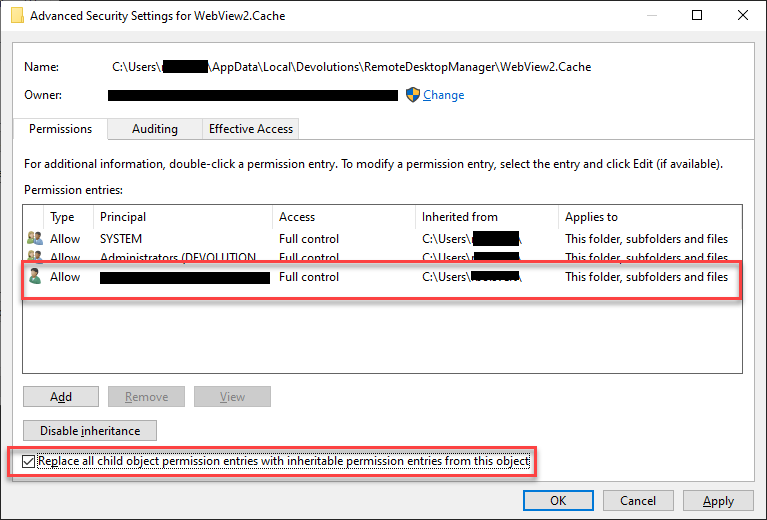
Could you also double check that RDM is configured to use that folder? Go to File > Options > Advanced, you will see the path at the bottom: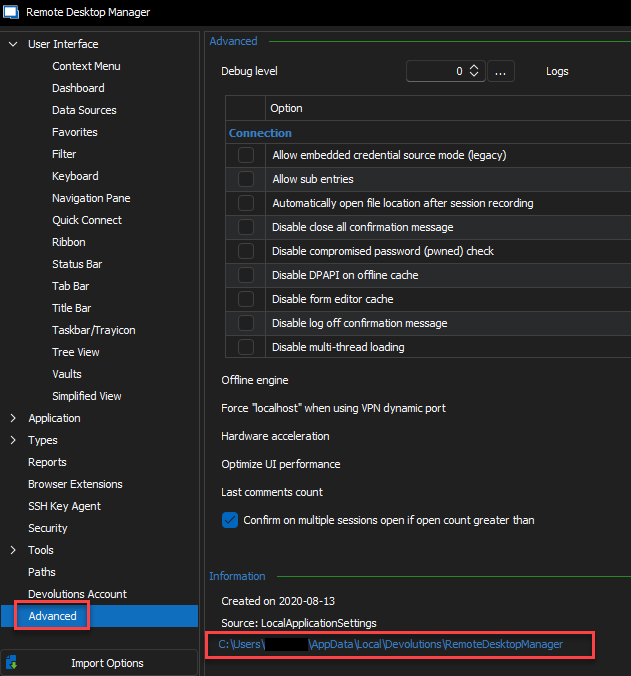
Best regards,
Richard Boisvert
bb6da1b7-46cb-4fc6-8011-ecdaf69539ec.png
b3b5f590-b1f7-488e-8b8e-94e5d4636f96.png
yes, the path is correct and I have full control: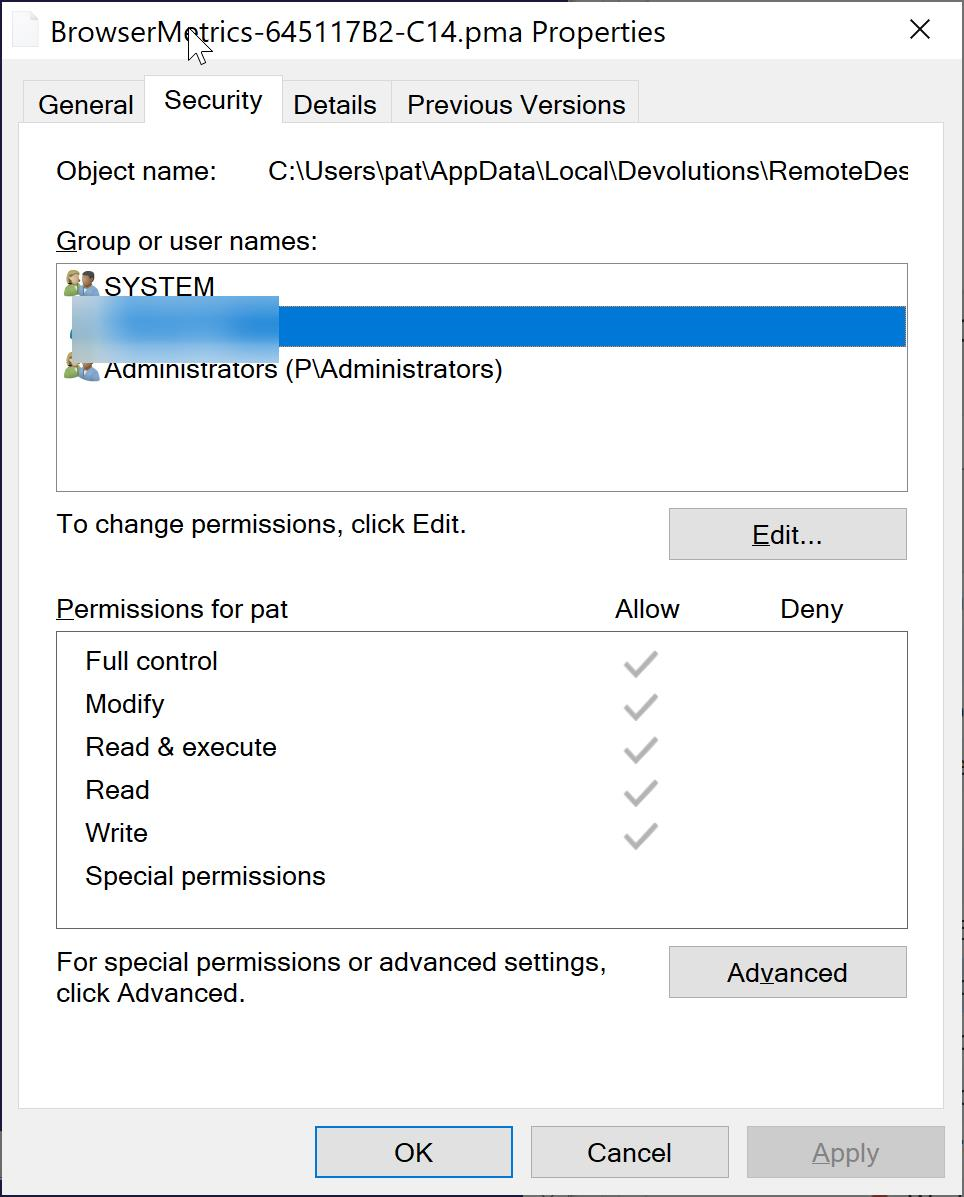
when trying to delete the file in windows explorer I get: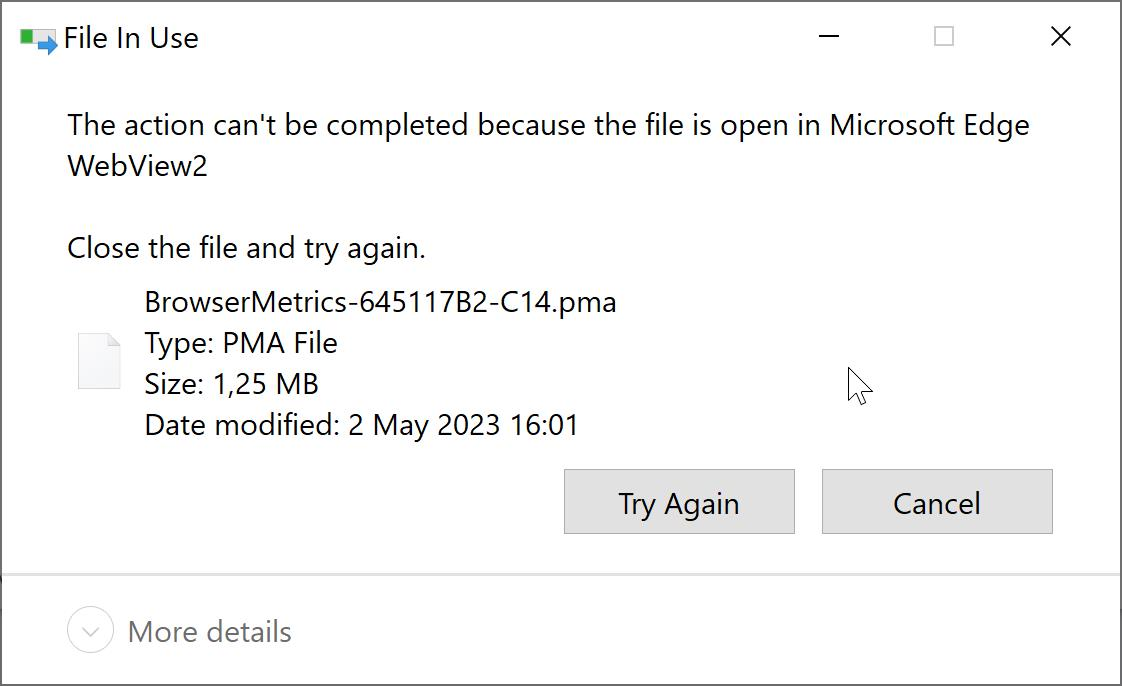
which seems quite logical to me, as webview is open as long as RDM has a browser session open (I assume).
d93174dd-eed4-44f6-8a44-9fcfc361d4fd.png
b1074110-9f89-44b8-931b-eca5fe5a5147.png
Hello,
I am validating with the engineering team; I will get back to you shortly.
Best regards,
Richard Boisvert
hello,
any news here? :)
Hello,
Are you still using a different profile for each Website entry?
The issue I get when the Private session and Clear cache on startup option are enabled without using the Profile name option is the following one that the filename is different from your error message. When using the Profile name option, then the issue no longer appears. I have submitted a ticket for this particular behaviour.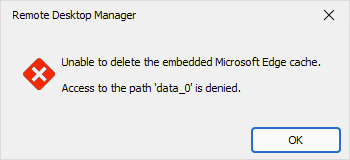
Once a fix will be available, we will post it here.
Thank you for your patience.
Best regards,
Érica Poirier
50939dcf-0409-4190-8ee7-7774c3995afc.png
I am still using the private mode for all web sessions, as switching to non-private is not possible.
Hello,
Thank you for your feedback.
With the Private session enabled, have you enabled the Profile name property? With a profile name for each Website entry, you should not get the error anymore.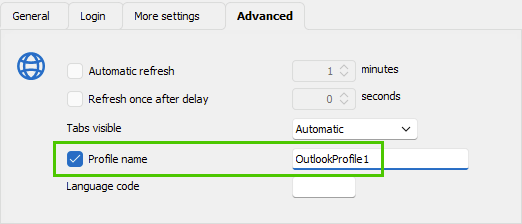
Let us know if that helps.
Best regards,
Érica Poirier
8bdf9713-35f7-4854-9e27-4945451b47d7.png
sure, but this is not the least practical as we are talking 50+ web sessions over our whole organisation. And we moved a bit away from the (semi-)original problem: I don't really care about deleting caches, I would like to switch the web sessions currently in private mode to non-private mode, as you told me, they are now using different sessions but this is not working, see this post: https://forum.devolutions.net/topics/39372/embedded-edge-private-session-deletes-cachecookies#175618
Hello,
Thank you for your feedback.
I cannot reproduce this blank page issue like you the one you get.
What URL are you using to connect on the Outlook page?
Best regards,
Érica Poirier
- this is not specific to outlook.com, it happens with all web sessions
- what you see is not an edge web session canvas, you can't right click and see options. It looks like the edge web session isn't even starting.
- I have this problem on two different systems
to reproduce:
- set edge defaults to private session/smart screen disabled
- create web session edge, embedded, default (private), any URL you want
- start session to test
- edit session and change settings to "prvate session disabled"
- reconnect -> error (blank screen)
- change back tp private and it works again
hello,
Thank you for your feedback.
Sadly I still cannot reproduce this behaviour.
Would you be available for a support session to investigate this problem? If so, please send us an email to service@devolutions.net with a reference to this thread.
Best regards,
Érica Poirier
Hi @perler
I've fixed the issue with the Clear cache at startup. The fix will be available in the next release v2023.2 (in beta soon) and if ever we release another v2023.1 build then it would also be there.
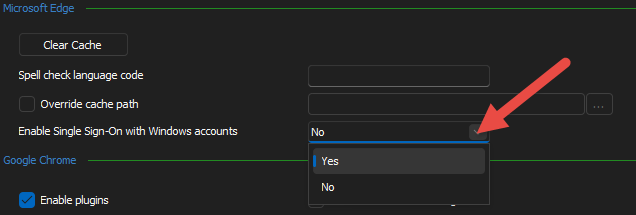
As for the blank/empty/black screen you get, I was able to reproduce an issue similar to what you get but not using the exact same steps. I'm still trying to figure out what is actually going on under the hood. From what I can gather is that it occurs if we initialize the WebView2 control (aka Edge control) with conflicting properties the second time.
How I reproduce the issue:
- Import attached file
- Open the session
- keep it opened
- File > Options > Types > Website > Microsoft Edge (section) > change the value for "Enable Single Sign-On with Windows accounts"
- Open the session a second time
- the new session will be blank
- Put the setting back like it was
- Open a third instance
- will work correctly
Stéfane Lavergne
98c667b8-eea1-41e1-a39b-0cf8b070850b.png
we have a support teams meeting today, if you would like to join, I now have even a case where the problem (blank screen) comes ip in a private session.
Hello,
The RDM version 2023.1.28 contains a fix for the Clear cache on startup issue when another Edge Website entry is opened.
As for the blank screen issue, we will have to investigate further more on this as we are still unable to reproduce it internally.
Thank you for your patience.
Best regards,
Érica Poirier
ok, in our support session you seemed quite confidence, that this fix would solve both problems. anyway, i know got an installation where I have web sessions (only some) which show the blank screen no matter if in private or non-privagte sessions - which makes this a bit more urgent..
ok, re blank screen, on the machine, where this happens even in private mode it looks like as if this happens in AWS cloud9 sessions only for now. this would be this service (which is free, so maybe you can give it a spin): https://aws.amazon.com/cloud9/ - this is quite complex HTML stuff (basically an IDE in the browser), so maybe this gives a clou.
Hello,
Thank you for your feedback.
I think I have been able to reproduce your issue. I need to find out the root cause of this issue to be sure we will fix this problem.
I will keep you updated.
Thank you for your patience.
Best regards,
Érica Poirier
Hello,
I think we have found the problem.
Could you please verify in File - Options - Types - Website and set the SmartScreen option to Enabled?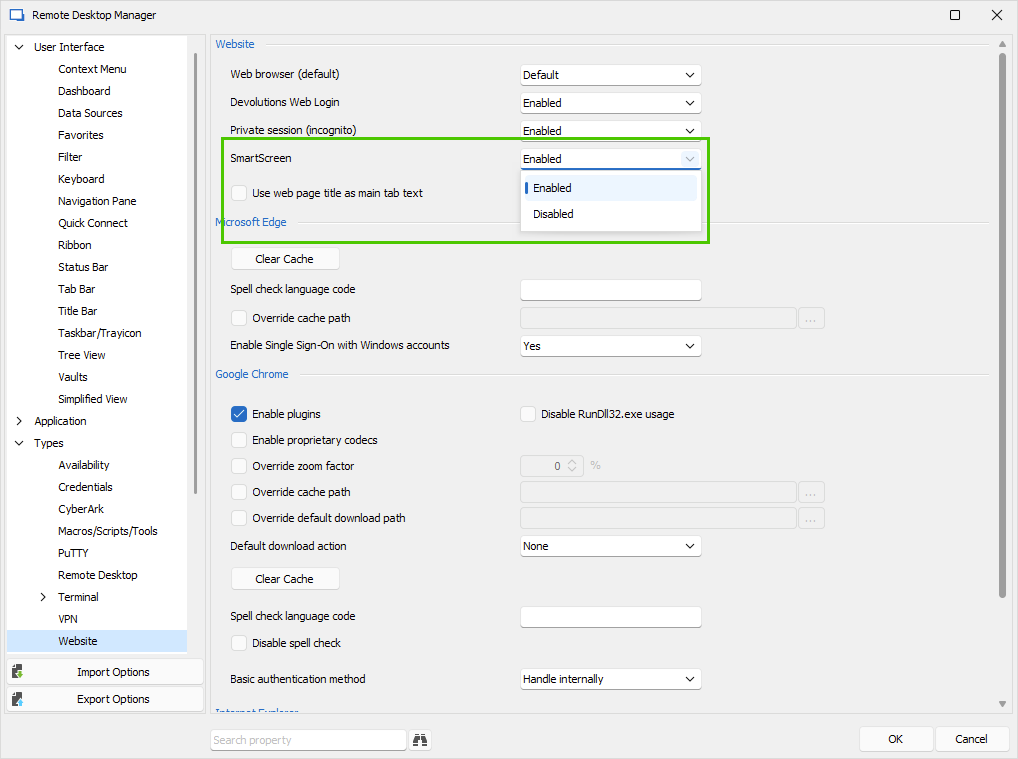
Then try again to open any Website entry, no matter if the have the Private session option enabled or disabled.
Best regards,
Érica Poirier
ba44cf7f-d0f0-4a92-b62f-4a7f61c94792.png
sorry, at least on the notebook which doesn't even opens the AWS link in private mode, setting the session like this doesn't solve the problem: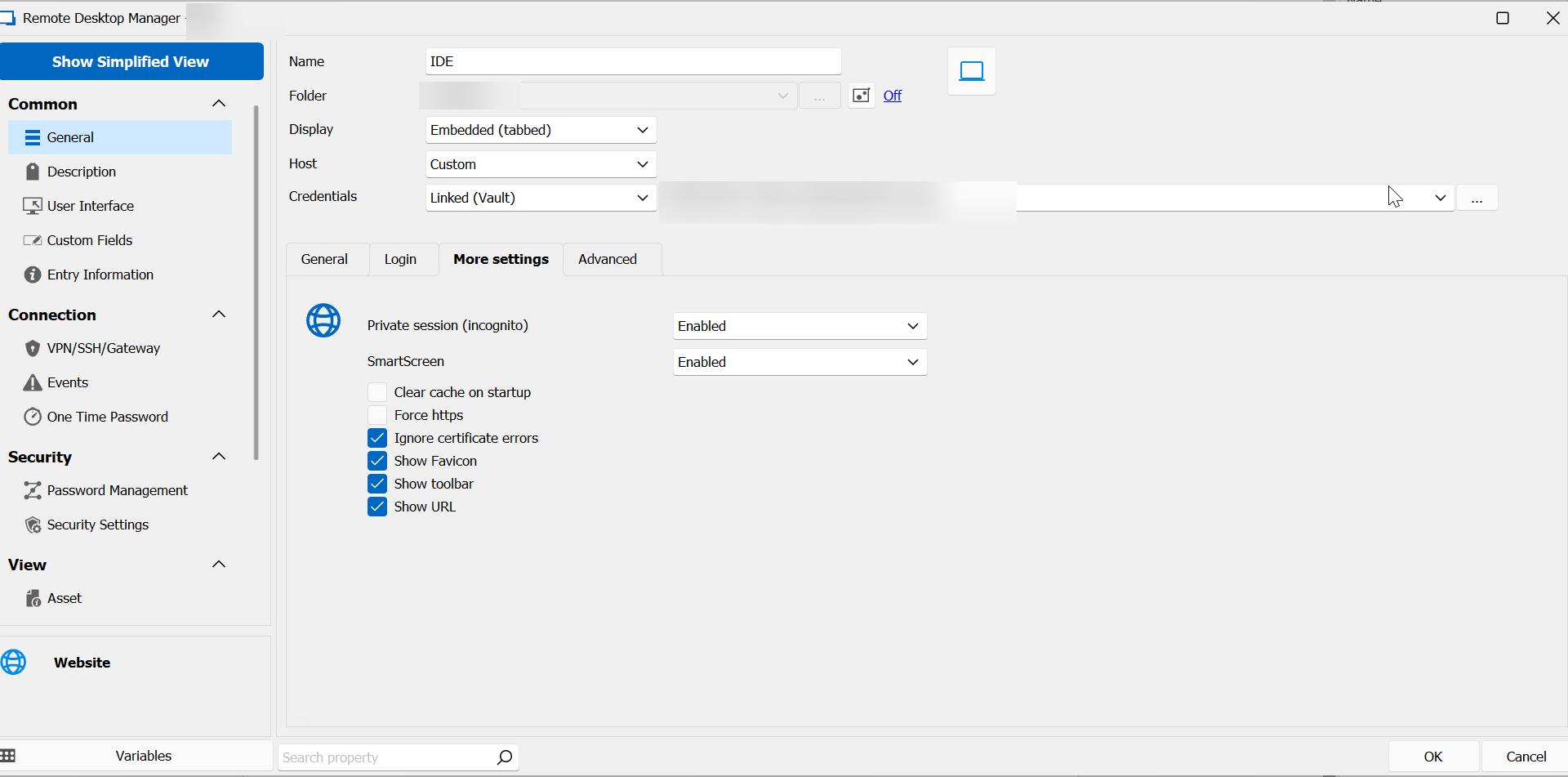
4aae5a21-62e6-4df5-aa6c-d9727faf06f5.png
Hello,
Thank you for your feedback.
No matter which website I'm trying to reach, as soon as I open a Website entry that has the SmartScreen disabled, then all other Website entry will display a blank page.
A ticket has been submitted to our engineering team. Once a fix will be available, we will post it here.
Thank you for your patience.
Best regards,
Érica Poirier
hurray, it works. what an immensly helpful improvement, to have each web session in it's own browser instance!
Hello perler,
Thank you for confirming the issue is resolved!
Best regards,
Richard Boisvert