Import Favorites from Another Machine

I'm setting up a new laptop and wanting to import all the settings from my old laptop. Eventually I managed to get my connections and UI settings imported but when I attempt to import the favorites from and exported XML file it only creates the folders without the connections. Can you help please?
All Comments (10)
Hello,
which RDM version are you using?
Regards,
Min
Hello,
To add to @min's reply, could you please confirm if the "change IDs" option was checked when you exported your entries? If it was, this caused your favorites to lose their link since their IDs changed.
To fix this, you could delete what you just imported into your data source. Export your data from your old laptop once more and make sure that the "change IDs" option is unchecked and then import it back into your data source.
Best regards,
James Lafleur
The version I'm exporting from is 2021.1.36.0 (freed edition) but I don't see an option to "change IDs" in the process (see attached).
Capture.PNG
Hello,
I suspect the ID's were automatically changed by a XML export. Would you give the vault migration a try?
With this migration your favourites should be keep.
Regards,
Min
I already did a "vault migration" and it just imported my connections into the new destination vault, it didn't create any favorites. So I assumed i had to do the export and import of favorites as a separate process which is what I tried to do but it's not working.
Hello,
After testing this, it seems to my knowledge, that exporting your favorites will not keep them as "Favorites" once they're imported.
This means that as of now you'll need to add them to your favorites after importing.
I'm going to see with our engineers if this is unintentional or something that simply isn't supported in RDM.
Best regards,
OK, thanks. Seems a bit of an oversight to me.
Hello again...this still seems to be the case for me also. Importing favorites from another Vault does nothing. Exporting and importing from the same Vault is working but not from a different vault. Background: the switch and migration from MySQL to SQL Express. So we can migrate the main structure and also the user's vault but not the favorites. They seem to be linked to the fault somehow ?
(Still using 2023.2.34.0 64-bit because we are still on MySQL. )
@mike_s,
As I can see, the ticket opened with our development team is still opened.
I will add a note to it.
Best regards,
Jeff Dagenais
Hello,
This feature as been completed internally and will be available starting from the version 2024.2.2.0 of RDM.
When you export entries you will have the option called "Remember favorites" available to export your favorites. When you import them back they will appear as they were before exporting. If they were in a folder it will be added too.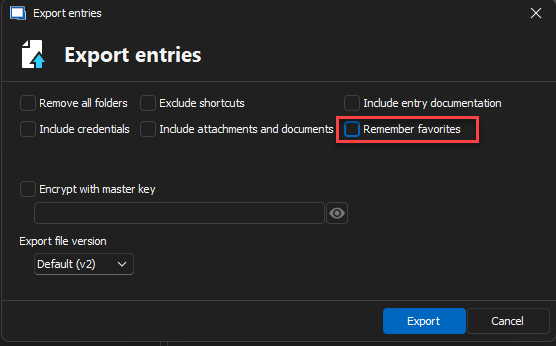
Regards.
b80ad9bf-1b02-4548-9726-f921383cfe2f.png