How can we integrate personal VPNs into Server configurations
How can we integrate personal VPNs into Server configurations
0 vote

Hello RDM-Team
We've run into some issues regarding the integration of personal VPNs to connect to our customers.
We would like to implement personal VPNs (including OTP) to an RDP-Session. (Credentials via 1Password)
We're only able to add a VPN-Config, which doesn't work, cause everyone has different VPN-Configs and Accounts that belong to them.
It would be great if you added a feature similar to the existing Personal-Credential-Function, that allows for private VPN-Configs to be added.
We would like to create multiple personal VPN-Configs / Credentials so we can differentiate between different customers.
We also had an idea about the OpenVPN-Usage, instead of Macro-Scripts to insert credentials you could use the OpenVPN-CLI. (We experience a lot of inconvenience with the Macro-Scripts, cause they fail often. (The Macro-Script got killed by a Teamviewer Process running in the background))
Kind Regards and a nice Weekend!
Frederik Sinniger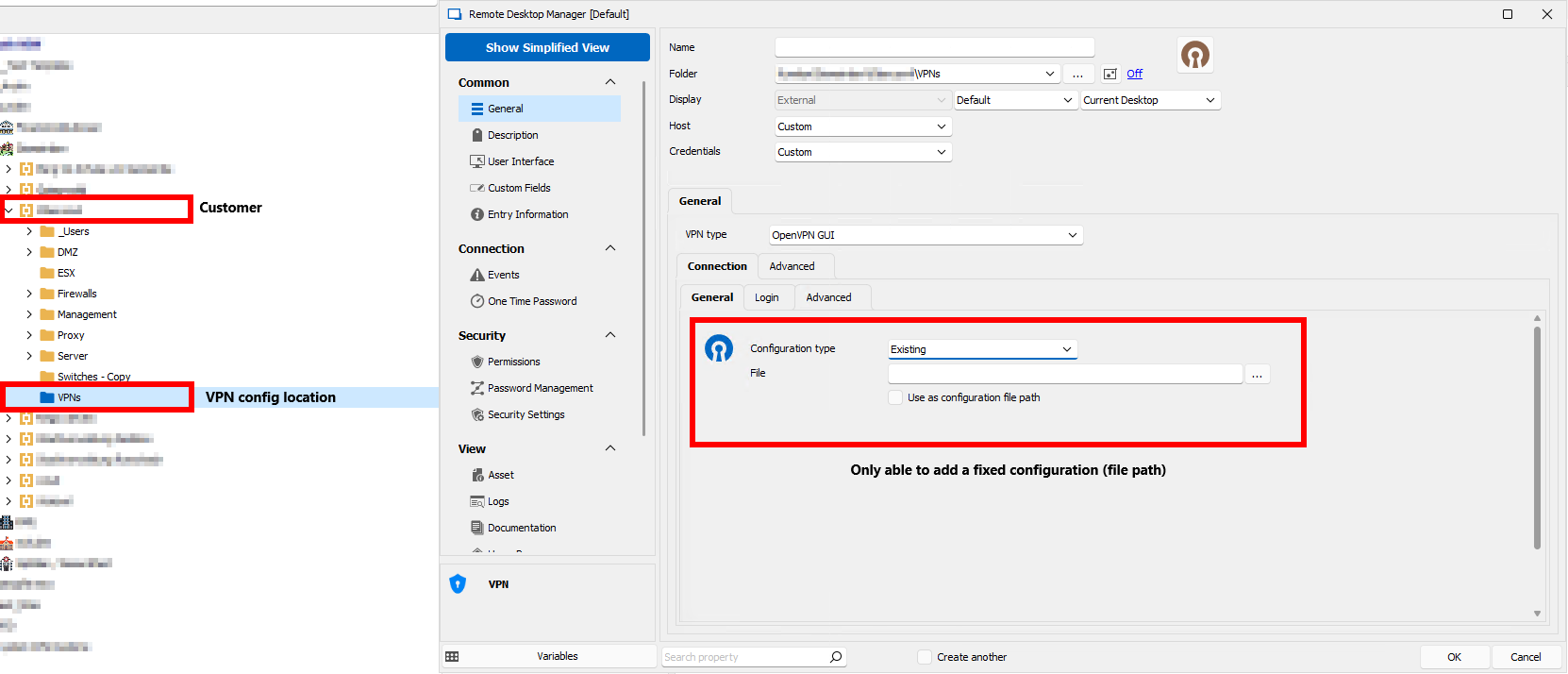
2023-03-24 14_41_18-RDM-DEMO - Remotedesktopverbindung.png
2023-03-24 14_23_52-RDM-DEMO - Remotedesktopverbindung.png
All Comments (27)
Hello,
Thank you for your request.
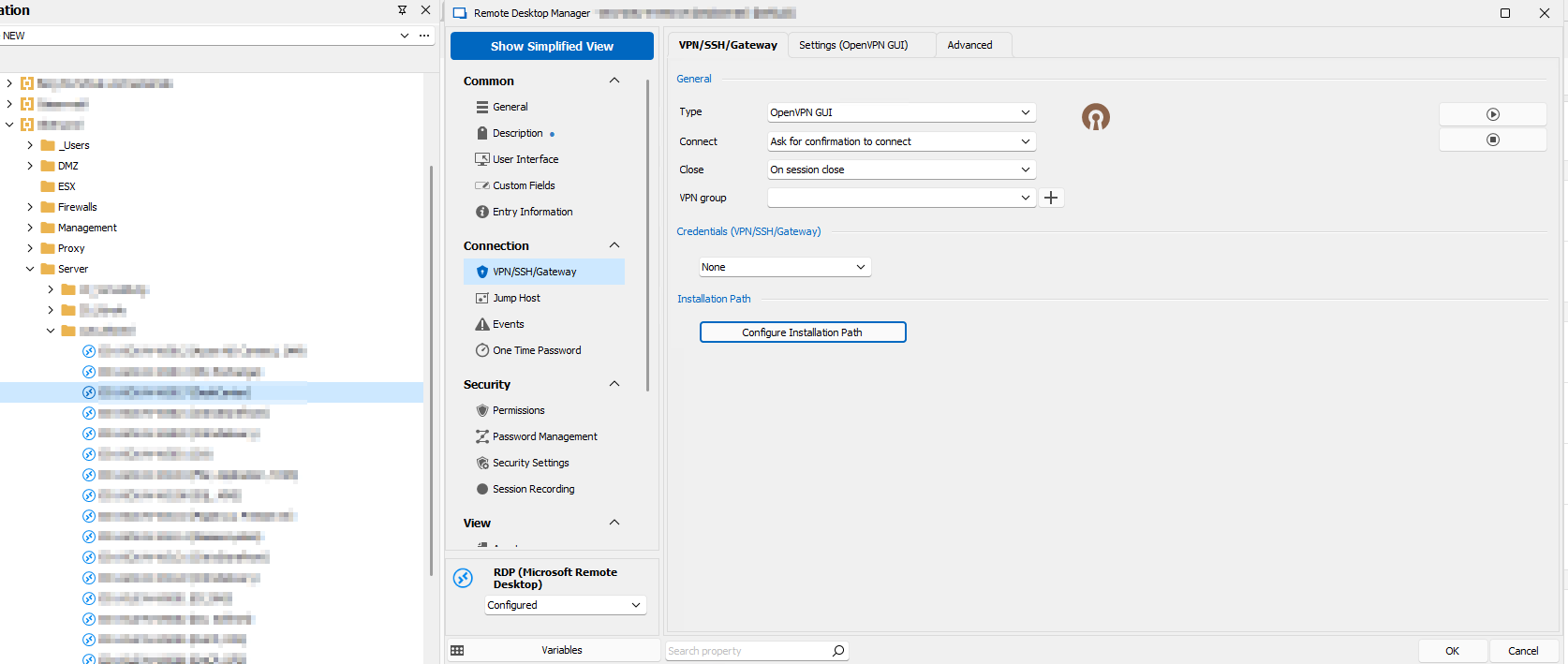
For your first point about VPN configurations, I feel like if we added a way to choose "find by name (user vault)" in the VPN/SSH/Gateway tab of entries, this would allow you to tell your users to create a VPN entry with that name in their user vault, and RDM would use that VPN to connect. What do you think about this idea?
For your point about OpenVPN, did you try checking the option "use authentication file"? Using this option, the information will be passed through an authentication file instead of through macros. It's a tradeoff of security (the authentication file needs to live on disk for a time to let OpenVPN use it) versus stability (macros being typed in the wrong context).
Regards,
Hubert Mireault
Hi Hubert,
I think your Idea sounds pretty cool, but this would mean everyone would have to name their VPN config the same for every customer?
The authentication method with the Authentication file doesn't work for me, it's probably do tho the use of OTPs, but I can't really tell. There's sadly not much information about this type of authentication with OpenVPN.
Best Regards
Frederik Sinniger
Hello,
As you say, this would require your users to have their VPN entry be named correctly, or at the minimum contain the search string. If RDM can't find the exact string, it will prompt for other matches I believe.
As you say I think the authentication file can only contain the username and the password, so if you have an OTP to fill as well, it's not possible to pass this information in the authentication file.
We currently call the CLI for OpenVPN-GUI.exe, and unfortunately there isn't many parameters we can pass. The way the integration works, we create an OVPN file on disk with all the necessary information, and we tell OpenVPN-GUI.exe to open that file.
Regards,
Hubert Mireault
Hi Hubert,
The feature to get the VPN from the Personal vault would be great and exactly what we were looking for!
Now, my question of the credential pass-through still remains. Would a feature request at OpenVPN be helpful, or can you as a company do something like this? Using the way via macro is just not reliable enough, and for a busy company like us.
Best Regards
Frederik Sinniger
Hello,
Perfect, I have opened a ticket to add the "Find by name (user vault)" feature to the existing VPN selection.
As for passing the credentials, I would indeed suggest opening a feature request with OpenVPN. We don't currently have a partnership with the OpenVPN team and requests that come directly from their users might be taken more seriously. Being able to pass more information in the authentication file like the OTP would be a great plus for the integration and for anyone else scripting their OpenVPN connections.
Regards,
Hubert Mireault
Hi Hubert,
I'm just curious if there is any update in the progress of my feature request. Also, I was in contact with OpenVPN, but it seems like their feature request system is really slow, but we will see what happens.
Best Regards
Frederik
Hello Frederik,
Your feature request to add "Find by name (user vault)" to the existing VPN selection is currently planned for our 2023.2 release this summer.
Keep us updated on the request on the OpenVPN side. If they add this functionality we will be happy to make the changes in RDM to support sending the OTP through the authentication file.
Regards,
Hubert Mireault
Hello,
The "Find by name (user vault)" feature has been implemented internally, so it's confirmed for the 2023.2 summer release.
Regards
Jonathan Del Signore
Hello,
Thanks for the confirmation, we are really happy to have this feature!
For my other request about the OTP pass-through, I have some news:
Unfortunately, OpenVPN doesn't really care about my request, so I did my own research and I think I found a way to pass-through Username, Password and OTP via shell. With the following command, you can connect to a VPN and add all the necessary credentials.
"openvpn.exe --cipher <AES-asdf-asdf> --ncp-ciphers <AES-asdf-asdfa-asdf> --config <yourfile\file.ovpn>"
You have to be in the installation folder to execute this. If you type this it will prompt for credentials and as far as my understanding is it should be possible to fill them in with the --auth configuration that can be configured. There is no parameter for OTP but my reasearch showed that you can just write it append the Password like in the normal GUI. Is there any way of implementing this as a setting in RDM, so it is possible to use credentials from 1Password without the use of Macro scripts?
Best Regards
Frederik
Hello,
We are indeed doing something very similar in order to pass the OTP along with the password, but it's currently only working with a Configuration Type set to "Custom".
We'll open a ticket in order to add this possibility for "Existing" configurations and come back to you with any update.
Regards
Jonathan Del Signore
Hello,
The OTP will now be appended to the password in the authentication file for both types of configuration.
The fix will take effect in version 2023.1.27.0.
Regards
Jonathan Del Signore
Hi,
The feature works really well, thank you for the integration. I still have one problem that I coulden't solve. If I'm using credentials that are coming from OnePassword the OTP wont get recognized and the connetion fails. my temporary fix was a prompt but i want it to be fully automated! Is there a way I missed?
Best regards
Frederik
Hello,
We currently don't support OTPs from OnePassword. We'll see if their API allows us to retrieve them and come back to you once we know more.
Regards
Jonathan Del Signore
Just to confirm, are you using the mode "Web connector" ? We very rarely make changes to the "Linked to a local file" mode, so we'd look into adding OTP support only for the web connector if that's fine with you.
Regards
Jonathan Del Signore
Hi,
Thanks! I forgot to add this to my last post, I'm wondering if you added the feature I asked in the beginning of this thread about adding the possibility to add user vault VPN Connections to a rdp connection by making a search in the user vault (search by name) I cant find it in the latest RDM!
best Regards
Frederik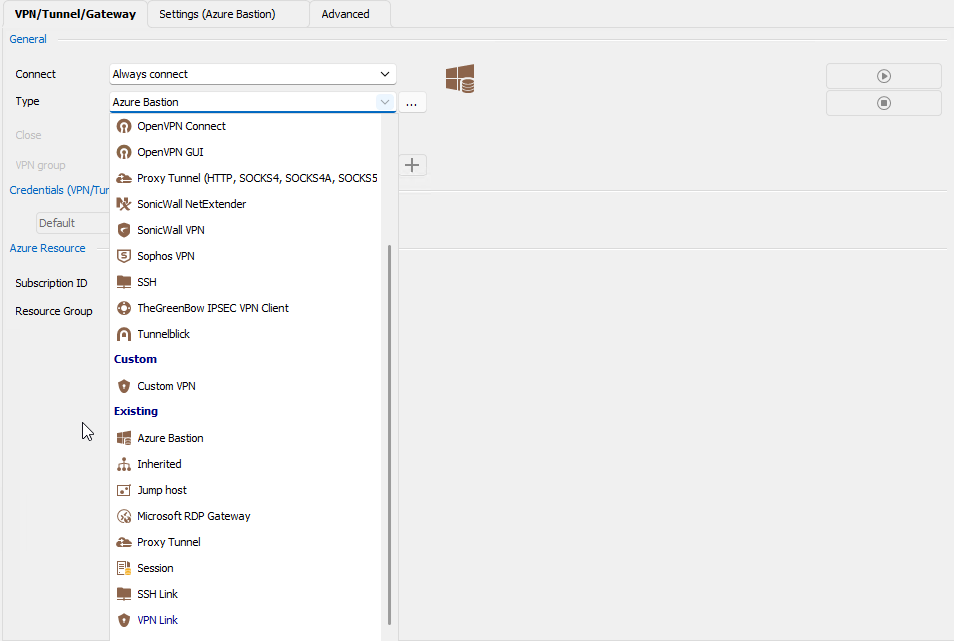
ace0ad4b-45eb-4275-8fc6-afe851566bf8.png
Just to confirm, are you using the mode "Web connector" ? We very rarely make changes to the "Linked to a local file" mode, so we'd look into adding OTP support only for the web connector if that's fine with you.
Regards
yes, I did use the web connector but I couldn't get the otp running
Perfect thank you, we'll look into that. As for the "Find by name", it's indeed available. You need to set the Type to "Session", and you'll find the new option in the "Settings" tab.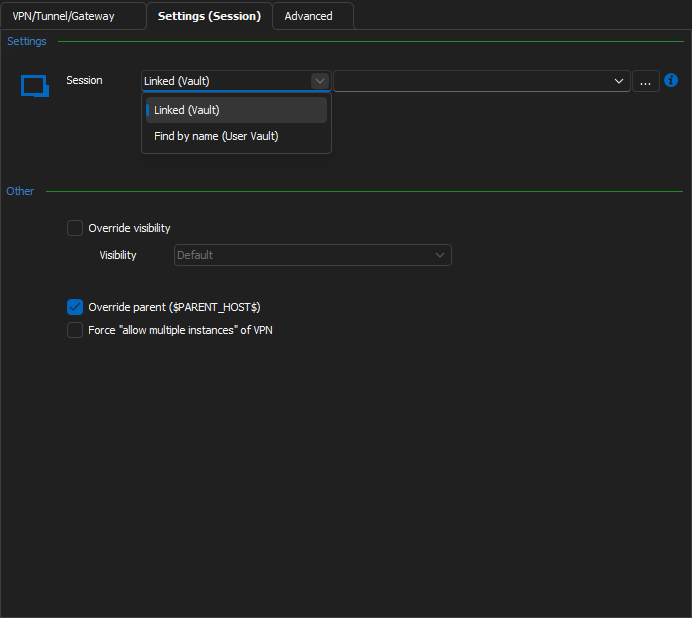
Regards
Jonathan Del Signore
8f62db0d-94f9-40a4-9e1c-ddae0f46bb83.png
Hi,
The find by name works perfectly, I just didn't get it in thebeginning that this feature was for sessions in general.
Are there any news about the 1Password Web-connector and the OTPs?
Best Regards
Frederik
Hello,
We have an engineer looking into 1Password OTPs, we'll notify you as soon as we have an update.
Regards
Jonathan Del Signore
Hello,
The backend for OTPs is now done, so we'll be able to start working on integrating it in RDM.
We'll notify you of any more progress on the matter.
Regards
Jonathan Del Signore
Hi,
I am wondering when we can expect the implementation of the feature into RDM?
Best regards
Frederik
Hello Frederik,
This is currently assigned to a developer, we can't give you an estimate yet but we will update this forum when we have an update.
Regards,
Hubert Mireault
Hello Frederik,
The feature to retrieve OTPs from 1Password as been completed internally and will be available starting from the version 2024.1.4.0 of RDM.
Regards.
Hi there
Thanks for implementing this feature! Now, I just found a bug with the feature and I'm not sure if the problem is with 1Password or if RDM is doing something wrong. When I try to copy the username and password for the 1Password credential entry, it works fine, but when I copy the OTP, I get the following error: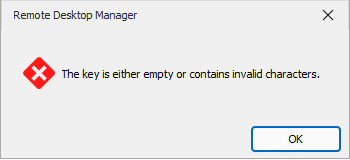
Is this a known issue? I couldn't find the error in the logs.
Regards
549e96ec-3b4d-469f-bb31-b59f9762ab2e.png
Hi,
We might have found the issue. We'll let you know when it's fixed. Just to be sure do you use QR Code for the OTP?
Regards,
Hi
Yes there are scanned QR codes.
Regards,
Hello Frederik,
We fixed the issue it will be available starting from the version 2024.1.21.0 of RDM.
Regards,