Trying to run a script on a connection with Powershell but it fails
Trying to run a script on a connection with Powershell but it fails

Hi There,
New to RDM and it's PS module so please forgive my initial ignorance.
I have the RDM Client: 2022.3.35.0 64-bit
I have the PS module 'Devolutions.Server': 2022.3.13.0
I want to be able to run a PS script that uses the current connection name to query another system to retrieve the correct IP address of that server I want to RDP into (DNS is not resolvable).
So the script would execute before the connection is made, retrieves the IP address, updates the connection and then starts the RDP session to the server/PC in question.
Any help on this is highly appreciated!
Regards,
Steven
All Comments (5)
Hello,
Thank you for contacting us on that matter.
To update the IP address while opening an RDP entry, it is possible to do it with a script that is being imported in the Before Open Event of the RDP entry. The script you will import must contains a function, in the following sample RetrieveIP, that will return the IP address of the remote server you want to connect to.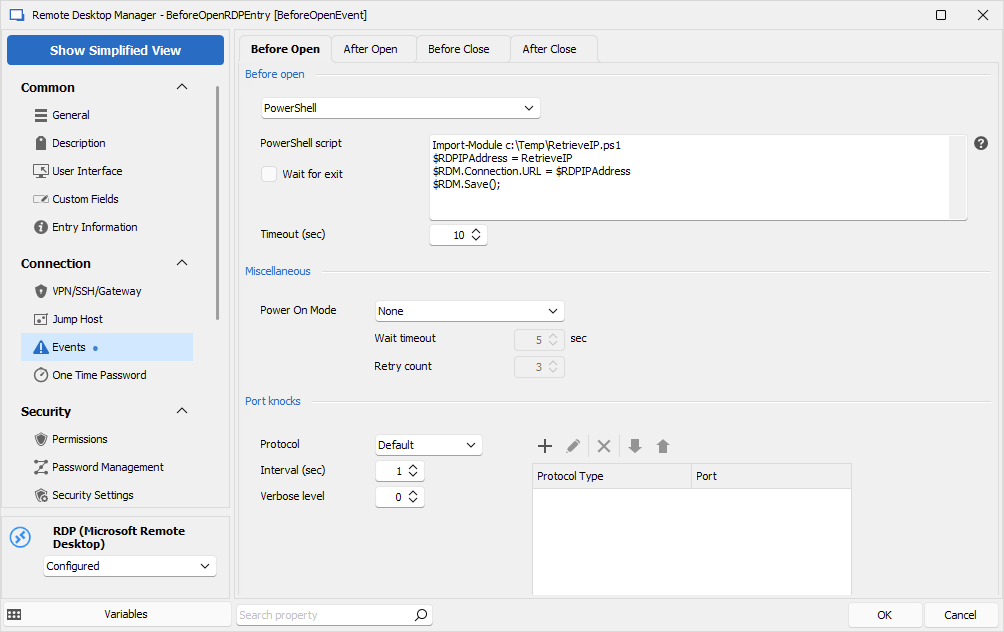
Let us know if that's what you want to achieve.
Best regards,
Érica Poirier
image.png
Hi Erica,
This does not seem to work for me.
This is what I tried to set and nothing works or shows in the GUI properties in RDM when I edit the connection in RDM.
$RDM.Connection.Host = 'ConnHost'
$RDM.Connection.HostIP = '66.66.66.66t'
$RDM.Save()
$RDM.connection.host = '44.44.44.44'
$RDM.save()
$RDM.Connection.Name = 'AAAAAAAAAA'
$RDM.Save()
Nothing works, nothing is set in the properties of the connection as I would have expected.
Your example works to save the settings with :
$RDM.Save()
I dumped several methods and properties from the $RDM object, this is on the "Before Open" event.
$RDM | gm | Out-File -FilePath c:\temp\rdm.methods.txt -Force -Encoding ascii
$RDM | Out-File -FilePath c:\temp\rdm.values.txt -Force -Encoding ascii
$RDM.Connection | gm | Out-File -FilePath c:\temp\rdm.connection.methods.txt -Force -Encoding ascii
$RDM.Connection| Out-File -FilePath c:\temp\rdm.connection.values.txt -Force -Encoding ascii
$RDM.Prompt | gm | Out-File -FilePath c:\temp\rdm.prompt.methods.txt -Force -Encoding ascii
$RDM.Prompt | Out-File -FilePath c:\temp\rdm.prompt.values.txt -Force -Encoding ascii
Looking at the $RDM object methods available:
TypeName: Devolutions.RemoteDesktopManager.Managers.PowerShellManager+PowerShellEventProxy
Name MemberType Definition
---- ---------- ----------
Equals Method bool Equals(System.Object obj)
GetHashCode Method int GetHashCode()
GetType Method type GetType()
ToString Method string ToString()
Cancel Property bool Cancel {get;set;}
Connection Property RemoteDesktopManager.AddOn.ISession Connection {get;}
Prompt Property Devolutions.RemoteDesktopManager.Business.OpenSessionComment Prompt {get;}
I see no "Save" method, or am I mistaken?
Do I need to get some object/connection/datastore/whatever in order to be able to change properties and save a connection?
And can I ask, where is the explanation on the $RDM object, the scopes at various points and all that? I have no clue about this object atm.
And is this object available when I execute scripts on a connection? I mean, not the events and running a script, I mean creating a PS script and calling that: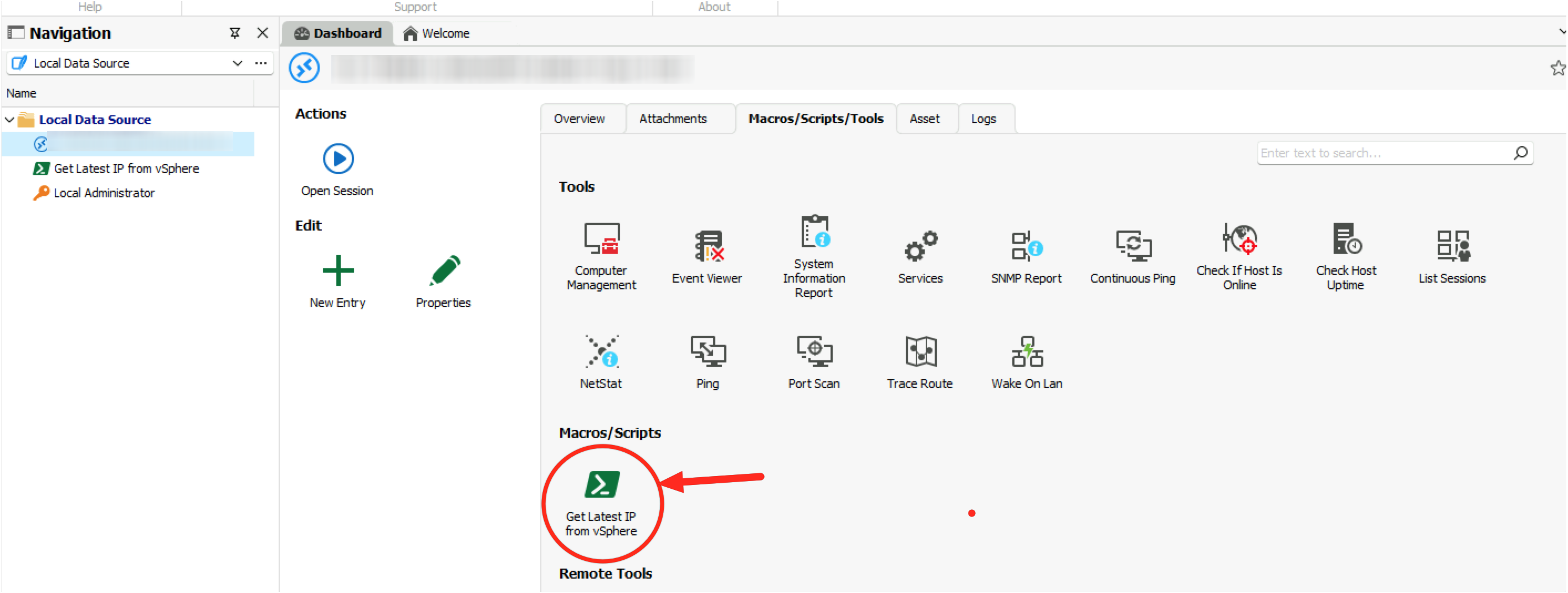
Is there some documentation on scripting with Powershell and the objects you can use (methods and properties) at various points of scripting in RDM?
Right now I am kinda reverse engineering that info a bit by dumping methods and properties as shown above, that is not exactly ideal.
Regards,
Steven
Capto_Annotation.png
Hello,
Thank you for your feedback.
I should have mentioned that the $RDM.Save() function will use the information only when opening the session and this won't be saved permanently in the entry.
But if you want to update the IP address when opening the RDP entry, the the property that must be updated is URL and not Host like the following.
$RDM.connection.url = '44.44.44.44'
$RDM.save()
The method to find the object property's names is to edit the property and save the entry. Then go in Home - Copy - Preview 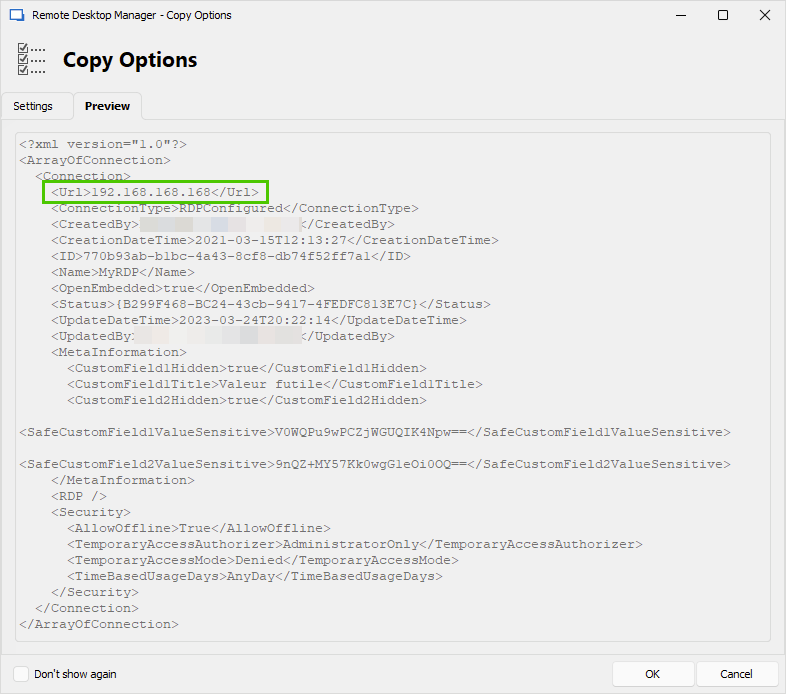
Let us know if that helps.
Best regards,
Érica Poirier
image.png
Thanks for the response.
So this means the IP/URL will change in memory only and only temporarily (how long?)?
Could you perhaps answer these questions?
1) Why would the $RDM.Save() method be called if it does not actually save?
2) I cannot see that method on the $RDM object, how is this supposed to work then?
3) What would be the correct location where all this is explained and the object model(s) are explained?
4) Running scripts (so not on events) poses the same question, where can I find what you get in respect to scripting (objects, methods, sessions, etc.)?
Thanks!
Regards,
Steven
Hello,
The change is valid for the opened session only. Once close, the information no longer exist in memory.
Here are the answers to your questions.
- It's a method that exist only for temporary modifications in the Events feature as it runs in the context of the opening session. If used in the Edit (Special Actions) - Custom PowerShell to update entries parameters, then it's permanent. Or we can use the Devolutions.PowerShell module to run scripts to interact with the RDM data source and entries.
- You won't see it on the $RDM object. My previous comment mentions how it works.
- The following online article provides some Batch Actions Samples that can be used for the Events feature.
- For the available cmdlets of the PowerShell Module, you can use the Get-Command cmdlet to list all methods of the module combined with the Get-Help cmdlet for the information regarding any individual cmdlets. About the RDM entries properties, we do not have any online documentation. You can edit an entry and set a permission to then see its name in Home - Copy - Preview.
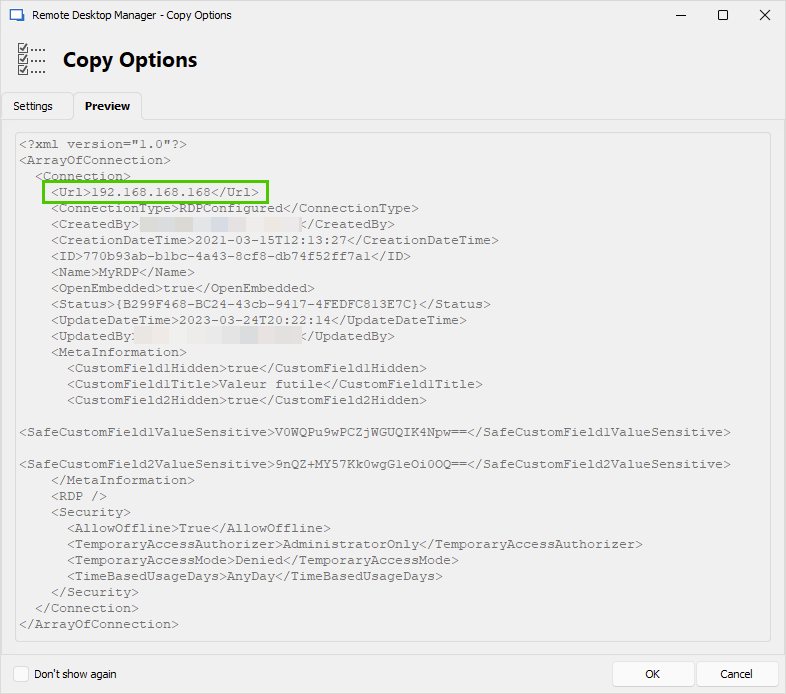
Let me know if you have further questions about this.
Best regards,
Érica Poirier
image.png