Adding data source to default configuration

Hi!
We have manually created a default configuration file by picking out parts of RemoteDesktopManager.cfg. I want to include only specific settings where we have reasons to change them. The other options can just stay whatever the default is of the current RDM version.
Is there a way to manually create a data source configuration too? The only thing I found after using the Options dialog to export the configuration including the data source, are the <OptionEncryptionPacked> and <OptionSensitivePacked> tags, which are encoded/encrypted so I'm not sure what's in there. I could just include those tags, but I was wondering if there's a better way.
Thanks!
Daniel
All Comments (19)
Hello Daniel,
The easiest method would be to configure the data source the way you want it to be on your machine, and then do a File > Options > Export. The CFG export through option will have the data source section filled in. Then you could edit the rest of the options as you see fit.
For the data source part, you will be limited to that method, since, as you mentioned, it is encrypted in the CFG file.
Best regards,
Richard Boisvert
OK, Thanks! So which parts of the CFG file belongs to the data source? Ist it exactly the <OptionEncryptionPacked> and <OptionSensitivePacked> tags? There's also a <Token> tag which I don't recognize. I think the rest is unrelated to the data source.
Another question: When I want to test the default configuration, which files/directories do I need to delete so that RDM acts like it's a fresh install. Is deleting "%LocalAppData%\Devolutions\RemoteDesktopManager" enough?
Hello Daniel,
I validated with the engineering team and these two tags are for the data stored in the ENC and STV files of RDM. The STV contains the data source information and is only decryptable with the ENC info. In short, yes, it is the right info, but it's not manually modifiable.
As for your second question, by renaming or deleting the folder you mentioned, RDM will behave as a new installation.
Best regards,
Richard Boisvert
Thank you for clarifying! I'll export the data source from a fresh client to make sure there's no user specific data in there.
But I don't quite understand the encryption scheme here... This data will be saved in a default configuration file, which should be readable by any new RDM installation. So why is it encrypted, if it can be read without providing a key?
Maybe you can help with this as well: I prepared a data source configuration on a fresh client and entered "%username%@%userdnsdomain%" for the username. I exported the config and moved the two "Packed" tags to the default.cfg. After starting the new RDM, it asks for a username:
When I check the data source settings, there's nothing entered in the username field. I don't know if it got exported correctly or not, because it's encrypted :)
What could be the reason the username field got removed?
Thanks!
Daniel
image.png
default.zip
Thank you for clarifying! I'll export the data source from a fresh client to make sure there's no user specific data in there.
But I don't quite understand the encryption scheme here... This data will be saved in a default configuration file, which should be readable by any new RDM installation. So why is it encrypted, if it can be read without providing a key?
Hello Daniel,
This is Mathieu from the Devolutions Security Team.
The property OptionSensitivePackaged is encrypted with a random key. This property contains the sensitive options such as data source configurations.
The key is saved in the OptionEncryptionPacked property of the exported RemoteDesktopManager.cfg file. If an application password was configured on the RDM application this key will be encrypted with it. If no application password is configured, this key will be obfuscated.
The properties OptionEncryptionPacked & OptionSensitivePacked are normally separate files (OptionEncryptionPacked -> RemoteDesktopManager.enc, OptionSensitivePacked -> RemoteDesktopManager.stv) on a standard installation. We pack them when exporting options to simplify deploying new instances.
Regards,
Mathieu
Mathieu Morrissette
Hi!
Thanks for the information about the encrypted configuration! I now came around to testing the default config again.
I still have the problem that is asks for the datasource user on first start, even though it was set to %username%@%userdnsdomain% and moved to the default.cfg using the two "Packed" tags. In version 2023.1.20.0 It also prompts
I tried exporting from a fresh install without ever connecting to the datasource, and also from a working datasource, but then the "Packed" tags are over 8000 characters long. In the working config, I also get a <Token> tag where I'm not sure if this is safe to be kept in a default configuration.
Do you have other ideas how else we could set the username to the currently logged on UPN through the default config?
When I use the export function of the datasource dialog, I get an unencrypted XML of the datasource. Is there a way to set that as the default datasource for new clients? I'd rather work with an unencrypted configuration because it's easily to edit and troubleshoot. Also, when it's unencrypted, I can make sure there's no sensitive information in the default config.
Thanks!
Daniel
Hello,
I still have the problem that is asks for the datasource user on first start, even though it was set to %username%@%userdnsdomain% and moved to the default.cfg using the two "Packed" tags. In version 2023.1.20.0 It also prompts
I'm not sure about the datasource still prompting even though a user is configured I will contact the development team, to me it seems like a bug. I'll keep you updated on this.
I tried exporting from a fresh install without ever connecting to the datasource, and also from a working datasource, but then the "Packed" tags are over 8000 characters long. In the working config, I also get a <Token> tag where I'm not sure if this is safe to be kept in a default configuration.
The "<Token>" tag is used to store the serial data.
When I use the export function of the datasource dialog, I get an unencrypted XML of the datasource. Is there a way to set that as the default datasource for new clients? I'd rather work with an unencrypted configuration because it's easily to edit and troubleshoot. Also, when it's unencrypted, I can make sure there's no sensitive information in the default config.
I will open a feature request.
Regards,
Mathieu
Mathieu Morrissette
Thank you!
Hello Daniel,
I'm unable to reproduce the default.cfg datasource prompt issue with RDM 2023.1.23.
Here is some screenshots of what I did :
My data source configuration: 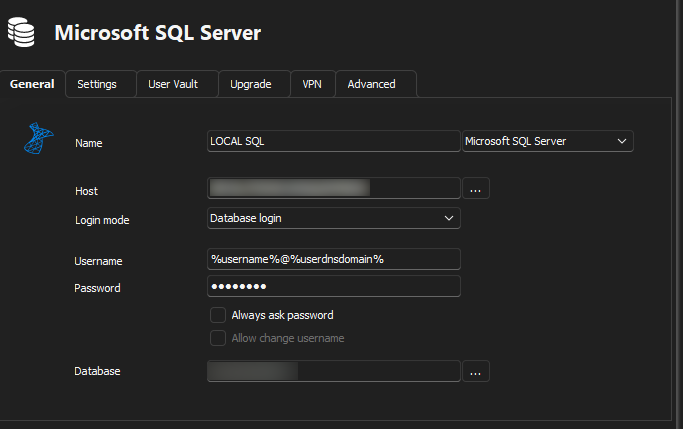
My export config : 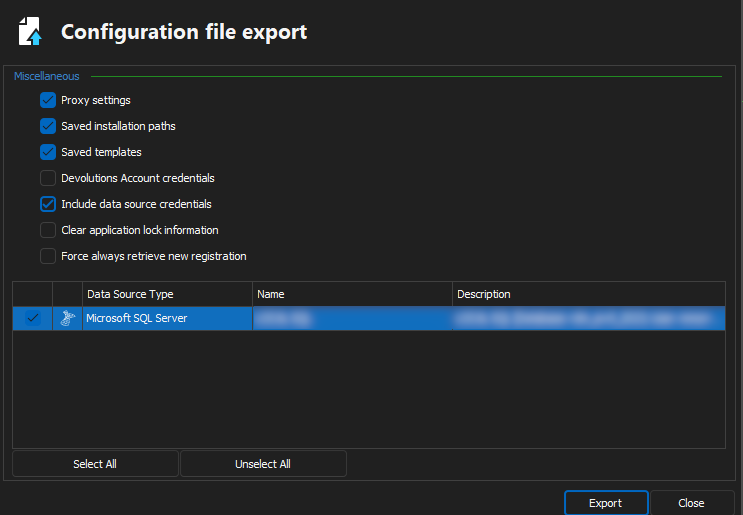
Regards,
Mathieu Morrissette
Devolutions Security Team
Mathieu Morrissette
8e79a967-cd45-4a69-9cb8-6fa40c32eec9.png
d78e2297-c439-4a75-896c-67331a907039.png
OK I think I found the issue. In hindsight it's so obvious. I feel dumb 😄 If you check the option "Include data source credentials" it works.
Hello Daniel,
Glad to see you were just missing an option and that it is now working.
Best regards,
Richard Boisvert
Do you have other ideas how else we could set the username to the currently logged on UPN through the default config?
fyi, I found a better solution for this as well.
So far I used %username%@%userdnsdomain% in the data source to get the currently logged on user. But that did not always match the UPN of the user, which is required for Azure AD authentication. You can also use $USER_PRINCIPAL_NAME$, which is not an environment variable but a RDM internal variable, that works too.
PS: An unencrypted data source in the default.cfg would be convenient now again :)
Hello Daniel,
Thank you for sharing that solution, it is indeed possible to use the $USER_PRINCIPAL_NAME$ variable.
Best regards,
Richard Boisvert
Has there ever been a change that @Daniel Albrecht requested to allow the export of an unencrypted data source? We are moving from MS SQL to DVSL with EntraID, so nothing inside the XML would need to be hidden, it would only be the FQDN of the DVSL server and the username variable. It would make the maintenance of the default.cfg so much easier.
--
Citrix Technology Advocate (CTA) at https://www.meinekleinefarm.net
Hi!
I'm reworking our default config again and could use this feature still :)
It would be much easier to just change the XML instead of going through the whole procedure of installing RDM in a sandbox, configuring the data source, exporting the config and pasting the encrypted tags into the default.cfg.
When you export the data source itself you get some clean XML that could also be read from the default.cfg, like this:
  <DataSources>
    <RDMSConnectionDataSource>
      <Name>dvls.example.com</Name>
      <Server>https://dvls.example.com</Server>
      <UserName>$USER_PRINCIPAL_NAME$</UserName>
      <AutoGoOffline>true</AutoGoOffline>
      <AutoRefreshInterval>300</AutoRefreshInterval>
    </RDMSConnectionDataSource>
  </DataSources>
Thank you!
Hello,
I've revived the discussion regarding this feature on our end, we have a few questions we have to settle internally before we can plan development for this, which is part of why we hadn't started anything yet.
While I understand how annoying it is that we've not improved this flow, I appreciate you mentioning that this is still an issue. I'm hoping we can bring this back to our internal roadmaps and figure out a good solution.
Regards,
Hubert Mireault
Hi @Daniel Albrecht ! I'm not sure I understand correctly: Is this a proposal or already possible? I would love to get rid of this rather sooner than later.
--
Citrix Technology Advocate (CTA) at https://www.meinekleinefarm.net
Hi Marco! This is still just a feature request, not possible as far as I know. The XML is just an example taken from a data source export (not a config export)