The option "copy login and password" does not work

The option "copy login and password" does not work, or rather the inscription RDM that they are copied out. But on the insert command, only the password is already put in, there is no login (it doesn't get into the omen buffer at all)
I tried to insert both in the browser and in notepad
If I go back to a version earlier than 2022.3.24.0, then everything works. What have you changed in the RDM code that this good function is now impossible to use ?
PS
If you use the other commands "Copy login" or "Copy password" separately, they work. The "Copy username and password" command sends only the password to the clipboard. If I go back to an older version of RDM than 2022.3.24.0, it works there, I upgrade the version, it doesn't work again (((
All Comments (14)
Hello,
Thank you for contacting us on that matter!
Would it be possible for you to follow the steps listed here: https://kb.devolutions.net/kb_clipboard_diagnostic.html and then see if this issue persists with the latest version of RDM?
Best regards,
James Lafleur
Yes, I did such testing. After clicking "copy login and password", only the password is immediately inserted into the notepad by the first ctrl+v (previously, before version 2022.3.24.0, starting with it, everything broke) and it doesn't matter if it's a notepad, browser or any other program, only the password is inserted immediately by the command "copy login and password". At the same time, there are no prohibiting rules on the clipboard in RDM, it is empty at all
PS:
Let's say 100 and 200 and even 500 stayed on the same Chrome delay, whatever the password is inserted immediately
The option of simultaneously copying the login and password has stopped working in ANY program, only the password is transmitted or nothing is transmitted at all. But individually (Copy login or Copy password) works everywhere.
If I go back to some old version, for example 2022.3.15.0 copying the login and password at the same time works fine, I update to any version higher than 2022.3.22.0, all the option refuses to work correctly (at the same time I do not change ANYTHING in the settings, the same configuration file)
This is odd, I'm not sure I changed anything in the code between those two updates but I will have a look.
Can you please perform this test:
- Open Clipboard diagnostic (Help > Clipboard Diagnostic)
- click "Copy Username & Password"
- Anything displayed in Allowlisted section?
- If something is here, this is what is "taking" the content of the clipboard, we will need to investigate.
- Now past into notepad
- You should see NotePad displayed in the list

Stéfane Lavergne
1. I run the Clipboard Diagnostics snap-in
2. The allowed ones are empty (the forbidden ones are also empty)
3. Click Copy Username and Password
4. In the lower right corner (next to the clock) in the RDM interface, a notification window appears that the Login and Password have been successfully placed in the buffer
5. In the diagnostic window, the rdpclip process appears in the ALLOWED ones (I attach a screenshot)
6. I launch notepad
7. There is only one rdpclip process in the diagnostic window so far
8. I do insert into notepad, the password is inserted immediately (the login is NOT INSERTED)
9. In the diagnostic window, the notepad process is added to the Allowed
PS: Correction. I'm working with RDM while already in a Terminal session on a dedicated server, maybe that's the reason, but it used to work fine too!
Hello,
Thank you for your swift reply!
To ensure that this issue is not related to the local installation of RDM, would it be possible for you to create a portable installation of RDM and see if this issue persists with it?
To do so, you will need to do the following:
1- Download the .zip file below:
https://remotedesktopmanager.com/home/thankyou/rdmbin
2- Create a new folder on your Desktop
3- Extract the content of the .zip file into the folder created at #2
4- Go to this folder once the .zip file has been extracted and run remotedesktopmanager64.exe
5- Connect to your data source
Best regards,
James Lafleur
Sorry for the delayed response (actually on vacation at this time).
I will need to investigate why it worked before but not now. At step 5 when you see rdpclip in the list, this is where your username is going, the second you press "copy username & password" rdpclip asks/takes the username and you are left with only the password. This is likely due to the Terminal session. For now the only workaround would be to add a delay to rdpclip. I don't have my Windows PC with me so I'm going off memory.
- Configuration tab of the Clipboard diagnostics screen
- In the Delay section, New
- Set the Description
- Set the process name = rdpclip
- set the delay, start with 500ms as a test
Warning this will have two side effects, the first being it will give you 500ms from the time rdpclip takes the username for you to also paste it. The second side effect is you will keep on pasting the username for 500ms so you will need to delay before you paste the password. You will need to delay your second paste something like:
- Copy Username & Password
- Paste Username
- wait at least 500ms
- Past password
Let me know if the workaround works for you. You can also try to set it slower/faster (300ms, 800ms, 1000ms...) and see what works and feels good for you.
Best regards,
Stéfane Lavergne
1. Did you manage to find out why the copy login and password function used to work in the terminal session, but stopped after the 20th-24th release?
2. I tried your option, add a delay of 500 to the rdclip process and it's really VERY INCONVENIENT, out of 120 copying attempts, I only managed to insert a username and password 2 times
Offer
1. Can add rdclip immediately in the RDM code to the list of exceptions, well, or find out why there was no such problem before
2. Is it possible to add some kind of indicator that signals that 500 seconds are counting down, now you can insert a login, and now you can insert a password (maybe a countdown counter or a pop-up window in the lower right corner of the RDM that can be inserted now or what exactly is in the RDM clipboard right now)
PS: Unfortunately, it has become IMPOSSIBLE to use the Copy login and password function, it is easier to do this separately in the current RDM release in a terminal session... although everything worked fine before
1. Did you manage to find out why the copy login and password function used to work in the terminal session, but stopped after the 20th-24th release?
No
2. I tried your option, add a delay of 500 to the rdclip process and it's really VERY INCONVENIENT, out of 120 copying attempts, I only managed to insert a username and password 2 times
I will ask the QA department to try to reproduce the issue here locally so that we can test possible solutions.
Offer
1. Can add rdclip immediately in the RDM code to the list of exceptions, well, or find out why there was no such problem before
I think if we reproduce the issue the real solution might be for us to ignore the first rdpclip request and accept the second. I might try to implement this as a test with a system option to enable so that, worst case, you could test on your end if we can't reproduce it here.
2. Is it possible to add some kind of indicator that signals that 500 seconds are counting down, now you can insert a login, and now you can insert a password (maybe a countdown counter or a pop-up window in the lower right corner of the RDM that can be inserted now or what exactly is in the RDM clipboard right now)
I like the idea, I will see what I can do.
PS: Unfortunately, it has become IMPOSSIBLE to use the Copy login and password function, it is easier to do this separately in the current RDM release in a terminal session... although everything worked fine before
I understand the frustration, Copy Username & Password is a huge time saver, when it works, and huge pain when it doesn't. Unfortunately we need to work within the constraint of the Windows clipboard and that is not always simple.
Best regards,
Stéfane Lavergne
Hi,
So I've been testing, so far I've tried:
- copying from => to
- local => remote
- local => local
- remote => local
- remote => remote
With both scenarios
- Using an embedded RDP session in RDM
- Using MSTSC (external)
Result
- I have not been able to reproduce the issue once.
- I did not change any settings in the clipboard diagnostics to include/delay the rdpclip.
- The only time I can even get rdpclip to show up in diagnostic window is when copy from the embedded (or external) RDP and then paste into a notepad on the local machine. This is normal since rdpclip is the process that allows to copy/paste within the RDP protocol.
Conclusion
I think that since you are seeing rdpclip in the clipboard diagnostic window that your problem scenario must be when copying from the remote RDM (via RDP) and pasting locally. Is this a correct assumption?
My guess is that I must be doing something different than your problem scenario. Do you have an idea what it might be?
Best regards,
Sample of two of the scenarios (both via embedded RDP)
- Green : copy local, paste remote
- Red : Copy remote, paste local

Stéfane Lavergne
No, alas, not a correct assumption. I log in from my PC to the RDP remote desktop there I launch RDM and it is in the remote session (right-click) that I try to use the Login and Password Copying function and it is from the RDP session that I send screenshots of the Clipboard. I do all the work in the RDP session and do not switch to the main PC, I try to insert my username and password into programs or notepad on a remote machine
ps
Copy remote, Paste remote
Thank you for the clarification. I'm still not able to reproduce. I've tried RDP via RDM vs external (MSTSC) and with our without clipboard sharing and in all 4 permutations it works flawlessly.
At this point, your best option might be to disable the Copy Username & Password and configure Copy Username and Copy Password to use the Legacy copy method. It won't be as efficient but at least it will provide a predictable behaviour every time.Clipboard Diagnostic > Configuration (tab), make sure you press Save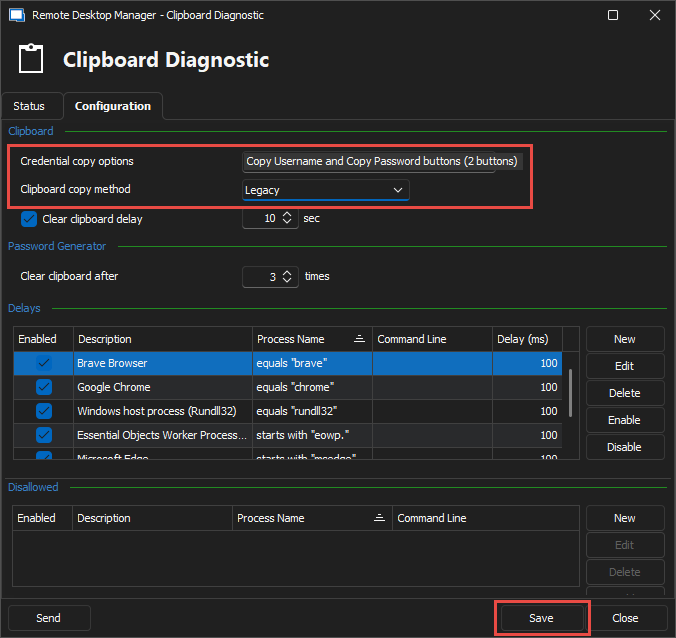
Worked via RDM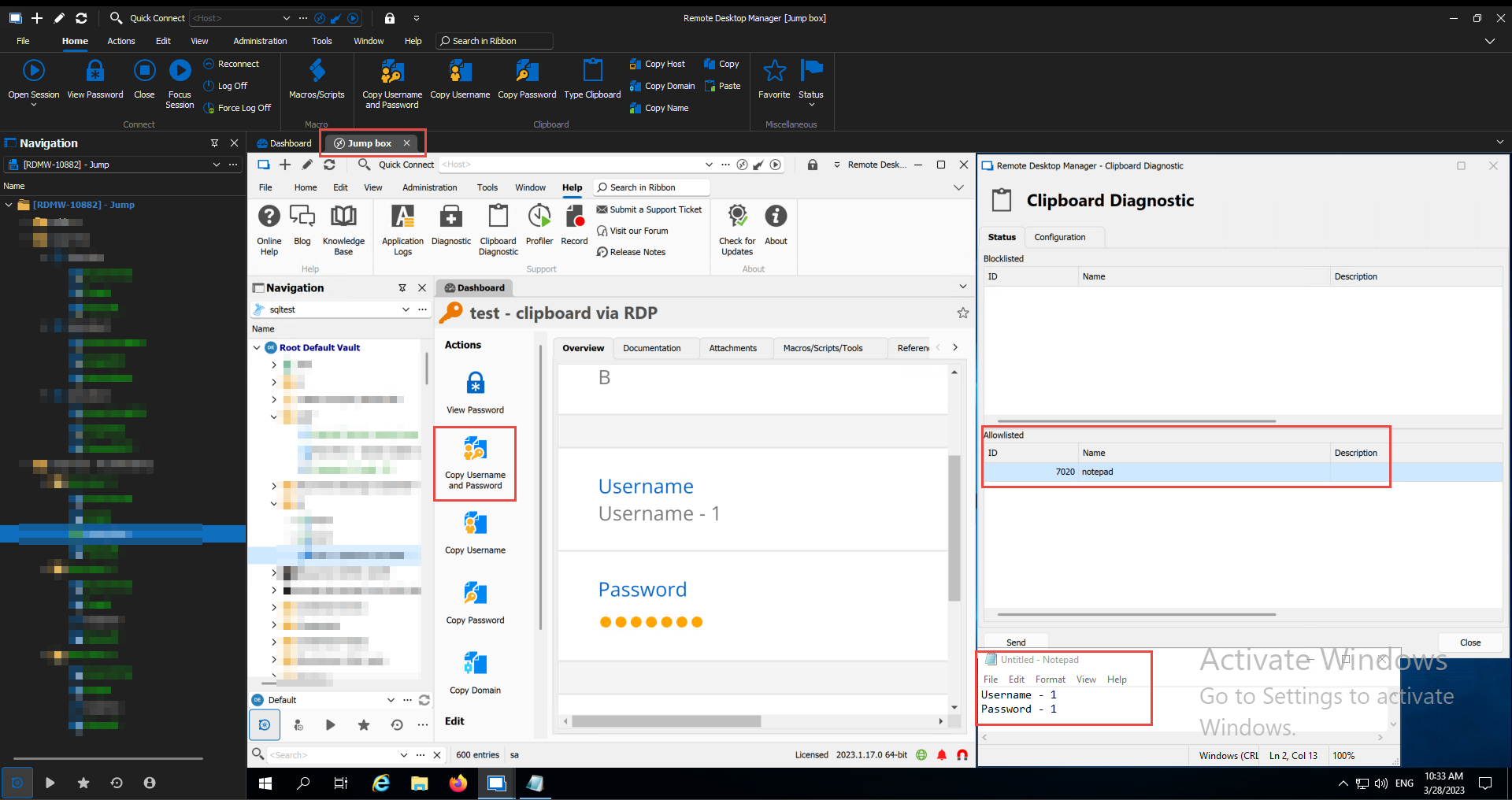
Worked via MSTSC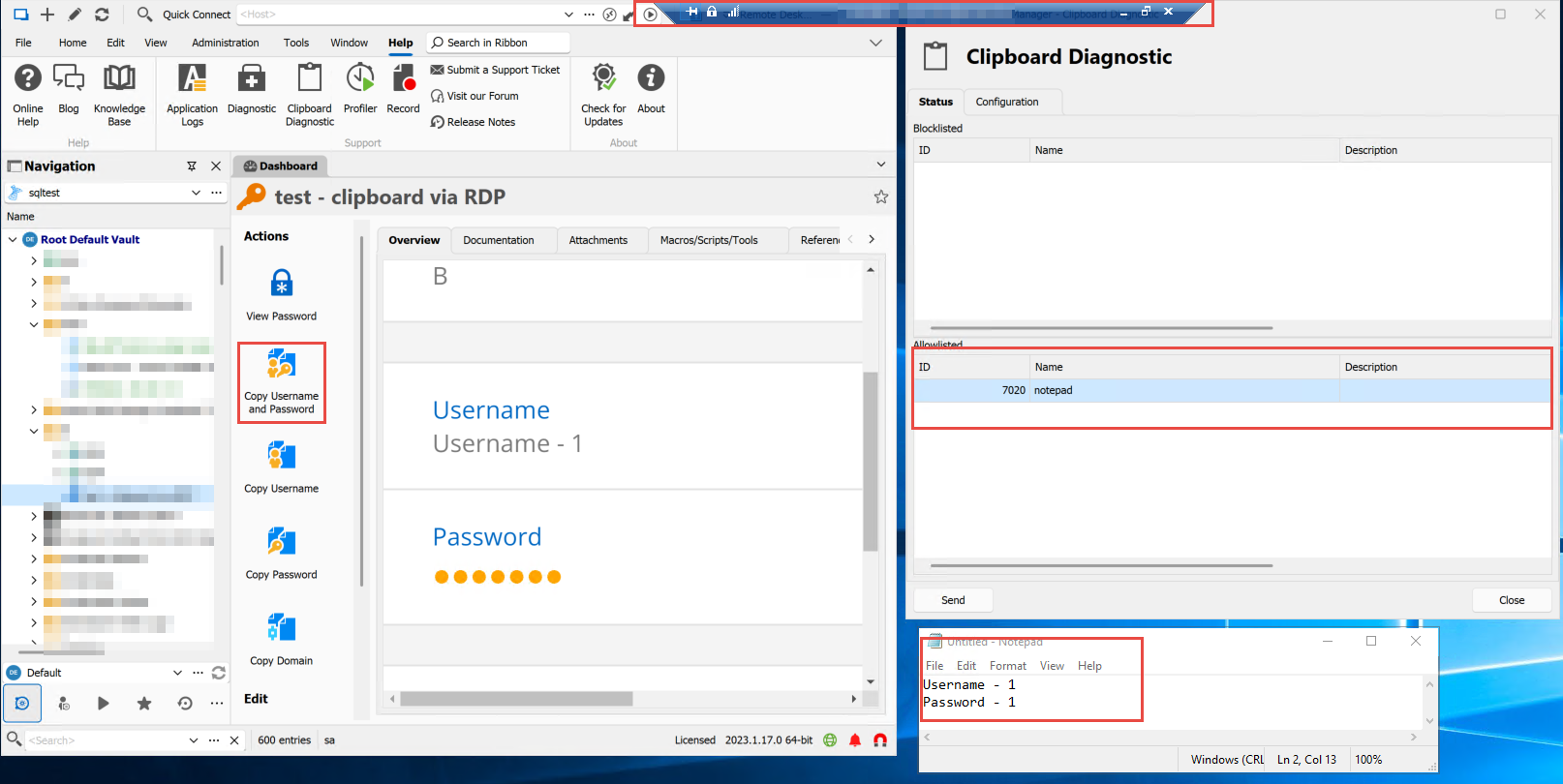
Disable/Enable clipboard
MSTSC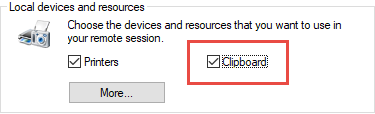
RDM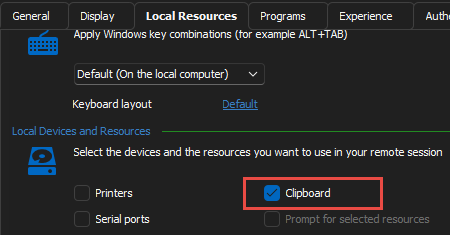
Stéfane Lavergne
via RDM.png
via MSTSC.png
2023-03-28_10-39-00.png
2023-03-28_10-39-19.png
image.png
Tried your recommendation Didn't help.
see, another person has the same problem as me one-on-one
https://forum.devolutions.net/topics/39200/rdm-20231150-copy-username--password-not-working
(and also on new releases 2023 and if we go back to 2022, then everything starts working, so I definitely think it's not a problem in Windows functions, it worked that year, but it doesn't ((see, another person has the same problem as me one-on-one
disabling the clipboard in rdp does not help. The function still does not work in a remote session, tested even on version 2023.1.18.0
Even setting the following didn't help? (Make sure you hit Save)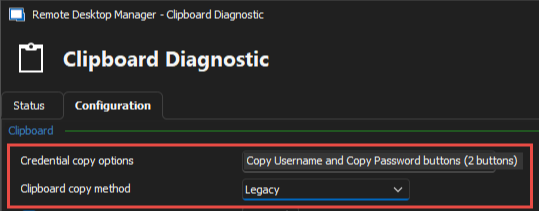
Stéfane Lavergne
5ca0dc27-ab55-418d-926c-f383862034ec.png